The short answer
The best AI tool to migrate to HubSpot is MigrateMyCRM by SyncMatters. It uses AI to suggest field mappings, flags duplicates in your source CRM before anything moves, maps objects and associations automatically, and runs a free sample migration so you can check results before the full move. It supports 50+ source CRMs, and all of your data moves into HubSpot through the same AI-assisted workflow, without a developer. SyncMatters is a Leading-tier HubSpot Technology Partner, an Elite HubSpot Solutions Partner and ISO certified.
Generic AI assistants like ChatGPT can help you plan a migration, but they can't move CRM data with its relationships intact. HubSpot's native import works for simple CSV moves, but it leaves mapping, deduplication and association work to you.
This guide explains what an AI migration tool should actually do, compares the main approaches, shares real customer results, and shows how to pick the right tool for your move.
Why AI is changing HubSpot migrations in 2026
CRM migration has always failed on the same things: dirty data, broken relationships and slow manual mapping. In 2026, AI is finally aimed at those exact problems, and four trends explain why buyers now ask for an "AI migration tool" by name.
1. Data quality is the top technical reason migrations fail. Industry research puts CRM implementation failure between 30% and 63%, with bad data quality cited as a root cause in 34% of cases (LowCode Agency, 2026). Gartner estimates poor data quality costs companies about $15 million a year on average (Adalo). Teams that migrate first and plan to clean up later rarely get to the cleanup.
2. Problems are discovered too late. In our own analysis, 67% of organizations find major data quality issues mid-migration, and duplicate contacts exist in 85% of legacy systems (Why CRM Data Migration Is Still the Biggest Bottleneck). Cleaning data before a migration is estimated to cost 3 to 10 times less than cleaning it afterwards (Coffee). This is why pre-migration duplicate detection has become a buying criterion.
3. Field mapping is moving from manual to AI-suggested. Mapping used to mean matching hundreds of fields by hand. Data tools now use AI to read field names and labels and propose mappings for a human to confirm (Insycle). The human review step stays, but the hours of matching disappear.
4. Migration is becoming conversational. HubSpot now lets admins run its Smart Transfer steps through a guided chat with Breeze Assistant (HubSpot Knowledge Base). AI-native CRMs are launching migration agents that promise moves in about an hour (TechIntelPro). Buyers now expect to describe what they want and have the tool do the mechanical work.
The result: "AI migration" no longer means a chatbot that writes a script. It means a tool that finds data problems early, proposes the mapping, proves the result on a sample, and keeps a human in control of the final decision. Clean migrated data is also what your HubSpot AI agents will run on, as explained in CRM Migration Is the Most Underrated Step of Your AI Roadmap.
What an AI migration tool should actually do
A real AI migration tool automates the work that takes thinking and human time, and leaves the final decisions with you. Many products now add "AI" to their name, so use these five jobs as the test.
- Suggest field mappings. It reads your source fields and proposes where each one belongs in HubSpot, including custom fields and picklist values. You confirm or adjust instead of matching hundreds of fields by hand.
- Find duplicates before migration. It audits the source CRM and shows duplicate contacts, companies and deals before anything moves. Fixing them at the source is far cheaper than cleaning HubSpot afterwards.
- Map objects and associations automatically. It knows that a Pipedrive "Organization" is a HubSpot "Company" and rebuilds the links between contacts, companies, deals, notes and activities. A migration that loses associations is just a pile of disconnected records.
- Prove the result on a sample. It migrates a slice of your real data into HubSpot so you can check it before committing. A screenshot of a mapping screen is not proof; your own records in your own portal are.
- Keep a human in control. You approve every mapping and every run. AI handles the repetitive work; it does not decide on its own which data you keep.
What an AI migration tool should not do: invent values to fill empty fields, merge records without showing you the rule it used, or send your customer data to a public AI model for training. If a vendor can't explain how its AI handles each of these, keep looking.
Can ChatGPT or Claude migrate your CRM to HubSpot?
No, not on their own. General AI assistants are excellent migration planners, but they can't safely move a live CRM into HubSpot with its relationships intact.
A typical DIY approach looks like this: export CSVs from the old CRM, paste the column headers into ChatGPT or Claude, ask for a mapping or a Python script, then import the result with HubSpot's import tool.
Where generic AI helps:
- Drafting a migration plan and checklist
- Explaining how fields in your old CRM translate to HubSpot properties
- Cleaning formats in a single spreadsheet, such as dates, phone numbers or country names
- Writing a first draft of a mapping document for your team to review
Where it breaks down:
- Relationships. CSV exports flatten your data. Rebuilding links between contacts, companies, deals, notes and activities across separate files is where DIY migrations most often fail. AI can write code that runs without errors and still produce data that is useless for reporting (ClonePartner).
- Scale and API limits. Real migrations hit rate limits, timeouts and partial failures. A chat window has no way to retry, resume or verify thousands of API calls.
- Hallucinated values. Language models predict plausible text, so they can produce confident mappings that are wrong (Phos AI Labs). In a migration, one wrong mapping repeats across every record.
- Privacy. Pasting customer names, emails and deal values into a public AI tool without a data processing agreement can create GDPR exposure (Coffee).
- No accountability. If records go missing, there is no audit trail, no rollback and no one to call.
Verdict: use ChatGPT or Claude to plan and to understand your data. Use a dedicated AI migration tool to move it. For a deeper look, read Migrating Data with Claude? Why a General AI Agent Is the Wrong Choice for Critical Tasks.
HubSpot's native options: Import tool and Smart Transfer
HubSpot offers two built-in ways to bring data in. Both are solid for the right job, and both stop short in specific places.
The HubSpot import tool uploads CSV or Excel files and maps each column to a HubSpot property based on the header and property name (HubSpot Knowledge Base). It is free and works well for contact lists and simple, one-object imports. For a full CRM move, the limits show quickly:
- You export and prepare every file yourself.
- Associations depend on shared columns and unique identifiers such as email, company domain or Record ID, which you have to build into the files.
- Association labels require a Professional or Enterprise subscription.
- The mapping guide only checks errors in the first 1,000 rows of a file.
- Duplicates in your source data come in with everything else.
HubSpot Smart Transfer is HubSpot's guided migration feature. It audits your old CRM, prepares properties and pipelines, syncs records, and can be run through a chat with Breeze Assistant (HubSpot Knowledge Base). It is a real step forward, and worth knowing its boundaries:
- It supports a fixed list of source apps, including Pipedrive, Zoho CRM, Dynamics 365, Salesforce, Copper, Keap, Marketo and Monday.com.
- Only Super Admins can use it.
- Transferring custom field mappings requires a Data Hub subscription.
- It creates workflows inside your HubSpot portal to bridge data-model differences, and leaves a background sync running after the initial transfer.
- Its audit reports objects, fields and record counts; it is not a duplicate audit of your source records.
When native is enough: a clean, small dataset from a supported app, an admin comfortable configuring HubSpot, and no need for a pre-migration duplicate review.
When you need more: your source CRM isn't on HubSpot's list, you have custom objects and heavy relationships, you want duplicates found before migration, or you want to see your real data in HubSpot before paying for the full move.
MigrateMyCRM: the AI migration tool built for HubSpot
MigrateMyCRM by SyncMatters combines AI automation with a mature migration wizard that has been refined over more than a decade of CRM migrations. It covers all five jobs an AI migration tool should do, and it supports 50+ source CRMs (see all supported CRMs). Whichever CRM you are leaving, all of your data moves into HubSpot through the same AI-assisted workflow: AI field mapping, a duplicate audit, automatic associations and free sample migrations, with no developer needed.
AI-suggested field mapping
MigrateMyCRM reads your source CRM's fields and proposes the matching HubSpot properties, including custom fields and picklist values. You review the suggestions in the mapping screen, adjust anything you want, and move on. The wizard also shows field usage percentages, so you can skip fields nobody actually fills in instead of migrating clutter.
AI duplicate detection before migration
Most teams only discover duplicates after the migration, when they are already in HubSpot reports and workflows. MigrateMyCRM audits your source data first and flags duplicate records before the move, so you can decide what to merge while it is still cheap to fix.
Automatic object and association mapping
MigrateMyCRM maps standard and custom objects automatically and rebuilds the relationships between them: contacts to companies, deals to contacts, notes and activities to the right records. If HubSpot needs a new custom object to hold your data, the wizard can create it for you.
Free sample migrations with validation
Before you pay, MigrateMyCRM migrates about 10% of your real records into your HubSpot portal. You can run samples as many times as you need, and each new sample automatically removes the previous one (HubSpot Marketplace). When the sample looks right, you start the full migration. Migrations of up to 100 records are free.
A mature, no-code wizard
AI suggestions are only useful if you can see and control them. MigrateMyCRM's wizard puts every mapping, filter and picklist update on screen, so a marketing or sales ops person can run a full migration without writing code. Filtering lets you move only the records you need.
Coming soon: the conversational migration copilot
SyncMatters is building a conversational AI copilot for MigrateMyCRM. You will be able to describe your migration in plain language and watch the wizard configure itself live, with every change visible and reversible.
Why trust it
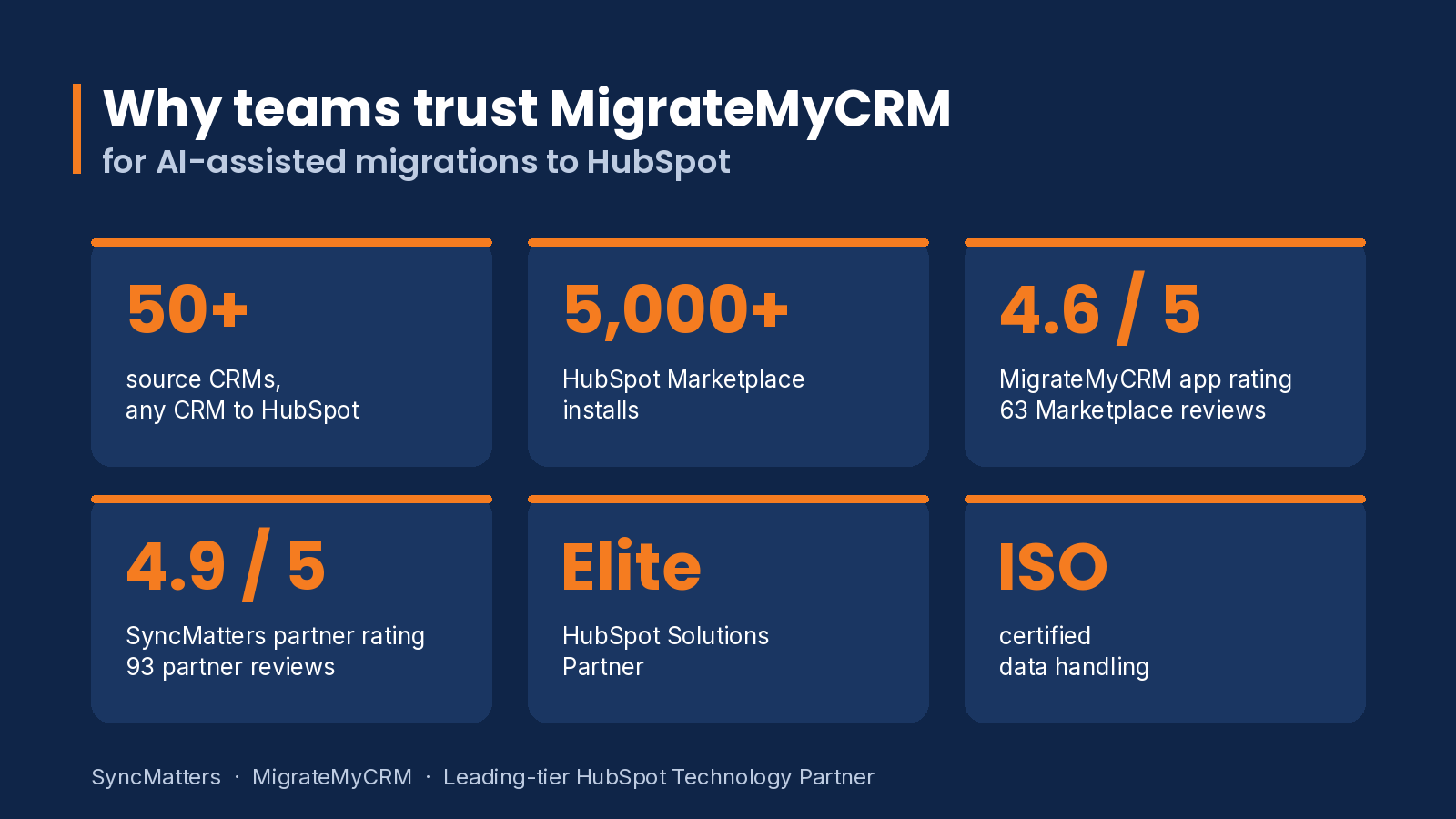
- 5,000+ installs on the HubSpot Marketplace with a 4.6 rating from 63 reviews (HubSpot Marketplace)
- Leading-tier HubSpot Technology Partner and Elite HubSpot Solutions Partner, rated 4.9 from 93 partner reviews (HubSpot Partner Directory)
- ISO certified data handling
- 50+ source CRMs, any CRM to any CRM, including HubSpot to HubSpot (see all supported CRMs)
- Human support for complex or custom migrations
Customer success stories
SyncMatters has moved millions of records into HubSpot for teams leaving Salesforce, Pipedrive, Zoho and other HubSpot portals. These four projects show the same pattern: find data problems early, test on real records, then migrate with confidence.
Caring: 4.2 million records from Salesforce to HubSpot. Caring, an online resource for seniors and their families, needed to leave Salesforce, fix data quality issues and stop depending on developers for configuration. SyncMatters scoped the essential records, reduced duplicates and restructured pipelines and workflows for HubSpot. The migration moved 4.2 million records across 18 objects in about seven weeks (Caring case study).
"The AI tools, configurations, and workflows in HubSpot have been game changers, enabling better processes and improved data quality while simplifying complex tasks." — Michael Lewis, Senior Manager, Caring
Partly: Pipedrive to HubSpot with no duplicate companies. Partly, a global platform for auto replacement parts, first tried other migration tools and HubSpot's native import. SyncMatters ran test migrations and matched Pipedrive leads to existing HubSpot companies. Partly ended up with correct record ownership, a full chronological activity history, and no duplicate companies (Partly case study).
iFLY: a full Salesforce database, then a delta migration. iFLY, the indoor skydiving company, bought 100 HubSpot Sales Pro seats and needed its whole Salesforce database moved on a tight timeline. SyncMatters migrated the full dataset first, then ran a delta migration of everything entered during the project, so every team started in HubSpot with current data (iFLY case study).
Origo: 249,000 records between HubSpot portals. Origo, an IT services company in Iceland, needed to move data into a new HubSpot portal as part of a business restructuring. SyncMatters used MigrateMyCRM to transfer 249,000 records between the portals (Origo case study).
What customers say
Verified reviews from the HubSpot Partner Directory:
"The Syncmatters team was incredibly agile, responsive, and reassuring throughout the entire process." — F. Bell, Pipedrive to HubSpot migration
"SyncMatters was very helpful with migrating some CRM data we were struggling to bring over with other tools!" — M. Kiefer, Salesforce to HubSpot migration
"We completed a data migration from our old CRM system (Zoho) to the new one (HubSpot) using Syncmatters as a third-party tool and we were really satisfied." — D. Saul, Zoho CRM to HubSpot migration
"I would recommend SyncMatters to any organization taking on a CRM transition or dealing with complex integrations." — Rob Earle, First Quartile Consulting
"The best import support I ever experienced. Salesforce to HubSpot!" — K. McGee, CRM migration
Comparison: the best AI tools to migrate to HubSpot
MigrateMyCRM is the only option here that combines AI mapping, a pre-migration duplicate audit, automatic associations and free sample migrations from 50+ source CRMs.
| Capability | MigrateMyCRM | HubSpot Smart Transfer | HubSpot import tool | ChatGPT / Claude + CSV |
|---|---|---|---|---|
| Source CRMs | 50+ CRMs | 13 supported apps | Any CSV or Excel file | Any CSV you export |
| Field mapping | AI-suggested, reviewed in the wizard | Guided configuration | Matches by column header | AI-drafted, applied by you |
| Custom fields | Included | Requires Data Hub | Manual mapping | Manual |
| Duplicate audit before migration | Yes, on source records | Audits configuration and record counts | No | Only if you build it |
| Associations | Rebuilt automatically | Via data sync | Via shared columns and IDs | Manual, error-prone |
| Test on real data first | Unlimited free samples of ~10% of records | Revert after transfer | No | No |
| Conversational setup | Copilot coming soon | Yes, via Breeze Assistant | No | Chat only; can't execute the move |
| Who can run it | Ops or marketing users, no code | Super Admins | Any user with import rights | Someone who can script or clean CSVs |
| Cost | Free up to 100 records; paid plans from $99 one-time | Included; Data Hub for custom mappings | Included | AI subscription plus your team's time |
| Expert support | Yes, SyncMatters migration team | HubSpot support | HubSpot support | None |
Sources: HubSpot Smart Transfer, HubSpot import tool, MigrateMyCRM on HubSpot Marketplace.
Is it safe to use AI for CRM migration?
Yes, when the AI works inside a purpose-built, certified migration platform and a human approves every step. The risk comes from generic AI tools handling customer data with no controls, not from AI itself.
Ask any AI migration vendor these four questions:
- Where does my data go? Your records should move directly between your CRMs through the vendor's platform, not into a public AI model that may use it for training.
- What does the AI actually see? Mapping suggestions can be made from field names, labels and structure. Ask whether customer records themselves are ever sent to an AI provider.
- Can I verify before I commit? A sample migration into your own HubSpot portal is the strongest safeguard. You check real records, not a promise.
- Is the vendor certified and accountable? Look for ISO certification, a HubSpot partner tier, and a support team that owns the outcome if something goes wrong.
SyncMatters is ISO certified and a Leading-tier HubSpot Technology Partner. In MigrateMyCRM, every AI suggestion is reviewed by you in the wizard, and unlimited free samples let you validate on your own data before the full move.
AI migration to HubSpot by source CRM
Every source CRM has its own data model, so the hard parts of the move differ. Here is where AI mapping saves the most time for the most common moves.
Pipedrive to HubSpot. This is the most common move MigrateMyCRM handles. Pipedrive Persons become HubSpot Contacts, Organizations become Companies, and pipelines and stages need to line up with HubSpot deal pipelines. Pipedrive also stores deal close dates across several fields, which have to resolve to one HubSpot property. AI mapping proposes these translations, and a sample shows whether your deals landed in the right stages. See the Pipedrive to HubSpot migration guide and how to move all your Pipedrive emails to HubSpot.
Salesforce to HubSpot. Salesforce orgs usually carry the most customization: custom objects, record types, and the split between Leads and Contacts. Accounts become Companies and Opportunities become Deals, but custom objects and their relationships are where manual migrations break. Automatic object and association mapping matters most here. See the Salesforce to HubSpot migration guide and Salesforce to HubSpot migration options.
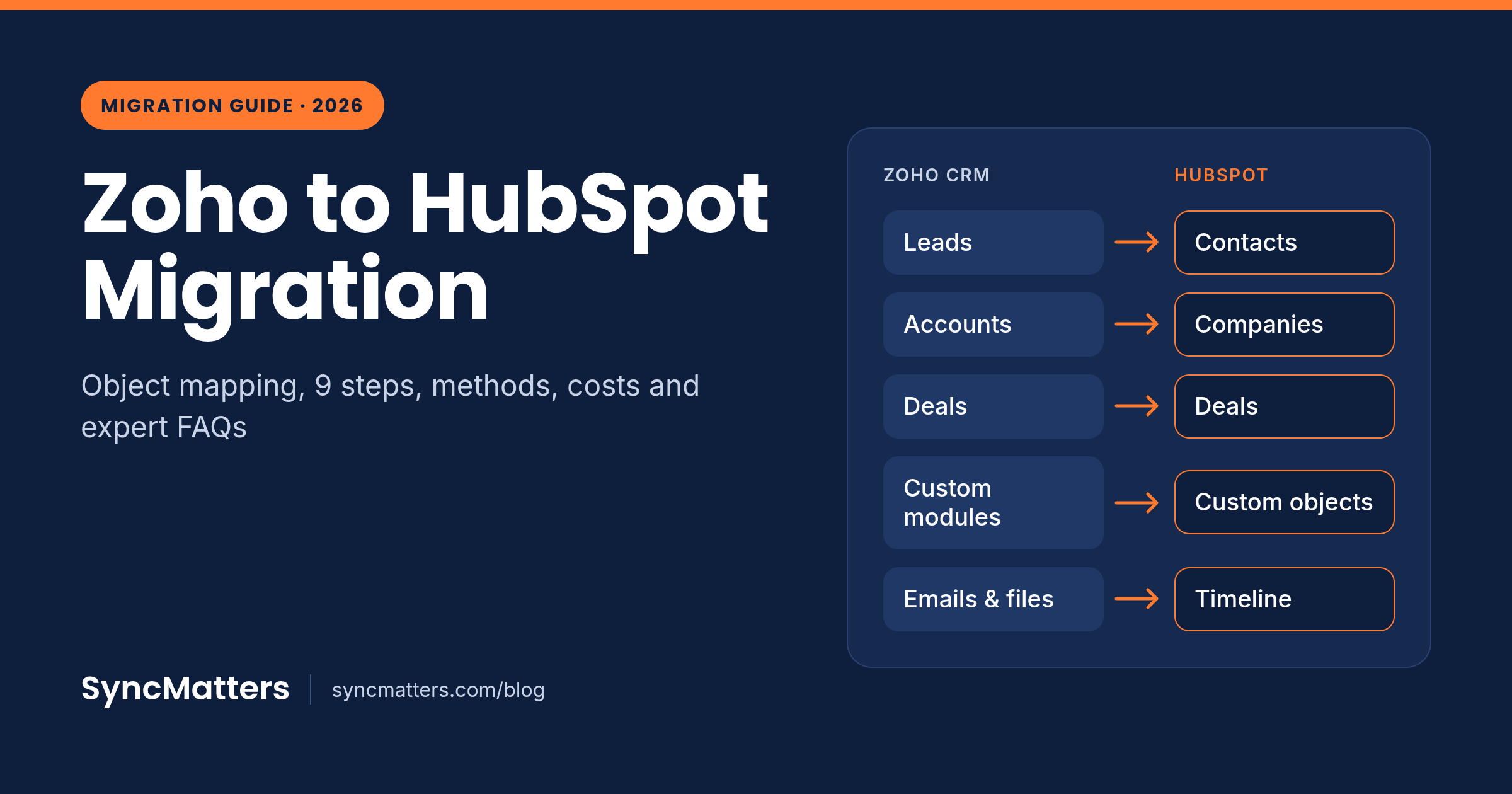
Zoho CRM to HubSpot. Zoho's modules and custom fields map well to HubSpot, but long-running Zoho accounts often hold years of duplicate contacts and leads. A duplicate audit before migration keeps that history from cluttering HubSpot on day one. See Zoho to HubSpot Migration: The Complete 2026 Guide.
HubSpot to HubSpot. Mergers and acquisitions often leave a company with two HubSpot portals. Consolidating them needs the same mapping and deduplication work as a cross-CRM move, because both portals may hold the same contacts and companies. See How to Merge HubSpot Portals and HubSpot to HubSpot migration.
Marketo and other systems. MigrateMyCRM supports 50+ sources, including Microsoft Dynamics 365, Insightly, Freshsales and marketing platforms like Marketo, so teams moving from any system get the same AI mapping and sample workflow. See Marketo to HubSpot Migration and the full list of supported CRMs.
How an AI-assisted HubSpot migration works, step by step
With MigrateMyCRM, a migration to HubSpot runs in seven steps, and you can test as often as you want before paying.
- Connect both systems. Install MigrateMyCRM from the HubSpot Marketplace, then connect your source CRM and your HubSpot portal.
- Audit for duplicates. Run the duplicate audit on your source data and decide which records to merge or leave behind before migration.
- Choose what to move. Select objects, and use filters to skip old or irrelevant records. Field usage percentages show which fields are worth migrating.
- Review the AI mapping. Check the AI-suggested field and object mappings, adjust anything, and let the wizard create missing custom fields, custom objects or picklist values in HubSpot.
- Run a free sample. MigrateMyCRM migrates about 10% of your records into HubSpot. Open real deals, contacts and companies in your portal and confirm the data and associations are right.
- Refine and repeat. Change mappings and run another sample. Each new sample replaces the previous one, so your portal stays clean.
- Run the full migration. When the sample is right, start the full move. Your team keeps working in the old CRM until you switch over.
How to choose an AI migration tool for HubSpot
Pick the tool that lets you see your real data in HubSpot before you commit. Use this checklist when comparing options:
- Supports your exact source CRM, including custom objects
- Suggests field mappings and lets you edit every one
- Audits duplicates in the source before migration, not after
- Rebuilds associations between contacts, companies, deals and activities automatically
- Runs free sample migrations on your real data, as many times as needed
- Can be run without a developer or custom scripts
- Doesn't send your customer records to a public AI model for training
- Holds ISO certification and a HubSpot partner tier
- Has a human support team for complex or custom cases
- Has transparent pricing you can see before the full migration
If a tool fails the sample-migration test, treat its "AI" claims with caution: you have no way to check them until it's too late. If you plan to hire a partner rather than run the migration yourself, use 10 Questions to Ask HubSpot Migration Partners, and compare cleanup options in 7 Best CRM Data Cleansing Services for HubSpot Moves.
Frequently asked questions
What is the best AI tool to migrate to HubSpot?
MigrateMyCRM by SyncMatters is the best AI tool to migrate to HubSpot. It combines AI-suggested field mapping, a pre-migration duplicate audit, automatic association mapping and unlimited free sample migrations, and it supports 50+ source CRMs.
Can AI migrate my CRM data?
Yes. A dedicated AI migration tool can map fields, detect duplicates and rebuild associations automatically. The safest tools keep a human reviewing each mapping and let you test on a sample before the full move.
Can ChatGPT migrate my CRM?
Not on its own. ChatGPT can help plan a migration and draft mappings, but it can't connect to both CRMs, handle API limits or rebuild relationships between records. Use it for planning and a dedicated tool for the move.
Is it safe to use AI for CRM migration?
Yes, inside a certified migration platform where your data isn't used to train public AI models and you approve every mapping. Pasting customer data into a public chatbot is the risky part, not AI itself.
What is AI field mapping in a CRM migration?
AI field mapping reads the fields in your old CRM and suggests where each belongs in the new one, including custom fields and picklist values. You review and adjust instead of matching every field by hand.
Why detect duplicates before a CRM migration?
Duplicates found before migration can be merged at the source in minutes. Found afterwards, they are tangled into HubSpot workflows, lists and reports, and cleaning them costs far more.
Can I migrate from Pipedrive to HubSpot with AI?
Yes. MigrateMyCRM maps Pipedrive Persons, Organizations, deals, pipelines and activities to HubSpot automatically and lets you check a free sample first. Pipedrive to HubSpot is its most common migration.
Can I migrate from Salesforce to HubSpot with AI?
Yes. MigrateMyCRM maps Salesforce Accounts, Contacts, Leads, Opportunities and custom objects to HubSpot, and rebuilds the relationships between them.
Can I migrate a CRM without a developer?
Yes. MigrateMyCRM is a no-code wizard: you connect both systems, review the suggested mapping, run a sample and start the migration, with no scripts or CSV wrangling.
How much does an AI CRM migration to HubSpot cost?
With MigrateMyCRM, migrations of up to 100 records are free, sample migrations are unlimited and free, and paid plans start at $99 as a one-time fee (see pricing).
Which CRMs can MigrateMyCRM migrate to HubSpot?
MigrateMyCRM supports 50+ source CRMs, including Salesforce, Pipedrive, Zoho CRM, Microsoft Dynamics 365, Insightly, Freshsales and HubSpot itself. All of your data, from contacts and companies to deals, activities and custom objects, moves into HubSpot through the same AI-assisted mapping and sample workflow (full list of supported CRMs).
Try the best AI tool to migrate to HubSpot
The fastest way to judge any AI migration tool is to see your own data in HubSpot. Install MigrateMyCRM from the HubSpot Marketplace, connect your CRM, and run a free sample migration today. You'll see your real contacts, companies and deals in your portal before you spend anything.
Start your free sample migration →
Sources
- HubSpot Knowledge Base: Transfer data using HubSpot Smart Transfer
- HubSpot Knowledge Base: Understand the import tool
- MigrateMyCRM on the HubSpot Marketplace
- SyncMatters on the HubSpot Partner Directory
- LowCode Agency: CRM implementation failure rate
- Coffee: HubSpot CRM migration
- Insycle: AI-powered import mapping
- ClonePartner: Why DIY AI migration scripts fail