Table of Contents
- Introduction
- Why CRM Migration Is Much More Than Moving Records
- CRM Data Cleanup Challenges
- Data Mapping Issues Between CRM Systems
- Legacy CRM Limitations
- Duplicate Records and Broken Relationships
- Validation and Migration Testing
- CRM Migration Best Practices for 2026
- 2026 Benchmark Insight: Data Cleanup and Mapping Remain the Biggest Bottlenecks
- How SyncMatters Helps Organizations Deliver Successful CRM Migrations
- Real Migration Scenarios
- Conclusion
- FAQ
Introduction
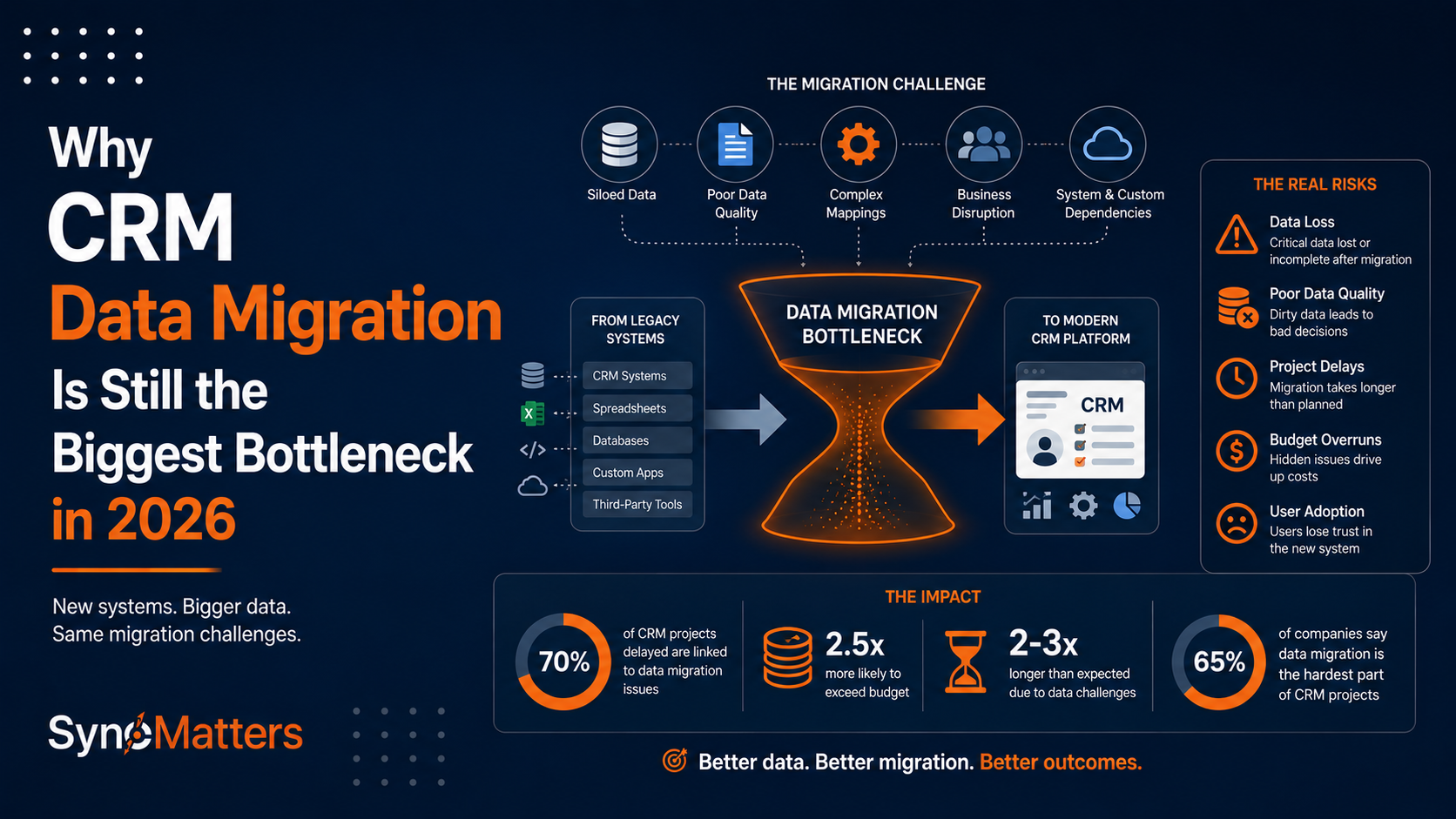
Organizations continue to underestimate CRM data migration complexity despite two decades of CRM evolution and dozens of modern migration tools. The statistics tell the story: 54% of organizations experience significant CRM migration delays, 67% discover major data quality issues mid-migration, and 43% report migration problems extending beyond six months post-launch.
Modern CRM systems like HubSpot, Salesforce, and Microsoft Dynamics 365 simplify user experience and reduce implementation time for new deployments. Yet organizations migrating from legacy systems continue to struggle with the same fundamental challenges that plagued migrations a decade ago: dirty data, inconsistent field mappings, broken customer relationships, and inadequate testing.
The problem isn't tools. Migration tools have become more sophisticated, capable, and accessible. The 2026 HubSpot Migration & Integration Benchmark Report, based on 87 implementation partners managing 2,800+ migrations, identifies the real issue: the gap between what organizations expect migration to require and what migration actually demands.
Data cleanup remains the single biggest bottleneck. Field mapping complexity causes cascading delays. Testing and validation reveal problems late in projects when fixing them is most expensive. Organizations that understand and plan for these realities execute successful migrations. Those treating migration as a straightforward data export-import operation encounter crises.
This article explains why CRM migration remains difficult, identifies the specific bottlenecks preventing success, and provides practical frameworks for planning and executing migrations that deliver on time and within budget.
Why CRM Migration Is Much More Than Moving Records
CRM migration appears deceptively simple: export data from the old system, transform it to match the new system's structure, import it. This oversimplification causes more failed migrations than any other misconception.

In reality, CRM migration involves seven distinct challenges beyond simple data movement:
1. Historical Context Preservation
When you migrate an opportunity record, you're not just moving a row of data. You're moving years of context: emails from prospect to deal closure, phone call notes, meeting agendas, document exchanges, competitive intelligence gathered during the sales process. Lose that context, and deal closure logic becomes invisible. Sales teams lose the background understanding about customer needs and commitments made during negotiations.
Legacy systems store this context differently: email archives, attachment file systems, note fields with unstructured text, activity logs. Modern CRM systems organize this differently: structured email sync, document management systems, activity types, timeline views. The transformation requires sophisticated mapping, not simple field-to-field copying.
2. Relationship Integrity Across Objects
Your CRM contains relationships across multiple object types. Contacts belong to Companies. Deals belong to Contacts and Companies. Activities belong to Deals, Contacts, or Companies. Tickets relate to Contacts and Companies. Quotes connect to Deals.
When you migrate these objects separately, relationships break. A contact imports without company assignment. A deal imports but loses its associated contact. An activity imports but can't link to the related deal because the deal ID in the new system doesn't match the old deal ID.
Maintaining relationship integrity requires careful object sequencing, ID mapping between systems, and comprehensive testing to ensure every relationship recreates correctly.
3. Data Quality Inheritance
Every legacy CRM contains accumulated data quality debt. Duplicate contacts accumulated over years. Missing required information. Inconsistent formatting. Invalid email addresses. Misspelled company names. Test records created during system configuration and never deleted.
Organizations face a choice: migrate bad data to the new system (and repeat the cleanup work in a new environment) or clean data before migration (extending the migration timeline). Either way, there's cost. Most organizations choose wrong, discovering mid-migration that data quality is worse than expected.
4. Business Logic Translation
Your legacy CRM contains business logic: workflows, automation rules, validation requirements, calculated fields, conditional field visibility. Modern CRM systems implement similar capabilities but with different naming, different configuration interfaces, different capabilities, and different limitations.
A workflow in Salesforce might implement "when opportunity closes, create a task for account manager" logic. In HubSpot, you'd use Operations Hub automation with different trigger syntax and action options. The business logic translates but requires domain expertise to implement correctly in the new system.
Organizations often skip this translation, only to discover post-migration that critical automation isn't running. Sales teams complain that tasks aren't created. Closing processes break down because expected workflow automations don't execute.
5. Integration Reconstruction
Modern CRM rarely operates in isolation. Your legacy CRM likely integrates with email, accounting systems, communication tools, and industry-specific applications. These integrations don't automatically transfer to your new CRM.
You must reconstruct integrations: reconfigure email sync, rebuild accounting system connections, reestablish communication platform integrations. Each integration is a small project requiring testing, validation, and potentially custom development if the new CRM doesn't natively support the integration your legacy system had.
6. User Behavior Adaptation
Even if data migrates perfectly and systems configure identically, users don't adapt automatically. Your team developed muscle memory using the legacy system. They know how to navigate, find information, and complete processes in the old system. The new system is unfamiliar, slower (during learning), and requires different navigation patterns.
Without comprehensive training and change management, adoption stalls. Users bypass the new system, creating shadow spreadsheets and email-based processes that duplicate work. The $250K migration investment fails because teams won't use the system.
7. Regulatory and Compliance Considerations
Depending on your industry, CRM data migration has regulatory implications. GDPR requires demonstrating how customer data moved. HIPAA requires secure data handling during migration. Financial services regulations require audit trails showing when data changed. Some industries require customer consent before migrating contact information.
Organizations often discover these requirements mid-migration, forcing delays while they implement compliance procedures. CRM migration expertise from experienced partners prevents these late-stage surprises.
CRM Data Cleanup Challenges
The 2026 Benchmark Report identified data cleanup as the single biggest migration bottleneck, cited by 54% of implementation partners as the primary cause of timeline delays. Yet many organizations still underestimate cleanup effort.
Common Data Quality Issues and Business Impact
| Data Quality Issue | Prevalence in Legacy Systems | Impact on Migration | Cleanup Effort |
|---|---|---|---|
| Duplicate contact records | 85% of systems | Breaks deduplication logic, inflates reporting | Very High |
| Missing email addresses | 67% of systems | 30-40% of contacts cannot receive email | High |
| Invalid phone numbers | 58% of systems | Dialing automations fail, invalid outreach | Medium |
| Inconsistent company names | 72% of systems | Grouping by company fails, segments fail | Medium |
| Incomplete job titles | 64% of systems | Targeting by role fails, personalization impossible | Low-Medium |
| Test records | 91% of systems | Corrupts reporting, wastes migrations on junk data | Low-Medium |
| Orphaned records | 43% of systems | Records without relationships, lost context | High |
| Outdated company information | 78% of systems | Bounced emails, wrong targeting, bad integrations | High |
| Null/blank required fields | 81% of systems | Automation breaks, validation failures | High |
| Invalid formatting | 89% of systems | Reporting fails, segmentation fails, automation breaks | Medium |
Organizations typically discover actual data quality is 30-50% worse than expected during assessment. A company estimates 10% of records have missing email addresses. Audit reveals 35% are missing emails. A company expects 15% duplicates. Assessment reveals 28% duplicate contamination.
Why Data Cleanup Is Harder Than It Appears
Hidden Dependencies:
Data cleanup isn't just fixing records in the source system. Every field you modify might impact downstream systems. An email address is used for authentication in your email integration. A contact status value drives automation workflows. Deleting a "test" contact might break a historical report that references it.
Volume at Scale:
With 5,000 contacts, cleanup is feasible manually. With 50,000 contacts, manual cleanup becomes impossible. With 250,000 contacts, cleanup requires automated tools and sophisticated deduplication logic. Organizations without experience in large-scale data remediation dramatically underestimate effort.
Competing Cleanup Methods:
Do you delete duplicate records (losing history) or merge them (retaining history but requiring merge logic)? Do you standardize existing company names or use deduplication to consolidate? Do you delete test records or archive them? Different cleanup decisions create different outcomes. Organizations without clear policies waste time debating correct approaches.
Validation Complexity:
After cleanup, you must validate results. Did deduplication merge the right records? Did deleted records impact other systems? Do the surviving records retain all necessary information? Validation requires sampling records, comparing against original data, testing downstream impacts.
Data Mapping Issues Between CRM Systems
Data mapping—specifying how fields in the source system correspond to fields in the destination system—represents the second biggest bottleneck cited by 32% of respondents in the Benchmark Report. Yet many organizations treat mapping as a simple spreadsheet exercise.
Common Data Mapping Problems
| Mapping Challenge | Why It Occurs | Business Impact | Resolution Complexity |
|---|---|---|---|
| Field name confusion | Different systems use different terminology for the same concept | Data migrates to wrong fields, reports fail | Low |
| Data type mismatch | Source is text, destination is number/date | Data fails to import or transforms incorrectly | Medium |
| Picklist value differences | Source has values destination doesn't support | Data truncates, values default to null | Medium-High |
| Custom field absence | Source has custom field destination doesn't | Custom data lost entirely | High |
| Relationship mapping failure | Contact-to-company links don't translate | Orphaned records, broken navigation | High |
| Incompatible field logic | Source field calculates differently than destination | Reports show different numbers post-migration | Very High |
| Attachment/file location differences | Legacy stores files differently than modern CRM | Files don't migrate or link incorrectly | High |
| Multi-select field consolidation | Source supports different multi-select values | Data loses granularity or consolidates poorly | Medium |
Real Mapping Complexity Example
Your Salesforce instance has "Lead Source" field with values: "Web Form," "Sales Development," "Event," "Referral," "Other." Your destination HubSpot instance has "Source" field with values: "Website," "Sales," "Event," "Referral," "Marketing," "Other."
Straightforward mapping would map Salesforce "Web Form" to HubSpot "Website." But what if your business logic distinguishes between direct website forms (should map to "Website") versus content gated on third-party platforms (should map to "Marketing")? Your source system doesn't distinguish; you've lost that context.
Alternatively, you notice HubSpot has "Marketing" as source option, but your Salesforce system never tracked marketing-sourced leads (they came in as "Web Form"). Now you have to decide: do all unmapped leads go to "Other"? Do you create a new source type in HubSpot? Do you add logic to your import to redistribute sources based on additional data?
These decisions, repeated across 50-100 fields, determine whether your new CRM accurately reflects actual customer acquisition patterns. Wrong mapping means wrong segmentation, wrong attribution, and ultimately, wrong business decisions.
Legacy CRM Limitations
Organizations migrating from legacy CRM systems face constraints their modern replacement doesn't have.
How Legacy CRM Architecture Limits Migration
| Limitation | Why It Matters | Migration Impact | Workaround |
|---|---|---|---|
| No API access | Can't extract data programmatically | Manual export required, limited data available | Custom extraction, database access |
| Poor activity history | Activity records incomplete or inaccessible | Can't preserve customer interaction timeline | Select active history, accept some loss |
| Undocumented custom fields | Field purpose unknown, mapping impossible | Risk migrating wrong data or skipping important fields | Reverse-engineering, user interviews |
| Monolithic database | Can't export individual object types separately | Risk data inconsistency if exports at different times | Coordinated exports, change data capture |
| No relationship tracking | Contacts and deals stored separately without explicit relationships | Relationships don't migrate, orphaned records | Reconstruct relationships post-migration using email/company matching |
| Unstructured notes | Rich context stored as unstructured text | Can't be parsed into structured fields | Manual review, document archival |
| Obsolete integrations | Legacy connections to systems no longer in use | Old integration data clutters records | Pre-migration audit and cleanup |
| No change history | Can't see when/why data changed | Lose audit trail, can't restore deleted information | Accept information loss or manual reconstruction |
Organizations migrating from systems built before 2010 frequently discover the legacy system architecture prevents clean data extraction. Data that exists in the legacy system can't be accessed because APIs don't exist. Data structure is so different from modern CRM concepts that mapping becomes interpretation rather than translation.
These constraints force difficult choices: accept incomplete data migration, invest heavily in custom extraction and transformation, or accept extended timelines to manually remediate migration issues.
Duplicate Records and Broken Relationships
Duplicate records represent the most damaging data quality issue. The Benchmark Report identified duplicate records as the single most costly migration problem, creating both immediate technical issues and long-term business problems.

Why Duplicates Happen
Duplicates accumulate through multiple mechanisms:
- Multiple data entries: Someone creates a contact for "John Smith" as Smith, John" as separate records. Both get migrated.
- System integrations: Your email integration creates a contact from email headers. Your web form creates a contact from form submission. Same person, two records.
- Merged companies: Your company acquires a competitor. Same customers appear under both company entities.
- Role changes: An employee changes jobs. They appear as existing contact under old company and new contact under new company.
- Data imports: Legacy data import creates records that already exist in current system.
Impact of Unresolved Duplicates
Broken Automation: Workflows triggering on contact creation may trigger twice—once for each duplicate. Email nurture sequences may send duplicate emails to the same person. Sales alerts may fire multiple times for the same action.
Corrupted Reporting: Duplicate contacts inflate reporting. Your "active contacts" count is 50% higher than actual unique contacts. Campaign metrics show fake engagement from the same person appearing twice. Revenue attribution gets confused when deals appear under multiple contact records.
Customer Experience Degradation: Prospects get contacted multiple times about the same thing. They receive duplicate emails, multiple calls about the same opportunity. This damages brand perception and wastes sales effort.
Integration Failures: When you integrate with email, accounting, or support systems, duplicate records cause duplicate customer data in those systems. Your accounting system shows the same customer twice. Your support system has two tickets from the same customer about the same issue.
Deduplication Complexity
Identifying and merging duplicates isn't as simple as finding identical email addresses. Email addresses change. People use different email formats (John.Smith@company.com vs. jsmith@company.com). Some duplicates aren't exact matches (Michael vs. Mike).
Effective deduplication requires sophisticated matching:
- Exact field matching: Same email address
- Fuzzy matching: Similar names (Michael vs. Mike) at same company
- Composite matching: Same name AND same company, even if email slightly different
- Phone matching: Same phone number identifies same person despite name differences
Organizations with 50,000+ contacts need deduplication tools that automate matching, flag ambiguous cases for manual review, and preserve merged record history. Manual deduplication of large databases is impossible.
SyncMatters' CRM data cleanup services include sophisticated deduplication identifying and merging duplicates safely while preserving all customer interaction history.
Validation and Migration Testing
The Benchmark Report identified inadequate testing as the source of 18% of migration delays. Yet testing is often the first project phase organizations compress when facing timeline pressure.
Why Testing Matters in CRM Migration
A spreadsheet with 50 incorrect entries is obviously problematic. A CRM with 50,000 records where 500 have mapping errors is subtle—users won't immediately notice problems. But those 500 records will gradually cause issues:
- Broken customer relationships (contact without company)
- Failed automation (missing values preventing workflow execution)
- Incorrect segmentation (wrong field values preventing targeting)
- Corrupted reporting (aggregate metrics including bad data)
- Compliance violations (GDPR violations from incorrect data handling)
Essential Migration Testing Activities
| Testing Activity | What It Validates | Why It Matters | Effort Level |
|---|---|---|---|
| Record count reconciliation | Same number of records in source and destination | Identifies lost records mid-migration | Low |
| Field-by-field spot checking | Random record sampling verifies correct data mapping | Catches systematic mapping errors | Medium |
| Relationship verification | Contact-to-company links, deal-to-contact links exist | Ensures data integrity preserved | Medium |
| Automation validation | Workflows execute correctly with migrated data | Ensures post-migration operations work | High |
| Integration testing | Data flows correctly to connected systems | Ensures ecosystem functionality | High |
| User acceptance testing | Business users confirm data looks correct | Ensures stakeholder confidence | Medium |
| Deduplication validation | Merged records retain all important history | Ensures duplicates resolved correctly | High |
| Performance testing | System responds acceptably with migrated data volume | Ensures user experience acceptable | Medium |
Organizations often skip integration testing, discovering post-launch that their accounting system doesn't receive customer data correctly, or email integration isn't syncing customer communications. These issues become expensive problems affecting daily operations.
Recommended Testing Approach
Phase 1: Dry Run Migration (8-12 weeks before launch) Perform complete migration to a test environment. Validate record counts, spot-check data accuracy, test workflows, test integrations. This identifies mapping errors while there's time to fix them.
Phase 2: Incremental Data Testing (4-6 weeks before launch) Export fresh data from source system. Perform incremental migration. Validate new/changed records migrated correctly. Test deduplication logic with recent changes.
Phase 3: Final Pre-Launch Validation (1 week before launch) Do final reconciliation. Verify record counts match. Spot-check recent records. Confirm workflows operational. Launch confidence at maximum.
CRM Migration Best Practices for 2026

Based on the Benchmark Report and lessons from 2,800+ migrations, successful CRM migrations follow these practices:
1. Comprehensive Data Assessment Before Migration Planning
Before estimating timelines or allocating resources, audit your source data:
- Count records by type
- Identify duplicate contamination percentage
- Assess email validity (bounced addresses, invalid formats)
- Evaluate completeness (what percentage of records have required fields populated)
- Document custom fields and their business purpose
- Understand integration dependencies
Data assessment drives realistic planning. Organizations skipping assessment typically underestimate timeline and budget by 40-60%.
2. Establish Clear Data Ownership and Governance
Assign ownership for data cleanup decisions:
- Who decides which duplicate records to merge?
- Who determines whether to delete test records or archive them?
- Who approves custom field mapping decisions?
- Who validates cleanup quality?
Without clear ownership, cleanup decisions get debated endlessly. Decisions should be made quickly and documented for reference.
3. Plan Integration Architecture Before Migration
Don't treat integrations as post-launch activities. Plan integration requirements upfront:
- Which systems must integrate with your new CRM?
- What data must flow between systems?
- What integration methods support your requirements (native integrations, APIs, middleware)?
- What deduplication logic prevents duplicates across systems?
Integration planning before migration enables integrated validation testing, reducing post-launch integration surprises.
4. Use Specialized Migration Tools for Complex Projects
The Benchmark Report shows organizations using specialized migration tools complete projects 25-30% faster and with 40% fewer post-launch issues compared to those using native imports. For migrations exceeding 50,000 records or multiple source systems, specialized tools are essential, not optional.
5. Build Testing Into Your Timeline (20-30%)
Allocate at least 20-30% of project time to testing. Organizations compressing testing timelines invariably discover issues post-launch that would have been cheaper and faster to fix pre-launch.
6. Plan Change Management Alongside Technology
User adoption determines whether your migration investment delivers value. Budget 15-20% of project resources for:
- Training on new system
- Change management communication
- Early user access to test environment
- Post-launch support and issue resolution
Organizations with strong change management see 90%+ adoption within 30 days. Those without change management see 40-50% adoption within weeks, with extended ramp-up.
7. Engage Experienced Partners for Complex Work
The Benchmark Report shows organizations engaging specialized CRM migration partners:
- Complete migrations 2-3 weeks faster
- Experience 60% fewer post-launch data issues
- Achieve 30% higher user adoption
- Report 85%+ satisfaction with migration outcome
SyncMatters' CRM migration services combine specialized tools with expert guidance ensuring migrations deliver expected outcomes.
2026 Benchmark Insight: Data Cleanup and Mapping Remain the Biggest Bottlenecks
The 2026 HubSpot Migration & Integration Benchmark Report, representing 87 implementation partners and 2,800+ migrations, identified consistent patterns:
Data Cleanup (54% cited as primary bottleneck) Organizations underestimate how much data cleanup their legacy CRM requires. Assessment typically reveals data quality 30-50% worse than expected. Organizations planning 2-3 weeks for cleanup frequently need 6-8 weeks. This single factor causes more timeline extensions than any other issue.
Data Mapping (32% cited as primary bottleneck) Field mapping across different CRM architectures is more complex than it appears. Custom fields, picklist value differences, relationship mapping, and calculated field logic create subtle but significant mapping challenges. Organizations underestimate mapping effort by 40% on average.
Integration Development (20% cited as bottleneck) ERP integrations (NetSuite, SAP) and specialized system connections require custom development. Pre-migration estimation frequently misses integration complexity. Organizations discovering integration requirements post-migration experience significant delays and budget overruns.
User Adoption (21% cited as bottleneck) Technology migration is straightforward compared to organizational change. Teams comfortable with legacy system behavior resist new processes. Training and change management must begin weeks before launch and continue weeks after launch. Organizations underestimating adoption effort see productivity drops lasting months rather than weeks.
The benchmark shows that organizations addressing these four areas systematically—data cleanup starting early, clear mapping decisions, integration planning pre-launch, and change management throughout—achieve on-time delivery and high post-launch success. Organizations downplaying these factors experience delays, budget overruns, and extended post-launch problem resolution.
How SyncMatters Helps Organizations Deliver Successful CRM Migrations
SyncMatters specializes in helping organizations navigate CRM migration complexity successfully. Rather than treating migration as simple data movement, they architect complete migration solutions addressing the bottlenecks identified in the Benchmark Report.
Comprehensive Migration Services
CRM Assessment and Planning: SyncMatters' migration assessment services audit your existing CRM, assess data quality, identify integration requirements, and develop realistic project plans. Assessment prevents the timeline and budget surprises that plague poorly planned migrations.
Data Cleanup and Remediation: SyncMatters manages data cleanup—deduplication, standardization, validation, and remediation—enabling clean data migration. Rather than migrating dirty data to your new system, they clean it in the source system first, reducing post-migration cleanup burden.
Migration Execution and Validation: SyncMatters executes complete migrations using specialized tools and proven processes. They validate data accuracy, test relationships, confirm automation functionality, and ensure integration integrity. This reduces post-launch surprises and enables confident go-live.
Integration Architecture: SyncMatters' integration services design and implement integrations connecting your CRM to financial systems, e-commerce platforms, communication tools, and specialized applications. Integration planning integrated into migration strategy prevents post-launch integration challenges.
HubSpot Implementation: For organizations selecting HubSpot, SyncMatters' HubSpot implementation services ensure configuration aligns with your business processes. Rather than generic HubSpot setup, SyncMatters implements HubSpot tailored to your specific requirements, ensuring higher adoption and faster productivity.
Why Partner with SyncMatters for CRM Migration
Organizations selecting SyncMatters report:
- 25-30% faster migrations through specialized tools and experienced expertise
- 40% fewer post-launch data issues through rigorous validation and testing
- Higher user adoption through training and change management integration
- 40-60% lower total cost of ownership through eliminated rework and faster productivity
Rather than treating migration as a technical project, SyncMatters treats it as a business transformation, ensuring technology implementation supports organizational success.
Real Migration Scenarios

Scenario 1: Manufacturing Company Migrating Legacy CRM to HubSpot
The Challenge:
A mid-market manufacturing company operated a legacy CRM system built in-house 12 years earlier. The system worked but was increasingly fragile—vendor support for underlying databases had ended, security updates were impossible, and staff turnover meant disappearing institutional knowledge.
The database contained 380,000 customer records spanning 12 years. Many records had accumulated poor data quality: duplicate contacts for the same people, inconsistent company naming, missing email addresses (35% of records), incomplete job titles (60% of records).
The company selected HubSpot as their replacement. Initial estimates suggested 4-month migration timeline. They underestimated complexity.
Assessment and Planning:
Comprehensive data assessment revealed:
- 85,000 duplicate contacts (22% duplication rate)
- 35% of records missing email addresses
- 15,000 orphaned contacts without company assignment
- 8,000 test records from system configuration
- Custom fields poorly documented, purpose unclear for 30% of fields
The assessment extended timeline estimate to 6-7 months, revealing that initial estimates missed significant cleanup requirement.
Execution:
Rather than migrating all 380,000 records, the company strategically migrated 250,000 active records (customers and qualified opportunities) while archiving 130,000 inactive/historical records separately. This reduced migration complexity and kept the new system clean.
Deduplication identified and merged 85,000 duplicates, preserving complete customer history while eliminating false contacts. Email validation identified 40,000 invalid email addresses, triggering manual research to correct records where possible.
Integration planning included NetSuite connection (revenue reconciliation), Stripe connection (payment sync), and Outlook integration (email tracking). These were planned and partially tested before migration, enabling smooth post-launch integration.
Results:
Migration completed in 7 months—2 months longer than initial estimate but 3 months faster than timeline without proper planning. User adoption reached 92% within 30 days post-launch. Post-launch data issues were minimal—no significant surprises because validation had been thorough.
Key Learning:
Comprehensive assessment prevents surprises. Organizations planning for worst-case data quality outcomes complete migrations faster than those discovering problems mid-way.
Scenario 2: SaaS Company Consolidating Multiple Salesforce Instances
The Challenge:
A rapidly growing SaaS company operated three separate Salesforce instances—one for sales, one for customer success, and one for professional services. Each instance had different configurations, different custom fields, different automation rules. Consolidating into a single HubSpot instance while preserving functionality represented significant complexity.
The three instances contained 380,000 combined contacts, but actual unique customers numbered only 145,000. The remaining 235,000 records represented duplicates across instances.
Data Quality Complexity:
Different instances used different contact field structures. The sales instance tracked opportunity pipeline stage. The customer success instance tracked renewal likelihood. The professional services instance tracked project status. These different data models needed consolidation into unified HubSpot structure.
Different instances also had different automation. Sales automation ran deal progression workflows. Success automation ran renewal workflows. The new HubSpot instance needed to support both automation models simultaneously.
Solution:
Rather than simple data export-import, this migration required:
- Complete data reconciliation across three instances
- Sophisticated deduplication matching customers across instances
- Unified contact schema combining fields from three different instances
- Workflow consolidation combining automation from three different sources
- Integration planning for external systems connected to each legacy instance
The project required 9 months: 2 months planning, 3 months data remediation and consolidation, 2 months configuration and automation building, 2 months testing and validation.
Results:
Successful consolidation reduced 380,000 records to 245,000 unique customer records (clean). Automation functioned across all business processes post-launch. User adoption exceeded 95% because users saw their same workflows operating in new system. Integration with external systems (accounting, support, project management) worked smoothly post-launch because it had been planned and tested pre-launch.
Annual CRM costs dropped 40% through consolidating three instances into single HubSpot instance. The investment in thorough planning and careful execution prevented post-launch problems and enabled immediate productivity.
Key Learning:
Complex migrations requiring data consolidation benefit enormously from experienced partners. SyncMatters' CRM migration expertise helped this company navigate consolidation complexity that would have been impossible internally.
Scenario 3: Financial Services Company Modernizing Legacy System
The Challenge:
A financial services company operated a legacy CRM built on proprietary database architecture from 1998. The system contained 25 years of customer relationship data critical to business operations, yet the system itself was becoming unreliable and impossible to maintain.
Regulatory compliance requirements (SEC, FINRA, state banking regulations) required comprehensive audit trails and data security that the legacy system couldn't provide. The company needed to migrate to a modern CRM ensuring compliance while preserving 25 years of customer history.
Complexity Factors:
Legacy system data extraction was impossible through normal means—no APIs existed, database schema was undocumented, even basic data exports were difficult. Custom database queries were required to extract customer records, activities, and transactions.
Data security compliance required controlled data handling throughout migration—encryption during transfer, secure destruction of staging data, detailed logging of access. This added significant process overhead to migration execution.
Regulatory requirements meant the company couldn't test migration in public cloud environments. Migration had to occur in secure, isolated environments with detailed audit logging.
Solution:
This migration required specialized expertise beyond typical CRM implementation. SyncMatters' migration services partnered with database specialists to:
- Extract data directly from legacy database using custom queries
- Validate data integrity during extraction
- Transform data into HubSpot format while maintaining audit trails
- Implement security controls ensuring compliance requirements met
- Test migration in secure environment before production launch
The engagement took 5 months: 1 month data extraction architecture planning, 2 months data extraction and transformation, 1.5 months configuration and testing, 0.5 months validation and go-live.
Results:
Successful migration preserved 25 years of customer data while modernizing platform. Compliance requirements met—audit trails documented every step, security controls ensured data protection. Post-launch, the company could finally retire the legacy system, eliminating ongoing maintenance burden and compliance exposure.
Key Learning:
Truly complex migrations require specialized expertise. Attempting this migration without experienced partners would have cost significantly more in failed attempts, regulatory violations, and data loss.
Conclusion
CRM data migration remains difficult despite modern tools because organizations continue to underestimate what migration actually requires. Moving records is simple. Ensuring data quality, maintaining relationships, preserving context, validating accuracy, implementing business logic, integrating systems, and enabling user adoption—that's the actual migration work.
The 2026 Benchmark Report confirms findings from migrations across the past decade: organizations that succeed plan comprehensively, address data quality systematically, map fields carefully, test thoroughly, and engage experienced partners deliver successful migrations on reasonable timelines. Organizations treating migration as simple data export-import encounter crises.
If your organization is considering CRM migration, learn from the experience of 2,800+ completed migrations. Invest in assessment and planning upfront. Budget adequate time for data cleanup and mapping. Plan integrations before migration. Allocate resources for testing and validation. Engage experienced partners for complex work. The organizations following this pattern consistently deliver successful migrations. Those ignoring these lessons consistently encounter problems.
Your CRM migration can succeed. But success requires understanding and planning for what migration actually entails.
CTA
CRM migration planning and execution challenges? Request a complimentary CRM migration assessment from SyncMatters. We'll audit your existing CRM, assess data quality, identify integration requirements, and develop a realistic project plan. No obligation—just honest assessment of what your migration will require.
If you're ready to move forward with migration support, SyncMatters' CRM migration services provide end-to-end support: data cleanup, migration execution, integration architecture, and post-launch optimization. We've helped hundreds of organizations successfully navigate CRM migration complexity. We can help you too.
FAQ
What is the biggest CRM migration challenge?
Data quality remains the single biggest challenge. Legacy CRM systems accumulate duplicate contacts, incomplete fields, inconsistent formatting, and invalid data over years of operation. Organizations typically discover actual data quality is 30-50% worse than expected during assessment. This unexpected poor quality extends data cleanup timeline from weeks to months. Comprehensive data assessment before migration planning prevents timeline surprises and enables realistic budgeting.
How long does a CRM migration take?
Timeline depends on scope and complexity. Small migrations (<50,000 records, single source system) take 8-12 weeks. Medium migrations (50,000-250,000 records, multiple sources) take 12-18 weeks. Large migrations (250,000+ records, multiple sources, complex integrations) take 18-30 weeks. The largest timeline variable is data cleanup—organizations finding significant data quality issues experience 40-60% longer timelines than those with cleaner data. Timeline estimates should include 20-30% buffer for unexpected complexity.
What CRM data should be migrated?
Migrate active customer data, complete opportunity records, customer interaction history (emails, calls, meetings), related documents, and contact activities. Archive inactive historical data separately rather than migrating it to the new system—this keeps the new system clean and reduces migration complexity. Test records created during system configuration should be deleted, not migrated. Duplicate records should be deduplicated and merged before migration, not after. Selective migration of necessary data results in cleaner systems and simpler migrations.
How do you handle duplicate contacts during CRM migration?
Deduplication before migration is preferable to handling duplicates after migration. Identify duplicates using sophisticated matching (exact email match, fuzzy name matching, composite matching of name plus company). Merge duplicate records in the source system before migration, preserving customer history and interaction timeline. For large databases (50,000+ contacts), specialized deduplication tools are necessary—manual deduplication is impossible. Unresolved duplicates in the new system corrupt reporting, break automation, and damage customer experience.
How much does CRM migration cost?
Costs vary dramatically based on complexity. Simple migrations using native CRM import tools cost minimal additional software expense. Professional migrations (50,000-250,000 records) cost $40,000-$120,000. Large migrations (250,000+ records, multiple systems, complex integrations) cost $150,000-$400,000. Costs include data assessment, cleaning, migration tool licensing, professional services, integration development, and testing. Organizations often recoup migration investment through CRM licensing cost reduction or operational efficiency improvements within 12-18 months.
Why does CRM migration fail?
Migrations fail because organizations underestimate complexity, skip data cleanup, inadequately test before launch, don't plan integrations upfront, or lack change management for user adoption. The Benchmark Report identified data quality and mapping complexity as the biggest failure causes. Organizations that fail typically didn't invest in assessment and planning upfront, discovered problems mid-migration, and couldn't recover from timeline delays. Successful migrations follow systematic approaches addressing known bottlenecks.
What is the difference between CRM migration and CRM implementation?
CRM migration moves data from an existing system to a new system. CRM implementation configures the new system and teaches people to use it. Successful projects require both migration expertise (data movement, cleanup, validation) and implementation expertise (configuration, automation, integration, training). Organizations sometimes hire different partners for migration and implementation, creating coordination challenges. SyncMatters provides both services ensuring seamless handoff from migration to implementation to post-launch support.
What CRM migration best practices matter most?
Assessment before planning prevents surprises. Data cleanup before migration prevents post-launch problems. Testing before launch validates success. Change management throughout enables user adoption. Engaging experienced partners improves outcomes measurably. The Benchmark Report shows organizations following these practices achieve 25-30% faster timelines and 40% fewer post-launch issues compared to those ignoring best practices. Best practices aren't optional—they're proven paths to successful outcomes.
Should you migrate all your CRM data?
Not necessarily. Migrate active, valuable data. Archive inactive historical data. Delete test records and obvious spam. Merge duplicate records before migration. Selectively migrating clean, necessary data results in a healthier destination system. Large organizations often migrate only 50-60% of records from legacy systems while archiving the remainder. Selective migration improves system cleanliness, reduces migration complexity, and accelerates timeline.
Why do CRM migrations take longer than expected?
The Benchmark Report shows actual timelines average 30-50% longer than initial estimates. Primary causes: underestimated data cleanup (discovered during migration rather than assessment), more complex field mapping than anticipated, integration requirements found mid-project, and underestimated user adoption effort. Organizations planning for worst-case scenarios and including 20-30% contingency buffer finish much closer to estimates than those planning optimistically. Conservative planning prevents surprise timeline extensions.



.svg)