
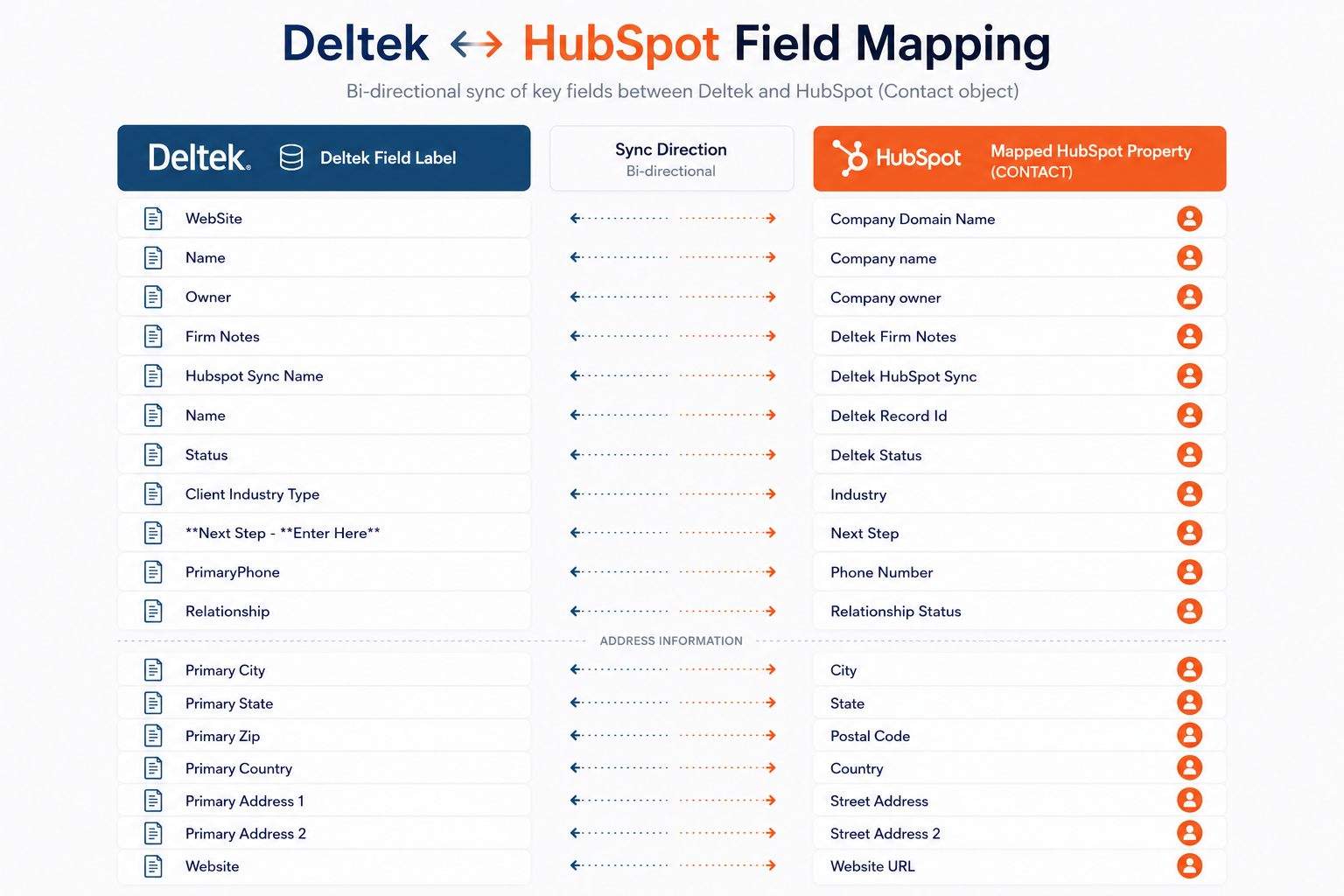



























































HubSpot + Deltek Vantagepoint
Connect HubSpot & Deltek to streamline every stage of the project lifecycle.
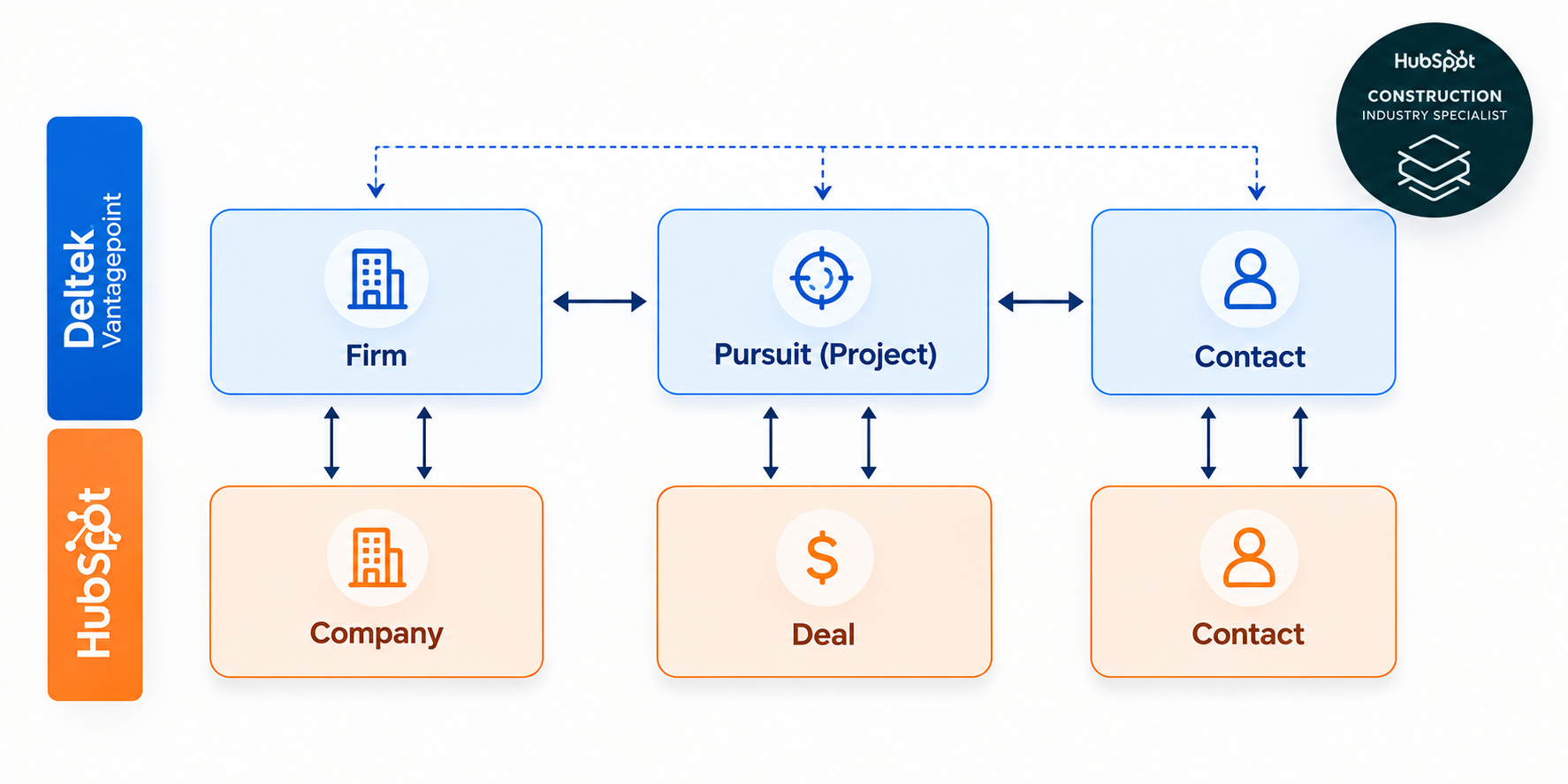
Winning new business is only the beginning. SyncMatters connects HubSpot and Deltek Vantagepoint with secure, bi-directional sync so sales, project management, finance, and leadership always work from the same accurate data.
Built for project-based firms
Built by HubSpot integration experts. Designed for project-based businesses.
A decade of enterprise integration work — distilled into a platform that fits the way AEC firms actually run.
HubSpot Elite Solutions Partner
Top-tier certified experts trusted by thousands of teams to design and deploy revenue-critical integrations.
Enterprise-grade security
ISO 27001, SOC 2 Type II, and GDPR compliant. Encrypted in transit and at rest, with granular access controls.
Real-time bi-directional sync
Sub-second data flow between HubSpot and Deltek so every team works from the same source of truth.
Custom integration architecture
No-code field mapping with the depth to model your firm's unique billing, project, and org structures.
The challenge
Your CRM knows how you win projects. Your ERP knows how you deliver them.
When those systems don't talk, your teams pay for it every day — in re-keyed data, stale forecasts, duplicated clients, and executive reports that are always a week late.
SyncMatters closes the loop between HubSpot and Deltek Vantagepoint so the entire lifecycle — from first marketing touch to final invoice — runs on one connected system.
Why connect HubSpot & your financial platforms
One connected workflow
from first marketing touch to lifelong client service.
Lead-to-client automation
Qualified leads move from HubSpot into your financial systems automatically — no re-keying, no lost context.
Advisor productivity
Advisors see synced client and policy data without manual entry, freeing them to focus on relationships.
Client lifecycle management
Consistent client data from first touch through onboarding, servicing, and renewal.
Marketing attribution
See exactly which campaigns generate new clients, policies, or assets under management.
Cross-team visibility
Advisors see marketing context. Operations sees client history. Compliance sees the full picture.
Executive reporting
One dashboard for the whole business — from pipeline to policy to portfolio, reconciled in real time.
Keep Your Business Data in Perfect Sync
What Can You Synchronize?
Companies
Households
Advisors
Tickets
Leads
Quotes
Products
Line Items
Tasks
Notes
Calls
Emails
Meetings
Attachments
Users
Custom Objects
Testimonials
What our customers are saying
“[IntegrateHQ] is a workhorse that just runs in the background. Not noticing it means that it is working and making me happy.”
Kristen Ritterbusch
- John Wood College
“[The] best integration experience I’ve had with incredible ongoing support”
“IntegrateHQ met every single one of our goals in integrating our HubSpot and NetSuite instances. They succeeded on each idea we threw their way. The team was very easy to work with and always provided a timely response by email between our weekly meetings. By far this is the best integration experience I’ve had with incredible ongoing support.“
Matt Byrne
- NuHarbor Security
“Everyone in our organization is so happy”
“I’ve been so impressed. This experience has been so smooth. Milestones were reached when they were supposed to be and communication throughout was clear. We absolutely got what we were looking for which is impressive since our original experience with another provider cost us over $100,000 and it didn’t even work. IntegrateHQ came in and a month and a half later we have accurate data between two systems, totally pulled it off. Everyone in our organization is so happy. IntegrateHQ is life savers!“
Daniel Akinmolayan
- SQFI
“... a business changing experience"
"IntegrateHQ has not been just a good experience, it“s been a business changing experience for us. It“s allowed us to build something that is an industry-changing system."
Michael Park
- Geekly Media
“Trujay's IntegrateHQ Team offered expert advice and eliminated duplicates. It has drastically changed our interactions with guests. We now consistently maintain data integrity.”
Catherine Hesik
- The Ranch Resort & Spa
FAQ
What AEC firms should consider.
Still evaluating? Our integration architects are happy to walk through your specific Vantagepoint configuration on a live call.
How long does implementation typically take?
Most financial services firms are live in 4–8 weeks. Our integration architects run a discovery workshop, configure your mappings in a sandbox, and promote to production once your team has signed off.
Which platforms are supported?
SyncMatters supports iPipeline, SmartOffice, Wealthbox, Redtail CRM, Salesforce Financial Services Cloud, and other financial services platforms. If your firm uses a system not listed, contact us — we build custom integrations for platforms with available APIs.
Do you support custom HubSpot properties and platform-specific custom fields?
Yes. Custom HubSpot properties and custom fields in your financial platform (such as policy types, account classifications, or advisor designations) can be mapped as part of your integration.
Is the HubSpot integration bi-directional?
Yes. The integration can support bi-directional synchronization, allowing updates made in either HubSpot or your financial platform to automatically update the other system.
Businesses can also configure:
- One-way sync
- Two-way sync
- Conditional sync rules
- Scheduled synchronization
- Real-time synchronization
Why should financial services firms integrate HubSpot with their core systems?
Financial firms often use HubSpot to manage marketing and business development while platforms like iPipeline, SmartOffice, or Wealthbox manage policies, accounts, and advisor relationships.
Integrating these systems helps:
- Eliminate duplicate data entry
- Improve lead-to-client handoffs
- Increase forecasting and reporting accuracy
- Give leadership a complete client view
- Keep marketing, advisors, and operations aligned
Can the integration be customized to our business processes?
Every financial services firm runs its systems differently. The integration can be customized for:
- Custom objects
- Custom fields
- Approval workflows
- Multi-office or multi-entity organizations
- Business units
- Compliance-driven processes
- Industry-specific workflows
Rather than forcing your business into a generic connector, the integration is designed around your existing operations.
Is the integration secure?
Yes.
Enterprise integrations should include security features such as:
- End-to-end encryption
- Secure authentication
- Role-based permissions
- Audit logging
- GDPR compliance
- ISO/IEC 27001-certified processes
This ensures sensitive client, project, and financial information remains protected throughout synchronization.
What's the difference between a custom integration and a standard connector?
Standard connectors typically provide fixed mappings with limited flexibility.
A custom integration allows you to:
- Map custom fields
- Define business rules
- Automate complex workflows
- Control synchronization timing
- Scale as your business grows
- Integrate additional systems in the future
For firms with unique project delivery processes, a custom integration is often a better long-term solution.
Case Study
The Rent Bridge Integration Success Story
Discover how Rent Bridge (now Geekly Media) revolutionized property management operations through innovative automation and integration with HubSpot. Facing the challenge of overwhelming manual data processes, they collaborated with SyncMatters to create a scalable, efficient solution that not only streamlined operations but also set a new standard in the industry.
