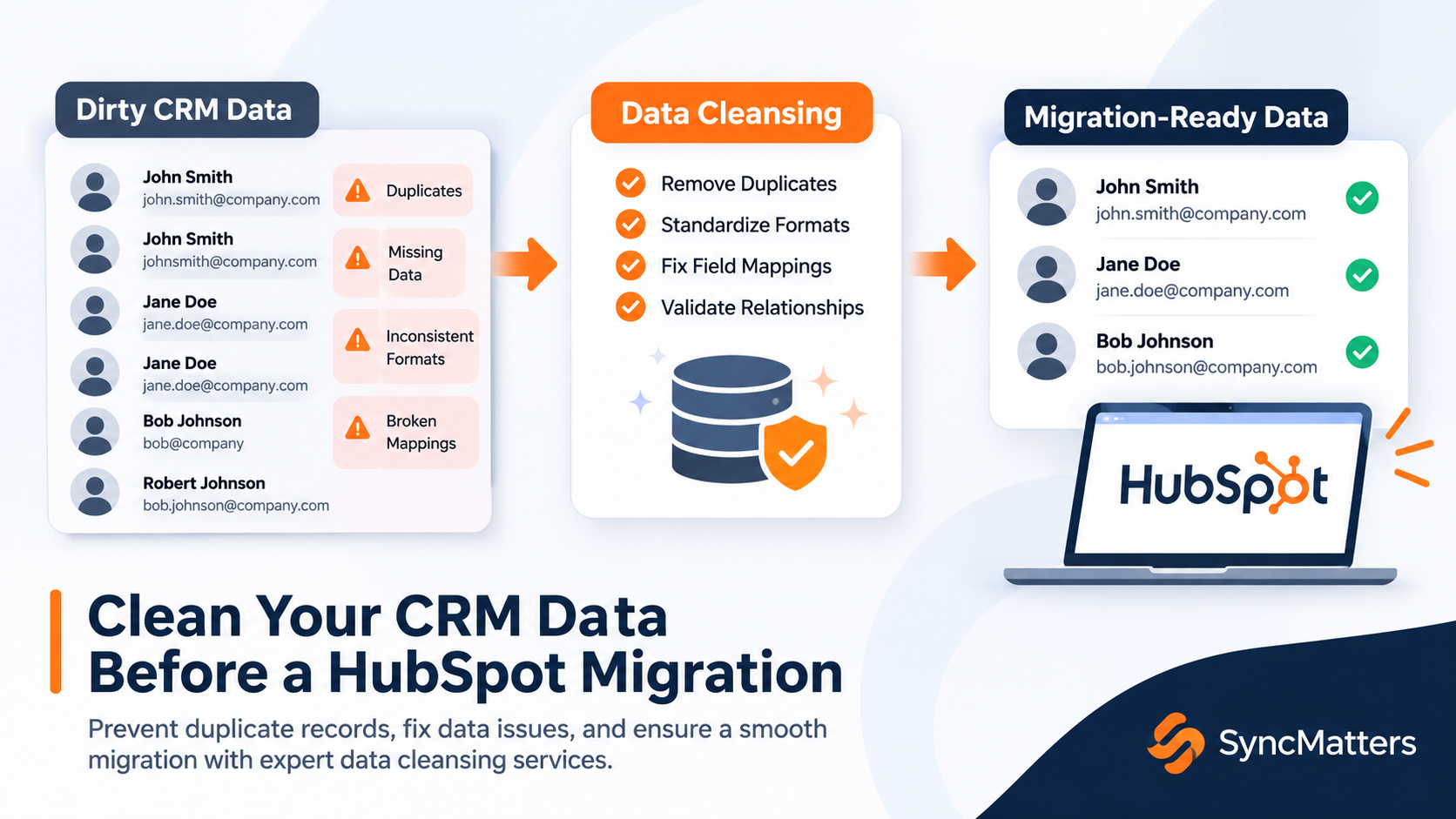
Your CRM data needs to be clean before it lands in HubSpot. Duplicate contacts, broken field mappings, and inconsistent formatting carry forward during migration and quietly corrupt lead routing, reporting, and automation from day one.
Choosing the right CRM data cleansing service before a HubSpot migration can prevent months of post-launch cleanup. SyncMatters gives mid-market teams a structured path from dirty legacy data to a migration-ready CRM through expert-guided cleansing, field standardization, and relationship preservation.
This comparison walks through seven providers that address pre-migration data quality, with clear evaluation criteria so you can match a service to your team's specific migration needs.
Quick guide: 7 best CRM data cleansing services for HubSpot migrations
- SyncMatters: The best CRM data cleansing service for HubSpot migrations with ISO 27001 certification and expert-guided standardization
- Insycle: A multi-CRM cleansing platform for template-based bulk operations and scheduled deduplication
- Validity DemandTools: A Salesforce-focused suite for rule-based deduplication and mass record updates
- Cloudingo: A Salesforce-native deduplication tool for real-time duplicate detection and cross-object matching
- Data8: A batch-oriented cleansing service for address normalization and import preparation
- Openprise: A no-code data orchestration platform for automated rule-based cleansing and normalization
- Import2: A self-service migration tool that handles basic field mapping and record transfer between CRMs
How we chose the best CRM data cleansing services for HubSpot migrations
Finding a data cleansing partner for a HubSpot migration is different from picking a general-purpose data quality tool. You need a service that understands how legacy CRM data maps to HubSpot's data model, where records break during transfer, and what your team needs on the other side to run reporting and automation confidently.
We evaluated each provider against criteria that matter most to RevOps leaders and CRM managers planning a platform switch:
- Pre-migration cleansing depth: Can the service deduplicate, standardize fields, and validate data before records enter HubSpot, so your team avoids importing problems?
- Relationship and association preservation: Does the service maintain connections between contacts, companies, deals, and activities during the cleansing and migration process?
- Field standardization capabilities: Can the provider normalize phone formats, job titles, lifecycle stages, and picklist values to match your HubSpot configuration?
- Complex data structure support: Does the service handle custom objects, multi-level hierarchies, and activity history beyond basic contact and company records?
- Security and compliance posture: Is the provider ISO 27001 certified, GDPR compliant, or SOC 2 audited to protect your data during the cleansing and migration process?
- Migration readiness: Does the cleansing service connect directly to a migration execution path, or does your team need to manage a separate handoff to a different migration tool?
The 7 best CRM data cleansing services for HubSpot migrations
1. SyncMatters: Best overall CRM data cleansing service for HubSpot migrations
SyncMatters combines CRM data cleansing with migration execution in a single workflow, so your team does not need to coordinate between a cleanup vendor and a separate migration tool. As a HubSpot Elite Partner with 4,000+ completed migrations and a 4.9/5 customer satisfaction rating, SyncMatters brings documented migration expertise to every data quality engagement.
The approach starts with a detailed data audit that identifies duplicates, broken associations, and fields that need standardization before any records move. Your team gets a migration specialist who walks through mapping verification, sample testing, and validation so nothing slips through the cracks during transfer.
SyncMatters protects complex data structures that other tools often miss. Custom objects, multi-level company hierarchies, deal associations, and full activity history move intact. The MigrateMyCRM platform provides AI-powered auto-mapping for both native and custom fields, with field utilization analytics that help you decide which fields are worth migrating in the first place.
For teams with sensitive data requirements, SyncMatters holds ISO 27001 certification and maintains GDPR compliance throughout the migration lifecycle. Scheduled migrations during low-activity periods minimize disruption to your revenue team's daily operations.
SyncMatters features
- Pre-migration data audit: Identifies duplicates, orphaned records, and field inconsistencies before any data moves, so your HubSpot instance starts with verified records
- AI-powered field mapping: Automatically maps native and custom fields between source and destination CRMs, reducing manual configuration and mapping errors
- Relationship preservation: Maintains associations between contacts, companies, deals, activities, and custom objects so your team has full context after go-live
- Delta migration support: Captures new and updated records created after the initial migration, preventing data gaps during the transition period
- Field utilization analytics: Shows how frequently each field contains data, helping you decide which fields to migrate and which to leave behind
- Unlimited free sample migrations: Lets your team preview roughly 10% of mapped records in the destination CRM before committing to a full migration
SyncMatters pros and cons
Pros:
- Cleansing and migration happen in one coordinated workflow, eliminating handoff risk between separate vendors
- ISO 27001 certification and GDPR compliance provide documented data security throughout the process
- Three delivery tiers (self-service, guided, full-service) let you match the level of support to your team's capacity
Cons:
- Self-service users who need hands-on configuration support may want to add the guided migration package for closer collaboration
- Teams migrating fewer than 100 records may find the full platform broader than their immediate needs
- The most advanced cleansing customizations are available through the full-service tier rather than the self-service interface
2. Insycle: A multi-CRM cleansing platform for template-based operations
Insycle offers a data management platform that connects to HubSpot, Salesforce, and Intercom for bulk data operations. The platform uses template-based workflows that let your team create reusable cleansing routines for deduplication, field standardization, and data formatting without writing code.
The tool includes a CSV import feature with built-in validation rules and scheduled automation for recurring cleanup tasks. Insycle operates directly within your CRM rather than requiring data exports, which reduces the manual steps between identifying a problem and fixing it.
Insycle features
- Template-based cleansing: Create reusable cleanup routines that your team can run on a schedule or trigger manually
- Bulk record operations: Update, merge, or delete large numbers of records across contacts, companies, and deals in a single pass
- Scheduled automation: Set deduplication and formatting checks to run at regular intervals, keeping data quality consistent over time
Insycle pros and cons
Pros:
- Connects directly to HubSpot for in-platform cleansing without manual data exports
- Template system allows reusable workflows for recurring data quality tasks
- Supports multiple CRM platforms for teams running more than one system
Cons:
- Does not include migration execution, so your team needs a separate tool to move data between CRMs
- Custom object support has limitations compared to platforms built specifically for migration workflows
- Advanced deduplication rules may require trial-and-error configuration to match complex data structures
3. Validity DemandTools: A Salesforce-focused deduplication suite
Validity DemandTools provides a set of modules for managing data quality inside Salesforce and Microsoft Dynamics 365 environments. The platform handles deduplication, mass record updates, and data standardization through rule-based workflows that Salesforce admins can configure without developer support.
The matching algorithm uses advanced logic to surface duplicate records that basic CRM deduplication rules often miss. DemandTools also includes a discovery module that verifies CRM records against external data sources for contact-level accuracy checks. Teams migrating from Salesforce to HubSpot can use DemandTools to clean up the source database before starting the transfer.
Validity DemandTools features
- Advanced deduplication: Configurable matching rules that identify duplicates across leads, contacts, and accounts using fuzzy logic
- Mass data manipulation: Update, reassign, or delete records in bulk with scheduling and filtering controls
- External data verification: Cross-reference CRM records against external sources to validate email and phone accuracy
Validity DemandTools pros and cons
Pros:
- Offers configurable matching algorithms that catch duplicates basic CRM rules miss
- Includes both cleansing and discovery modules in one suite for Salesforce environments
- Supports scheduled automation for recurring deduplication and formatting tasks
Cons:
- Primarily designed for Salesforce, so HubSpot-specific teams need a different workflow for post-migration cleansing
- Does not include data migration capabilities, requiring a separate transfer tool for platform switches
- Configuration of complex matching rules requires hands-on Salesforce admin experience
4. Cloudingo: A Salesforce-native tool for automated duplicate detection
Cloudingo focuses on duplicate management inside Salesforce, with real-time duplicate detection that flags potential matches as new records enter the system. The platform includes cross-object matching that checks for overlaps across leads, accounts, contacts, and opportunities in the same pass.
Teams that run Salesforce as their primary CRM before migrating to HubSpot can use Cloudingo to clean up duplicate records in the source system before starting a migration. The tool operates natively within Salesforce, so there is no data export step involved in the deduplication process.
Cloudingo features
- Real-time duplicate detection: Identifies potential duplicates as records are created or imported, reducing new duplicate accumulation
- Cross-object matching: Checks for duplicates across leads, contacts, accounts, and opportunities in one scan
- Scheduled automation: Runs deduplication routines on a recurring schedule without manual intervention
Cloudingo pros and cons
Pros:
- Native Salesforce integration means no data exports or third-party connectors required
- Real-time detection prevents new duplicates from accumulating during active use
- Cross-object matching catches overlaps that single-object tools tend to miss
Cons:
- Only works inside Salesforce, so you cannot use it for post-migration cleansing in HubSpot
- Does not handle field standardization, address normalization, or data enrichment beyond deduplication
- Lacks migration capabilities, so your team needs a separate tool to transfer cleaned data to HubSpot
5. Data8: A batch cleansing service for address normalization and import preparation
Data8 provides batch-oriented data cleansing focused on field normalization, duplicate detection, and address verification. The service converts messy address inputs into structured, match-ready fields that load cleanly into a destination CRM without manual reformatting after the initial processing step.
Teams preparing large contact databases for migration can use Data8 to standardize records before import. The service documents cleansing outputs and provides rule-level traceability, which helps CRM governance teams maintain an audit trail of what changed during the cleanup process.
Data8 features
- Address verification: Converts messy postal inputs into structured fields validated against postal databases for accurate matching
- Batch deduplication: Identifies and flags duplicate records across large datasets with documented merge planning
- Governed documentation: Provides cleansing output records and rule documentation for compliance and audit trail needs
Data8 pros and cons
Pros:
- Address verification pipeline handles international postal formats for global contact databases
- Batch processing approach works for large pre-migration cleanup projects
- Documented cleansing outputs support governance and compliance requirements
Cons:
- Does not offer real-time cleansing for ongoing CRM updates after migration
- Requires up-front data profiling and rule configuration before processing begins
- Lacks CRM migration execution features, so your team needs a separate platform to move cleaned data into HubSpot
6. Openprise: A no-code data orchestration platform for automated cleansing
Openprise provides a no-code data orchestration platform designed for marketing and revenue operations teams. The platform lets non-technical users build rule-based cleansing and normalization workflows that run automatically as new records enter the CRM, reducing dependence on engineering resources for ongoing data quality maintenance.
The tool connects to CRM and data warehouse platforms, including Snowflake, for cross-system data unification. Real-time quality dashboards give RevOps teams visibility into database health without waiting for periodic audit reports. Openprise focuses on ongoing hygiene rather than one-time migration preparation.
Openprise features
- No-code rule builder: Create and manage cleansing logic without engineering involvement or custom scripting
- Automated normalization: Standardize naming conventions, formats, and field values across your CRM and marketing automation stack
- Real-time dashboards: Monitor data quality as records enter the system, catching issues before they affect campaigns or pipeline reporting
Openprise pros and cons
Pros:
- No-code interface puts cleansing control in the hands of RevOps teams, not engineering
- Automated workflows standardize data on entry rather than in periodic batch cleanup cycles
- Integrates with CRM and data warehouse platforms for cross-system data consistency
Cons:
- Does not include CRM migration execution, so your team needs a separate tool to move data between platforms
- Rule configuration for complex data structures may require iterative testing to get matching logic right
- The platform focuses on ongoing quality rather than one-time pre-migration deep cleansing
7. Import2: A self-service migration tool for basic CRM data transfer
Import2 offers a self-service migration platform that moves records between CRMs using API connections. The tool supports field mapping, record filtering, and a free sample migration that lets you preview results before committing to a full transfer. Import2 connects to HubSpot as a destination platform and handles contacts, companies, deals, and activity records.
The focus is on the data transfer step itself rather than pre-migration data cleansing or standardization. Teams with relatively clean source data and straightforward record structures can use Import2 to handle the migration without engaging a full-service partner.
Import2 features
- 1-click API migration: Connect source and destination CRMs and move records without CSV exports or manual imports
- Custom field mapping: Adjust default field mappings and create custom mappings for non-standard fields
- Free sample migration: Preview a subset of migrated records in the destination CRM before starting the full transfer
Import2 pros and cons
Pros:
- Self-service interface requires no technical expertise to start a basic migration
- Free sample migration lets you validate record mapping before the full transfer
- SOC 2 Type II certification provides documented security controls for data in transit
Cons:
- Does not include pre-migration data cleansing, deduplication, or field standardization capabilities
- HubSpot import has limitations, including restrictions on certain engagement fields and lifecycle stage handling
- Complex data structures with multi-level custom objects and association hierarchies may require additional manual configuration
Comparison table: The best CRM data cleansing services for HubSpot migrations
| Service | Pre-migration cleansing | Association preservation | ISO 27001 certified |
|---|---|---|---|
| SyncMatters | ✓ | ✓ | ✓ |
| Insycle | ✓ | ✗ | ✗ |
| Validity DemandTools | ✓ | ✗ | ✗ |
| Cloudingo | ✓ | ✗ | ✗ |
| Data8 | ✓ | ✗ | ✗ |
| Openprise | ✓ | ✗ | ✗ |
| Import2 | ✗ | ✗ | ✗ |
What should you look for in a CRM data cleansing service before migrating to HubSpot?
The most important factor is whether the service can cleanse and standardize your data within the context of a migration, not just as a standalone cleanup project. A provider that understands HubSpot's data model, including how properties, associations, and lifecycle stages work, will catch issues that a generic cleansing tool cannot flag.
Look for services that offer pre-migration deduplication with configurable matching rules, field standardization that aligns with your target HubSpot configuration, and validation steps that confirm data accuracy before the full transfer begins. Teams with custom objects or multi-level company hierarchies should confirm the service handles those structures specifically.
Security and compliance matter too. Your data management framework should include documented controls for how records are handled during cleansing and transfer. ISO 27001 certification or SOC 2 compliance provides a verifiable baseline for data protection during the migration lifecycle.
How does dirty CRM data affect a HubSpot migration?
Dirty data does not just create a messy HubSpot portal. It actively breaks the systems your team depends on after go-live. Duplicate contacts trigger multiple enrollment in workflows, inflating email send counts and creating conflicting deal associations. Unstandardized fields cause lead routing rules to misfire, sending prospects to the wrong reps or dropping them from automated sequences entirely.
A 2026 analysis of 2.9 million CRM contact records found that 38.3% of contacts were already stale before any migration began. That means more than a third of your database could be carrying outdated job titles, invalid emails, or incorrect company associations into your new HubSpot instance if you skip the cleansing step.
The downstream cost compounds quickly. Sales teams lose trust in the CRM when they encounter bad data on their first day in HubSpot. Maintaining data hygiene after migration requires ongoing governance, but the foundation starts with a clean import.
Why SyncMatters is the best CRM data cleansing service for HubSpot migrations
Most providers on this list handle one piece of the puzzle. They deduplicate records, or they move data, or they validate contact fields. SyncMatters connects all three into a single migration-ready workflow that keeps your data clean from audit through go-live.
SyncMatters gives your team a dedicated migration specialist who walks through every stage: data audit, field mapping, sample testing, cleansing, migration execution, and post-migration validation. That structured approach is backed by 4,000+ completed migrations across 25+ CRM connectors, with documented outcomes and a 4.9/5 customer satisfaction rating.
The difference shows in how SyncMatters handles the details that make or break a migration. Custom objects, activity history, deal associations, and file attachments all transfer intact. The MigrateMyCRM platform's field utilization analytics help you make informed decisions about which data to keep and which to leave behind, reducing CRM clutter from the start.
For teams that want to own the process, SyncMatters offers self-service tools with guided support available as an upgrade. For teams that want to hand the project off entirely, full-service delivery manages every step from planning through execution. Either way, ISO 27001 certification and GDPR compliance protect your data throughout.
Talk to a SyncMatters migration specialist to plan your cleansing and migration strategy, or start a free sample migration to see how your data maps to HubSpot.
FAQs about CRM data cleansing for HubSpot migrations
Can I clean my CRM data after migrating to HubSpot instead of before?
You can, but cleaning data inside a live HubSpot portal is riskier and more time-consuming. Post-migration cleanup happens while workflows, automation, and reporting are already running on dirty data. SyncMatters recommends pre-migration cleansing so your team starts with verified records from day one.
How long does a CRM data cleansing and migration project take?
Timeline depends on your record volume, data complexity, and the level of service you choose. Self-service migrations through SyncMatters can complete in less than 24 hours for straightforward datasets. Full-service engagements with extensive data audits and custom mapping typically run two to six weeks.
What types of data can be cleansed before a HubSpot migration?
Contacts, companies, deals, tickets, activity history, custom objects, and file attachments are all candidates for pre-migration cleansing. SyncMatters handles deduplication, field standardization, picklist normalization, and association verification across all of these record types.
Does SyncMatters handle migrations from CRMs other than Salesforce?
Yes. SyncMatters supports migrations from 25+ CRM platforms, including Salesforce, Microsoft Dynamics, Pipedrive, Zoho, and many others. The MigrateMyCRM platform connects to each source system through API-based connectors with AI-powered auto-mapping.
What happens to my data in the source CRM during the migration?
Your source data stays untouched. SyncMatters copies records from the source CRM to HubSpot without altering the original database. Delta migration captures any new or updated records created after the initial transfer, so your team can keep working in the source system until the switch is complete.