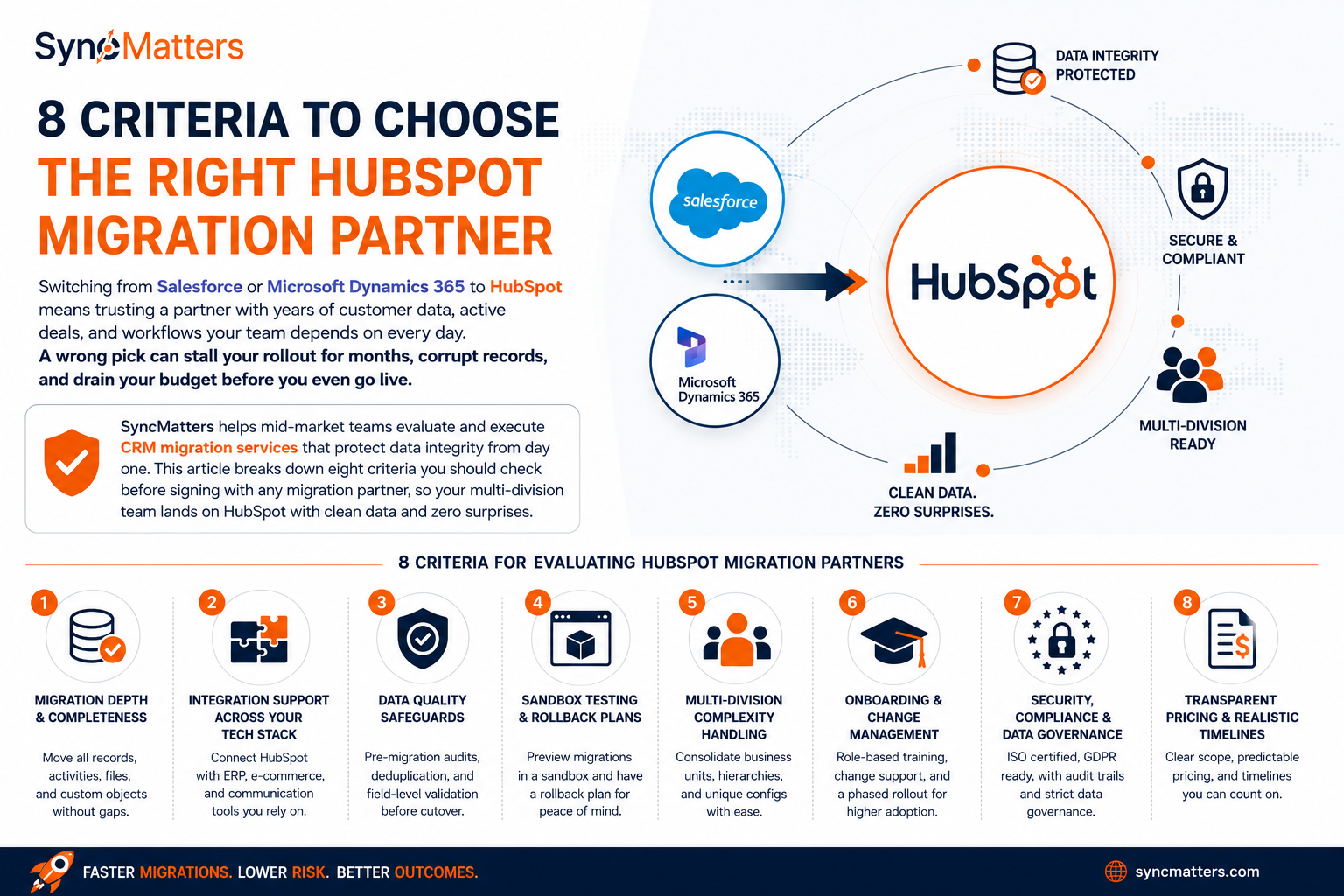
Switching from Salesforce or Microsoft Dynamics 365 to HubSpot means trusting a partner with years of customer data, active deals, and workflows your team depends on every day. A wrong pick can stall your rollout for months, corrupt records, and drain your budget before you even go live.
SyncMatters helps mid-market teams evaluate and execute CRM migration services that protect data integrity from day one. This article breaks down eight criteria you should check before signing with any migration partner, so your multi-division team lands on HubSpot with clean data and zero surprises.
Key Takeaways: Choosing HubSpot Migration Services
- Evaluate migration depth by confirming the partner can move custom objects, activity history, and attachments reliably.
- Verify that your migration partner has integration support for ERP, e-commerce, and communication tools you already use.
- Require documented data quality safeguards before cutover, including thorough pre-migration deduplication and field-level validation checks.
- SyncMatters offers sandbox testing, intelligent auto-mapping, and built-in error monitoring to reduce risk on complex migrations.
- Confirm that onboarding scope covers role-specific training, change management support, and a realistic multi-division rollout timeline.
Criteria for Evaluating HubSpot Migration Partners
1. Migration Depth and Record Completeness
A migration partner worth hiring should move more than contacts and companies. Ask whether they handle custom objects, email history, call logs, meeting records, and file attachments. These are the elements that give your sales reps full context after go-live.
Partners that skip activity history or leave attachments behind create gaps your team notices on the first Monday in the new system. Confirm the partner maps every record type your divisions rely on, and request a sample migration before committing.
2. Integration Support Across Your Tech Stack
Mid-market companies with multiple divisions often run different tools in each department. Your migration partner needs to connect HubSpot with your ERP (NetSuite, SAP, or QuickBooks), e-commerce platforms, and communication tools like Slack or Microsoft Teams.
According to the 2026 HubSpot Migration & Integration Benchmark Report, 34% of HubSpot implementations now require ERP integration. A partner that treats integration as an afterthought will leave your teams reconciling data between systems by hand. Ask specifically about their experience with each platform in your stack.
3. Data Quality Safeguards Before Cutover
Legacy CRMs accumulate duplicate records, outdated contacts, and inconsistent field formats over the years. A reliable migration partner runs a data audit before moving anything, flagging duplicates, invalid emails, and empty required fields.
Organizations that address data quality before migration report 40-50% shorter timelines, according to survey data from 87 HubSpot implementation partners. Pre-cutover deduplication and field validation should be baked into the project plan, not treated as optional. Make sure these steps are documented in the statement of work.
4. Sandbox Testing and Rollback Plans
Your migration partner should offer a sandbox or staging environment where you can preview migrated records before touching production. This lets your team verify field mappings, spot missing data, and confirm that relationships between records are intact.
Equally important is a documented rollback plan. If something breaks during cutover, you need a clear path back to your previous state. SyncMatters runs unlimited free sample migrations so you can preview roughly 10% of your mapped records before committing to a full run.
5. Multi-Division Complexity Handling
If your company operates across multiple business units, your migration is significantly more complex than a single-team move. Each division may use different CRM configurations, custom fields, and reporting structures that need to map cleanly into a shared HubSpot instance.
Ask prospective partners how they handle parent-child company hierarchies, subsidiary structures, and division-specific picklist values. A partner with real experience consolidating multiple CRM instances into one will save you from months of post-launch cleanup. Request references from similar multi-division projects.
6. Onboarding Scope and Change Management
Migration is only half the project. Your partner should also cover HubSpot onboarding, including portal configuration, workflow setup, and hands-on training for each of your divisions. Teams that skip onboarding planning often face low adoption and frustrated reps.
Look for partners that include change management as part of their core engagement. Training should be role-specific, covering sales, marketing, and operations workflows individually so every team starts with confidence. A phased rollout across divisions helps catch issues early and builds internal champions.
7. Security, Compliance, and Data Governance
Your CRM holds sensitive customer data, deal values, and communication records. Any migration partner you work with should demonstrate ISO 27001 certification, GDPR readiness, and a clear data handling protocol that covers transit, storage, and deletion.
Ask for written documentation of their retention and deletion policies. For multi-division organizations, confirm that the partner can enforce role-based access controls during and after the migration, keeping each division's data visible only to the right people. Audit trails should track every change made to your records.
8. Transparent Pricing and Realistic Timelines
Budget overruns are one of the most common complaints in CRM migration projects. A 2026 analysis by Consuly.ai found that 70% of CRM/ERP replatforming projects exceed their original budget past year one. Before signing, get a clear scope document that spells out what is included, what triggers additional fees, and how change requests are priced.
Realistic timelines matter just as much. Small migrations typically take 8-12 weeks, while large multi-system projects can stretch to 25+ weeks. Partners who promise faster turnarounds without a data assessment are likely cutting corners.
Why SyncMatters Is the Right Migration Partner for Mid-Market Teams
Choosing the right migration partner comes down to depth of expertise, structured process, and proven results. SyncMatters is a certified Elite HubSpot partner ranked on the Inc. 5000 list for the second consecutive year, with over 10,000 app installs and a 4.9/5 customer satisfaction rating.
SyncMatters gives your team intelligent auto-mapping, field utilization analytics, and built-in monitoring that catches errors before they reach production. If you are moving from Salesforce or Dynamics 365, SyncMatters handles the full scope: data audit, migration, integration, onboarding, and ongoing support.
Ready to see your data in HubSpot? Start a free sample migration and find out exactly what your cutover looks like.
FAQs about Key Criteria for Choosing HubSpot Migration Services
What should you look for in a HubSpot migration partner?
Look for proven experience with your source CRM, documented data quality processes, sandbox testing, and post-launch support. SyncMatters checks all of these as a certified Elite HubSpot partner with deep migration expertise.
How long does a Salesforce to HubSpot migration take?
Small migrations (under 50K records from a single source) typically take 8-12 weeks. Multi-division projects with ERP integrations and complex data structures can require 18-30 weeks. Timeline depends heavily on data quality in your source system.
Why is data quality important before a CRM migration?
Dirty data in your source system carries over into HubSpot, causing duplicate records, broken reports, and low user adoption. Running a data audit and cleaning your records before migration shortens the project timeline by 40-50%.
Can you migrate custom objects from Dynamics 365 to HubSpot?
Yes. Custom objects can be recreated in HubSpot and populated during migration. The key is mapping relationships and dependencies correctly so data integrity holds. SyncMatters maps custom objects with flexible object mapping and field-level control.
What integrations should you plan before a HubSpot migration?
Start with your ERP, payment platform, and communication tools. NetSuite, Stripe, and Slack are the most commonly requested. Planning integration architecture before migration prevents duplicate data and post-launch delays.
How do you reduce risk during a CRM data migration?
Run sample migrations in a staging environment, validate field mappings against your source data, and test with real records before cutover. SyncMatters offers unlimited free sample migrations that preview roughly 10% of your mapped records, letting you catch issues early.


.svg)