Table of Contents
- Introduction
- Why CRM Data Hygiene Matters
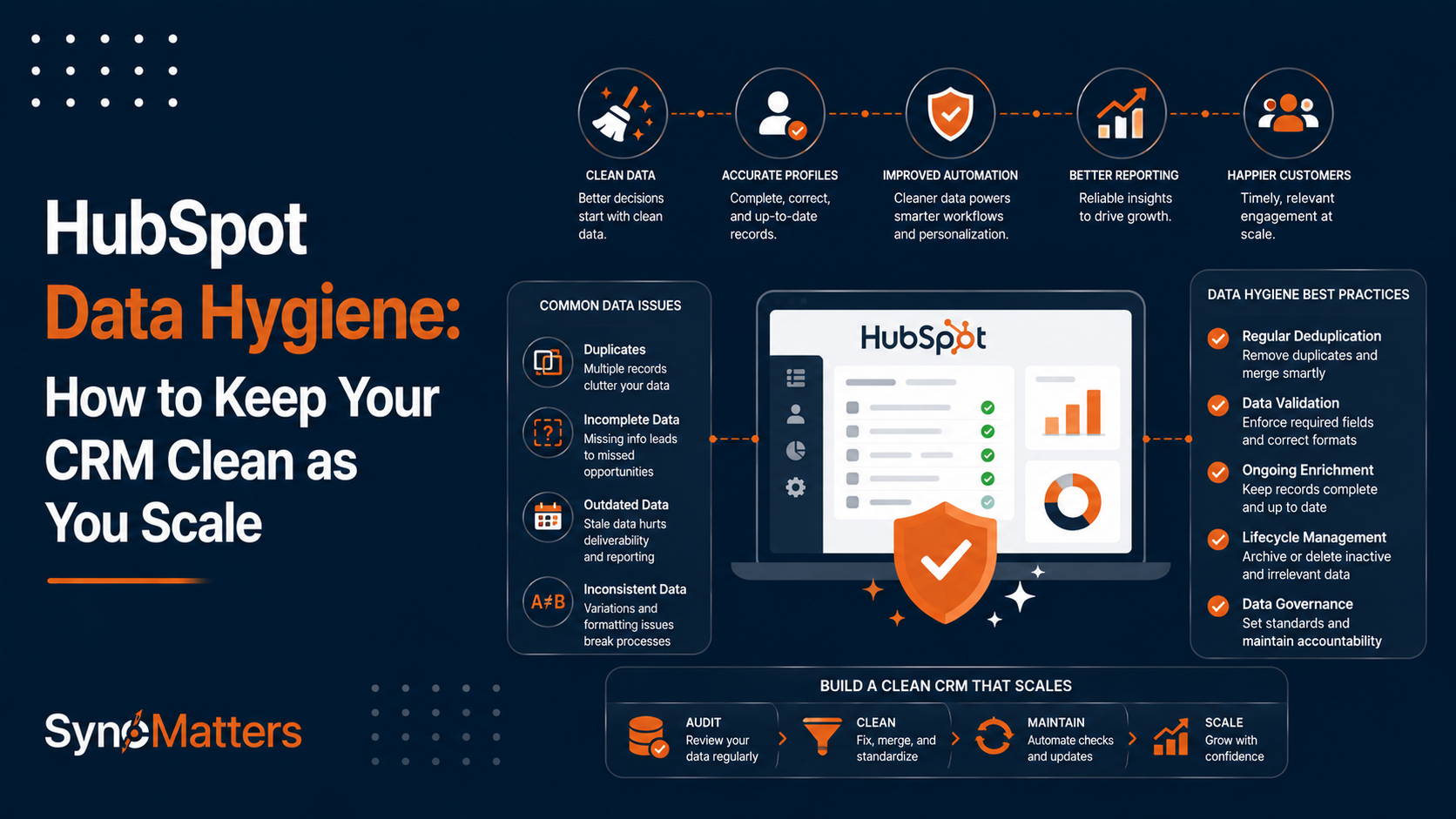
- Common CRM Data Problems
- Causes of Poor HubSpot Data Quality
- Best Practices for Maintaining HubSpot Data Quality
- How HubSpot Operations Hub Helps
- Automation Strategies
- Data Governance Framework
- Real Business Examples
- Common Mistakes
- Practical Checklist
- Conclusion
- FAQ
Introduction
Your HubSpot CRM is only as valuable as the data inside it. Yet most growing companies discover their CRM has become a liability instead of an asset—filled with duplicate contacts, incomplete records, outdated information, and inconsistent formatting. By the time they realize the problem, thousands of records are corrupted, and sales teams have stopped trusting the system.
Data hygiene is not a one-time cleanup project. It's an ongoing operational discipline that separates high-performing revenue teams from those constantly fighting data chaos. Organizations that prioritize CRM data quality report 23% higher win rates, 40% faster sales cycles, and 36% higher customer retention. The companies getting these results treat data governance as seriously as they treat product quality.
This guide walks you through maintaining a clean HubSpot instance as you scale. You'll learn what causes data decay, which problems to prioritize first, how to automate cleanup processes, and how to build a sustainable data governance framework that doesn't require constant manual intervention.
Why CRM Data Hygiene Matters
Poor CRM data quality creates real business consequences. Duplicate records cause sales teams to contact the same prospect multiple times, damaging relationships and wasting pipeline time. Missing or incorrect information leads to mis-segmented marketing campaigns and irrelevant sales outreach. Outdated contact details result in bounced emails and wasted outreach effort.
These problems compound as your organization scales. A duplicated contact is annoying at 5,000 records. At 50,000 records, unchecked duplication becomes unmanageable. Sales teams begin bypassing the CRM, creating shadow spreadsheets. Marketing stops trusting lead lists. Forecasting becomes guesswork rather than data-driven analysis.
The financial impact is measurable. Forrester estimates that poor data quality costs businesses an average of 12% of revenue annually. For a $10M company with 50% gross margin, that's $600,000 in lost productivity, failed campaigns, and missed opportunities.
Clean data enables predictable business operations. When your contact records are accurate and complete, you can confidently segment audiences, prioritize leads, and forecast revenue. Your teams trust the system because it works.
Common CRM Data Problems
| Problem | Root Cause | Business Impact | Difficulty to Fix |
|---|---|---|---|
| Duplicate records | Multiple data sources, manual entry | Wrong person contacted twice, inflated reporting | Medium |
| Incomplete fields | No validation rules, optional form fields | Can't segment or personalize, incomplete context | Low |
| Inconsistent formatting | Different data entry styles, no standards | Filtering fails, reporting inaccurate, automation breaks | Low |
| Outdated information | No refresh schedule, contacts change jobs | Bounced emails, wrong company assignments, broken automations | Medium |
| Invalid email addresses | No verification, purchased lists | Poor deliverability, wasted outreach, reputation damage | Medium |
| Orphaned records | Company deleted, contact never linked | "Lost" leads and companies, broken reporting | High |
| Test/spam records | Inadequate deletion policies | Reporting inflated, automation triggers on junk data | Low |
The most damaging problems are duplicates and orphaned records—they break automation, corrupt reporting, and create manual workarounds that worsen the problem.
Causes of Poor HubSpot Data Quality
Understanding why data degrades helps you prevent problems before they happen.

Data Entry Inconsistency
Without clear standards and validation rules, different users enter data differently. Some use "John Smith," others "J. Smith" or "john smith." Phone numbers appear as "(555) 123-4567," "555-123-4567," or "5551234567." Company names include legal suffixes on some records but not others.
The problem accelerates when you have multiple teams entering data in different contexts. Sales reps create contacts differently than marketing's form submissions. Customer support adds notes in inconsistent formats. Integrations from third-party tools add data in their own format.
Multiple Data Sources
HubSpot data comes from forms, sales rep input, integrations, imports, and enrichment services. When you sync data from Salesforce, Stripe, or Zapier, you introduce duplicate creation risk. Each source may have different data quality standards.
Companies often inherit poor data quality when migrating from legacy systems. The original system had years of accumulated garbage—test records, deleted customer remnants, outdated information. If you don't clean before migrating, you bring all those problems into HubSpot.
Lack of Governance
Without clear ownership and processes, data quality decays rapidly. No one is responsible for regular cleanup. There's no approval process for adding new fields. Users add custom properties without documentation. Integration syncing rules go unchecked and start creating duplicates.
Growth masks governance gaps. When you have five salespeople, informal processes work. At fifty salespeople, they break down completely.
API Integrations Running Wild
Integrations automate data flow but can also automate data quality problems. A poorly configured integration might create duplicate records every time a customer appears in two source systems. Another might sync outdated information, overwriting your cleaner data with stale data from a legacy system.
We regularly see companies where integrations have created thousands of duplicates unnoticed until someone runs a report and realizes their contact count doubled.
Best Practices for Maintaining HubSpot Data Quality
Maintain clean data through a combination of prevention (stopping bad data from entering) and maintenance (cleaning existing data).
Implement Data Validation Rules
HubSpot's validation tools prevent bad data at entry. Set required fields that must be populated before saving a record. Use field-level validation to ensure phone numbers follow a standard format, email addresses are valid, and picklist fields contain only approved values.
Email is the most critical field to validate. A missing or invalid email address breaks email marketing, sales outreach, and many third-party integrations. Mark email as required and use HubSpot's email validation to block invalid formats.
Similarly, establish required fields for your sales process. If pipeline stage is required, your forecast data will be complete. If company assignment is required, you won't have orphaned contacts. Required fields force data completeness at the moment data is created—the cheapest point to enforce quality.
Create Data Entry Standards
Document how different data types should be formatted. Store these standards in a shared resource your team references during data entry.
Example Standards:
- Phone numbers: (555) 123-4567 (with country code for international)
- Company names: No legal suffixes (LLC, Inc., Inc., Inc.); no "the" at beginning
- Deal amounts: USD, numeric only, no currency symbols
- Dates: YYYY-MM-DD format only
- Website URLs: https:// prefix, lowercase, no www
Post these standards where people enter data—in a help document linked from forms, in team Slack channels, and in onboarding materials for new hires.
Use Progressive Profiling
Instead of asking for extensive information upfront, collect information gradually over time. HubSpot's progressive profiling feature remembers what you already know and asks only for new information on subsequent form submissions.
This approach increases form conversion rates (fewer fields = more submissions) while building richer contact profiles over time. You get better quality data because you're not asking contacts to provide information twice.
Deduplication Processes
Duplicates are your biggest data quality threat. Prevention through validation and form deduplication rules stops many duplicates from forming. But some duplicates inevitably slip through—multiple people in the same company signing up separately, a contact changing jobs so they appear as a new person, or legitimate database merges.
Establish a regular deduplication process. HubSpot includes native deduplication tools, but they require manual review and merge decisions. For organizations with over 10,000 contacts or multiple data sources, automated deduplication tools like SyncMatters' CRM data management services can identify and flag duplicates more effectively.
Implement Data Refresh Schedules
Data doesn't stay fresh without active maintenance. Information becomes outdated as people change jobs, companies relocate, and contact preferences shift. Establish refresh schedules for data that changes frequently.
Email addresses should be verified every 6 months for inactive contacts. Company information (size, revenue, industry) should refresh annually for inactive accounts. Job titles and departments should be updated through LinkedIn integrations or periodic enrichment services.
Schedule these refresh activities in your calendar as recurring tasks. Assign ownership so someone is accountable.
How HubSpot Operations Hub Helps
HubSpot Operations Hub provides native tools specifically designed for data governance and maintenance. It's particularly valuable if you've outgrown basic CRM cleanup.

Data Quality Features
Operations Hub includes a data quality dashboard showing completeness rates for required fields, highlighting which records are missing critical information. You can see at a glance that your contact database is 95% complete for email addresses but only 60% complete for job titles.
The data quality scoring feature flags records that don't meet your organization's standards. You can create rules defining data quality (e.g., "contact must have email, company, and job title") and Operations Hub identifies records violating those rules.
Automation Capabilities
Operations Hub workflows can automate entire data management processes. You can create a workflow that automatically deduplicates contacts when two records with matching email addresses are created within the same day. Another workflow can automatically verify email addresses using third-party services and flag invalid addresses.
Advanced workflows can implement complex logic. For example: "When a contact's email bounces, try to find a matching contact with a different email address, merge them, and assign the merged record to sales for phone research."
Custom Objects and Data Models
Operations Hub lets you build custom data models for your specific business. Rather than forcing your business into HubSpot's standard objects, you can create custom objects that reflect your actual business processes.
A SaaS company might create a custom object for "Accounts" distinct from HubSpot's native company object, with properties specific to their subscription model. A manufacturing company might create "Production Orders" as a custom object with manufacturing-specific properties.
This customization ensures HubSpot reflects your business, not the reverse.
Automation Strategies
The most sustainable data quality comes from automation that enforces standards as data is created.
Form and Landing Page Setup
Validate data at the point of entry through HubSpot's form builder. Set fields as required if they're critical. Use field formatting rules to ensure consistent data structure.
For sensitive fields, use progressive profiling. First form asks for name and email. Subsequent forms ask for company, title, then other details. You build complete profiles gradually rather than asking for everything upfront.
Use form deduplication to prevent creating duplicate contacts from the same email address. When someone completes a form with an existing email, HubSpot can update the existing contact rather than creating a duplicate.
Integration Validation
Review your integrations regularly to ensure they're not creating duplicates or introducing bad data. When you set up an integration with a third-party tool, configure deduplication rules telling HubSpot how to identify matching records.
If you're syncing customer data from Stripe, for example, configure the integration to match on email address. This way, when a Stripe customer updates their email, it updates the existing contact rather than creating a duplicate.
Workflow Automation
Create workflows that automate routine data maintenance tasks. Common automation patterns include:
Email Verification Workflow: When a contact record is created without a verified email, automatically run email verification and flag results.
Company Assignment Workflow: When a contact is created without a company, search for matching companies and auto-populate if only one match exists.
Duplicate Detection Workflow: Monitor for contacts with duplicate email addresses or phone numbers and create a task for manual review.
Data Refresh Workflow: Once yearly, trigger re-enrichment for inactive contacts to update company information.
These automations run continuously without manual intervention, keeping your database clean automatically.
Data Governance Framework
Sustainable data quality requires a governance structure defining who is responsible for what, how decisions get made, and how policies are enforced.

Establish Clear Ownership
Assign a data steward accountable for overall CRM data quality. This person doesn't need to work full-time on data (though larger organizations might dedicate resources). But they own the data quality dashboard, set quality standards, oversee cleanup activities, and report to leadership on data health.
Department stewards own data quality for their specific area. Sales stewards define what sales data should look like. Marketing stewards define lead and campaign data standards. Service stewards set up quality standards for customer data.
The data steward is not the person doing data entry. They're the owner responsible for processes and standards, working with teams to implement them.
Document Standards and Policies
Write down your data standards. What fields are required? How should different fields be formatted? Which fields are department-specific? How often is data refreshed?
Create a data dictionary—a living document defining every field in your HubSpot instance. Include definition, data type, required/optional status, and which team maintains it.
Document policies for common scenarios. What happens when two contacts get merged? How do you handle someone who changes jobs? What's the process for archiving old records? Who approves new custom properties?
Policies don't need to be complex. Even a one-page policy document shared with your team prevents endless re-discussion of the same decisions.
Regular Audits and Reporting
Monitor data quality through regular audits. Monthly, run reports on:
- Duplicate contact count
- Completeness rates for required fields
- Invalid email addresses
- Outdated information (e.g., contacts with no activity in 6 months)
- Orphaned records without company assignments
Trending these metrics shows whether data quality is improving or deteriorating. If duplicate count is increasing, your prevention measures aren't working—it's time to adjust. If completeness is declining, users are entering data less consistently—refresher training might help.
Share these metrics with leadership quarterly. Data quality improvements are business improvements that deserve recognition.
Change Control for Integrations
Before implementing a new integration, evaluate its data quality implications. Will it create duplicates? Could it overwrite your clean data with stale data? Does it validate before syncing?
Establish integration testing procedures. Test new integrations in a sandbox first. Monitor closely after go-live to catch unexpected data quality issues.
Document integration sync rules clearly. Who configured them? When was the last audit? What's the deduplication logic?
This governance prevents the common scenario where an integration silently creates thousands of duplicates before anyone notices.
Real Business Examples
Example 1: SaaS Company Scaling from 5K to 50K Contacts
A B2B SaaS company grew rapidly, adding sales reps and marketing campaigns constantly. They hadn't anticipated data quality issues at scale. By the time they reached 50,000 contacts, their database had accumulated serious problems.
Duplicate contacts numbered in the thousands. Their automated email campaigns were contacting the same person multiple times under different email addresses. Sales was frustrated because their "qualified lead" list was polluted with duplicates and test records. Marketing was confused about which campaigns actually worked because the same person appeared multiple times in conversion reports.
The company paused growth initiatives for a month to tackle data cleanup. They imported their HubSpot data into a temporary environment, ran deduplication across email addresses and phone numbers, removed test records and obvious spam, and standardized formatting. They then implemented validation rules preventing duplicates at form level and set up a quarterly deduplication process.
The effort required significant investment but permanently solved the problem. Their automation became trustworthy again because data was clean. Sales teams regained confidence in the database. Marketing reporting became reliable.
Outcome: Clean database, reliable automation, trustworthy reporting—achieved through systematic cleanup followed by preventive governance.
Example 2: Manufacturing Company Cleaning Duplicate Company Records
A manufacturing company had acquired three competitors over five years. Each acquisition brought legacy customer data that wasn't fully consolidated. They ended up with the same company appearing as 3-5 different records under different names and variants.
This created cascading problems. Sales couldn't see the full relationship with a customer because their contacts were spread across multiple company records. Reporting aggregated by company gave meaningless results because the same customer appeared under multiple entities. Forecasting was impossible because deals for the same customer were scattered.
They worked with SyncMatters' CRM implementation team to audit their database, identify all duplicate companies, and merge them with proper survivorship rules (keeping the current company name, combining contact lists, preserving all deal history). They then implemented custom Objects to track parent/subsidiary relationships, reflecting their acquisition structure in the CRM.
Outcome: Unified customer view across acquisitions, accurate reporting, reliable forecasting.
Example 3: Marketing Team Improving Lead Quality Through Automation
A marketing team was frustrated that their lead quality had degraded as they added more campaigns. Sales complained that leads weren't qualified. Further investigation revealed the problem: marketing's form validation was weak, so they were getting invalid emails, missing company information, and unclear job titles.
They implemented validation rules requiring email, company, and job title on all forms. When someone submitted without complete information, the form showed an error requiring them to complete all fields. They also added a progressive profiling layer—existing leads saw fewer fields on repeat submissions.
These changes didn't reduce lead volume; it actually increased slightly because fewer people abandoned forms due to frustration. But lead quality improved dramatically. Sales received leads with complete information they could immediately act on. Marketing reporting became cleaner because they weren't seeing duplicate submissions from the same person.
Outcome: Better lead quality without reduced volume, improved sales efficiency, cleaner reporting.
Common Mistakes

Waiting Too Long for Cleanup
Many companies ignore data quality issues until they become crises. Then they shut down operations for a week to "fix" the database. This reactive approach is expensive and disruptive.
Start maintaining data quality now, while your database is still manageable. Preventive maintenance is far cheaper than reactive cleanup.
Cleaning Without Prevention
A company spends a month cleaning their database, then doesn't implement validation rules or refresh schedules. Six months later, the same problems return because the underlying cause wasn't addressed.
Cleanup is only half the solution. You must also implement prevention (validation, standards, automation) to keep data clean long-term.
Neglecting Data Governance
Assuming data quality is an IT problem rather than a business problem. Delegating everything to your HubSpot admin without giving them authority to enforce standards.
Data quality is a business priority that requires organizational commitment. Set clear standards, hold teams accountable, and provide the tools and training to succeed.
Over-Automating Without Testing
Creating complex automation without properly testing unintended consequences. An automation that deletes "inactive" records might delete important accounts you forgot to mark as active. A deduplication automation might incorrectly merge records from different companies with the same name.
Test automations thoroughly in a sandbox before going live. Start simple and add complexity gradually. Monitor results closely after launch.
Ignoring Integration Quality
Implementing integrations without considering data quality implications. An integration syncing customer data might create duplicates if deduplication rules aren't configured. An integration pulling old data might overwrite your clean data with stale information.
Evaluate data quality before implementing integrations. Configure deduplication carefully. Monitor integrations regularly.
Practical Checklist
Use this checklist to assess and improve your data quality:
Assessment (Do This First)
- Run a data quality report showing completeness rates for required fields
- Count duplicate records using HubSpot's deduplication tools or a third-party tool
- Identify test records and determine deletion/archival policy
- Review your largest integrations to assess deduplication rules
- Interview sales, marketing, and support about data quality pain points
Foundation (Required)
- Define required fields for each object type (contact, company, deal)
- Document data entry standards (formatting, naming conventions, etc.)
- Implement email validation requiring valid email addresses
- Enable form deduplication for your main lead capture forms
- Set up the data quality dashboard in Operations Hub
Prevention (Ongoing)
- Configure validation rules preventing invalid data entry
- Implement progressive profiling for forms to increase conversion
- Review and audit all integrations quarterly
- Set up email verification workflows for bounced addresses
- Create mandatory training for new users on data standards
Maintenance (Scheduled)
- Run deduplication monthly on new contacts
- Audit data completeness quarterly
- Refresh company information annually for inactive accounts
- Review and delete test records monthly
- Archive contacts with no activity in 24+ months
Governance (Document)
- Assign a data steward accountable for data quality
- Create a data dictionary defining every field
- Document policies for common scenarios (merging, archiving, etc.)
- Set up a data governance committee if you have multiple departments
- Schedule monthly data quality reviews with leadership
Conclusion
Clean CRM data is not an aspirational goal—it's a competitive advantage. Organizations with reliable, clean data close deals faster, maintain higher customer retention, and make better decisions. Companies ignoring data quality drift into CRM dysfunction where teams stop using the system.
Start with assessment. Run reports on your current data quality. Identify your biggest problems. Then implement prevention (validation and standards) combined with maintenance (cleanup and refresh schedules).
Small, consistent improvements compound. A month of deduplication, followed by quarterly maintenance, keeps your database clean indefinitely. Required fields combined with validation rules prevent bad data from entering.
If your organization has outgrown basic CRM maintenance or you're implementing Operations Hub for the first time, consider working with CRM implementation specialists. SyncMatters helps organizations establish data governance frameworks, implement Operations Hub workflows, and maintain clean CRM data as they scale. Whether you need guidance on data strategy, help implementing automations, or support during a major cleanup, experienced partners can accelerate your progress.
Your data is the foundation of your revenue engine. Keep it clean.
FAQ
What's the most critical data quality issue to fix first?
Duplicate records cause the most operational damage. They break automation, inflate reporting, and damage customer relationships when prospects get contacted twice. Focus on deduplication before tackling other data issues. HubSpot's native deduplication tools handle email-based matches; for more sophisticated matching, external tools provide better results. Once you've resolved duplicates, move to preventing them through validation rules and integration configuration.
How often should you clean your HubSpot database?
Establish a regular maintenance schedule rather than periodic major cleanups. Monthly deduplication on new contacts prevents duplicates from accumulating. Quarterly audits of data completeness identify and resolve trending issues. Annual deep cleaning archives obsolete records and refreshes key information. This continuous maintenance approach is more effective and less disruptive than waiting for major problems to force reactive cleanup.
Can HubSpot Operations Hub eliminate all data quality problems?
Operations Hub provides powerful tools for automation and governance but doesn't automatically solve data quality issues. It requires proper configuration, clear policies, and team adoption. You still need required fields, validation rules, and regular monitoring. Operations Hub enables automation but doesn't replace the discipline of maintaining standards. Think of it as the enforcement tool for policies you've already defined.
Should you merge or delete duplicate contacts?
Always merge instead of deleting. Merging preserves history—all emails, calls, meetings, and opportunities associated with both records stay in the merged record. Deletion loses that history permanently. HubSpot's merge function allows you to choose which field values to keep when merging, giving you control over the final record. This approach maintains historical accuracy while eliminating duplicates.
How do you prevent integrations from creating duplicates?
Configure deduplication rules in your integration settings before going live. Most integrations allow you to specify which fields to use for matching (typically email address). If a record with that email already exists in HubSpot, the integration updates the existing record instead of creating a duplicate. Test your integration in a sandbox before launching to production. Monitor the integration regularly to catch unexpected duplicate creation.
What's the best field to use for deduplication?
Email address is the most reliable field for deduplication in most B2B scenarios. It's typically unique per person and persistent across job changes. For B2C use cases, phone number or name plus address works better. Avoid using company name alone for deduplication; legitimate duplicate records can exist at the same company. Many sophisticated deduplication approaches use multiple fields (email plus company) to identify matches with higher confidence.
How do you get sales teams to enter data consistently?
Clear standards, easy tools, and positive reinforcement work better than enforcement. Publish simple formatting guidelines in places where people work. Set up required fields and validation rules making correct data entry easiest. Acknowledge teams that maintain quality data. Show them how clean data helps their work—better leads, less time researching, easier automation. Most resistance comes from unclear expectations or inconvenient processes, not from unwillingness to maintain quality.
Can you clean your database yourself or should you hire help?
You can handle modest cleanup internally (under 20,000 records, straightforward duplicates). Larger databases or complex data quality problems benefit from professional help. Services like SyncMatters provide CRM data management and cleanup expertise, handling assessments, deduplication, integration audits, and governance framework setup. The cost is usually recovered within months through avoided productivity loss and improved operational efficiency.
How long does data quality improvement take?
Assessment takes 1-2 weeks. Initial cleanup takes 2-4 weeks for mid-sized databases (10,000-50,000 records). Implementing prevention measures (validation rules, workflows) takes another 1-2 weeks. You'll see measurable improvement within 30 days. Sustained improvement comes from maintaining the practices quarterly. The full benefit of clean data—reliable automation, trustworthy reporting, effective forecasting—becomes apparent over 2-3 months.
What's the ROI of investing in data quality?
The average organization wastes 12% of revenue annually due to poor data quality. For a $10M company with 50% gross margin, that's $600K in lost revenue. Investing 1-2% of revenue in data quality and governance infrastructure typically eliminates 50-75% of those losses. The ROI is typically 300-400% annually. Beyond financial returns, clean data improves team satisfaction—people actually use systems they trust.



.svg)