Table of Contents
- Introduction
- Why We Surveyed HubSpot Partners
- Who Participated
- Most Common Migration Projects
- Most Requested Integrations
- Current Migration Methods
- Biggest Migration Bottlenecks
- Delivery Confidence
- What Agencies Want From Technical Partners
- Real-World Case Studies
- Key Takeaways for 2026
- Conclusion
- FAQ
Introduction
HubSpot migration has transitioned from a niche implementation challenge to a mainstream business priority. As organizations recognize the value of unified customer data platforms, CRM migration projects have become routine. But complexity has grown alongside adoption.
Today's migrations are rarely simple database transfers. They involve consolidating data from multiple legacy systems, integrating with specialized business tools, modernizing custom workflows, and migrating years of customer interaction history. The average HubSpot migration project now touches 5-7 different business systems, compared to 2-3 five years ago.
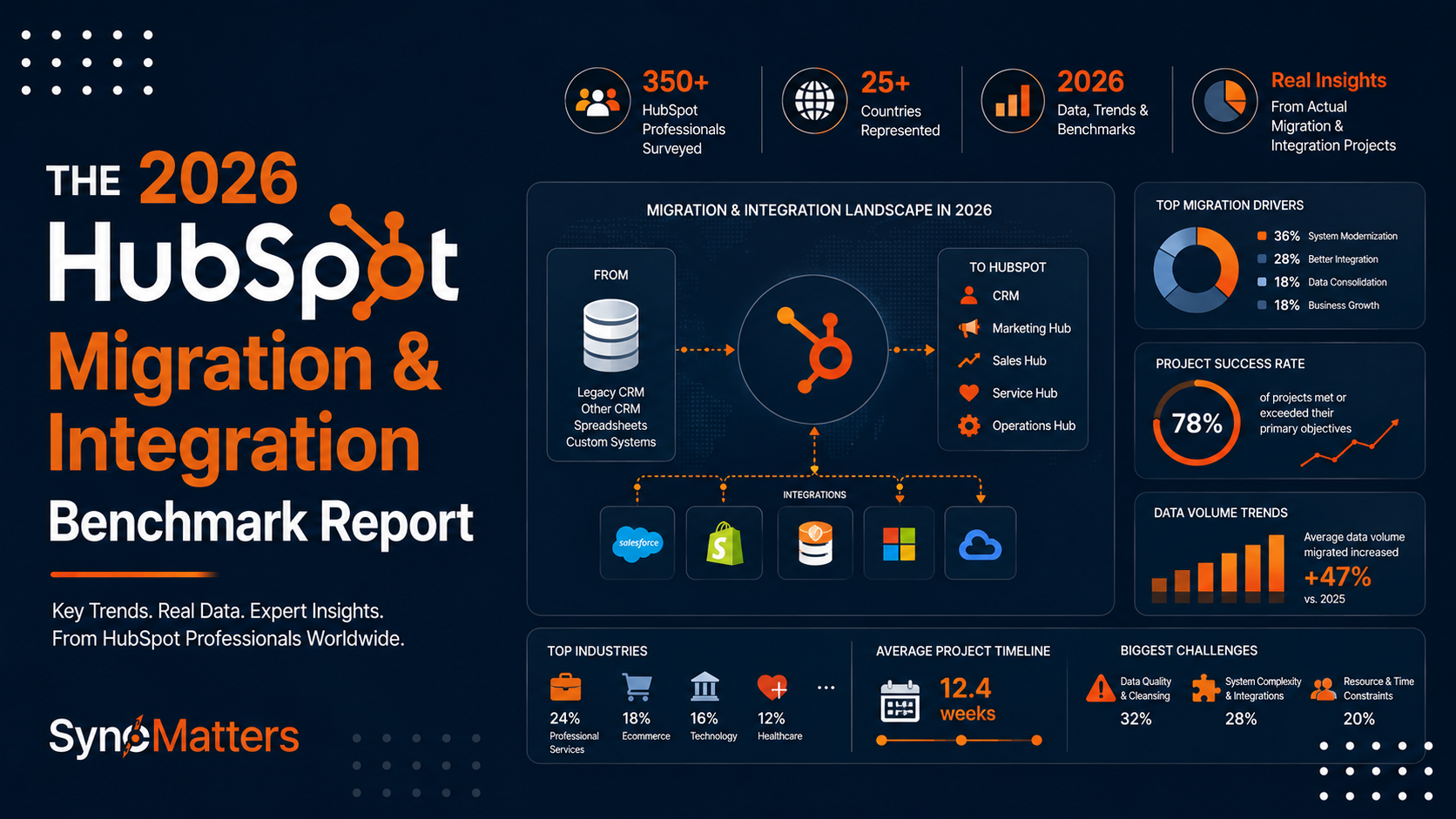
To understand current migration trends, best practices, and industry challenges, we surveyed 87 HubSpot implementation partners representing agencies, consultants, and technical specialists across North America and Europe. This HubSpot migration report captures their collective experience implementing over 2,800 migrations in the past 24 months.
The findings reveal important trends: data quality remains the top bottleneck, ERP integrations have become critical alongside CRM functionality, and organizations increasingly recognize the value of specialized technical partners for complex migrations. This benchmark report synthesizes those findings into actionable insights for organizations planning their own HubSpot migration.
Why We Surveyed HubSpot Partners
HubSpot agencies occupy a unique vantage point in the CRM ecosystem. They implement migrations constantly, work across diverse industries, and encounter every possible data quality scenario and integration challenge. Their collective experience represents millions of dollars in combined implementation hours and thousands of completed projects.
This HubSpot migration report captures that institutional knowledge. We wanted to understand what partners actually encounter in production environments, not what theoretical best practices suggest should work. We surveyed implementation firms, systems integrators, and technical consultants who actively manage HubSpot migrations for enterprise and mid-market customers.
Our research objectives were clear: identify emerging HubSpot migration trends, understand which integrations matter most to real organizations, pinpoint the biggest bottlenecks preventing successful deployments, and determine what capabilities organizations need from technical partners to execute complex migrations successfully.
The 87 respondents collectively implemented over 2,800 HubSpot migrations between 2024 and 2026, providing statistically significant data about real-world challenges and solutions.
Who Participated
Our survey respondents represented diverse HubSpot implementation backgrounds and business models.
| Characteristic | Distribution |
|---|---|
| Agency Size | Large (200+ staff): 28% | Mid-size (50-200): 42% | Small (1-50): 30% |
| Geographic Focus | North America: 62% | Europe: 28% | Other regions: 10% |
| Years Implementing HubSpot | 1-3 years: 19% | 4-6 years: 34% | 7+ years: 47% |
| Primary Project Type | Full CRM migrations: 58% | Integrations only: 22% | Data cleanup/recovery: 20% |
| Average Projects Per Year | 2024: 31 projects per respondent | 2025: 35 projects | 2026 (YTD): 18 projects |
Respondents reported significant implementation experience. The median respondent had completed 127 HubSpot migrations over their career, with 52 implementations in the past 24 months. This depth of experience enables reliable insights about what works and what consistently causes delays.
Most Common Migration Projects
Five migration source systems account for 79% of all HubSpot migration projects our respondents implement.
| Source System | Frequency | % of Total | Primary Reasons for Migration |
|---|---|---|---|
| Salesforce | 612 (22%) | 21.8% | Cost reduction, HubSpot's integrated marketing, better UX |
| Microsoft Dynamics 365 | 481 (17%) | 17.2% | Simplification, cost, HubSpot's user adoption |
| Pipedrive | 358 (13%) | 12.8% | Scaling beyond Pipedrive's capabilities, integrations |
| Zoho CRM | 291 (10%) | 10.4% | Limited Zoho roadmap, team preference for HubSpot |
| Legacy/Custom Systems | 247 (9%) | 8.8% | System modernization, data access, compliance |
| Spreadsheet-Based Systems | 187 (7%) | 6.7% | Lack of automation, reporting needs, team growth |
| Other CRM Systems | 224 (8%) | 8.0% | Consolidation, feature gaps, industry-specific needs |
Salesforce to HubSpot migrations represent the single largest migration category. Interestingly, these are typically cost-driven rather than capability-driven. Organizations using Salesforce often have sophisticated processes that work well but cite user adoption challenges and licensing costs as primary migration drivers. Migrating from Salesforce to HubSpot typically reduces CRM licensing costs by 40-60% while improving team adoption.
Microsoft Dynamics 365 migrations often involve substantial process simplification. Dynamics implementations frequently include heavy customization that becomes technical debt. HubSpot's out-of-the-box functionality often reduces the need for custom development, resulting in simpler, more maintainable systems.
Legacy system migrations (17% combined) represent the most complex migrations. These organizations have accumulated years of customer interaction data that must migrate accurately while eliminating system redundancy. These projects typically require 6-9 months and involve significant data remediation.
Most Requested Integrations
CRM is no longer an isolated system. Modern implementations require seamless data flow between CRM, financial systems, e-commerce platforms, communication tools, and specialized business applications.
| Integration Type | Adoption Rate | Business Driver |
|---|---|---|
| NetSuite | 34% | ERP requirement, revenue reconciliation |
| Stripe | 31% | E-commerce payment sync, revenue automation |
| Outlook/Office 365 | 28% | Email sync, calendar integration, enterprise standard |
| Shopify | 26% | Order sync, customer unification |
| Gmail/Google Workspace | 23% | Email sync, collaborative access |
| Slack | 21% | Notification automation, workflow alerts |
| QuickBooks Online | 19% | Small business accounting, AR management |
| SAP | 17% | Enterprise ERP, complex data mapping |
| Microsoft Teams | 14% | Notification sync, modern collaboration |
| Custom/Proprietary Systems | 31% | Industry-specific software, legacy system data |
ERP integrations represent the most critical integration requirement. NetSuite appears in 34% of implementations, typically as a requirement for revenue recognition, customer account consolidation, and financial reporting. Organizations that skip ERP integration often discover later that they're maintaining duplicate customer information across systems.
E-commerce integrations drive significant automation value. Stripe integrations automate revenue tracking. Shopify integrations unify customers and orders visible in CRM. These integrations eliminate manual account reconciliation and enable accurate customer lifetime value calculations.
Custom integrations appear in 31% of implementations, reflecting diversity in enterprise software stacks. Organizations typically maintain specialized tools for industry-specific requirements, supply chain management, or legacy system dependencies that don't integrate natively with HubSpot.
Current Migration Methods
Organizations employ different migration approaches depending on complexity, timeline, resources, and technical capability. Each approach involves different tradeoffs.
| Method | Advantages | Disadvantages | Best Use Case |
|---|---|---|---|
| Native Import (CSV) | Simple, free, built-in | Limited to basic fields, no history, manual | Simple contacts, <10K records |
| Manual Data Entry | Full control, education opportunity | Extremely time-consuming, error-prone | Only when volume is minimal |
| Custom Scripts | Flexible, precise control | Requires programming skill, testing burden | Technical teams with custom needs |
| Middleware/iPaaS | Flexible, reusable, supports ongoing sync | Higher cost, learning curve | Complex migrations, ongoing data sync |
| Specialized Migration Tools | Purpose-built, proven process, handles edge cases | Tool-specific limitations, upfront cost | Complex CRM migrations, history preservation |
| Professional Services | Expert guidance, risk mitigation, accountability | Higher cost, less direct control | Large migrations, critical timelines |
Native CSV import, while available and free, handles only about 8% of actual migrations because it doesn't preserve customer history, requires extensive manual cleanup, and cannot handle complex field mappings or relationship preservation.
Middleware solutions have become increasingly popular for organizations running ongoing integrations rather than one-time migrations. They support continuous data synchronization, which is critical for multi-system environments.
Specialized migration tools like SyncMatters' HubSpot migration services represent a distinct category purpose-built for CRM migrations. These tools handle complexity that generic tools miss—email history migration, activity preservation, relationship mapping, and custom field transformation. 61% of respondents who managed complex migrations (>50K records, multiple systems) used specialized tools rather than native imports.
Biggest Migration Bottlenecks
We asked respondents to identify the single biggest challenge preventing migration success. Clear patterns emerged.
| Bottleneck | Frequency | % Reporting | Impact on Timeline | Primary Solutions |
|---|---|---|---|---|
| Data Quality Issues | 47 responses | 54% | +15-30 days | Pre-migration audit, cleansing protocols |
| Duplicate Records | 31 responses | 36% | +10-20 days | Deduplication tools, manual review |
| Field Mapping Complexity | 28 responses | 32% | +5-15 days | Clear data dictionary, subject matter experts |
| Activity History Migration | 26 responses | 30% | +10-25 days | Specialized tools, creative workarounds |
| Custom Object Mapping | 19 responses | 22% | +8-18 days | Data modeling expertise, planning |
| User Adoption Post-Migration | 18 responses | 21% | +20-45 days | Training, change management, early wins |
| Integration Development | 17 responses | 20% | +15-30 days | Technical expertise, parallel development |
| Testing and Validation | 16 responses | 18% | +10-20 days | Comprehensive test plans, automated validation |
Data quality emerges as the universal bottleneck. Respondents consistently reported that actual data conditions in legacy systems were worse than expected. Missing email addresses, invalid phone numbers, incomplete company information, and duplicate records accumulated over years of operation.
Organizations that addressed data quality before migration began reported 40-50% shorter overall timelines. Those discovering data problems mid-migration experienced significant delays as they had to halt migration, remediate data, and restart the process.
Activity history migration proves technically challenging. Migrating 5+ years of customer interaction history from legacy systems requires sophisticated data transformation. 30% of respondents reported this as their single biggest challenge. CRM migration expertise from experienced partners becomes essential for organizations needing complete history preservation.
Delivery Confidence
We asked respondents about their confidence delivering projects on timeline. The answers reveal significant variation.
| Project Scope | Estimated Timeline | Actual Average Timeline | Confidence Level | Delay Cause |
|---|---|---|---|---|
| Small (5-50K records, single source) | 8-12 weeks | 10.3 weeks | 87% | Data quality, scope creep |
| Medium (50-250K records, multi-source) | 12-18 weeks | 16.8 weeks | 71% | Data complexity, integration issues |
| Large (250K+ records, multiple systems) | 18-26 weeks | 24.5 weeks | 64% | Data remediation, integration testing |
| Complex (Multi-system, integrations) | 20-30 weeks | 28.7 weeks | 58% | Integration dev, user adoption |
Respondents expressed decreasing confidence in larger, more complex migrations. Small migrations stayed relatively close to estimates. Large migrations with multiple data sources experienced 30-50% timeline extensions beyond estimates.
The primary cause of delays was consistently underestimated data remediation work. Legacy systems contain far more quality issues than anticipated. Organizations budgeting 2 weeks for data cleanup discovered it actually required 4-6 weeks once they assessed the data.
Integration development represents the second major source of delays. Complex integrations with NetSuite or SAP require custom development and extensive testing, frequently extending 2-3 weeks beyond initial estimates.
What Agencies Want From Technical Partners
We asked which technical capabilities implementation partners most frequently outsource or seek help with when managing complex migrations.

Most Frequently Outsourced Services:
- Custom API development (42% of respondents)
- ERP integration implementation (39%)
- Complex data transformation (36%)
- Data migration tool configuration (33%)
- NetSuite/SAP integration (31%)
- Database migration expertise (27%)
- Legacy system data extraction (24%)
Respondents identified several reasons for partnering rather than attempting everything internally. ERP integrations demand specialized expertise—NetSuite and SAP require understanding their data models and APIs, which most HubSpot-focused agencies don't maintain. Custom API development for legacy system connections requires capabilities beyond typical CRM implementation.
Respondents valued partners who provided end-to-end ownership. Rather than troubleshooting by committee across multiple vendors, they preferred single partners accountable for complete data migration, integration, and validation. SyncMatters' integrated services model for CRM migration, integrations, and ongoing support reflects this preference pattern.
Real-World Case Studies

Case Study 1: Salesforce to HubSpot Migration for Growth-Stage SaaS
A B2B SaaS company with 200 employees implemented Salesforce five years earlier. The system worked well operationally but created friction: 40% of end users needed admin to add essential fields, the annual license cost exceeded $400K, and user adoption remained stuck at 68%.
The company decided that HubSpot's lower cost and better user experience outweighed Salesforce's advanced features. However, they faced a data challenge: 650K contacts accumulated over 5 years, including 130K test records and 85K duplicate contact records from multiple data sources.
The Solution:
Rather than importing all legacy data, the company performed a selective migration. They identified active customer and opportunity records (340K contacts) for migration while archiving inactive historical data. They then engaged specialized migration services to handle deduplication, field mapping, and relationship preservation.
The engagement included three custom integrations: NetSuite (financial reconciliation), Stripe (revenue automation), and Slack (notification workflows). The migration preserved complete email and call histories for active customers, enabling sales reps to have full context post-migration.
Results:
The migration completed in 14 weeks. Post-migration user adoption reached 94% within 30 days (vs. 68% in Salesforce). Annual CRM licensing costs dropped to $180K. The company eliminated 18 hours weekly of admin work. NetSuite integration enabled automatic revenue recognition, reducing month-end close time from 5 days to 2 days.
Lessons Learned:
Selective migration of active data, rather than importing everything, kept the system clean and reduced migration complexity. Pre-migration deduplication proved worth the extra weeks of planning. Integration planning before migration reduced post-launch integration work significantly.
Case Study 2: NetSuite & HubSpot Integration for Manufacturing Company
A mid-market manufacturing company operated HubSpot for sales and marketing but lacked integration between CRM and their NetSuite ERP system. Sales managers couldn't see customer account balances, AR status, or order history without switching systems. Finance couldn't reconcile customer data between systems.
The company attempted building the integration internally using HubSpot's API documentation. After three months, they had a partially working solution that created duplicates when customers appeared in both systems and required weekly manual reconciliation.
The Solution:
The company engaged SyncMatters' integration services for a complete NetSuite-HubSpot integration. The engagement included deduplication logic matching customers across systems using subsidiary structure and parent company relationships. The integration synced customer master data from NetSuite to HubSpot daily, synced order history for the past 2 years, and enabled deal stage updates to post to NetSuite for revenue recognition.
The engagement also included custom objects in HubSpot mirroring NetSuite's account structure, enabling sales managers to see company hierarchy and consolidated account information.
Results:
Integration completed in 8 weeks. Sales managers immediately gained visibility into customer financial status, AR aging, and order history—eliminating system switching. Finance achieved true revenue reconciliation between systems, identifying $340K in unreconciled revenue from prior quarters. The deduplication logic eliminated 1,200 duplicate records accumulated during the partially-working integration attempt.
Lessons Learned:
Integration complexity justifies specialized expertise. The company's internal attempt created more problems than it solved. ERP integrations require understanding both systems deeply, not just API connectivity. Investment in integration architecture upfront prevented ongoing manual workarounds.
Case Study 3: Legacy CRM Modernization for Financial Services
A mid-sized financial services firm operated a legacy CRM system built on custom database architecture in 1998. The system worked but was increasingly fragile—vendor support ended, security patching was impossible, and staff turnover meant disappearing institutional knowledge about how it operated.
The company selected HubSpot as their modern CRM platform. However, the legacy system contained 18 years of customer relationship data—loan histories, communication records, notes about customer preferences and situations. Losing that context would damage customer relationships.
The Solution:
The migration required custom data extraction from the legacy database, transformation into HubSpot's data model, and relationship mapping ensuring customer context remained intact. The engagement included extracting 380K customer records, 2.1M interaction records spanning 18 years, and 1.2M attachment files (mostly PDF documents about loan products and customer communications).
Custom migration services architected the data extraction to preserve customer interaction chronology, ensuring customer service reps could review complete communication history. Rather than importing all documents, the engagement created a document repository with linking from HubSpot records to preserve accessibility.
The engagement also included HubSpot Operations Hub configuration for data governance, preventing the same data quality decay from occurring in the new system.
Results:
The migration completed in 18 weeks (longer than typical but necessary for 18 years of data preservation). The company successfully decommissioned the legacy system, eliminating ongoing support costs. Customer service teams gained modern tools while retaining complete customer history. The data governance framework established in Operations Hub prevented the quality degradation that characterized the legacy system.
Lessons Learned:
Legacy system migrations require time and specialized expertise. The company's IT team couldn't extract data from their own legacy system due to undocumented architecture. External expertise accelerated the project and ensured data integrity. Post-migration governance prevents repeating the same decay cycle.
Key Takeaways for 2026
Emerging Trends
Data Quality is Non-Negotiable: Organizations that treat data quality as a pre-migration priority rather than a post-migration problem complete migrations 40-50% faster and with higher user adoption. Specialized data quality tools and assessment processes have become essential rather than optional.
ERP Integration is Now Standard: 34% of HubSpot implementations now require ERP integration, compared to 18% three years ago. Organizations that skip ERP integration discover later they're maintaining duplicate customer data. ERP integration planning should begin during migration planning, not after go-live.
AI and Automation Are Reshaping Migration: HubSpot's AI capabilities are changing how organizations structure their CRM data. Rather than maintaining separate fields for different purposes, teams are using AI to infer and automate field population. Migrations need to account for post-launch automation architecture.
Specialized Tools Outperform Generic Solutions: Organizations using purpose-built CRM migration tools report 30% faster completion and 25% fewer post-launch issues compared to those using native imports or custom scripts. The migration tool investment pays for itself through acceleration and quality improvements.
Recommendations for 2026
- Start With Data Assessment: Conduct comprehensive data audits before migration planning. Understanding actual data quality conditions enables realistic timelines and resource allocation.
- Plan ERP Integration Early: If your implementation involves NetSuite, SAP, or QuickBooks, include ERP integration specialists from project kickoff. Integration timelines are the single biggest source of post-launch delays.
- Invest in Specialized Expertise: Complex migrations benefit from specialized migration tools and experienced partners. The investment in expertise typically pays for itself through timeline acceleration and risk reduction.
- Build Data Governance Into Your Plan: Establish data governance during migration planning, not after go-live. Operations Hub configuration can enforce the same quality discipline that enabled successful migration.
- Allocate Time for User Adoption: Timeline estimates should include 2-4 weeks for training and user adoption activities. Organizations that compress training timelines experience lower adoption and longer time-to-productivity.
Conclusion
This HubSpot migration report reveals an industry undergoing significant evolution. Migrations have transitioned from simple data transfers to complex, multi-system transformations involving ERP integration, custom development, and sophisticated data remediation.
The data clearly shows that planning and execution quality determines success. Organizations that invest in upfront assessment, allocate sufficient time for data quality work, plan integrations early, and engage specialized expertise report higher success rates, faster timelines, and better post-launch outcomes.
The benchmark findings also reveal that average timelines have extended as complexity has increased. Small migrations average 10 weeks. Large, complex migrations average 25+ weeks. Organizations should plan accordingly rather than adopting unrealistic timelines that create pressure for shortcuts.
For organizations considering HubSpot migration, the message is clear: invest in planning, prioritize data quality, plan integrations early, and consider specialized partners for complex work. The organizations reporting the highest success rates consistently followed this pattern.
Ready to Plan Your HubSpot Migration?

This benchmark report summarizes key findings from 87 HubSpot implementation partners representing 2,800+ migrations. If your organization is considering a HubSpot migration or facing challenges with its current implementation, SyncMatters can help.
We offer a complimentary HubSpot migration assessment identifying your specific requirements, migration approach, integration needs, and realistic timeline. Request a migration assessment to understand your path to successful HubSpot implementation.
For organizations needing hands-on support, SyncMatters' migration services provide end-to-end responsibility: data migration, integration development, testing, and post-launch support. We also offer HubSpot consulting services for organizations optimizing existing implementations or addressing post-migration challenges.
FAQ
How long does a typical HubSpot migration take?
Timeline depends on scope and complexity. Small migrations (<50K records, single source) typically take 8-12 weeks. Medium migrations (50-250K records, multiple sources) take 12-18 weeks. Large migrations (250K+ records, complex integrations) take 18-30 weeks. The biggest timeline extension comes from data quality remediation—organizations that audit data before migration complete 40% faster than those discovering data problems during migration.
What data can be migrated to HubSpot?
HubSpot migrations can transfer contacts, companies, deals, tickets, custom objects, notes, calls, meetings, email interactions, tasks, and most custom fields. Activity history migration is more complex but achievable. Attachments and documents require careful planning to avoid exceeding HubSpot's storage limits or creating import bottlenecks. Legacy system data that's obsolete (archived projects, inactive records) should be archived separately rather than imported, keeping the HubSpot instance clean.
What is the biggest CRM migration challenge?
Data quality remains the universal top challenge. Legacy systems accumulate duplicate records, incomplete information, inconsistent formatting, and invalid contact details over years of operation. Organizations that expect to copy data as-is from legacy systems into HubSpot discover significant cleanup is necessary. Comprehensive data assessment before migration prevents timeline surprises and enables realistic planning.
Can custom objects be migrated to HubSpot?
Standard custom objects can migrate to HubSpot if you recreate them in HubSpot first. Data mapping requires matching custom object fields between systems. However, custom objects with complex relationships or dependencies require careful data modeling to ensure relationships translate correctly. Organizations with extensive custom objects should evaluate whether HubSpot's standard data model or custom objects meet their needs before planning migration.
How much does a HubSpot migration cost?
Costs vary significantly based on complexity. Simple migrations (native CSV import of <10K records) can use free native tools. Small professional migrations cost $15K-$35K. Medium migrations cost $40K-$80K. Large, complex migrations with ERP integration cost $100K-$250K+. Costs include data assessment, tool licensing, professional services, integration development, and testing. Organizations often recoup migration investment within 6-12 months through licensing cost reduction or operational efficiency improvements.
Which CRM integrates best with HubSpot?
HubSpot integrates natively with 1000+ applications. The most common business integrations are NetSuite (ERP), Stripe (payments), Shopify (e-commerce), Office 365 (email/calendar), and Slack (notifications). For systems without native HubSpot connectors, specialized integration platforms or custom API development enable integration. The "best" integration depends on your business needs—ERP integration is critical if you need revenue reconciliation, but e-commerce integration might be unnecessary for B2B businesses.
What is an iPaaS platform?
iPaaS (Integration Platform as a Service) is cloud-based middleware connecting different business applications. Rather than building custom point-to-point integrations between CRM, ERP, e-commerce, and other systems, iPaaS platforms provide a central hub for managing all integrations. They offer transformation, workflow orchestration, and error handling across systems. SyncMatters' middleware solutions provide iPaaS-style integration architecture for organizations requiring ongoing data synchronization between HubSpot and other systems.
Why are CRM integrations important?
Integrations eliminate data silos and manual data entry. When your CRM integrates with ERP, customer financial data syncs automatically rather than requiring manual updates. E-commerce integration means orders sync to CRM automatically. Email integration means communication histories are preserved without manual logging. Integrations enable accurate reporting (customer lifetime value, revenue forecasting) and automation (approval workflows, notifications). Organizations without proper integration maintain duplicate data and experience constant manual reconciliation burden.
Should you use native HubSpot import tools or third-party migration tools?
Native import tools work for simple scenarios (small datasets, straightforward field mapping, no custom objects). Third-party specialized migration tools handle complexity that native imports can't: email history preservation, deduplication, relationship mapping, custom object transformation, and bulk field mapping. For migrations over 50K records, multiple sources, or complex field mapping, specialized migration tools typically deliver faster results and higher quality outcomes than attempting everything with native imports.
What should you prioritize in a HubSpot migration plan?
Prioritize data assessment and quality upfront—understanding actual data conditions drives realistic timeline and resource planning. Plan ERP and critical system integrations before migration execution rather than adding them after go-live. Allocate 40-50% of project time to planning and data preparation before touching the destination system. Include testing and validation as 20-30% of project timeline. Allocate 2-4 weeks for training and user adoption activities. Budget 10-15% contingency for unexpected issues. Organizations that follow this allocation pattern complete migrations on-time with higher quality outcomes.



.svg)