Table of Contents
- Introduction
- Understanding Data Migration Testing
- The Cost of Inadequate Migration Testing
- Key Testing Phases
- Pre-Migration Testing Strategy
- Functional Testing for Data Integrity
- Integration Testing Across Systems
- Performance and Load Testing
- Data Migration Testing Checklist
- Real-World Testing Failures and Lessons
- How SyncMatters Supports Migration Testing
- Testing Tools and Best Practices
- FAQ
Introduction
Data migration testing represents one of the highest-leverage investments in any system implementation project. Yet organizations frequently shortcut testing timelines, assuming that if data "looks good" it is ready for production. This assumption proves devastating when critical data errors surface after migration, causing operational disruption, customer dissatisfaction, and expensive remediation work.
Research indicates that 40 percent of CRM migrations encounter significant issues, with up to 60 percent of these problems stemming from inadequate data testing and validation. The organizations that avoid these failures invest 60 percent of their project timeline in planning and preparation, with comprehensive testing as a cornerstone activity. The financial impact of migration testing failures is severe: poor data quality costs U.S. businesses an estimated 15 million dollars annually on average, yet organizations that implement comprehensive testing frameworks save 5-10x the investment costs through prevention of failures.
This comprehensive guide provides a practical testing framework enabling your organization to validate data accuracy, completeness, and system functionality before cutover. Whether migrating CRM, ERP, or supporting systems, the testing disciplines outlined here prevent the costly errors that derail migrations.
Understanding Data Migration Testing
Data migration testing is the systematic process of validating that data transfers correctly from source to destination systems while maintaining integrity, completeness, accuracy, and compliance.

Core Testing Objectives
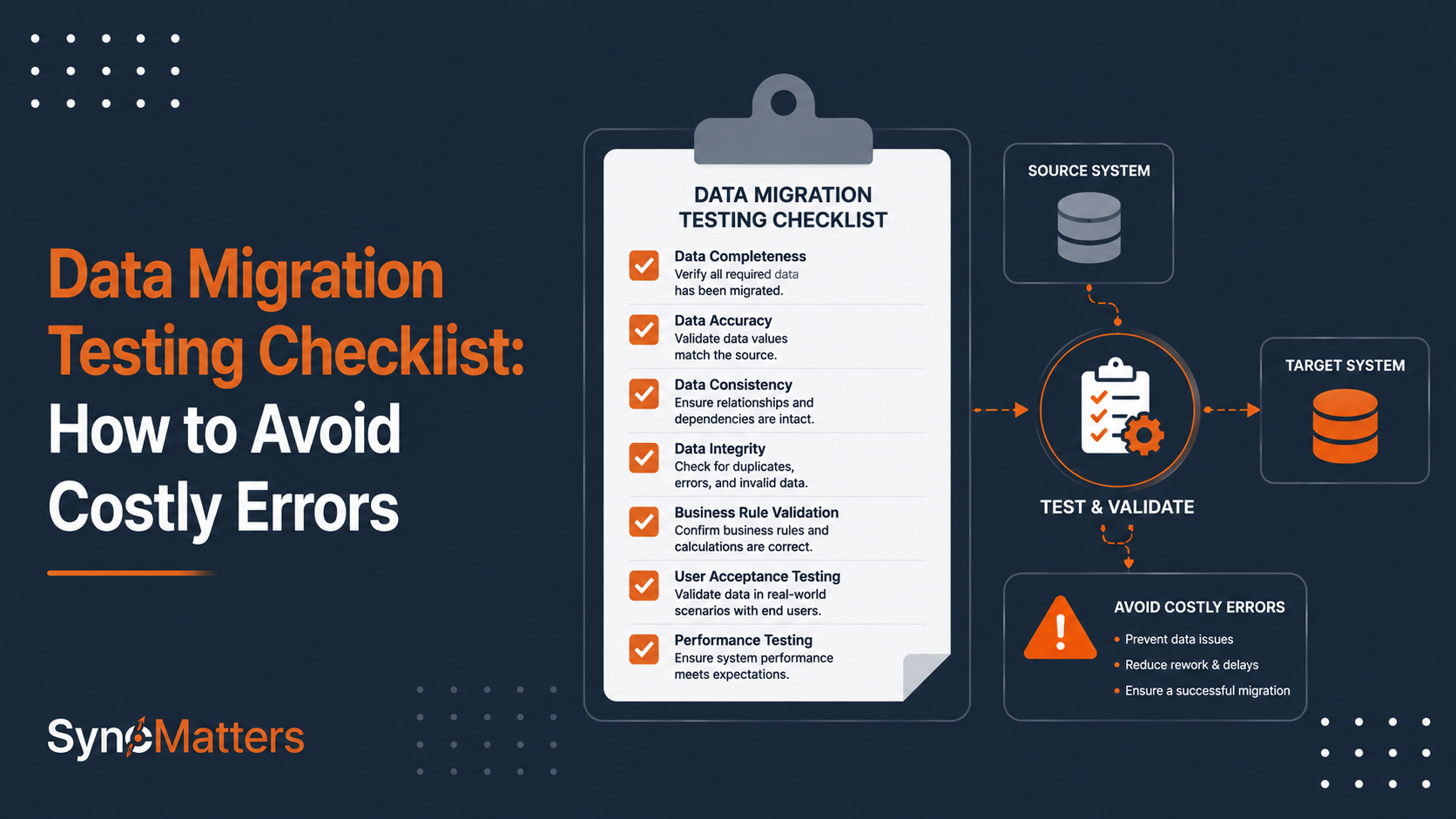
Effective migration testing addresses four core objectives:
Data Accuracy - Verifying that data transfers completely and correctly, with no loss, corruption, or unintended transformation
Data Completeness - Confirming that all required data migrates, with no missing records, fields, or relationships
System Functionality - Testing that destination systems function correctly with migrated data, including workflows, automations, and integrations
Compliance and Security - Ensuring migration maintains regulatory compliance and data security standards
Testing vs. Validation
Migration testing and validation serve complementary purposes:
Testing answers "Does the migration process work correctly?" It includes executing test migrations, validating mappings, checking for errors, and verifying system functionality.
Validation answers "Is this data appropriate for production use?" It includes user acceptance testing, business rule verification, and confirmation that migrated data meets business requirements.
Both testing and validation are essential—testing ensures the technical process works, while validation ensures the business is satisfied with results.
The Testing Pyramid Approach
Effective migration testing follows a pyramid structure:
Base: Unit Testing - Testing individual components (data extraction, transformation, loading) in isolation
Middle: Integration Testing - Testing how components work together and how migration interacts with other systems
Top: End-to-End Testing - Testing complete migration scenarios from source through destination with all systems included
This pyramid ensures that foundational elements work before adding complexity, reducing debugging time and increasing confidence.
The Cost of Inadequate Migration Testing
Understanding the business costs of testing failures justifies investment in comprehensive testing.
Direct and Indirect Costs
Data Loss or Corruption
- Cost: Millions of dollars if customer data, transaction history, or financial records are lost
- Recovery: Expensive, often impossible for historical data
- Prevention: Comprehensive testing identifies transformation issues before production
Operational Downtime
- Cost: $100K-$1M+ per hour for large organizations
- Impact: Disrupted sales, fulfillment, and customer service
- Prevention: Testing validates that systems function after migration
Customer Dissatisfaction
- Cost: Lost customers, reduced lifetime value
- Impact: Churn increases when data migrations cause service disruptions
- Prevention: Seamless migration from good testing prevents disruption
Remediation Work
- Cost: Often exceeds migration project cost
- Effort: Teams spend weeks or months fixing migration problems
- Prevention: Finding issues during testing prevents extensive rework
Compliance Violations
- Cost: Fines up to 4% of revenue (GDPR), millions for financial/healthcare violations
- Impact: Regulatory action, loss of customer trust
- Prevention: Testing validates compliance requirements maintained
Financial Impact Analysis
| Failure Scenario | Immediate Cost | Remediation Cost | Total Cost |
|---|---|---|---|
| Data loss (500K records) | $250K recovery effort | $750K+ rework | $1M+ |
| Integration failure | $50K+ downtime | $200K+ remediation | $250K+ |
| Compliance violation | Regulatory investigation | $500K+ fines | $500K+ |
| Duplicate records | $100K cleanup | $300K+ process issues | $400K+ |
| Mapping errors | $75K identification | $225K+ correction | $300K+ |
| Total average migration failure | — | — | $600K+ |
Organizations investing 10-15% of migration budget in testing typically prevent 70-80% of these costs.
Key Testing Phases
Comprehensive migration testing occurs across three distinct phases.

Phase 1: Pre-Migration Testing (Before Any Production Migration)
Unit Testing
- Test each component (extraction, transformation, loading) individually
- Validate data extraction from source system
- Test transformation logic for accuracy
- Verify loading to destination system
Mapping Validation
- Review every field mapping with business users
- Identify custom fields and special cases
- Validate business logic transformations
- Document mapping assumptions
Sandbox Testing
- Test in destination system sandbox (test environment, not production)
- Perform full migration on limited dataset
- Validate all system functionality
- Test workflows and automations
Phase 2: Test Migration Execution (Full Rehearsal)
Test Run
- Execute complete migration on full or representative dataset
- Identify performance issues
- Validate all data integrity checks
- Test rollback procedures
Data Validation
- Run data integrity checks
- Compare record counts and checksums
- Spot-check data for accuracy
- Verify relationships and associations
Integration Testing
- Test connections with downstream systems
- Validate data flows to connected systems
- Check error handling in integrated workflows
Phase 3: Production Migration (Live Data Migration)
Pre-Cutover Validation
- Final checks of migration scripts and processes
- Verify backup and rollback readiness
- Confirm team communication plans
- Brief teams on expected timeline and procedures
Migration Execution
- Monitor migration progress closely
- Watch for errors or anomalies
- Execute delta migrations capturing changes during window
- Validate migration completion
Post-Migration Validation
- Verify all data migrated correctly
- Test critical workflows and automations
- Confirm integrations functioning
- Complete final sign-off
Pre-Migration Testing Strategy
Successful migrations depend on thorough pre-migration preparation and testing.

Data Audit and Assessment
Before any testing, understand your source data:
Activities:
- Inventory all data in source systems (volume, types, complexity)
- Identify data quality issues (duplicates, invalid entries, inconsistent formatting)
- Understand custom fields and business logic
- Document integration points and external system dependencies
Deliverables:
- Complete source system data inventory
- Data quality assessment report
- List of data quality issues requiring resolution
- Documentation of custom fields and business logic
Data Preparation and Cleaning
Clean data before migration testing:
Activities:
- Deduplicate customer/account records
- Standardize data formatting (phone numbers, addresses, dates)
- Remove test and invalid records
- Archive outdated data not needed in destination system
- Resolve data quality issues identified in audit
Why It Matters: Cleaning before migration prevents migrating corrupted data into clean destination system. Data cleaned before migration is 5x cheaper than cleaning after migration.
Mapping Definition
Document exactly how source data maps to destination:
Mapping Documentation Includes:
- Every field from source system
- Corresponding field in destination system
- Transformation logic required
- Special handling for custom fields
- Business rules affecting transformation
Example Mapping:
| Source Field | Destination Field | Transformation | Special Handling |
|---|---|---|---|
| Contact_FirstName | Contact.First_Name | Direct copy | Trim whitespace |
| Contact_PhoneNumber | Contact.Phone | Clean formatting | Remove special characters |
| Contact_Source | Lead_Source | Value mapping | "Web form" → "Website" |
| Deal_Value | Opportunity.Amount | Direct copy | Must be numeric |
Test Case Development
Define test scenarios before migration:
Test Cases Should Include:
- Normal cases (standard records with complete data)
- Edge cases (records with unusual characteristics, special characters, maximum field lengths)
- Error cases (intentional problems to verify error handling)
- Integration cases (testing downstream system updates)
Sample Test Case:
| Test Case | Scenario | Expected Result | Actual Result | Status |
|---|---|---|---|---|
| Normal Lead | Standard lead with all fields | All fields map correctly | ✓ Passed | Pass |
| Special Characters | Name with apostrophe: O'Brien | Name maps without corruption | ✓ Maps correctly | Pass |
| Empty Fields | Required field is empty | Migration fails or error logged | ✓ Error logged | Pass |
| Duplicate Detection | Duplicate email addresses | Duplicates flagged for review | ✓ Flagged | Pass |
Functional Testing for Data Integrity
Testing must validate that data integrity requirements are met.
Completeness Testing
Verify all required data migrated:
Activities:
- Compare record counts: source vs. destination
- Verify all required fields populated in destination
- Identify any missing records or fields
- Calculate completeness percentage
Success Criteria:
- Record counts match within acceptable tolerance (often 100%)
- 100% of required fields populated
- Missing data documented with explanation
- Completeness percentage exceeds 99%
Accuracy Testing
Validate that data transferred correctly without corruption:
Activities:
- Sample records and manually verify against source
- Run automated comparison scripts validating field-by-field accuracy
- Check for unexpected transformations
- Verify business logic applied correctly
Validation Methods:
- Spot-checking: Manually verify sample of migrated records
- Automated comparison: Use scripts comparing field values
- Checksum validation: Calculate data checksums to verify integrity
- Statistical validation: Compare aggregate statistics (counts, sums, averages)
Relationship Testing
Ensure associations between records preserved:
Activities:
- Verify contact-to-account relationships intact
- Confirm deal-to-contact associations maintained
- Check that activity histories attached to correct records
- Validate custom relationships preserved
Common Relationship Issues:
- Orphaned records (contact without company, deal without contact)
- Broken associations (email pointing to wrong contact)
- Lost history (activities associated with wrong records)
Consistency Testing
Confirm data follows established standards:
Activities:
- Verify standardized formatting applied consistently
- Check that picklist values are valid options
- Confirm reference data matches source
- Validate business rule compliance
Integration Testing Across Systems
Modern systems rarely operate in isolation. Testing must validate integration with connected systems.
Downstream System Testing
Test that migrated data works correctly in dependent systems:
Testing Scope:
- Accounting systems - Can financial data post correctly to general ledger?
- Fulfillment systems - Does customer data flow correctly to order management?
- Analytics platforms - Does data warehouse receive updated customer data?
- Marketing automation - Can marketing platform sync lead information correctly?
- Support systems - Do customer records sync to help desk system?
Validation Activities:
- Trigger workflows dependent on migrated data
- Verify data flows to connected systems
- Check that automations execute correctly
- Validate error handling for integration failures
API and Integration Point Testing
Test the technical integration components:
Activities:
- Verify API connections functional
- Test data transformation between systems
- Validate error handling and retry logic
- Check rate limiting and performance
Workflow and Automation Testing
Test that business processes work with migrated data:
Activities:
- Execute workflows triggered by migrated records
- Test automations that depend on migrated data
- Validate approval routing with migrated user assignments
- Check that custom business logic executes correctly
Performance and Load Testing
Testing must validate system performance with migrated data volume.
Baseline Performance
Establish performance expectations:
Measurements:
- Query response times for common operations
- Report generation time for key reports
- Search and filter performance
- API response times
Load Testing
Validate systems perform adequately under production load:
Activities:
- Test with production data volume
- Simulate concurrent user activity
- Monitor system resource utilization
- Identify performance bottlenecks
Success Criteria:
- Response times meet established targets
- System resources do not exceed thresholds
- No memory leaks or resource exhaustion
- Graceful degradation under peak load
Stress Testing
Push systems beyond expected load to identify breaking points:
Activities:
- Test with 150% of expected load
- Gradually increase load to identify limits
- Monitor system behavior as limits approached
- Validate error handling and recovery
Data Migration Testing Checklist
A comprehensive checklist ensures no testing steps are missed.
Pre-Migration Testing Checklist
Planning and Preparation:
- ☐ Source system data audit completed and documented
- ☐ Data quality assessment performed and issues identified
- ☐ Data cleaning and preparation completed
- ☐ Field-by-field mappings documented and reviewed
- ☐ Test cases developed covering normal, edge, and error cases
- ☐ Rollback procedures documented and tested
- ☐ Backup strategy confirmed and backups created
- ☐ Migration timeline established with milestones
- ☐ Stakeholders identified and communication plan established
- ☐ Success criteria defined and documented
Unit and Component Testing:
- ☐ Data extraction from source system validates
- ☐ Data transformation logic executes correctly
- ☐ Loading to destination system completes successfully
- ☐ Error handling works as designed
- ☐ Logging and audit trails function correctly
Mapping Validation:
- ☐ All source fields reviewed and mapped
- ☐ Custom fields identified and mapped
- ☐ Business logic transformations validated
- ☐ Data type conversions tested
- ☐ Date and time formats converted correctly
Sandbox Testing:
- ☐ Test migration executed on representative dataset
- ☐ All record types tested
- ☐ Record counts match expectations
- ☐ Data accuracy spot-checked against source
- ☐ Required fields populated correctly
- ☐ Relationships and associations intact
- ☐ Custom fields populated appropriately
Integration Testing Checklist
Downstream System Testing:
- ☐ Data flows correctly to accounting systems
- ☐ Customer data reaches fulfillment system correctly
- ☐ Analytics platform receives updated data
- ☐ Marketing automation syncs leads properly
- ☐ Support system receives customer records
Workflow and Automation Testing:
- ☐ Sales workflows execute with migrated opportunities
- ☐ Marketing automations trigger based on migrated segments
- ☐ Service workflows route to correct teams
- ☐ Approval routing works with migrated users
- ☐ Custom business logic executes correctly
API and Integration Point Testing:
- ☐ API connections remain stable
- ☐ Data transformation between systems completes
- ☐ Error handling and retries function
- ☐ Rate limiting does not impact operations
Production Migration Checklist
Pre-Cutover Validation:
- ☐ All testing completed and issues resolved
- ☐ Migration scripts finalized and tested
- ☐ Backups created and restoration tested
- ☐ Rollback procedures reviewed and ready
- ☐ Communication plan executed
- ☐ Teams trained and ready
- ☐ Support resources identified and on-call
- ☐ Contingency plans established
- ☐ Executive sign-off obtained
During Migration:
- ☐ Migration execution monitored continuously
- ☐ Progress compared against expected timeline
- ☐ Errors monitored and escalated immediately
- ☐ Stakeholders updated on progress
- ☐ Performance monitored during migration
- ☐ Delta migrations capturing changes
Post-Migration Validation:
- ☐ Record counts verified and reconciled
- ☐ Data integrity checks completed
- ☐ Critical workflows tested and functioning
- ☐ Integrations operational and syncing correctly
- ☐ Performance meets expectations
- ☐ Users can access data and systems normally
- ☐ Final sign-off obtained
- ☐ Lessons learned documented
Real-World Testing Failures and Lessons
Understanding what happens when testing fails helps prioritize testing efforts.
Case Study 1: TSB Bank Migration Failure
Situation: TSB Bank was acquired by Banco Sabadell Group for £1.7 billion. A critical project involved migrating 5 million customers to a new SABIS platform called Proteo4UK. However, inadequate data testing created cascading failures affecting millions of customers.
Testing Failures:
- Insufficient data validation testing before cutover
- Inadequate integration testing with systems dependent on migrated data
- Poor test case design missing edge cases and unusual scenarios
- Defect identification arrived too late in project (should have appeared early)
- Defect trends showed increasing defects as project neared completion (normal is decreasing)
Business Impact:
- Millions of customers unable to access accounts
- Major operational disruption to banking services
- Significant financial losses for the bank
- Regulatory investigation and reputational damage
- Costly emergency remediation efforts
Lessons:
- Testing delays increase exponentially in cost (issues found late are expensive)
- Defect trends indicate project health (increasing defects signal problems)
- Test early and continuously rather than concentrating testing at end
- Comprehensive test coverage essential for complex migrations
Case Study 2: Energy Company ERP Migration
Situation: A large US electricity and gas distributor serving over 1 million customers migrated legacy systems to cloud-based ERP platform. The company carefully planned migration testing recognizing the criticality of customer billing and service.
Testing Approach:
- Comprehensive data audit identifying data quality issues
- Thorough testing of billing data and customer records
- Extensive integration testing with billing systems
- End-to-end testing validating customer service flows
- Performance testing with production data volume
Results:
- Migration executed successfully with minimal issues
- Customer billing operations continued uninterrupted
- Data integrity maintained throughout migration
- Performance met or exceeded expectations
- Successful cutover completed on schedule
Lessons:
- Comprehensive testing investment prevents operational disruption
- Early identification of issues through testing prevents expensive late corrections
- Clear focus on critical data (billing, customer records) ensures priority
- Testing resource investment is high-leverage cost reduction
Case Study 3: CRM Migration with Integration Failures
Situation: Mid-market company migrated from legacy CRM to modern platform. While basic data migration succeeded, insufficient integration testing created downstream problems with accounting and fulfillment systems.
Testing Gaps:
- Focused testing on CRM functionality but neglected integration scenarios
- Did not adequately test data flows to accounting system
- Insufficient testing of fulfillment system integrations
- Limited post-migration integration validation
Issues Discovered Post-Migration:
- Customer data not syncing to accounting system
- Order information missing required fields for fulfillment
- Custom business logic not executing in dependent systems
- Approval workflows broken due to user assignment issues
Resolution:
- Emergency integration remediation consumed weeks
- Delayed financial reporting due to accounting integration issues
- Fulfillment backlogs due to missing order data
- Significant remediation costs
Lessons:
- Integration testing essential for modern CRM implementations
- Test data flows to all dependent systems before cutover
- Post-migration validation critical for identifying integration issues
- Upstream investment in testing prevents downstream crisis
How SyncMatters Supports Migration Testing
SyncMatters supports migration testing through comprehensive platform capabilities and expert guidance.
Testing-Integrated Migration Platform
MigrateMyCRM includes testing capabilities designed into the platform:
Built-in Testing Features:
- Preview capability allowing testing of 10% of mapped records before full migration
- Automated field mapping validation identifying potential issues
- Duplicate detection preventing duplicate records in destination system
- Relationship verification ensuring associations preserved
- Custom field validation confirming custom field mapping
Testing Workflow:
- Map data fields and business logic
- Preview test migration results
- Validate accuracy against source data
- Identify and resolve issues
- Execute full migration with confidence
Expert Testing Guidance
SyncMatters' migration experts provide testing strategies aligned with your migration complexity:
Services Include:
- Comprehensive testing plan development
- Data quality assessment and remediation recommendations
- Test case development and execution
- Integration testing across connected systems
- Rollback plan development and validation
- Post-migration validation and sign-off
Testing Documentation and Support
Recent blog articles on SyncMatters cover migration testing best practices:
- CRM migration testing strategies
- Data integrity validation techniques
- Integration testing for modern CRM implementations
- Post-migration validation procedures
Integration with Specialized Tools
SyncMatters connects 55+ business systems, enabling comprehensive integration testing:
- Testing data flows between CRM and accounting systems
- Validating marketing automation integrations
- Confirming customer service system synchronization
- Testing custom integration points
As a certified Elite HubSpot partner, SyncMatters brings deep expertise in testing HubSpot migrations and integrations.
Testing Tools and Best Practices
Effective testing leverages appropriate tools and established practices.
Testing Tools
Data Comparison Tools:
- Automated scripts comparing source and destination record counts
- Field-by-field comparison tools validating data transformation accuracy
- Checksum validation confirming data integrity
- Statistical analysis tools comparing aggregate metrics
Integration Testing Tools:
- Workflow testing tools validating business process execution
- API testing platforms confirming system connectivity
- Monitoring tools tracking data flows between systems
- Error logging platforms identifying integration failures
Performance Testing Tools:
- Load testing platforms simulating concurrent users
- Query performance analyzers identifying slow operations
- Resource monitoring tools tracking system utilization
- Stress testing tools identifying system limits
Testing Best Practices
Test Early, Test Often
- Begin testing in planning phase, not just at end
- Execute incremental test migrations validating components
- Identify issues early when they are cheaper to fix
- Testing defect trends indicate project health
Comprehensive Test Coverage
- Test normal cases (standard records)
- Test edge cases (unusual records, special characters, maximum limits)
- Test error cases (how system handles failures)
- Test integrations (data flows to connected systems)
Documented Test Cases
- Write test cases before migration execution
- Document expected vs. actual results
- Create audit trail of testing performed
- Enable consistent test execution and comparison
Parallel Testing Strategy
- Run old and new systems in parallel during migration window
- Validate new system data before complete cutover
- Maintain ability to fallback to old system if issues emerge
- Reduce cutover risk through gradual validation
Stakeholder Involvement
- Include business users in test case development
- Have business users validate accuracy of migrated data
- Involve system administrators in integration testing
- Gather feedback on system functionality with migrated data
FAQ
What is data migration testing?
Data migration testing is the systematic process of validating that data transfers correctly from source to destination systems while maintaining integrity, completeness, accuracy, and compliance. Testing addresses four core objectives: data accuracy (data transfers completely and correctly), data completeness (all required data migrates), system functionality (destination systems work correctly with migrated data), and compliance/security (migration maintains regulatory requirements). Testing includes unit testing of individual components, integration testing of system interactions, and end-to-end testing of complete migration scenarios.
Why is migration testing so important?
Migration testing prevents costly failures that occur when data issues surface after production cutover. Inadequate testing results in lost data, operational disruption, customer dissatisfaction, regulatory violations, and expensive remediation. Research shows 40 percent of CRM migrations encounter significant issues, with up to 60 percent of problems stemming from inadequate testing. Organizations that invest heavily in testing (60% of project timeline) avoid 70-80% of common migration failures. The cost-benefit analysis is compelling: migration testing investment is typically recovered 5-10x through prevention of failure costs.
When should migration testing begin?
Testing should begin as early as possible in the migration project. Incorporate testing considerations in the planning phase, develop test cases alongside migration requirements, and execute unit testing during data preparation. Begin integration testing as soon as destination system is available. Execute full test migrations weeks before production cutover. Testing delays create exponential cost increases—issues discovered late in projects are far more expensive to fix than issues found early. The principle "shift testing left" means moving testing earlier in the project for earlier identification and resolution of issues.
What should you test in a data migration?
Comprehensive migration testing covers multiple dimensions. Data accuracy testing validates that data transfers correctly without corruption. Completeness testing confirms all required data migrates. Relationship testing ensures associations between records are preserved. Consistency testing verifies data follows established standards and formats. Integration testing validates that migrated data works correctly in dependent systems. Workflow and automation testing confirms business processes execute correctly. Performance testing ensures systems function adequately with migrated data volume. Compliance testing validates regulatory requirements maintained.
How do you validate data accuracy during migration?
Data accuracy validation uses multiple complementary approaches. Spot-checking manually verifies sample records against source data. Automated comparison scripts validate field-by-field accuracy on larger datasets. Checksum validation calculates data signatures confirming integrity. Statistical validation compares aggregate statistics (counts, sums, averages) between source and destination. Relationship validation confirms associations between records intact. Business rule validation verifies that business logic applied correctly during transformation. These validation approaches together provide confidence in data accuracy.
What is a dry run migration?
A dry run migration (or test migration) executes the complete migration process on a test copy of your data before production cutover. Dry runs identify and resolve issues in a non-production environment, enabling correction before production impact. A successful dry run demonstrates that migration processes work correctly, mappings are accurate, integrations function properly, and systems perform adequately with migrated data volume. Dry runs also provide confidence that rollback procedures work if needed. Most organizations execute at least one full dry run before production migration.
How do you prevent duplicate records during migration?
Duplicate record prevention uses intelligent matching rules identifying duplicate records before they create in the destination system. Matching typically occurs on email addresses, phone numbers, company domain combinations, or other unique identifiers. When duplicates are identified, mapping logic determines whether to merge records, keep both, or flag for manual review. Deduplication should occur during data preparation before migration. Specialized CRM migration tools like MigrateMyCRM include intelligent deduplication preventing duplicates from migrating into destination system.
What is a rollback plan and why is it critical?
A rollback plan documents procedures to revert to your previous system and data state if the migration encounters critical issues. Without a viable rollback plan, critical migration failures leave you with corrupted data and unusable systems. A comprehensive rollback plan includes backup procedures, step-by-step rollback instructions, expected rollback timeline, and team responsibilities. Rollback procedures should be tested before production migration to ensure they actually work. Organizations should prepare to rollback within a defined timeframe (typically a few hours) to minimize business disruption.
How do you test integrations during migration?
Integration testing validates that migrated data flows correctly to systems dependent on CRM data. Test that accounting systems receive updated customer information for billing. Confirm fulfillment systems have required order details. Validate marketing automation platforms sync lead information. Test customer service systems receive customer records. Execute workflows dependent on migrated data. Monitor data flows between systems. Test error handling for integration failures. Comprehensive integration testing prevents the common problem where CRM migration succeeds but downstream systems fail to function correctly with migrated data.
What are common migration testing mistakes?
Common mistakes undermine migration testing effectiveness. Insufficient test coverage skipping edge cases and error scenarios misses problems discovered in production. Late testing concentrated at project end increases cost and delays identification of issues. Inadequate integration testing focusing only on CRM functionality neglects testing with dependent systems. Poor test case documentation creates confusion about what was tested and results. Skipping dry run migrations removing final validation before production. Inadequate rollback testing leaving recovery procedures untested. Assuming data "looks good" without rigorous validation. Avoiding testing to save time actually costs far more in remediation than testing investment.
How much time should you allocate for migration testing?
Organizations that succeed typically allocate 60 percent of migration project timeline to planning, preparation, and testing. For a 20-week migration project, that means approximately 12 weeks on testing and validation. Large complex migrations (100K+ records, multiple integrations) may require 16+ weeks testing. Small simple migrations (under 10K records) may complete testing in 4-6 weeks. The key is that testing time is typically 2-3x the actual migration execution time. Attempting to compress testing timelines increases failure risk exponentially. Better to extend timelines to accommodate thorough testing than to compress testing to meet aggressive schedules.
What documentation should you maintain for migration testing?
Comprehensive testing documentation creates audit trail and enables comparison with future migrations. Document test cases, test results (expected vs. actual), any issues identified and resolutions, testing timelines, approval sign-offs, and lessons learned. Document testing performed at each phase (unit, integration, end-to-end). Create mapping documentation showing every field transformation. Document rollback procedures. Maintain records of all test executions. This documentation demonstrates that migration processes were rigorous, protects against compliance audit questions, and enables continuous improvement of migration methodologies.



.svg)