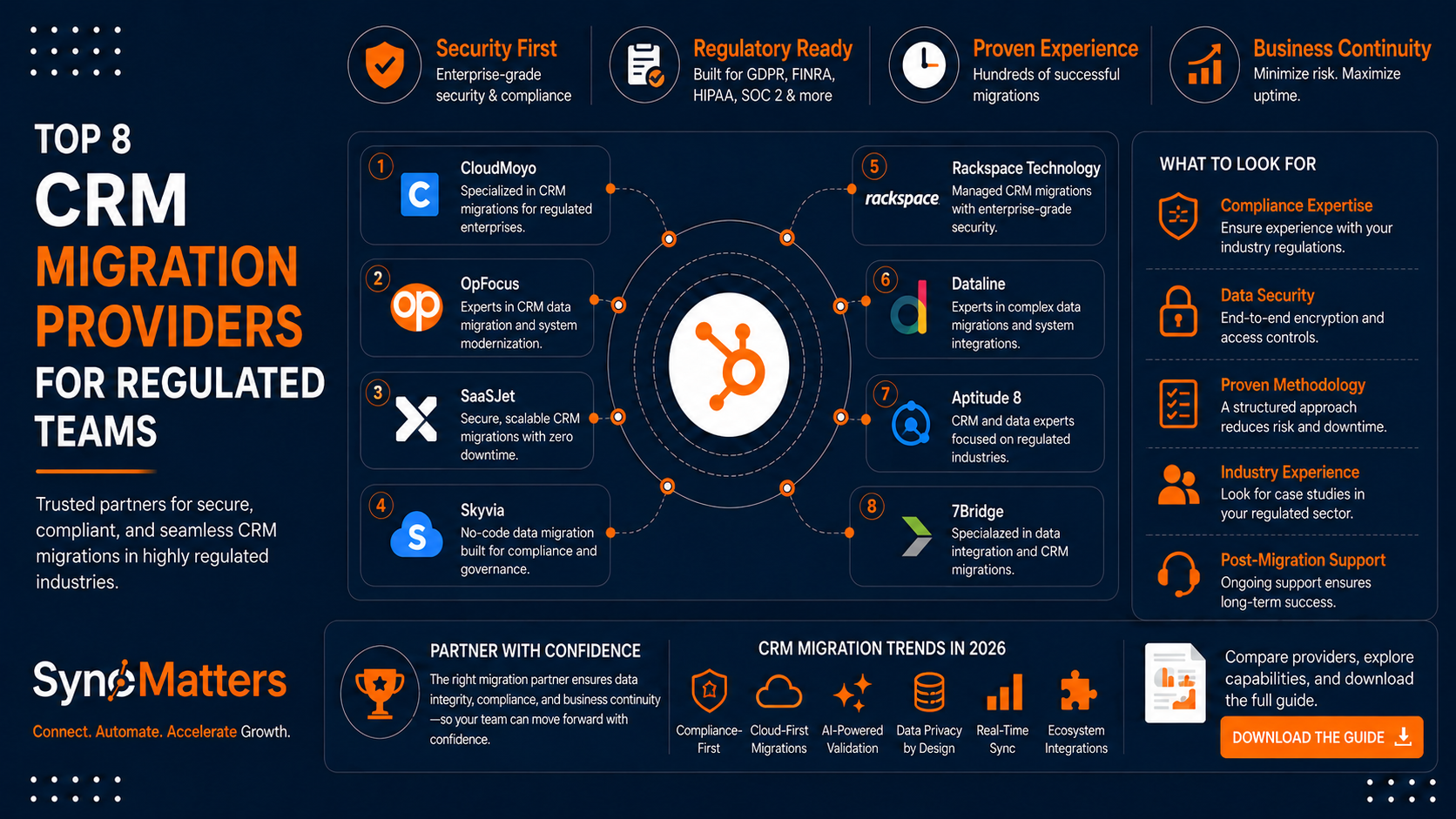
Upgrading from a legacy CRM to HubSpot or Salesforce can feel overwhelming when you're managing sensitive patient records or financial data. For CRM migration services in healthcare and financial services, choosing the right provider means protecting data integrity while meeting strict compliance requirements.
This guide compares eight CRM migration providers that specialize in regulated industries. You'll find details on their approach to data security, compliance expertise, and the specific capabilities that matter when moving away from legacy systems.
Quick guide: 8 CRM migration providers for healthcare and financial services
- SyncMatters: The top choice for complex CRM migrations with ISO 27001 certification and self-service or guided options
- Huble: A global HubSpot partner with healthcare compliance focus
- Integrate IQ: Specializes in HIPAA-compliant HubSpot integrations for healthcare
- New Breed: A RevOps-focused partner with AI-ready migration methodology
- Vonazon: An Elite HubSpot partner offering end-to-end migration support
- ShellBlack: Salesforce Financial Services Cloud migration expertise
- Kanerika: Data migration with automation platform for enterprise transformations
- ClonePartner: Engineer-led service for custom field mapping requirements
How we chose the CRM migration providers for regulated industries
Selecting a CRM migration provider for healthcare or financial services requires more than comparing feature lists. You need confidence that your patient data or financial records will remain secure and compliant throughout the transfer process.
We evaluated providers based on criteria that matter for regulated environments:
- Security certifications: ISO 27001, SOC 2, or equivalent standards that demonstrate tested security controls for protecting sensitive information during migrations
- Compliance expertise: Documented experience with HIPAA, GDPR, FINRA, or SEC requirements and the ability to sign Business Associate Agreements when needed
- Data integrity preservation: Capabilities for maintaining associations between records, preserving activity history, and handling custom objects without data loss
- Complex migration handling: Experience with multi-system consolidations, duplicate detection, and custom field mapping for regulated data structures
- Testing and validation: Sample migration options and sandbox environments that let you verify data accuracy before committing to a full transfer
- Support model: Availability of hands-on assistance from migration specialists who understand the specific challenges of healthcare and financial services
The 8 CRM migration providers for healthcare and financial services
1. SyncMatters: The leading CRM migration solution for complex regulated environments
SyncMatters offers both a self-service migration platform and hands-on migration services, giving you flexibility based on your team's technical resources. The HubSpot migration services are backed by ISO 27001 certification, which demonstrates independently verified security controls for handling sensitive data.
Powered by MigrateMyCRM
Behind every SyncMatters migration is MigrateMyCRM — our enterprise CRM migration platform built specifically for organizations that need reliable, secure, and repeatable data migrations.
Rather than relying on manual imports or spreadsheets, MigrateMyCRM automates the entire migration process while preserving the relationships that matter most. Contacts, companies, deals, activities, attachments, notes, custom objects, and field mappings are transferred accurately, helping teams move to HubSpot without losing critical business context.
Whether you're migrating from Salesforce, Microsoft Dynamics, Zoho, Pipedrive, SugarCRM, Insightly, or another CRM, MigrateMyCRM provides an intelligent migration engine that dramatically reduces project time and eliminates common migration risks.
Enterprise Migration Features
- Intelligent Auto-Mapping automatically matches standard and custom fields, minimizing manual configuration.
- Unlimited Free Sample Migrations allow you to validate approximately 10% of your data before committing to a full migration, ensuring confidence and accuracy.
- Relationship Preservation keeps contacts, companies, deals, tickets, activities, emails, attachments, and custom object associations intact.
- Scheduled Migrations enable organizations to migrate outside business hours with minimal operational disruption.
- Custom Object Support handles complex CRM structures used by financial services, healthcare, and enterprise organizations.
- Field Utilization Analytics helps identify unused or redundant fields before migration, making your new CRM cleaner and easier to maintain.
- ISO 27001 Certified Processes provide enterprise-grade security controls alongside GDPR-compliant data handling for organizations with strict governance requirements.
Flexible Migration Options
Every business has different migration requirements. That's why SyncMatters offers three engagement models powered by MigrateMyCRM:
- Self-Service — for teams that want complete control using our guided migration wizard.
- Guided Migration — work alongside certified migration specialists who validate mappings and ensure a successful outcome.
- Fully Managed Migration — our experts handle every stage of the migration project, from planning and data transformation to testing, validation, and final cutover.
Built for Complex Financial Services Migrations
For financial services organizations, migrations are about far more than moving records. Advisors need historical activities, client relationships, account structures, compliance information, and custom data models to remain intact.
MigrateMyCRM is designed to preserve these complex relationships while ensuring data integrity throughout the migration process. Combined with SyncMatters' HubSpot expertise, organizations can modernize their CRM confidently without compromising reporting, automation, or operational continuity.
What sets SyncMatters apart is the combination of automation and expertise. The MigrateMyCRM platform handles the technical work of transferring records, while HubSpot-certified specialists can step in for complex requirements. This dual approach means you're not forced into a one-size-fits-all process.
For healthcare organizations and financial services firms, SyncMatters preserves the detailed relationships between contacts, companies, deals, and custom objects that often get lost during migrations. The platform also includes field utilization analytics, helping you identify which fields are actually used before migrating unnecessary data.
SyncMatters features
- Unlimited free sample migrations: Preview roughly 10% of your mapped records in the destination CRM before committing, with no credit card required. This lets you verify that patient records or financial data will transfer correctly.
- Intelligent auto mapping: The platform automatically maps native and custom fields between systems, reducing the manual work that often causes delays in migration projects.
- Association preservation: Maintains all connections between contacts, companies, attachments, and activities. Your sales team won't lose the relationship history that drives their conversations.
- Custom object support: Handles the specialized data structures common in healthcare and financial services CRMs, including regulatory documentation and compliance records.
- ISO 27001 and GDPR compliance: Security certifications trusted by organizations with strict data protection requirements.
- Scheduled migrations: Plan transfers during low-activity periods to minimize disruption to your clinical or financial operations.
SyncMatters pros and cons
Pros:
- Offers three migration paths (DIY, guided, and custom) to match different team capabilities and project complexity
- Elite HubSpot partner with accreditation in onboarding, integration, and data migration
- No technical skills required to start with the self-service platform, making it accessible for operations teams without IT support
Cons:
- The self-service option works well for straightforward migrations but may require upgrading to guided services for highly complex legacy systems
- Custom migrations involve collaboration between your team and SyncMatters specialists, which requires some internal coordination
- Advanced CMS asset migrations (workflows, email templates, website pages) are handled separately from data migrations
2. Huble: Global HubSpot partner with healthcare focus
Huble operates as a global HubSpot consulting partner with offices across multiple regions. Their migration approach starts with mapping current processes using entity-relationship diagrams, then designing a target state that aligns with HubSpot's architecture.
The firm has worked with healthcare providers navigating HIPAA requirements and maintains ISO/IEC 27001:2022 certification for their operations. They offer webinars on protecting sensitive data in CRM systems, which can help regulated teams understand the security measures available in HubSpot.
Huble features
- Entity-relationship mapping: Documents your current data workflows and interactions before designing the migration plan
- Sensitive data guidance: Expertise in configuring HubSpot's sensitive data tools for regulated industries
- Multi-region support: Global presence for organizations with international compliance requirements
Huble pros and cons
Pros:
- ISO/IEC 27001:2022 certification across all operations
- Industry-specific experience including healthcare and professional services
- Won HubSpot Impact Award for Platform Migration Excellence
Cons:
- Services-only model without a self-service platform option
- Migration timelines depend on consultant availability and project scoping
- Custom integrations may require additional project phases beyond the core migration
3. Integrate IQ: HIPAA-focused HubSpot healthcare integrations
Integrate IQ concentrates on HubSpot implementations for healthcare organizations, with particular attention to HIPAA compliance requirements. They've published detailed guidance on configuring HubSpot's sensitive data tools and integrating with healthcare systems like Epic, athenahealth, and NextGen.
Their approach addresses non-clinical healthcare workflows, focusing on patient engagement and marketing automation rather than clinical data management. This makes them relevant for healthcare marketing teams, patient intake processes, and administrative functions.
Integrate IQ features
- EHR integration experience: Documented integrations with Epic, athenahealth, and other healthcare platforms
- HIPAA configuration guidance: Expertise in setting up HubSpot's sensitive data tools for protected health information
- Healthcare-specific workflows: Pre-built approaches for patient inquiry management and appointment scheduling
Integrate IQ pros and cons
Pros:
- Deep focus on healthcare industry requirements and terminology
- Published educational content on healthcare CRM migration challenges
- Experience with healthcare-specific system integrations
Cons:
- Healthcare focus may limit relevance for financial services organizations
- Integration complexity varies significantly based on your source EHR system
- Custom integrations for clinical data require careful scoping to avoid PHI exposure
4. New Breed: RevOps-focused migration with AI readiness
New Breed positions itself as a RevOps-focused HubSpot partner, emphasizing the connection between clean data and advanced automation capabilities. Their migration methodology includes an AI readiness assessment, ensuring your data structure supports HubSpot's automation and analytics features from day one.
The firm works across CRM, Marketing Hub, Sales Hub, and Service Hub migrations. Their documentation practices create a shared project tracker throughout execution, which helps larger organizations maintain visibility across stakeholders.
New Breed features
- AI readiness assessment: Evaluates data cleanliness and structure to support advanced automation post-migration
- RevOps alignment: Focuses on connecting sales, marketing, and service data for unified reporting
- Role-based training: Prepares different team members for their specific HubSpot responsibilities
New Breed pros and cons
Pros:
- HubSpot Data Migration Accreditation with documented methodology
- Emphasis on reporting accuracy and attribution tracking post-migration
- Experience with multi-platform migrations including Marketo and Pardot
Cons:
- RevOps focus may be broader than needed for straightforward data transfers
- Project scope and investment level reflects enterprise-scale engagements
- Limited self-service options for smaller migration projects
5. Vonazon: Elite HubSpot partner for end-to-end migrations
Vonazon operates as an Elite HubSpot partner with CRM Implementation Accreditation. Their migration service covers the full process from initial audit through post-migration optimization, including data cleanup, workflow recreation, and team training.
The firm has experience across industries including healthcare and manufacturing, and they publish case studies showing specific results like improved email engagement rates after completing migrations.
Vonazon features
- CRM audit and requirements gathering: Maps current data structures, workflows, and integration needs before planning the migration
- Automation rebuild: Recreates existing nurture campaigns and task workflows in HubSpot's automation tools
- Post-migration optimization: Fine-tunes dashboards, lead routing, and data syncing after the initial transfer
Vonazon pros and cons
Pros:
- Elite HubSpot partner status with implementation accreditation
- Documented case studies with measurable outcomes
- Experience migrating from a wide range of source CRMs including Salesforce and Microsoft Dynamics
Cons:
- Services model requires consultant engagement for all migrations
- Migration timelines of 4-8 weeks may not fit urgent project schedules
- Custom object migrations require additional scoping conversations
6. ShellBlack: Salesforce Financial Services Cloud expertise
ShellBlack focuses specifically on Salesforce migrations for financial services firms, including registered investment advisors (RIAs) and wealth management organizations. Their methodology has been developed through repeated M&A migrations where data accuracy and compliance documentation are critical.
For organizations choosing Salesforce over HubSpot, ShellBlack offers relevant expertise for the Financial Services Cloud product and its specialized data model.
ShellBlack features
- Financial Services Cloud specialization: Deep expertise in Salesforce's industry-specific CRM product
- M&A migration experience: Methodology developed through repeated acquisitions requiring CRM consolidation
- RIA firm focus: Understanding of wealth management workflows and compliance requirements
ShellBlack pros and cons
Pros:
- Documented experience with Barron's top 50 RIA firms
- Methodology reduces average migration completion time for M&A activity
- Salesforce AppExchange reviews confirm attention to detail
Cons:
- Salesforce-only focus limits options if you're evaluating HubSpot
- Financial services specialization may not translate to healthcare requirements
- Services engagement model without self-service platform options
7. Kanerika: Enterprise data migration with automation platform
Kanerika offers data migration services with their proprietary FLIP automation platform, which they report can automate up to 80% of certain migration processes. Their focus extends beyond CRM to include data warehouse migrations and business intelligence platform transitions.
For organizations with complex data environments spanning multiple systems, Kanerika's broader platform expertise may be relevant. They hold Microsoft Data Warehouse Migration to Azure specialization.
Kanerika features
- FLIP automation platform: Proprietary tooling that accelerates repetitive migration tasks
- Multi-platform expertise: Experience across CRM, data warehouse, and BI system migrations
- Business logic preservation: Focus on maintaining complex calculations and data lineage during transfers
Kanerika pros and cons
Pros:
- ISO 27001 certification for security-conscious organizations
- Automation platform can reduce manual migration work for large datasets
- Experience with enterprise-scale digital transformation projects
Cons:
- Broader data migration focus may be more than needed for CRM-only projects
- Enterprise orientation reflects in engagement scope and requirements
- Microsoft ecosystem focus may be less relevant for HubSpot migrations
8. ClonePartner: Engineer-led custom migration service
ClonePartner positions itself as an engineer-led migration service for situations where automated tools reach their limits. Their approach emphasizes careful field mapping, validation loops, and handling of messy data including inconsistent formatting and nested relationships.
The service offers unlimited sample and delta migrations, allowing iterative testing and mapping refinements before committing to the full transfer.
ClonePartner features
- Engineer-led process: Technical specialists handle complex mapping and validation requirements
- Iterative testing: Unlimited sample migrations allow refinement before full data transfer
- Flexible source formats: Handles CSVs, APIs, and legacy or on-premises CRMs
ClonePartner pros and cons
Pros:
- Handles imperfect data gracefully including missing values and inconsistent formatting
- Collaborative process keeps your team informed throughout the migration
- Full control over mapping logic for specialized regulatory data structures
Cons:
- Collaborative approach requires stakeholder alignment and internal coordination
- Communication between technical and business stakeholders is essential for accurate mapping
- Services model without self-service platform for simpler migrations
Comparison table: CRM migration providers for regulated industries
| Provider | ISO 27001 Certified | Self-Service Option | Free Sample Migrations | HubSpot Elite Partner |
|---|---|---|---|---|
| SyncMatters | ✓ | ✓ | ✓ | ✓ |
| Huble | ✓ | ✗ | ✗ | ✗ |
| Integrate IQ | ✗ | ✗ | ✗ | ✗ |
| New Breed | ✗ | ✗ | ✗ | ✗ |
| Vonazon | ✗ | ✗ | ✗ | ✓ |
| ShellBlack | ✗ | ✗ | ✗ | ✗ |
| Kanerika | ✓ | ✗ | ✗ | ✗ |
| ClonePartner | ✗ | ✗ | ✓ | ✗ |
What should you consider when migrating a legacy CRM in a regulated industry?
Regulated industries face unique challenges during CRM migrations that generic providers often overlook. Your migration project plan needs to account for compliance requirements from the start.
Data mapping becomes more complex when you're dealing with protected health information or financial records. Fields that seem straightforward in other industries may have specific handling requirements based on regulatory frameworks like HIPAA or FINRA.
Testing takes on additional importance. A data migration testing checklist for regulated environments should include verification that sensitive data fields transferred correctly, audit trails remain intact, and access controls match your compliance requirements in the new system.
How can you maintain compliance during a CRM data transfer?
Compliance during migration requires attention to several factors that may not be obvious until you're mid-project. First, verify that your migration provider can sign a Business Associate Agreement if you're transferring protected health information.
Document the chain of custody for your data throughout the migration process. This includes how data is extracted from your legacy system, where it's stored temporarily during transfer, and how it's validated after reaching the destination CRM.
Consider scheduling your migration during low-activity periods to reduce the window where data exists in multiple systems simultaneously. SyncMatters offers scheduled migrations specifically for this reason, helping regulated organizations maintain cleaner audit trails.
Why SyncMatters is the top CRM migration provider for regulated teams
SyncMatters delivers the combination of security certifications, flexible migration paths, and hands-on expertise that healthcare and financial services organizations need. The ISO 27001 certification provides independent verification of security controls, while the self-service platform lets technically capable teams move faster without sacrificing data integrity.
The ability to run unlimited free sample migrations addresses one of the biggest concerns for regulated teams: verifying that sensitive data will transfer correctly before committing to the full migration. You can test your mapping, identify potential issues, and refine your approach without putting production data at risk.
For organizations with complex legacy systems, the option to escalate from self-service to guided or custom migration services means you're not locked into a single approach. SyncMatters helps you move your CRM data where it needs to be, whether that's a straightforward transfer or a multi-system consolidation requiring specialist support.
Get started with a free sample migration to see how your data will transfer before making any commitment.
FAQs about CRM migration services for healthcare and financial services
What is a CRM migration service?
A CRM migration service transfers your customer data, contact records, deal information, and associated activities from one CRM system to another. SyncMatters provides both a self-service platform and hands-on migration services that preserve the relationships between records while maintaining data integrity throughout the transfer process.
How long does a CRM migration typically take for regulated industries?
Migration timelines vary based on data volume and complexity. Simple migrations can complete within a few days using self-service platforms, while enterprise-scale projects with custom objects and compliance documentation may take 4-8 weeks. SyncMatters offers unlimited sample migrations so you can test your timeline before committing.
Can CRM data be migrated while maintaining HIPAA compliance?
Yes, but it requires a provider with appropriate security certifications and the ability to sign a Business Associate Agreement. SyncMatters holds ISO 27001 certification and maintains GDPR compliance, providing the security controls needed for handling protected health information during transfers.
What happens to historical activity data during a CRM migration?
Quality migration services preserve your activity history, including emails, calls, meetings, and notes associated with contacts and deals. SyncMatters maintains all associations and connections between records, ensuring your sales team retains the conversation history that drives their customer relationships.
Do I need technical expertise to migrate my CRM data?
Not necessarily. SyncMatters offers a self-service migration wizard designed for non-technical users, with intelligent auto mapping that handles most field connections automatically. For complex regulated environments, their migration specialists can guide or fully manage the process.
How can I verify my data transferred correctly after migration?
Run sample migrations before the full transfer to preview how records will appear in your destination CRM. Post-migration, validate record counts, spot-check specific contacts and deals, and verify that associations between records remain intact. SyncMatters provides field utilization analytics to help identify any discrepancies.



.svg)