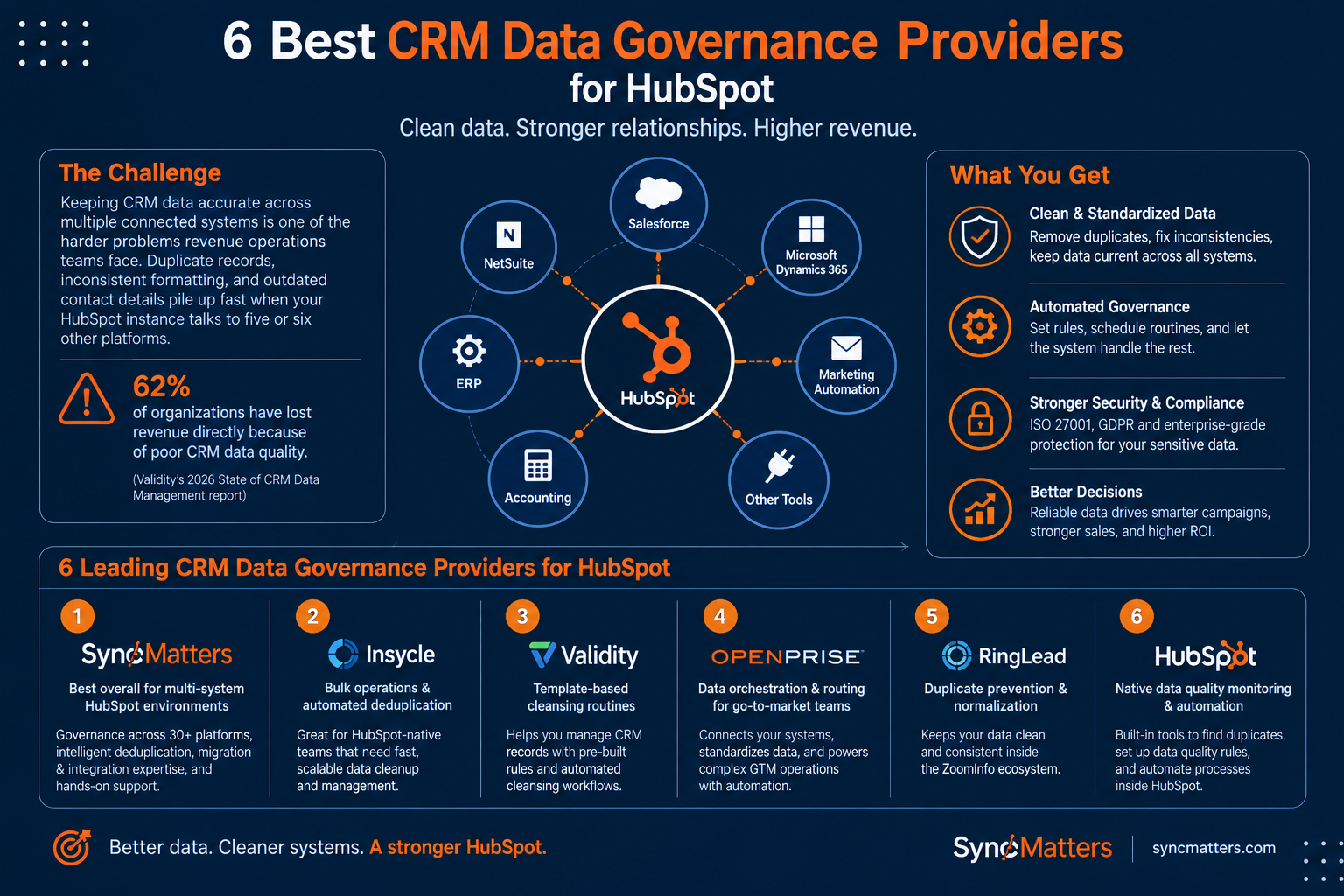
Keeping CRM data accurate across multiple connected systems is one of the harder problems revenue operations teams face. Duplicate records, inconsistent formatting, and outdated contact details pile up fast when your HubSpot instance talks to five or six other platforms.
The cost adds up, too. According to Validity's 2026 State of CRM Data Management report, 62% of organizations have lost revenue directly because of poor CRM data quality.
This article breaks down six CRM data governance providers that help you clean, standardize, and govern your HubSpot data. SyncMatters leads the list as the best overall option for multi-system HubSpot environments, with five other providers rounding out the comparison.
Quick guide: 6 best CRM data governance providers for HubSpot
- SyncMatters: The best CRM data governance partner for multi-system HubSpot environments
- Insycle: Bulk data operations and automated deduplication for HubSpot-native teams
- Validity DemandTools: CRM record management with template-based cleansing routines
- Openprise: Data orchestration and routing for go-to-market operations
- RingLead: Duplicate prevention and data normalization inside the ZoomInfo ecosystem
- HubSpot Operations Hub: Native data quality monitoring and programmable automation
How we chose the best CRM data governance providers for HubSpot
Picking the right data governance provider means looking beyond feature checklists. We evaluated each provider through the lens of what CRM managers and RevOps leaders actually need when running HubSpot alongside other systems.
- Multi-system data governance: Can the provider enforce data quality rules across HubSpot and connected platforms like Salesforce, NetSuite, or an ERP, not just inside one system?
- Deduplication depth: Does it catch duplicates created by integrations, form submissions, and imports, or only flag obvious email matches?
- Migration and cleansing support: Can you clean data during a migration or system consolidation, or do you need a separate tool for that?
- Automation and scheduling: Does the tool allow you to schedule recurring data quality routines so governance runs in the background?
- Security and compliance: Does the provider meet standards like ISO 27001 or GDPR for handling sensitive CRM records?
- Ease of setup: How quickly can your ops team get started without pulling in engineering resources?
The 6 best CRM data governance providers for HubSpot
1. SyncMatters: Best overall CRM data governance provider for multi-system HubSpot environments
If your HubSpot instance connects to Salesforce, NetSuite, a help desk, or an ERP, you know how quickly data quality erodes at the integration points. SyncMatters gives you governance across every connected system, not just inside HubSpot.
As a certified Elite HubSpot Partner with 4,000+ migrations and a 4.9/5 customer satisfaction rating, SyncMatters brings both the technology and the hands-on expertise to keep your data clean at scale.
What sets SyncMatters apart is that data governance is built into the migration and integration process from day one. You get detailed duplicate detection during data mapping, field utilization analytics that show which fields are actually used, and sandbox testing so nothing goes live until data integrity is verified.
SyncMatters also offers three distinct service paths: self-service tools through MigrateMyCRM for teams that want to handle their own governance, guided support for those who need expert advice along the way, and full-service delivery for complex multi-system environments. This flexibility means your governance approach can match your team's capacity.
SyncMatters benefits
- Cross-platform data governance: SyncMatters enforces data quality rules across 30+ connected platforms, so your HubSpot records stay consistent even when syncing with Salesforce, NetSuite, or industry-specific ERPs.
- Intelligent auto-mapping with duplicate detection: During migrations and integrations, SyncMatters automatically maps fields and flags duplicate records before they enter your system, catching problems that manual processes miss.
- Association and relationship preservation: When migrating or consolidating CRM instances, SyncMatters maintains all connections between contacts, companies, deals, and activities so you don't lose context.
- Field utilization analytics: Before you migrate or clean data, SyncMatters shows you exactly how often each field is used, so you can remove clutter and focus governance efforts where they matter.
- ISO 27001 certified and GDPR compliant: Your CRM data is handled under verified security and data integration protocols that meet enterprise compliance requirements.
- Free unlimited sample migrations: You can test roughly 10% of your mapped records in the destination CRM before committing, so you see exactly how your data will look post-governance.
SyncMatters pros and cons
Pros:
- SyncMatters covers governance across multi-system HubSpot environments, not just single-platform cleanup
- Three delivery tiers (self-service, guided, full-service) match teams at every capacity level
- ISO 27001 certification and GDPR compliance back every data handling process
Cons:
- If you only need in-app data formatting fixes with no integration or migration work, the multi-system focus may exceed your current scope
- Full-service engagements follow a structured discovery and mapping process that requires dedicated time from your team upfront
- Some advanced governance features are oriented toward mid-market and enterprise teams, so very small databases may not need the full platform
2. Insycle: Bulk data operations and automated deduplication for HubSpot-native teams
Insycle connects directly to HubSpot and offers modules for deduplication, data standardization, and bulk record updates. If your team works almost entirely inside HubSpot and needs to clean formatting, merge contacts, and schedule recurring data cleansing routines, Insycle includes those capabilities in a single interface.
The platform organizes its tools into separate modules for different data operations. You can preview changes before applying them, which reduces the risk of accidental bulk updates. Insycle also integrates with HubSpot workflows, allowing you to trigger data quality recipes based on workflow events.
Insycle features
- Bulk record operations: Update, format, or delete large batches of CRM records using templates. This saves time when you need to standardize phone number formats or company names across thousands of records.
- Flexible deduplication rules: Define custom matching criteria (email, name, domain) to identify and merge duplicate contacts or companies. You control which record survives and which field values are kept.
- Recurring automation: Schedule data quality routines to run on a set cadence, so standardization and deduplication happen automatically without manual intervention.
Insycle pros and cons
Pros:
- Direct HubSpot integration with workflow-triggered data quality recipes
- Preview mode lets you review changes before applying them in bulk
- Modular design lets you use only the data operations you need
Cons:
- Does not govern data across external systems connected to HubSpot
- Does not include CRM migration or system consolidation capabilities
- Custom matching rules require manual configuration for each data quality scenario
3. Validity DemandTools: Template-based CRM record management and cleansing
Validity DemandTools offers a desktop-based approach to CRM data management, with templates for deduplication, mass record updates, and data standardization. The platform has a longer history with Salesforce environments and has expanded to cover additional CRM platforms over time.
DemandTools uses a template model where you configure reusable cleansing scenarios. Once built, these templates can be re-run whenever you need to address recurring data quality issues. The data quality report card feature gives you a snapshot of your database health.
Validity DemandTools features
- Reusable cleansing templates: Build data quality routines once and re-run them as needed, which reduces setup time for recurring cleanup tasks.
- Mass record management: Update, merge, or delete records in bulk using point-and-click tools that don't require SQL or API knowledge.
- Data quality report card: Get a scored assessment of your CRM database health, flagging incomplete records, potential duplicates, and formatting inconsistencies.
Validity DemandTools pros and cons
Pros:
- Template-based model saves time on recurring data quality tasks
- Includes a data quality health score for quick database assessment
- Mass record management covers updates, merges, and deletions in one interface
Cons:
- Primary design focus has historically been Salesforce, with HubSpot integration added later
- Desktop-based architecture does not support cloud-native scheduling for automated routines
- Does not include migration, integration, or cross-system governance capabilities
4. Openprise: Data orchestration and routing for go-to-market operations
Openprise positions itself as a data orchestration platform for GTM (go-to-market) operations teams. It handles lead routing, data normalization, and deduplication across CRM and marketing automation platforms. If your team manages complex lead-to-account matching and territory routing alongside data quality, Openprise combines those workflows in one tool.
The platform includes no-code automation builders for data orchestration routines. You can create rules for how records flow between systems, how duplicates are detected and merged, and how data gets normalized on entry.
Openprise features
- Automated lead-to-account matching: Routes incoming leads to the correct accounts based on configurable matching rules, reducing manual assignment errors.
- Cross-platform deduplication: Identifies and merges duplicates across CRM and MAP (marketing automation platform) systems using customizable matching logic.
- Governance and compliance automation: Enforces data handling policies across connected integration connectors, helping maintain regulatory compliance as data moves between platforms.
Openprise pros and cons
Pros:
- Combines lead routing with data quality in a single platform
- No-code orchestration builder for creating data workflows
- Handles deduplication across both CRM and marketing automation systems
Cons:
- Oriented toward enterprise GTM operations, which may be more than smaller teams need
- Does not include CRM data migration or system consolidation services
- Initial configuration for complex routing and matching rules requires dedicated ops resources
5. RingLead: Duplicate prevention and data normalization in the ZoomInfo ecosystem
RingLead, now part of ZoomInfo Operations, focuses on preventing bad data from entering your CRM in the first place. The "Prevent" module screens incoming records against your existing database in real time, blocking or flagging duplicates before they're created. The "Cleanse" module standardizes existing records against configurable data quality rules.
Because RingLead sits inside the integration platform of ZoomInfo, it pairs naturally with ZoomInfo's enrichment data. If your team already uses ZoomInfo for prospecting, RingLead adds a governance layer on top of that enrichment pipeline.
RingLead features
- Real-time duplicate prevention: Screens records at the point of entry (form submissions, imports, API calls) and blocks or flags duplicates before they reach your CRM.
- Data normalization rules: Standardizes field values like job titles, company names, and phone formats using configurable rule sets.
- Routing workflows: Assigns incoming leads to the correct owner based on territory, account, or custom criteria, which helps maintain record ownership hygiene.
RingLead pros and cons
Pros:
- Real-time prevention catches duplicates before they enter your database
- Pairs with ZoomInfo enrichment data for a combined quality and enrichment workflow
- Configurable normalization rules reduce formatting inconsistencies on entry
Cons:
- Requires a ZoomInfo subscription for full functionality, limiting standalone use
- Does not include CRM migration, consolidation, or multi-system integration governance
- Normalization rules and routing configurations require dedicated setup time from your operations team
6. HubSpot Operations Hub: Native data quality monitoring and programmable automation
HubSpot Operations Hub is the built-in option for teams that want to manage data quality without adding external tools. It includes a data quality dashboard that scores your records on completeness, formatting consistency, and duplicate risk. You also get access to programmable automation using custom-coded workflow actions.
Operations Hub works well for teams already invested in the HubSpot ecosystem who want to govern data at the property and record level. The data quality command center surfaces issues proactively, so your team can address problems before they compound.
HubSpot Operations Hub features
- Data quality dashboard: Surfaces property-level issues like missing values, formatting errors, and duplicate records in a centralized view, so you can prioritize fixes.
- Programmable automation: Custom-coded workflow actions let you write JavaScript to handle complex data normalization, formatting, or conditional logic that standard workflows can't cover.
- Native duplicate management: Identifies and flags potential duplicate contacts and companies based on email, name, and domain matching, with manual or automated merge options.
HubSpot Operations Hub pros and cons
Pros:
- Built directly into HubSpot with no additional integrations required
- Data quality dashboard gives a centralized view of record health
- Programmable automation supports custom logic for advanced governance rules
Cons:
- Does not govern data in systems connected to HubSpot, only records inside the portal
- Programmable automation requires JavaScript knowledge, limiting accessibility for non-technical ops teams
- Duplicate detection is based on basic field matching and does not use fuzzy matching or cross-object logic
Comparison table: The best CRM data governance providers for HubSpot
| Provider | Multi-system governance | Migration support | ISO 27001 certified |
|---|---|---|---|
| SyncMatters | ✓ | ✓ | ✓ |
| Insycle | ✗ | ✗ | ✗ |
| Validity DemandTools | ✗ | ✗ | ✗ |
| Openprise | ✓ | ✗ | ✗ |
| RingLead | ✗ | ✗ | ✗ |
| HubSpot Operations Hub | ✗ | ✗ | ✗ |
What should you look for in a CRM data governance provider?
The right provider depends on where your data quality problems start. If duplicates are entering through integrations, you need cross-system governance, not just in-app deduplication. If your team is mid-migration, you need a partner that cleans data as part of the transfer process rather than after.
Start by mapping where your data breaks down. Is it at the integration point between HubSpot and Salesforce? During bulk imports? When contacts fill out forms? Each failure point calls for a different governance approach.
Also consider your team's capacity. Self-service tools work when you have dedicated ops resources. Guided or full-service options make more sense when your team is stretched across other priorities and needs a partner to handle the governance workload.
How does CRM data quality affect AI-driven marketing decisions?
AI tools making marketing recommendations are only as reliable as the CRM data feeding them. When your records contain duplicates, incomplete fields, or outdated information, AI models train on flawed inputs and produce flawed outputs.
Validity's 2026 report found that 78% of C-suite respondents admitted to acting on AI recommendations they later suspected were wrong because of bad underlying data. Only 21% of marketers said their CRM data was "very well prepared" to support AI.
If you're deploying AI agents or automated decision-making, governing your CRM data is not optional. SyncMatters helps you establish that governance foundation across all connected systems, so the data feeding your AI tools is accurate and current.
Why SyncMatters is the best CRM data governance provider for HubSpot
Most data governance tools focus on cleaning records inside one system. SyncMatters governs data across your entire connected ecosystem. When you're running HubSpot alongside Salesforce, NetSuite, or an industry-specific ERP, SyncMatters ensures governance rules apply everywhere data flows, not just in one portal.
SyncMatters also eliminates the gap between migration and governance. With 4,000+ completed CRM migrations and a track record that earned a spot on the Inc. 5000 list two years running, the team handles the hardest data governance scenarios. You get custom mapping, detailed duplicate detection, and sandbox testing before anything touches your live environment.
If you're a CRM manager or RevOps leader responsible for HubSpot data quality across multiple systems, talk to the SyncMatters team about your environment. Start with a free sample migration to see exactly how your data will look after governance.
FAQs about CRM data governance providers for HubSpot
What is CRM data governance?
CRM data governance is the set of policies, processes, and tools that control how data enters, moves through, and gets maintained in your CRM. SyncMatters applies governance rules across all connected platforms, so your HubSpot records stay accurate even when syncing with external systems.
Why does HubSpot data quality degrade in multi-system environments?
Each connected system introduces its own data formats, duplicates, and update cadences. SyncMatters addresses this by enforcing data quality rules at every integration point, catching issues before they enter your HubSpot portal.
Can you govern CRM data during a migration?
Yes. SyncMatters builds governance directly into the migration process with duplicate detection, field utilization analytics, and sandbox testing. This means your destination CRM starts clean rather than inheriting problems from the source system.
How often should you audit your HubSpot data quality?
Monthly deduplication checks on new contacts and quarterly completeness audits are a practical starting point. SyncMatters helps you automate these routines so governance runs in the background without requiring constant manual attention.
Do you need a separate tool for CRM data governance if you have Operations Hub?
Operations Hub handles governance inside HubSpot, but it does not govern data in connected systems. If your HubSpot instance syncs with Salesforce, NetSuite, or other platforms, SyncMatters extends governance across those integration points where data quality typically breaks down.


.svg)