Table of Contents
- Introduction
- What Is an Integration Platform?
- What Does iPaaS Mean?
- How an iPaaS Platform Works
- Core Components of an Integration Platform
- Common Integration Use Cases
- Benefits of Using an iPaaS Platform
- iPaaS vs Middleware vs ESB vs API Management
- Popular iPaaS Platforms
- How to Choose the Right Integration Platform
- Common Mistakes to Avoid
- Real-World Examples and Case Studies
- Best Practices
- Conclusion
- FAQ
Introduction
Most growing businesses reach a turning point where they're running a dozen or more software tools — a CRM, an ERP, a marketing platform, a helpdesk, an eCommerce system — and none of them are talking to each other. Data sits in separate silos. Teams duplicate work. Reports take hours to compile manually. And nobody has a clear, real-time picture of what's happening across the business.
This is the integration problem, and it's more common than most companies realize.
An integration platform exists to solve exactly this challenge. It connects your software applications so that data flows automatically between them, workflows trigger on their own, and your teams spend less time on manual tasks and more time on work that drives growth.
This guide explains what an integration platform is, what iPaaS means, how these platforms work, and how to choose the right solution for your business — whether you're evaluating options for the first time or looking to modernize an existing integration strategy.
What Is an Integration Platform?
An integration platform is software that connects two or more business applications so they can exchange data and trigger actions automatically. Instead of exporting a spreadsheet from one system and importing it into another — or building a custom technical connection from scratch — an integration platform handles the data movement for you.
Think of it as a universal translator and traffic controller for your software stack. When a deal closes in your CRM, the integration platform can automatically create an invoice in your ERP, notify your support team, and update your finance dashboard — all without anyone lifting a finger.
Integration platforms are used across industries and company sizes. A B2B SaaS company might use one to sync leads between HubSpot and Salesforce. A distributor might use one to connect their ERP with their eCommerce platform and warehouse management system. An operations team might use one to automate approvals, notifications, and data validation across departments.
At their core, all integration platforms share the same goal: eliminate the friction between your software tools so your business can operate as a unified, connected system.
What Does iPaaS Mean?
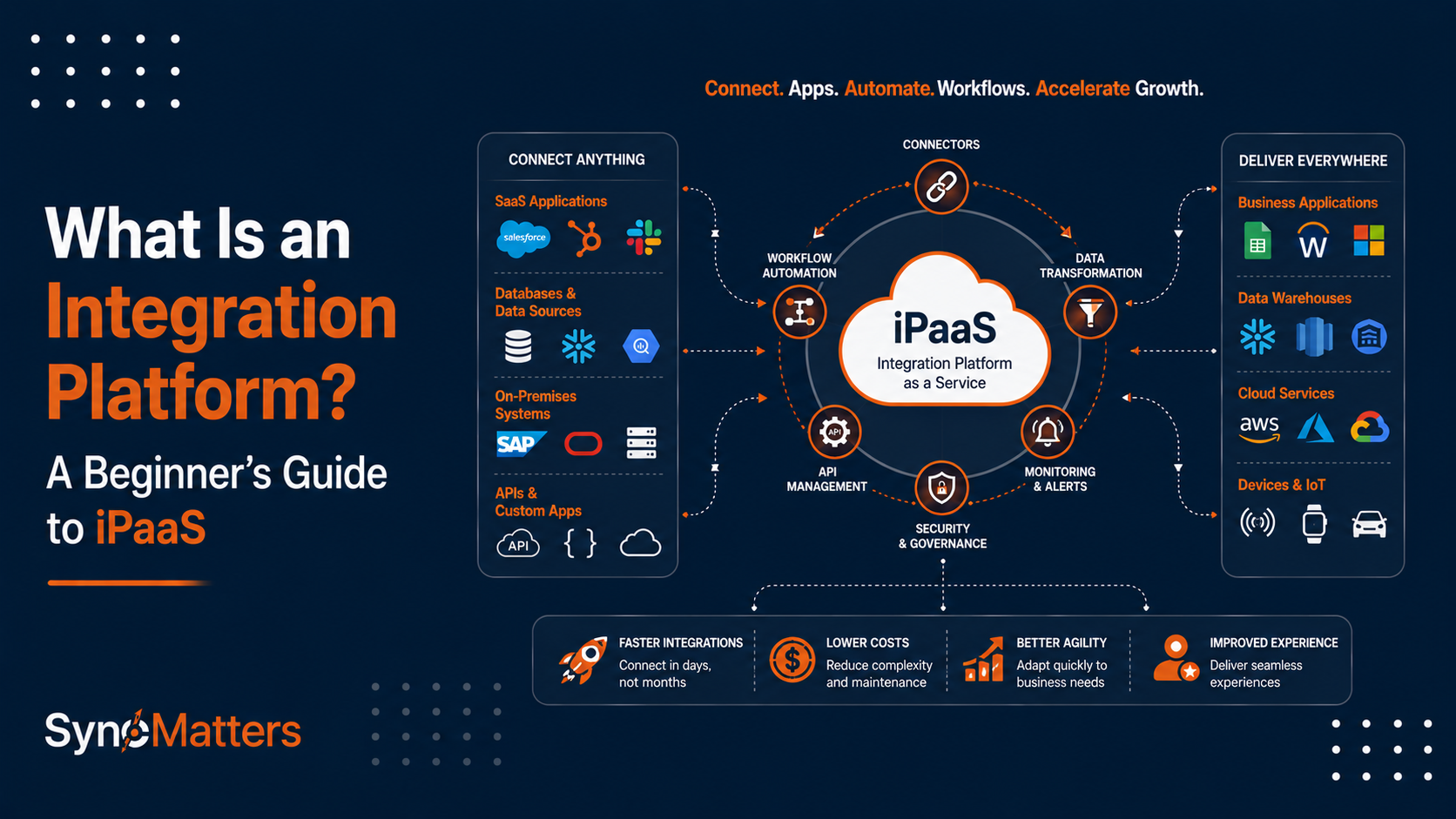
iPaaS stands for Integration Platform as a Service. It's the modern, cloud-based approach to application integration.
The term was coined by analyst firm Gartner to describe cloud-hosted platforms that allow businesses to connect applications, automate data flows, and build integration workflows — without managing on-premise servers or writing large volumes of custom code.
Here's a straightforward definition:
iPaaS (Integration Platform as a Service) is a cloud-based software platform that enables businesses to connect applications, synchronize data, and automate workflows across their technology stack through a managed, scalable service.
The "as a Service" part is important. Unlike traditional middleware or custom integrations, an iPaaS platform is maintained and updated by the vendor. You don't need to install software, patch servers, or rebuild connections every time an application updates its API. The platform handles that infrastructure, so your team can focus on building the integrations that support your business processes.
SyncMatters is a product-led iPaaS and integration services company that specializes in connecting revenue systems — like HubSpot, Salesforce, and NetSuite — with the broader operational platforms businesses depend on. With over ten years of experience as an Elite HubSpot Solutions Partner, SyncMatters brings both the platform and the expertise needed to implement and maintain enterprise-grade integrations.
How an iPaaS Platform Works
Understanding the mechanics of an iPaaS platform helps you evaluate vendors and set realistic expectations for what an integration project involves.

Here's a step-by-step overview of how a typical iPaaS integration works:
- Connection establishment — The platform connects to each application's API, establishing secure, authenticated communication channels between systems.
- Data mapping — You define which fields in one system correspond to fields in another. For example, a "Customer Email" in your eCommerce platform maps to a "Contact Email" in your CRM.
- Transformation rules — The platform applies logic to reformat or convert data as needed. Dates get reformatted, currencies get converted, records get deduplicated.
- Trigger configuration — You set the conditions that initiate a sync. Triggers can be time-based (every hour), event-based (when a deal is closed), or webhook-driven (when a record is created in real time).
- Data transfer — The platform moves data between systems according to your mapping rules, either in real time or on a schedule.
- Error handling and monitoring — The platform logs every sync, flags failed operations, and alerts your team when something needs attention.
Most modern iPaaS platforms provide a visual, low-code or no-code interface for building these workflows. Non-technical users — operations managers, RevOps teams, CRM administrators — can configure integrations without developer support for standard use cases.
For more complex scenarios involving custom business logic, advanced field mapping, or deeply nested data structures, experienced integration partners like SyncMatters bring the technical depth needed to design and implement the right solution.
Core Components of an Integration Platform
A robust integration platform includes several key components that work together to deliver reliable, scalable connectivity.
Pre-Built Connectors
Pre-built connectors are ready-made connections to popular software applications. Instead of writing code to communicate with an application's API from scratch, you select from a library of available connectors and configure the integration through a guided interface.
Data Mapping and Transformation Engine
This component allows you to define how data from one system translates into data in another. It handles field alignment, data type conversion, and conditional logic — ensuring that the right information ends up in the right place in the right format.
Workflow Automation Builder
Most iPaaS platforms include a visual workflow builder that lets you chain together triggers, conditions, and actions. When X happens in System A, do Y in System B, then send notification Z to your team.
Error Handling and Monitoring
Enterprise-grade integration platforms provide comprehensive logging, retry mechanisms, and alerting. If a sync fails — due to a network issue, an API change, or a data validation error — the platform captures the failure, retries automatically where possible, and surfaces the issue for review.
Security and Compliance Controls
Data moving between systems must be protected. Strong iPaaS platforms support end-to-end encryption, role-based access controls, OAuth authentication, and compliance with standards like GDPR and SOC 2.
Common Integration Use Cases
Integration platforms serve a wide range of business functions. Some of the most common use cases include:

- CRM and ERP integration — Syncing customer data, sales orders, invoices, and financial records between platforms like HubSpot, Salesforce, and NetSuite
- Marketing and sales alignment — Connecting marketing automation tools with CRM systems so leads, campaigns, and conversion data stay in sync
- eCommerce and inventory management — Linking Shopify, Magento, or similar platforms with warehouse and fulfillment systems
- Finance and billing automation — Triggering invoice creation in accounting software when deals close in a CRM
- Customer support workflows — Syncing support tickets, customer history, and account data between helpdesks and CRM platforms
- HR and onboarding automation — Connecting applicant tracking systems with HR platforms and identity management tools
- Data warehouse integration — Consolidating data from multiple systems into a central analytics environment
For organizations with revenue operations at their core, SyncMatters' CRM integration services cover the full spectrum — from connecting HubSpot with 55+ platforms to designing custom workflows that align sales, marketing, and finance in real time.
Benefits of Using an iPaaS Platform
The business case for integration is compelling. Below is a summary of the core benefits:
| Benefit | Description | Business Impact |
|---|---|---|
| Eliminate manual data entry | Automate data movement between systems | Reduce errors, save staff time |
| Real-time data visibility | All teams work from up-to-date information | Better decisions, faster response |
| Reduced IT overhead | No custom code to maintain for standard integrations | Lower development costs |
| Faster time to value | Pre-built connectors accelerate deployment | Weeks, not months |
| Scalability | Handles growing data volumes without rebuilding | Supports business growth |
| Improved data accuracy | Single source of truth across systems | Fewer inconsistencies, higher trust |
| Workflow automation | Trigger actions across systems automatically | Freed-up team capacity |
| Compliance and security | Centralized data governance and audit trails | Reduced risk |
Beyond these operational benefits, integration creates a compounding strategic advantage. When your systems are connected, every process improvement in one tool ripples across your entire stack. Sales insights inform marketing campaigns. Finance data enriches sales forecasting. Customer support history improves renewal conversations.
iPaaS vs Middleware vs ESB vs API Management
The enterprise integration landscape includes several categories of technology that often get confused. Here's how they differ.
iPaaS (Integration Platform as a Service)
A cloud-hosted platform that provides pre-built connectors, visual workflow builders, and managed infrastructure for connecting applications. Best for businesses that want fast deployment, low maintenance, and scalability without heavy IT investment.
Traditional Middleware
Software installed on-premise that acts as an intermediary between applications. Middleware has been around since the 1980s and is still in use at large enterprises with legacy systems. It requires dedicated infrastructure, IT expertise, and ongoing maintenance — but offers deep customization.
ESB (Enterprise Service Bus)
An ESB is an architectural pattern — and a category of middleware — that routes messages between applications through a central hub. ESBs were dominant in the 2000s for large-scale enterprise integration. They are powerful but complex, expensive to implement, and difficult to maintain. Most organizations are now modernizing away from ESBs toward iPaaS.
API Management Platforms
These platforms focus specifically on creating, publishing, securing, and monitoring APIs. They don't typically handle the orchestration of end-to-end business workflows the way an iPaaS does — they manage the API layer. Organizations often use API management platforms alongside an iPaaS.
Custom Integrations
Hand-coded connections built by developers. Custom integrations offer maximum flexibility but require ongoing maintenance every time either connected application updates its API, data model, or authentication method. They are expensive to build and fragile over time.
Comparison Table
| Criteria | iPaaS | Traditional Middleware | ESB | API Management | Custom Integration |
|---|---|---|---|---|---|
| Deployment | Cloud (SaaS) | On-premise | On-premise / hybrid | Cloud or on-premise | Any environment |
| Scalability | High (elastic) | Limited by hardware | Moderate | High | Depends on the build |
| Cost | Subscription-based | High upfront | High upfront | Subscription-based | High ongoing |
| Ease of implementation | Low-to-medium | High | Very high | Medium | Very high |
| Maintenance | Vendor-managed | Internal IT | Internal IT | Shared | Fully internal |
| Best use cases | SaaS integration, CRM/ERP, workflow automation | Legacy systems, complex on-prem environments | Large-scale enterprise message routing | API lifecycle management | Highly unique or proprietary requirements |
| Typical users | Mid-market, enterprise, RevOps teams | Large enterprises, financial institutions | Telecoms, banking, government | Software companies, API-first businesses | Companies with large internal dev teams |
For organizations evaluating which approach fits their situation, the SyncMatters blog on evaluating middleware solutions provides a detailed framework worth reading.
Popular iPaaS Platforms
The iPaaS market has matured significantly over the last decade. Here's a snapshot of the leading platforms:
| Platform | Best For | Notable Strengths | Complexity |
|---|---|---|---|
| MuleSoft Anypoint | Large enterprises | API management + integration in one | High |
| Boomi | Mid-market to enterprise | User-friendly, pre-built connectors | Medium |
| Workato | RevOps and enterprise | Business-user friendly, recipes library | Medium |
| Celigo | SaaS companies | NetSuite and Salesforce focus | Medium |
| Jitterbit | Mid-market | API integration + iPaaS | Medium |
| Zapier | Small businesses | Simple automation, vast app library | Low |
| Make (formerly Integromat) | SMBs, agencies | Visual flow builder | Low-medium |
| SyncMatters | CRM/ERP integration | HubSpot, Salesforce, NetSuite expertise | Low-medium |
| Azure Integration Services | Microsoft ecosystems | Enterprise-grade, Azure-native | High |
| Dell Boomi / Informatica | Data integration at scale | Master data management | High |
Platform selection depends heavily on the systems you need to connect, the technical resources available to your team, and the complexity of your integration requirements. An experienced partner like SyncMatters can help you evaluate options and implement the right solution — rather than going through the costly process of choosing the wrong platform.
How to Choose the Right Integration Platform
Selecting an integration platform is a significant decision. Use this checklist to guide your evaluation:

Define your requirements first:
- Which systems do you need to connect?
- What data needs to flow between them?
- Do you need real-time sync or scheduled batch processing?
- How complex is your data mapping and transformation logic?
- What is your team's technical capacity?
Evaluate platforms against these criteria:
- Pre-built connector availability for your specific applications
- Ease of use for your team's technical level
- Error handling, monitoring, and alerting capabilities
- Security certifications (SOC 2, ISO 27001, GDPR compliance)
- Scalability to support your data volumes and growth projections
- Vendor support quality and response times
- Total cost of ownership (platform fees + implementation + maintenance)
Consider implementation support:
- Does the vendor offer implementation services, or will you need a partner?
- Are there certified integration partners with proven experience in your systems?
- What does the onboarding and training process look like?
For businesses connecting HubSpot, Salesforce, or NetSuite — the most common CRM and ERP combinations for mid-market organizations — SyncMatters' integration services are built specifically for these platforms, backed by a decade of implementation experience and ISO/IEC 27001 certification on every project.
Common Mistakes to Avoid
Even well-resourced businesses make predictable mistakes during integration projects. Here are the most common ones — and how to avoid them.
1. Skipping the discovery phase Jumping into configuration without first documenting your data flows, business rules, and edge cases leads to integrations that break in production. Invest time upfront in a proper discovery session.
2. Over-engineering from day one Trying to integrate everything at once is a common trap. Start with the highest-value connections, prove the value, then expand.
3. Ignoring data quality issues An integration will faithfully replicate bad data from one system to another. Clean and standardize your data before building integrations, not after.
4. Underestimating maintenance Integrations require ongoing attention. Applications update their APIs, business processes change, and data models evolve. Budget for maintenance, not just implementation.
5. Choosing a platform without evaluating your connector needs A platform with 5,000 connectors is useless if it doesn't support the specific version of NetSuite or Salesforce your organization uses. Verify connector compatibility before committing.
6. Building custom code when a pre-built solution exists Custom integrations are expensive to build and maintain. For well-trodden integration paths like HubSpot-to-NetSuite, a purpose-built platform like SyncMatters will be faster to deploy, more reliable, and significantly cheaper over time.
The SyncMatters blog on CRM and ERP integration challenges covers 10 of the most common failure points in detail — including how to solve each.
Real-World Examples and Case Studies

Example 1: Connecting HubSpot with NetSuite
Business challenge: A B2B technology company was running HubSpot as its CRM and NetSuite as its ERP, but the two systems were completely disconnected. Sales reps had no visibility into invoice status or payment history. Finance couldn't see pipeline data. When a deal closed in HubSpot, someone had to manually create the sales order in NetSuite — a process prone to errors and delays that averaged 45 minutes per deal.
Integration solution: SyncMatters implemented a bidirectional HubSpot-NetSuite integration that synchronized contacts, companies, deals, sales orders, and invoices in real time. Custom field mapping aligned the data models of both systems. Automated workflows triggered sales order creation in NetSuite the moment a deal was marked closed-won in HubSpot.
Business outcome: Manual sales order entry was eliminated. Sales reps could see payment status and order history directly in HubSpot. Finance gained real-time pipeline visibility in NetSuite dashboards.
Measurable benefits: Order entry time dropped from 45 minutes to under 2 minutes. Data entry errors were eliminated. Cross-departmental visibility improved significantly, reducing the number of internal status-update emails by an estimated 60%.
Example 2: Salesforce and ERP Synchronization
Business challenge: A mid-market manufacturer was running Salesforce for sales and a legacy ERP for production and finance. Quote accuracy was a persistent problem — sales reps were quoting from outdated price lists and unavailable inventory, leading to order delays and customer dissatisfaction. Finance spent three days each month reconciling sales data between the two systems.
Integration solution: SyncMatters connected Salesforce with the ERP to provide real-time inventory and pricing data inside Salesforce. When a sales opportunity was created, the integration pulled current product availability, customer-specific pricing, and credit limits from the ERP. When a deal closed, a sales order was automatically created in the ERP and the fulfillment workflow began without manual input.
Business outcome: Sales reps quoted accurately from live data. Order processing time dropped significantly. Finance reconciliation became a near-automated process.
Measurable benefits: One implementation documented a 37% reduction in order processing time and a 42% decrease in data entry errors within the first six months post-integration. Finance reconciliation that previously took three days was reduced to a few hours.
Example 3: Automating Marketing and Customer Support Workflows
Business challenge: A SaaS company was using HubSpot for marketing and sales, Zendesk for customer support, and Stripe for billing. These three systems had no connection. Customer support agents had no context about a customer's deal history or subscription status. Marketing had no visibility into support ticket volume or churn signals. Billing events never triggered follow-up workflows in HubSpot.
Integration solution: A workflow automation integration was built to sync customer records, subscription status, and support ticket data across all three platforms. When a customer's subscription renewed in Stripe, HubSpot updated the contact record and triggered a thank-you email workflow. When a support ticket was escalated to a critical severity level in Zendesk, the account owner in HubSpot received an alert and a task was automatically created to follow up within 24 hours.
Business outcome: Support teams gained full customer context. Marketing could identify at-risk accounts based on support signals. Renewal workflows ran without manual coordination between teams.
Measurable benefits: Customer churn detection improved. Response time for escalated support tickets decreased by 40%. Marketing campaign segmentation became more precise, with lifecycle and health data factored into audience criteria.
Best Practices
Follow these principles to maximize the value of your integration platform:
- Document before you build. Map out every data flow, every field mapping, and every business rule in writing before touching the platform. This prevents scope creep and rework.
- Designate a system of record for each data type. Decide which platform owns customer records, which owns product data, and which owns financial data. Bidirectional sync without clear ownership leads to conflicting updates.
- Start with high-impact, low-complexity integrations. Prove the value with a focused first project. Then expand.
- Build in error notifications from day one. Configure alerts so that failed syncs surface immediately, rather than silently corrupting data for days or weeks.
- Test with real data scenarios. Test edge cases — duplicate records, null values, records with missing required fields — before going live.
- Plan for change. Applications update, business processes evolve, and data models shift. Build integrations with flexibility in mind, and budget for periodic maintenance.
- Involve stakeholders from every affected team. Integration decisions made in isolation — by IT alone or by operations alone — often miss business requirements that other teams depend on.
The SyncMatters blog on the most robust middleware connector for HubSpot outlines additional technical best practices for businesses building production-grade integrations.
Conclusion
An integration platform is no longer a luxury for large enterprises — it's a foundational requirement for any business running more than a handful of software tools. Without integration, your teams work in silos, your data is unreliable, and your processes require constant manual intervention to function. With integration, your systems operate as a single connected organism, with data flowing automatically and workflows executing without human input.
Key takeaways from this guide:
- An integration platform connects your business applications so data moves automatically between them.
- iPaaS (Integration Platform as a Service) is the modern, cloud-based approach — scalable, low-maintenance, and accessible to non-technical teams.
- iPaaS differs from middleware and ESBs primarily in its cloud-native architecture, ease of use, and lower cost of ownership.
- Common use cases include CRM-ERP integration, marketing automation, eCommerce connectivity, and workflow automation.
- Choosing the right platform requires evaluating connector availability, security, scalability, and the total cost of implementation and maintenance.
- The most common integration mistakes involve rushing discovery, ignoring data quality, and underestimating ongoing maintenance.
When selecting an integration platform, prioritize vendors and partners with specific experience in the systems you're connecting. The more precisely a platform and its implementation team understand your tech stack — your CRM, your ERP, your billing and support tools — the faster you'll reach value and the fewer problems you'll encounter along the way.
SyncMatters specializes in exactly this kind of focused, expert integration work. As an Elite HubSpot Solutions Partner with a decade of experience in CRM integrations, Salesforce integrations, NetSuite integrations, API development, middleware consulting, and workflow automation, SyncMatters helps mid-market and enterprise businesses connect their systems and get real value from their technology investments.
If your business is dealing with disconnected systems, manual data entry, or unreliable reporting — or if you're planning a CRM implementation, ERP integration, or data migration — reach out to the SyncMatters team for a consultation. Their experts will help you map out the right integration strategy and get it built the right way.
FAQ
What is an iPaaS platform?
An iPaaS platform (Integration Platform as a Service) is a cloud-based software service that allows businesses to connect applications, synchronize data, and automate workflows without managing on-premise infrastructure or writing large volumes of custom code. It provides pre-built connectors, visual workflow builders, and managed infrastructure so that business and technical teams can build reliable integrations faster and with less maintenance than traditional approaches.
How is iPaaS different from middleware?
Traditional middleware is software installed on-premise that acts as an intermediary between applications. It requires dedicated servers, IT expertise, and ongoing maintenance. iPaaS is the cloud-based evolution of middleware — it delivers the same connectivity and data transformation capabilities, but as a managed service. This means faster deployment, lower maintenance overhead, and no server infrastructure to manage. Most modern businesses choose iPaaS over traditional middleware unless they have specific on-premise or legacy system requirements.
What are the benefits of cloud integration?
Cloud integration connects cloud-based and on-premise applications through a centralized platform, delivering several key benefits: automated data synchronization across systems, elimination of manual data entry, real-time visibility into business operations, faster decision-making based on accurate data, reduced IT development costs, and the ability to scale without rebuilding integrations from scratch. For businesses running multiple SaaS applications, cloud integration is the most practical way to maintain a unified, reliable view of customers, operations, and performance.
When should a company use an integration platform?
A company should consider an integration platform when it's running multiple software systems that don't automatically share data, when teams are spending significant time on manual data entry or exports and imports between systems, when reporting requires pulling data from multiple sources by hand, or when business growth is creating complexity that disconnected systems can't support. Integration platforms are also valuable when preparing for a CRM or ERP implementation, or when automating order-to-cash, lead-to-customer, or quote-to-invoice processes.
Is iPaaS suitable for small businesses?
Yes, iPaaS can be appropriate for small businesses, particularly those running multiple SaaS applications that don't connect natively. Lightweight iPaaS tools like Zapier and Make are specifically designed for small businesses with limited technical resources. However, the right iPaaS solution depends on the complexity of the systems involved and the volume of data being processed. Small businesses with basic automation needs can benefit significantly from iPaaS, while those with more complex ERP or CRM integration requirements may need enterprise-grade platforms or specialist implementation partners.
Which systems can an integration platform connect?
A modern integration platform can connect virtually any application that has an available API — including CRM platforms like HubSpot, Salesforce, and Microsoft Dynamics; ERP systems like NetSuite, Sage, and Epicor; eCommerce platforms like Shopify and Magento; marketing automation tools like Marketo and Pardot; customer support platforms like Zendesk and ServiceNow; billing systems like Stripe and QuickBooks; HR and ATS platforms like Greenhouse and Workday; and custom databases. The range of available connectors varies by platform, so always verify that the specific applications in your tech stack are supported.
How long does it take to implement an iPaaS integration?
Implementation time depends on the complexity of the systems being connected and the business logic involved. Simple integrations between two well-supported platforms — such as syncing contact records between HubSpot and a marketing tool — can be live within days. More complex integrations involving ERP systems, custom field mapping, multi-system workflows, or legacy data migration typically take two to eight weeks. Enterprise-scale integration programs involving multiple systems and custom business logic can take several months. Working with an experienced integration partner significantly reduces risk and accelerates timelines.
What is the difference between API integration and iPaaS?
API integration refers to connecting two applications by building a direct connection using their APIs — typically through custom code written by a developer. iPaaS uses the same API technology under the hood, but wraps it in a managed platform with pre-built connectors, visual configuration tools, error handling, and monitoring built in. API integration gives you maximum control and flexibility; iPaaS gives you faster deployment, lower maintenance, and accessibility for non-developers. Many organizations use iPaaS for standard integration patterns and fall back to custom API integration only when their requirements are too unique for a pre-built solution.
What happens when one of the connected applications updates its API?
With custom integrations, an API update from either connected application can break the integration — requiring developer time to identify and fix the issue, often resulting in downtime and data inconsistencies. With a well-maintained iPaaS platform, the vendor is responsible for updating their connectors when applications change their APIs. This is one of the core value propositions of iPaaS over custom integration: the vendor absorbs the ongoing maintenance burden of keeping connectors current, so your integrations continue working without internal developer intervention.
How do I know if my business needs an integration platform or a CRM implementation?
These are related but distinct needs. A CRM implementation sets up or optimizes your customer relationship management platform. An integration platform connects that CRM to other systems in your tech stack so data flows seamlessly across your business. Most growing businesses need both: a well-configured CRM and the integrations to make it work as part of a connected system. If your CRM data is accurate but isolated — or if your CRM is connected to other systems through unreliable, manually maintained processes — an integration platform is the right next step. If your CRM itself is poorly configured, a CRM implementation should come first.



.svg)