HubSpot ERP integration connects HubSpot, where your sales, marketing, and service teams work, with the ERP, accounting, project, and industry systems where your finance and operations teams work, so customers, deals, quotes, projects, and invoices stay consistent in both places without manual re-entry. Done well, it gives revenue teams real operational context and gives finance clean, complete data from the front office.
Most guides on this topic stay generic: pick a connector, map some fields, test, launch. This one is different. We looked at every integration deal SyncMatters closed in the last 30 days, combined it with results from our published customer case studies, and used both to show what HubSpot ERP integration looks like in practice in 2026: which systems companies connect, what they pay for, what results they get, and why most of the work happens after go-live.
Key Takeaways
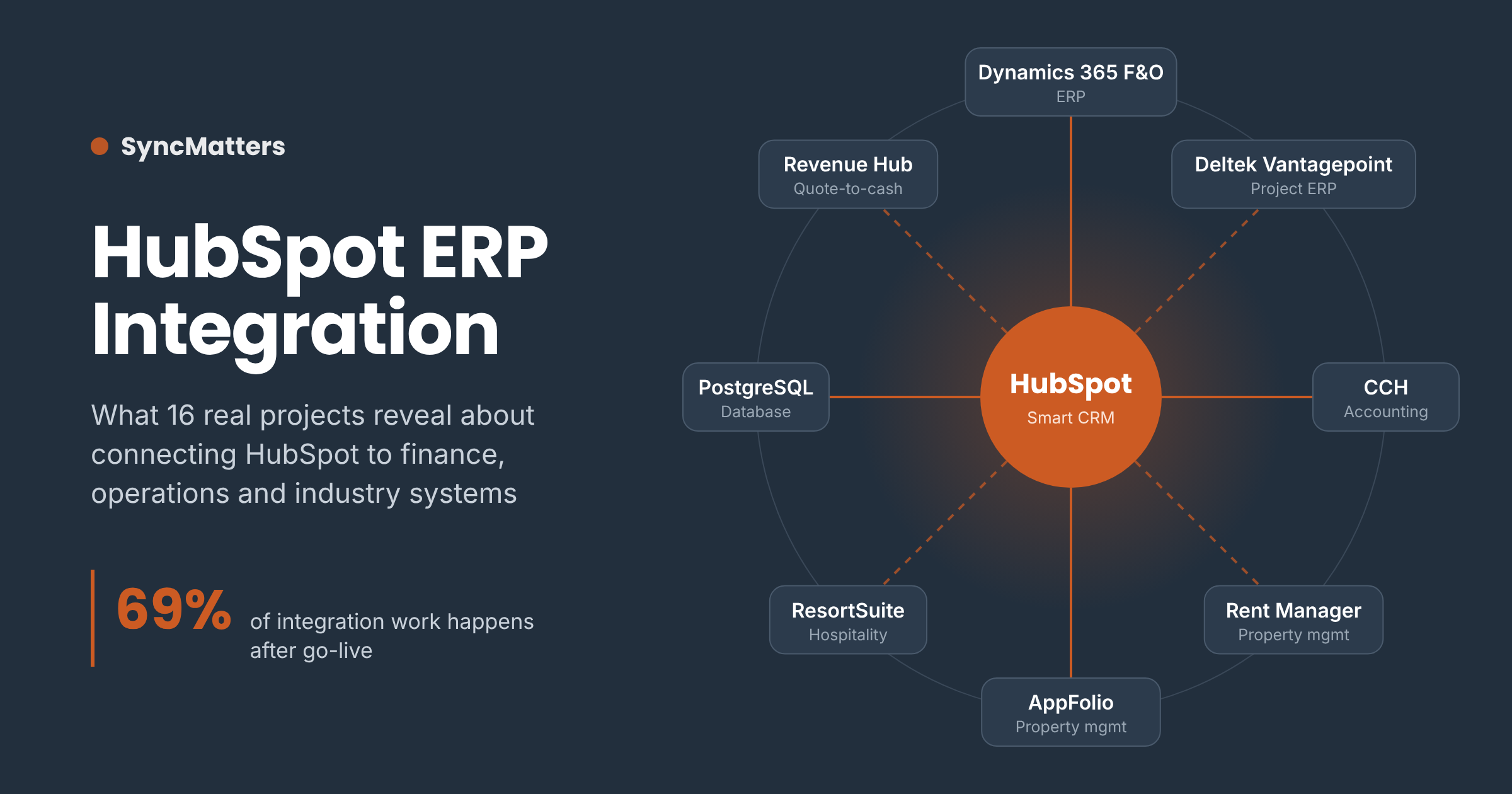
- Integration is ongoing, not a one-time project. In SyncMatters' last 30 days of closed integration deals, 11 of 16 (69%) were enhancements to integrations that were already live, and 4 were license renewals. Only 1 was a brand-new build.
- "ERP" means more than ERP. Recent projects connected HubSpot to Microsoft Dynamics 365 Finance & Operations, Deltek Vantagepoint, CCH practice management, Rent Manager, AppFolio, ResortSuite, and PostgreSQL databases. Industry systems matter as much as classic ERPs.
- The ROI is measurable. One property management partner, Geekly Media, eliminated more than 80 hours of manual data work per week and reported about $418,000 in annual savings after automating AppFolio and Propertyware syncs with HubSpot.
- Source of truth is the most important design decision. The most common enhancement request was changing which system owns a field once teams saw how data really moved in production.
- Data quality logic belongs inside the integration. Duplicate prevention, normalization, and matching rules are frequent post-launch additions.
- Quote-to-cash is where HubSpot and ERP meet. HubSpot Revenue Hub quotes, contracts, and subscriptions increasingly need to stay in sync with finance systems.
Why HubSpot ERP Integration Matters More in 2026
Companies run far more software than they connect. MuleSoft's 2025 Connectivity Benchmark Report, based on interviews with 1,050 IT leaders, found that the average enterprise manages 897 applications, yet only 29% are integrated. The same research reports that 95% of IT leaders see integration as a barrier to using AI effectively.
Data quality makes the problem worse. According to Validity's 2025 State of CRM Data Management report, 76% of organizations say less than half of their CRM data is accurate. When HubSpot and your ERP disagree about a customer, a price, or a project status, every report built on top of them inherits the error.
For growing companies, that gap shows up in very practical ways:
- Sales reps quote without knowing a customer's open invoices or credit status.
- Finance re-keys closed-won deals into the ERP and introduces typos.
- Project and delivery teams don't see what was sold, so handoffs break.
- Leadership gets two versions of revenue: one from HubSpot, one from finance.
- AI tools and HubSpot Breeze agents work from incomplete records.
"Every company we talk to has the same realization at some point: HubSpot knows the customer, the ERP knows the money, and nobody trusts either system on its own. The integration is what turns those two halves into one view of the business. And the companies that get the most out of it treat it as a living system they keep improving, not a box they check once."
— Darren Trumeter, CEO, SyncMatters
What 30 Days of Real HubSpot Integration Projects Show
To ground this guide in reality, we reviewed all 16 integration deals SyncMatters closed between October 10 and November 9, 2026, across new projects, enhancements, and renewals. Client names from these deals are withheld; industries and systems are described in general terms.
Deal mix: most integration work happens after go-live
| Deal type | Share of closed integration deals | What it typically covered |
|---|---|---|
| Enhancements to live integrations | 11 of 16 (69%) | New fields and objects, sync-direction changes, matching and dedupe logic, quote and contract syncing, extra testing hours |
| Annual license renewals | 4 of 16 (25%) | Year-2 renewals for running integrations, including healthcare, financial services, and property management |
| New integration builds | 1 of 16 (6%) | HubSpot ↔ Microsoft Dynamics 365 Finance & Operations, delivered with a HubSpot partner agency |
Source: SyncMatters Integration Sales and Integrations Renewals pipelines, deals closed Oct 10 – Nov 9, 2026.
The takeaway is simple. If you're budgeting for a HubSpot ERP integration, the initial build is only the start. Your business will change, your teams will find edge cases once real data flows, and new HubSpot features will create new sync needs. Plan for that from day one.
The systems companies are connecting to HubSpot
| System | Category | Typical industry | What syncs with HubSpot |
|---|---|---|---|
| Microsoft Dynamics 365 Finance & Operations | Enterprise ERP | Manufacturing, distribution | Accounts, contacts, orders, products, financial status |
| Deltek Vantagepoint | Project-based ERP | Architecture, engineering, construction (AEC) | Clients, opportunities, projects, primary vs. billing companies |
| CCH practice management (Wolters Kluwer) | Accounting practice management | CPA and advisory firms | Clients, responsible staff (billing admin, billing manager), engagement data |
| Rent Manager | Property management | Residential communities, real estate | Properties ↔ communities, units, assets, prospects, contacts |
| AppFolio and Propertyware | Property management | Multifamily, single-family, real estate | Properties, residents, owners, leasing activity |
| ResortSuite | Hospitality booking and property management | Resorts, spas, hospitality | Guests, reservations, stay history, preferences |
| PostgreSQL | Database / data warehouse | Nonprofit, SaaS, any data-driven team | HubSpot objects replicated to tables for reporting and BI |
| HubSpot Revenue Hub | Quote-to-cash inside HubSpot | Professional services, subscription businesses | Quotes, quote templates, contracts, subscriptions synced with finance |
Notice the pattern. Only one of these is a "classic" ERP in the textbook sense. The rest are the industry-specific systems that actually run operations for AEC firms, accounting firms, property managers, and resorts. If your core operational system isn't a big-name ERP, you still need the same kind of integration, and a generic connector usually won't cover it.
Customer Results: HubSpot Integration Case Studies
Deal data shows what companies ask for. Case studies show what they get. Here are three published SyncMatters integration stories that map directly to the patterns above.
| Customer | Systems connected | Key results |
|---|---|---|
| Geekly Media (formerly Rent Bridge) | AppFolio, Propertyware ↔ HubSpot | 80+ hours of manual work removed per week; about $418,000 in annual savings; $9,000 lower monthly payroll; 60+ deals completed; new client integrations launched in about 3 days |
| Rancho La Puerta | ResortSuite ↔ HubSpot | Real-time guest stay history and preferences in HubSpot; less manual entry; automated alerts so staff fix data errors at the source |
| IT systems team (company not named) | Two core business systems via SyncMatters iPaaS | Accurate data between both systems about six weeks after a previous provider's $100,000+ attempt failed |
Geekly Media: from 80 hours of manual work a week to an automated "Bridge"
Geekly Media is a HubSpot Solutions Partner that serves the property management industry. Before working with SyncMatters, the team moved data from AppFolio and Propertyware into HubSpot by hand. That process consumed more than 80 hours a week of the managing director's time and limited how many new clients the company could take on.
SyncMatters replicated those manual steps as repeatable integration logic and turned it into a custom integration template that connects both property management systems to HubSpot. The setup also clones Geekly Media's master HubSpot portal to spin up client portals in minutes and parses Zillow lead emails into HubSpot leads. New client "Bridges" now launch in about three days.
"[SyncMatters] has not been just a good experience, it's been a business changing experience for us. It's allowed us to build something that is an industry-changing system."
— Michael Park, Chairman of the Board, Geekly Media
"Without [SyncMatters], I'm not really sure where we would be."
— Heather Park, Co-Founder and CEO, Geekly Media
The integration still runs today and was renewed again this quarter, a good example of the long-term model described above. Read the full Geekly Media case study.
Rancho La Puerta: guest history from ResortSuite inside HubSpot
Rancho La Puerta, a destination spa founded in 1940, needed its ResortSuite booking data in HubSpot without duplicates or manual entry. SyncMatters built an integration that brings current and past reservations, visit frequency, and guest preferences into HubSpot in real time. Custom notification emails flag data issues so staff can correct them in the source system right away, protecting data quality on both sides.
"Knowing how many times a guest has visited the Ranch, the frequency of their stay, or if it's a recurring annual event has drastically changed our interactions and builds relationships with our guests."
— Catherine Hesik, Director, Rancho La Puerta
Read the full Rancho La Puerta case study.
When a previous integration fails
Some teams come to SyncMatters after another approach didn't work. One IT systems leader described the difference this way:
"I've been so impressed. This experience has been so smooth. Milestones were reached when they were supposed to be and communication throughout was clear... our original experience with another provider cost us over $100,000 and it didn't even work. SyncMatters came in and a month and a half later we have accurate data between two systems."
— Daniel, Director IT Systems & Customer Service
Other customers have called it the "best integration experience I've had with incredible ongoing support" and said SyncMatters "met every single one of our goals in integrating our HubSpot and NetSuite instances." See more SyncMatters customer case studies.
The 6 Integration Patterns Behind Successful HubSpot ERP Projects
Across recent projects and case studies, the same six patterns came up again and again. Use them as a checklist when you scope your own integration.
1. Decide the source of truth per field, then revisit it after launch
Every field that exists in both systems needs an owner. One AEC firm running Deltek Vantagepoint started with HubSpot owning most project data. After the sync ran in production, the team learned that accounting, not business development, updates projects once they're created. The fix: let both primary and billing companies be set at creation in HubSpot, then make Deltek the source of truth after creation, with sync directions updated field by field.
That's normal. You rarely know exactly how data behaves until real users touch it. Build your integration so sync direction is configurable per field, not hard-coded.
2. Build data quality and matching logic into the sync
Integrations amplify bad data. An apparel company asked for dedicated normalized fields to catch duplicates that slipped through: a phone number with formatting removed, a stripped-down street address, and a normalized company name with spaces, punctuation, ampersands, "the," and "and" removed. That way "Bella + Canvas," "Bella and Canvas," and "Bella & Canvas" all resolve to the same match key.
They also defined a matching order. For companies: normalized name, then phone, then address, then first and last name. For contacts: name, then phone, then address. Explicit rules like these prevent the slow drift into duplicates that undermines reporting. Rancho La Puerta's error notifications are another version of the same idea: catch bad data early and fix it at the source.
3. Map the fields your teams actually use, not just the defaults
Out-of-the-box connectors sync standard objects and fields. Real businesses run on custom ones. A CPA firm asked to sync the billing admin and billing manager from HubSpot company records into the matching responsible-staff roles in CCH. It's a small mapping, but it means partners, managers, and admins see the same assignments in both systems, and no one has to update them twice.
4. Handle the source system's quirks
Every operational system has behavior that breaks naive syncs. A residential community developer wanted to sync two new Rent Manager properties as HubSpot communities. The catch: their user-defined field didn't update the record's last-modified date, so change-based syncing wouldn't pick it up. Related units, assets, and prospects also needed a change to sync. The solution was a one-time script to find and sync every associated record, followed by normal incremental syncing.
This is where experience pays off. Knowing how Rent Manager, Deltek, AppFolio, or Dynamics actually behaves under the API saves weeks.
5. Treat testing environments as part of the architecture
A security and alarm services company paid for a dedicated discovery phase just to design how integrations would be tested without touching production data. Their systems sat behind a DMZ, so the options included relocating a sandbox and connecting it over a peer-to-peer VPN. Testing in a sandbox before going live is standard practice; making it work in a locked-down network takes planning.
Testing also takes time. One solar company needed twice the planned testing hours. Budget for realistic test cycles, not optimistic ones.
6. Connect quote-to-cash, not just contacts and deals
As more companies adopt HubSpot Revenue Hub, quotes, contracts, and subscriptions become integration objects too. Recent projects included moving subscription data into Revenue Hub contracts with matching integration adjustments, and building quote templates with conditional sections. Once quotes and contracts live in HubSpot, finance needs them reflected accurately in the ERP or accounting system.
HubSpot ERP Integration Methods Compared
There are four main ways to connect HubSpot to an ERP or operational system. The right one depends on how standard your data model is and how much change you expect.
| Method | Best for | Strengths | Limitations |
|---|---|---|---|
| Native HubSpot connector (Marketplace app) | Simple, standard syncs on popular systems | Fast to set up, low upfront cost | Limited custom objects and logic; little control over sync direction and matching |
| Generic iPaaS / automation tools | Teams with in-house integration skills | Flexible, many connectors | You own the build, monitoring, and maintenance; complex logic gets fragile |
| Custom API development | Unique requirements with an internal dev team | Full control | Highest cost and maintenance burden; knowledge often leaves with the developer |
| Managed integration platform delivered as a service (e.g., SyncMatters integrations) | Growing companies with custom objects, industry systems, and changing requirements | Custom logic without building it yourself; ongoing enhancements and support included in the model | Annual license plus scoped project work |
MuleSoft's research has found that IT teams spend a large share of their time building and maintaining custom integrations. That maintenance load is exactly what the enhancement data above shows: integrations need continuous care. The question is who carries it.
How Much Does a HubSpot ERP Integration Cost?
Cost depends on scope, but the structure is predictable. Budget for three layers:
- Initial build. Discovery, field mapping, sync logic, testing, and launch. Complex ERPs such as Dynamics 365 Finance & Operations sit at the higher end.
- Annual license. The platform that runs the sync, monitors it, and handles errors and API limits.
- Enhancements. New fields, objects, rules, and changes as your business evolves. Based on our recent data, most clients add some enhancement work every year.
Weigh that against the cost of not integrating. Geekly Media's results, more than 80 hours a week of manual work removed and about $418,000 in annual savings, show how quickly manual data work adds up.
For current packages and what's included, see SyncMatters integrations pricing.
Step-by-Step: How to Plan Your HubSpot ERP Integration
- List the business outcomes. For example: "Reps see open invoices before quoting," or "Closed-won deals create projects in Deltek automatically."
- Inventory objects and fields in both systems. Include custom objects, user-defined fields, and associations.
- Assign a source of truth for every shared field, and note when ownership changes (for example, at project creation).
- Define matching and dedupe rules before the first sync, including normalization of names, phones, and addresses.
- Plan your test environment. Sandboxes for both systems, test data, and network access.
- Run a staged rollout. Start with one object or one team, validate, then expand.
- Set an enhancement cadence. Review sync errors, user feedback, and new requirements quarterly.
"The fastest projects are the ones where someone on the client side can answer one question for every field: who owns this, and when? If that answer exists, the technical side is straightforward."
— Sara Lindmont, Director, Consulting, SyncMatters
Industry Playbooks
Architecture, engineering, and construction (Deltek Vantagepoint)
Business development works opportunities in HubSpot; accounting and project managers live in Deltek. Key decisions: when a HubSpot deal becomes a Deltek project, how primary and billing companies are handled, and when Deltek takes ownership of project data. Learn more about our HubSpot and Deltek Vantagepoint integration.
Accounting and advisory firms (CCH)
Marketing and business development run in HubSpot; client service and billing run in practice management. Syncing client records and staff roles keeps partners and managers aligned without double entry.
Property management and real estate (Rent Manager, AppFolio, Propertyware)
Leasing and marketing teams nurture prospects in HubSpot while properties, units, owners, and residents live in the property management system. Watch for user-defined fields, change tracking, and the hierarchy of property, unit, and asset records. For agencies serving many property managers, a reusable integration template, like the one built for Geekly Media, makes each new client launch fast and repeatable.
Hospitality and wellness (ResortSuite)
Marketing needs guest history and preferences to personalize outreach; operations owns reservations. Syncing stays and guest profiles into HubSpot, with error alerts back to the booking system, keeps both sides accurate.
Manufacturing and distribution (Dynamics 365 F&O and other ERPs)
Sales needs product, order, and account status; operations needs clean customer and order data from sales. See our integrations for manufacturing companies.
Data-driven teams (PostgreSQL and data warehouses)
Replicating HubSpot data into PostgreSQL powers BI, finance reporting, and AI workloads. Plan for schema changes; even renaming tables is a maintenance event.
Common HubSpot ERP Integration Mistakes
- Syncing everything both ways. Bidirectional sync on every field creates loops and overwrites. Sync only what each team needs, in the direction that matches ownership.
- Skipping dedupe rules. Without normalized matching, duplicates multiply in both systems.
- Underestimating testing. Plan realistic test hours and a sandbox strategy.
- Treating launch as the finish line. Requirements will change. Budget for enhancements.
- Choosing on price alone. A cheap build that doesn't work costs more than a working one. One customer spent over $100,000 with another provider before getting accurate data with SyncMatters in about six weeks.
- Ignoring security. ERP data includes financial and customer details. Work with a partner that holds certifications such as ISO 27001 and can document how data is encrypted and logged. See SyncMatters security.
Why Companies Choose SyncMatters Integrations
SyncMatters connects HubSpot to ERPs, accounting, project, property management, hospitality, and database systems through its own integration platform, delivered as a service. That means custom objects, sync rules, and matching logic without building and maintaining them in-house, plus a team that keeps improving the integration as your business changes. SyncMatters is an Elite HubSpot Solutions Partner with HubSpot's Custom Integration accreditation and Integration Innovation award, holds the Quote-to-Cash Capability Badge, and is ISO 27001 certified.
Ready to connect HubSpot to the systems that run your business? Book an integration scoping call and we'll map your objects, ownership rules, and sync design with you. Or explore SyncMatters custom integrations.
FAQs About HubSpot ERP Integration
What is HubSpot ERP integration?
HubSpot ERP integration is a connection between HubSpot and an ERP or operational system that keeps shared data, such as companies, contacts, deals, products, quotes, orders, projects, and invoices, consistent in both systems automatically.
Does HubSpot have a native ERP integration?
HubSpot offers Marketplace apps for some ERPs and accounting tools, but they usually cover standard objects only. Custom objects, industry systems, and complex rules typically need a managed or custom integration.
Which systems can be integrated with HubSpot?
Common examples include Microsoft Dynamics 365 Finance & Operations and Business Central, NetSuite, Deltek Vantagepoint, CCH practice management, Rent Manager, AppFolio, Propertyware, ResortSuite, and databases such as PostgreSQL. Most systems with an API can be connected.
What ROI can a HubSpot ERP integration deliver?
It depends on how much manual work the integration replaces. Geekly Media removed more than 80 hours of manual data transfer per week and reported about $418,000 in annual savings after automating AppFolio and Propertyware syncs with HubSpot.
Should HubSpot or the ERP be the source of truth?
It depends on the field. Usually HubSpot owns marketing and sales data, and the ERP owns financial and operational data. Some fields change owner at a specific point, such as when a deal becomes a project.
How long does a HubSpot ERP integration take?
Simple syncs can launch in a few weeks. Complex ERP or multi-object projects take longer, mostly due to discovery, mapping decisions, and testing. With a reusable template, new instances can launch in days. Plan for ongoing enhancements after launch.
How do you prevent duplicates when integrating HubSpot with an ERP?
Define matching rules before the first sync and use normalized match keys, such as phone numbers with formatting removed and company names with punctuation and filler words removed. Then set a clear matching order for companies and contacts, and add error alerts so bad data is fixed at the source.
Can HubSpot Revenue Hub quotes and contracts sync with my ERP?
Yes. Quotes, contracts, and subscriptions can be synced so finance sees what sales sold. This is a growing part of quote-to-cash integration work.
How much does a HubSpot ERP integration cost?
Expect an initial build, an annual platform license, and periodic enhancements. See SyncMatters integrations pricing for current packages.