Your CRM is only as useful as the data inside it. Duplicate records, outdated contacts, and broken field mappings can quietly undermine everything from lead routing to revenue forecasting. For mid-market and enterprise teams across North America, the challenge is not just cleaning up bad data but finding a CRM data quality service that prevents it from coming back.
SyncMatters helps revenue teams improve CRM data quality through expert-guided migrations, real-time integrations, and ongoing data cleansing. This article walks you through six services worth evaluating, the criteria that matter most, and how to match a provider to your specific needs.
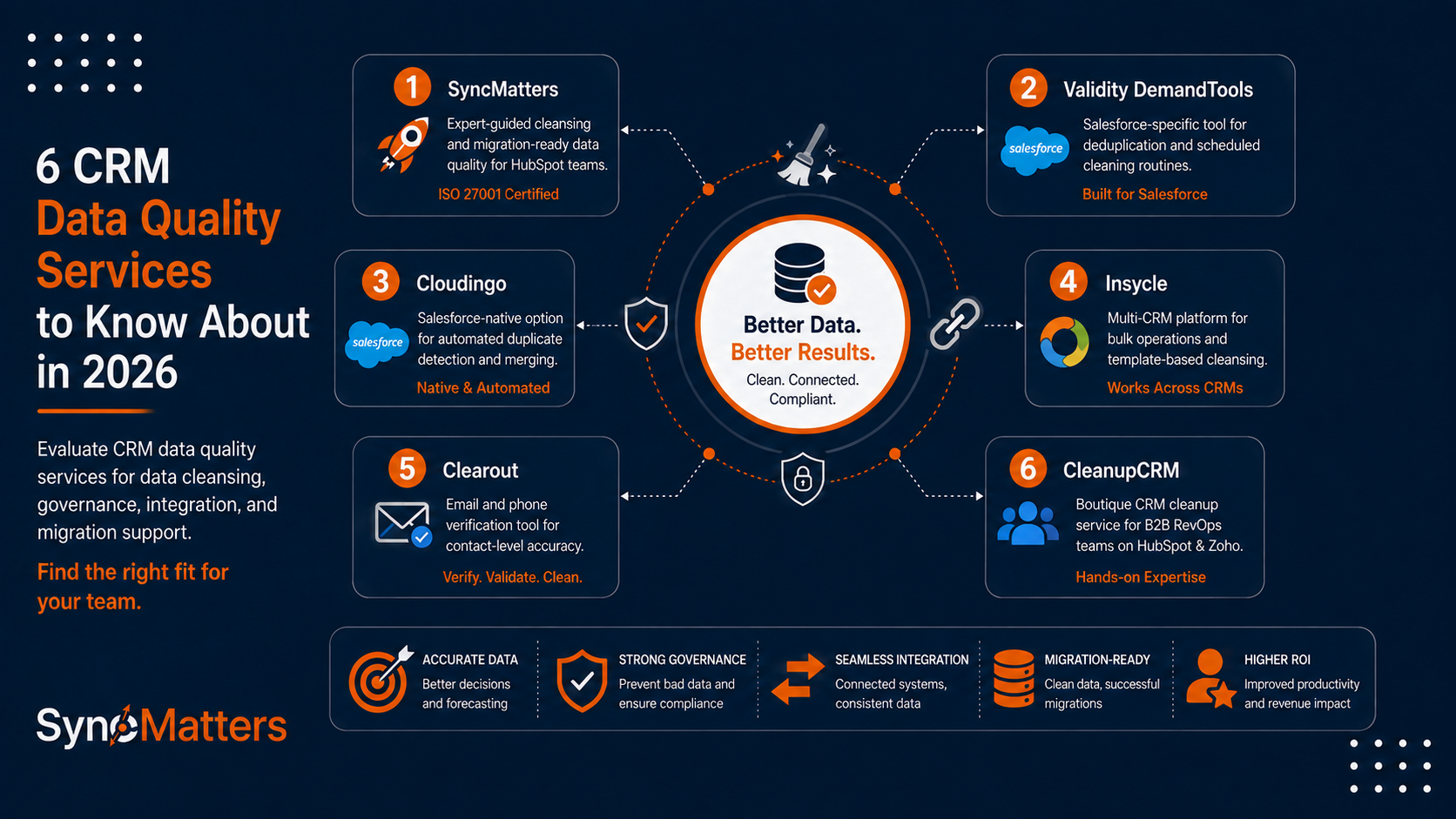
Quick guide: 6 best CRM data quality services for mid-market and enterprise teams
- SyncMatters: The best CRM data quality service for HubSpot teams needing migration-ready cleansing with ISO 27001 certification
- Validity DemandTools: A Salesforce-specific tool for deduplication and scheduled cleaning routines
- Cloudingo: A Salesforce-native option for automated duplicate detection and merging
- Insycle: A multi-CRM platform for bulk operations and template-based cleansing
- Clearout: An email and phone verification tool for contact-level data accuracy
- CleanupCRM: A boutique CRM cleanup service for B2B RevOps teams on HubSpot and Zoho
How we chose the best CRM data quality services for North American businesses
Choosing a CRM data quality service is not just about finding software that removes duplicates. Your team needs a partner who understands your CRM architecture, your compliance requirements, and the downstream impact of bad data on revenue operations.
We evaluated each provider based on criteria that matter to CRM managers and RevOps leaders at mid-market and enterprise organizations:
- Data cleansing depth: Does the service go beyond surface-level fixes? You need deduplication, standardization, enrichment, and validation working together to keep records accurate.
- Governance and prevention: A one-time cleanup is not enough. The right service builds workflows and guardrails that stop bad data from entering your CRM in the first place.
- Integration fit: Does the provider connect with your existing tech stack? CRM data quality depends on how well your systems communicate across sales, marketing, and operations.
- Migration support: If you are switching CRMs or consolidating instances, data quality should be addressed during the migration itself, not after records have already been transferred with errors intact.
- Security and compliance: Enterprise teams need ISO 27001 certification, GDPR compliance, and clear data handling policies before granting access to customer records.
- Ongoing support: Does the provider offer guidance after the initial project? Long-term data quality requires training, monitoring, and periodic reviews.
The 6 best CRM data quality services for North American businesses
1. SyncMatters: Best overall CRM data quality service for HubSpot teams
SyncMatters delivers CRM data quality services that address the root causes of dirty data, not just the symptoms. As a certified Elite HubSpot partner with ISO 27001 certification, SyncMatters brings both the platform expertise and security credentials that enterprise teams require.
What makes SyncMatters different is how data quality fits into the broader picture. Rather than treating cleansing as a standalone task, SyncMatters connects data quality improvement directly to migrations, integrations, and ongoing CRM performance.
Their MigrateMyCRM platform includes intelligent auto-mapping, field utilization analytics, and sandbox testing so you can evaluate your data quality before going live. For teams running HubSpot, SyncMatters offers DIY, guided, and fully custom paths depending on your internal resources and project complexity.
SyncMatters features
- Intelligent auto-mapping: Automatically maps native and custom fields between systems, catching mismatches and data loss risks before migration begins.
- Field utilization analytics: Shows you which fields hold valuable data and which are cluttering your schema, so you can make informed decisions about what to keep.
- Sandbox testing environment: Run test migrations in isolation to identify data quality issues before they reach your production CRM.
- Association preservation: Maintains the relationships between contacts, companies, deals, and custom objects so your reporting stays intact after migration.
- Duplicate detection: Custom mapping solutions with detailed duplicate identification help you merge or remove redundant records during the migration process.
- iPaaS integration platform: Connects revenue systems with operational platforms like NetSuite for real-time data synchronization, reducing the drift that creates quality issues over time.
SyncMatters pros and cons
Pros:
- ISO 27001 certified with GDPR compliance, meeting enterprise-grade security requirements for customer data handling
- Over 10,000 app installs and a 4.9/5 customer satisfaction rating demonstrate reliability at scale
- Hands-on collaborative approach with client involvement at every step, from data audit through post-migration validation
Cons:
- Custom migration projects require a discovery phase, which adds time before the active work begins
- Self-service migrations work well for simple use cases but complex data structures benefit from guided or custom paths
- Advanced iPaaS integrations may require onboarding time for teams new to integration platforms
2. Validity DemandTools: A Salesforce-specific tool for deduplication
Validity DemandTools has served Salesforce administrators for over two decades, offering granular control over deduplication, bulk data loading, and scheduled cleaning routines. The platform connects to Validity's email verification tools for bounce rate management.
For teams deeply invested in the Salesforce ecosystem who need configurable matching rules and merge logic, DemandTools offers technical depth that simpler tools lack.
Validity DemandTools features
- Cross-object deduplication: Identifies and merges duplicate records across multiple Salesforce objects using configurable matching criteria.
- DupeBlocker: Prevents duplicates from entering the CRM during real-time data entry.
- Scheduled cleaning routines: Automates recurring data quality jobs so maintenance runs without manual intervention.
Validity DemandTools pros and cons
Pros:
- Two decades of Salesforce-specific development gives it deep platform expertise
- Handles deduplication scenarios that simpler tools cannot address
- Integrates with Validity's email verification for bounce rate reduction
Cons:
- Works only with Salesforce; HubSpot and other CRM users need alternative solutions
- Configuration requires technical knowledge and is not designed for non-technical users
- Does not include data enrichment capabilities; focuses exclusively on cleaning existing records
3. Cloudingo: A Salesforce-native option for automated duplicate merging
Cloudingo offers Salesforce users a focused tool for detecting and merging duplicate records. The platform includes configurable filters, scheduled deduplication jobs, and mass merge capabilities for cleaning large datasets.
For Salesforce teams that need a dedicated deduplication tool with automation features, Cloudingo addresses the duplicate problem without requiring custom development.
Cloudingo features
- Automated deduplication: Runs scheduled duplicate scans and merges records based on rules you define.
- Mass merge capabilities: Processes large volumes of duplicate records in bulk rather than one-by-one.
- Import cleaning: Catches duplicates during data imports before they enter your CRM.
Cloudingo pros and cons
Pros:
- Focused specifically on deduplication with configurable matching rules
- Automation features reduce the manual effort of ongoing duplicate management
- Import cleaning catches duplicates before they enter the system
Cons:
- Limited to Salesforce; does not support HubSpot, Pipedrive, or other CRM platforms
- Focuses narrowly on deduplication; does not address broader data quality needs like enrichment or standardization
- Advanced configuration may require Salesforce admin expertise to set up correctly
4. Insycle: A multi-CRM platform for bulk operations and automated cleansing
Insycle offers data management across HubSpot, Salesforce, and other platforms with a focus on bulk operations, template-based automation, and association management. Operations teams can perform mass updates, merges, and record corrections without row-by-row editing.
For teams managing data quality across multiple CRM instances or needing repeatable automation for recurring tasks, Insycle offers a middle ground between manual work and custom engineering.
Insycle features
- Bulk operations: Perform mass updates, merges, and deletions across large record volumes.
- Automated templates: Save and reuse cleansing configurations for recurring data quality tasks.
- Association management: Clean up and manage record relationships across your CRM.
Insycle pros and cons
Pros:
- Works natively with both HubSpot and Salesforce for multi-CRM environments
- Template-based automation saves time on repetitive data quality tasks
- Interface is designed for operations teams without deep technical backgrounds
Cons:
- Usage-based pricing tied to CRM record volume means costs scale with database size
- Some advanced configurations require technical knowledge to set up correctly
- Limited to supported CRM platforms; may not work with industry-specific or legacy CRMs
5. Clearout: An email and phone verification tool for contact-level accuracy
Clearout focuses specifically on verifying email addresses and phone numbers in your CRM. The platform helps remove invalid contacts, typos, and bounced addresses before they damage your sender reputation or waste your sales team's outreach hours.
For teams where outbound email and phone outreach drives revenue, Clearout offers targeted verification that catches issues at the contact level.
Clearout features
- Real-time email verification: Validates addresses during form submission or CRM entry to block invalid data at the source.
- Phone number validation: Verifies numbers with carrier, line type, and location data across global markets.
- Bulk validation: Processes CSV files or integrates directly with CRMs for large-scale contact verification.
Clearout pros and cons
Pros:
- Reduces email bounce rates, protecting your sender reputation and deliverability
- Global coverage across 250+ countries for international contact databases
- Direct CRM integration options for automated verification workflows
Cons:
- Focuses only on email and phone verification; does not address broader data quality issues
- Does not include deduplication, normalization, or migration capabilities
- Verification accuracy varies depending on data source quality and provider coverage
6. CleanupCRM: A boutique CRM cleanup service for B2B RevOps teams
CleanupCRM offers hands-on CRM data cleanup services for B2B sales and RevOps teams using HubSpot, Zoho, Pipedrive, and other platforms. Their approach focuses on identifying the root causes of bad data, not just cleaning symptoms.
For smaller teams that need a dedicated cleanup engagement rather than an ongoing software subscription, CleanupCRM offers structured audit-to-remediation projects.
CleanupCRM features
- Root-cause diagnostics: Identifies which forms, imports, integrations, or workflows are creating data quality issues.
- Validation workflow design: Builds approval queues, required-field logic, and guardrails to prevent bad data from entering again.
- CRM health reporting: Delivers segmentation lists, suppression lists, and before/after cleanup reports.
CleanupCRM pros and cons
Pros:
- Root-cause analysis goes beyond surface cleaning to prevent recurring issues
- Supports multiple CRM platforms including HubSpot, Zoho, Pipedrive, Attio, and Folk
- Approval-first process means no changes happen without your confirmation
Cons:
- Operates as a service engagement rather than a self-service platform; requires scheduling
- Newer operation with a smaller track record compared to established providers
- Third-party verification and enrichment costs are billed separately from the base engagement
Comparison table: The best CRM data quality services for North American businesses
| Provider | ISO 27001 Certified | Multi-CRM Support | Migration + Quality Combined |
|---|---|---|---|
| SyncMatters | ✓ | ✓ | ✓ |
| Validity DemandTools | ✗ | ✗ | ✗ |
| Cloudingo | ✗ | ✗ | ✗ |
| Insycle | ✗ | ✓ | ✗ |
| Clearout | ✗ | ✓ | ✗ |
| CleanupCRM | ✗ | ✓ | ✗ |
What criteria matter most when evaluating CRM data quality services?
The answer depends on where your data problems originate. If duplicates are your primary challenge, look for providers with configurable matching rules and real-time prevention. If your issues stem from failed integrations or past migrations, you need a service that addresses data quality during the transfer process itself.
Security credentials matter more than many teams realize. Any provider handling your customer data should demonstrate ISO 27001 certification or equivalent controls. This is not optional for organizations in financial services, healthcare, or any industry subject to data protection regulations.
Consider whether you need a one-time cleanup or an ongoing quality program. A quarterly audit might catch issues before they compound, but real-time validation workflows stop problems at the source. The right approach often combines both.
How does CRM data governance fit into a data quality strategy?
Data governance defines who owns data quality in your organization, what standards records must meet, and how compliance is enforced. Without governance, even the most thorough cleanup will degrade in months as new records enter your system without validation.
A governance framework typically includes field-level standards, ownership rules, and lifecycle management policies. According to Validity's 2025 State of CRM Data Management report, 76% of CRM users said less than half of their organization's CRM data is accurate and complete. That statistic points directly to governance gaps rather than technology limitations.
Start by defining which fields are required at each lifecycle stage, who can edit them, and how often records are reviewed. Then implement automation rules that enforce those standards in real time. SyncMatters helps teams build this governance layer alongside their migration and integration projects, so data quality is baked in from the start rather than bolted on later.
Why SyncMatters is the best CRM data quality service for North American businesses
Most CRM data quality services treat cleansing as a standalone project. SyncMatters takes a different approach by connecting data quality directly to migrations, integrations, and ongoing CRM performance. This means your data gets cleaner during every system change, not just during periodic sprints.
SyncMatters gives you field utilization analytics that show which data actually matters, sandbox testing that catches quality issues before they reach production, and association preservation that keeps your reporting intact. Combined with ISO 27001 certification and a 4.9/5 customer satisfaction rating across 10,000+ app installs, you get enterprise-grade security paired with proven reliability.
For CRM managers and revenue operations leaders at North American mid-market and enterprise organizations, SyncMatters offers the expertise, technology, and collaborative approach that turns CRM data quality from an ongoing headache into a strategic advantage. Ready to improve your data quality? Contact SyncMatters for a free consultation.
FAQs about CRM data quality services
What is CRM data quality?
CRM data quality refers to how accurate, complete, consistent, and current the records in your CRM system are. High-quality data means your sales and marketing teams can trust the information they are working with for outreach, reporting, and decision-making.
SyncMatters helps you achieve high data quality through field utilization analytics, deduplication, and validation during migrations and integrations.
How often should you audit your CRM data quality?
B2B contact data decays at roughly 30% per year as people change roles and companies. Quarterly audits are the minimum for active CRM databases. Teams running outbound campaigns benefit from monthly reviews of bounce rates and engagement metrics.
SyncMatters supports ongoing data quality by building prevention workflows into your CRM during migration and onboarding projects.
What causes CRM data quality to deteriorate over time?
The most common causes are manual entry errors, failed integrations between systems, incomplete migrations, and natural data decay. Without governance rules and automated validation, these issues compound faster than most teams realize.
SyncMatters addresses root causes by preserving associations during migrations and connecting systems through real-time integration, reducing the drift that creates quality problems.
Can you improve CRM data quality during a migration?
Yes, and this is often the ideal time to do it. Migration forces you to map every field and evaluate which records to carry forward. SyncMatters includes field utilization analytics and sandbox testing so you can cleanse data as part of the migration process rather than cleaning it separately afterward.
What security certifications should a CRM data quality service have?
ISO 27001 certification demonstrates international information security standards. GDPR compliance is required for any provider handling European contact data. SOC 2 compliance indicates strong controls over data processing and storage.
SyncMatters maintains ISO 27001 certification and GDPR compliance, meeting the security standards that enterprise organizations expect from vendors handling sensitive customer data.


.svg)