Most revenue teams don't have a data problem. They have a fragmentation problem. Deals live in one CRM, quotes are built in a spreadsheet or a CPQ tool, invoices come from accounting software, and subscriptions are tracked somewhere else entirely. Every handoff between those systems is a chance for data to go missing, duplicate, or fall out of date.
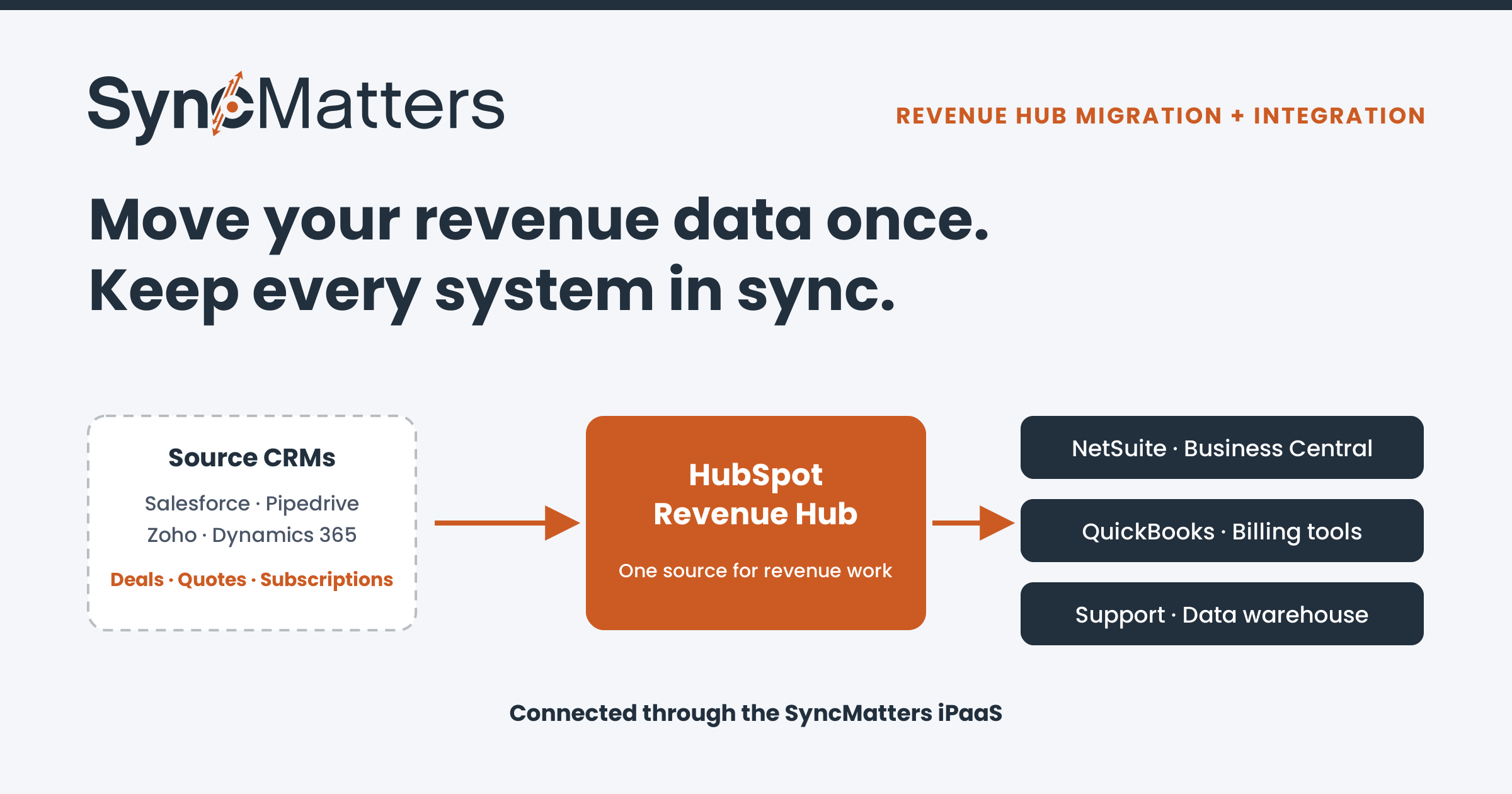
HubSpot Revenue Hub is designed to bring that work into one place: marketing, sales, service, and the quote-to-cash process that connects them. But getting there usually means two projects at once. First, you move your historical revenue data into HubSpot without losing its meaning. Second, you connect HubSpot to the systems that still need to talk to it, such as your ERP, accounting platform, billing tool, and support stack.
This guide walks through both. We'll start with the migration, covering what needs to move and how to keep it accurate. Then we'll cover the integration layer, where an iPaaS approach can keep your revenue data consistent across every system. Whether you're a RevOps admin responsible for the cutover or a HubSpot consultant scoping a client project, the goal is the same: a revenue stack that works as one.
What Revenue Hub Actually Needs From Your Data
Before you move anything, it helps to be clear about what Revenue Hub depends on. A migration that copies contacts and companies but ignores the revenue objects will leave your teams with a CRM that looks complete and isn't usable for forecasting, quoting, or renewals.
The core objects in a revenue workflow typically include:
- Companies and contacts, with consistent domain and ownership logic so accounts don't split into duplicates.
- Deals, including stage history, amounts, close dates, owners, and pipeline assignment. Stage history matters because it drives conversion reporting.
- Line items and products, which connect what was sold to the revenue recorded against it.
- Quotes, including versions, approval status, expiration dates, and linked deals.
- Subscriptions and recurring revenue data, such as billing frequency, renewal dates, and term length.
- Invoices and payment status, where they exist in the CRM or are mirrored from a finance system.
- Tickets and service history, which often inform renewal and expansion decisions.
- Activities and notes, which carry the context your sales team relies on.
Two decisions shape everything else. The first is how much history to bring over. Many teams migrate three to five years of closed deals for reporting continuity, and archive anything older in a data warehouse or spreadsheet. The second is how you'll map custom properties. Every source CRM has its own field naming, picklist values, and custom objects, and those rarely line up one-to-one with HubSpot.
Why Revenue Data Is Harder to Migrate Than Contacts
Moving contacts is mostly a matter of matching fields and removing duplicates. Revenue data is harder for three reasons.
Relationships matter more. A quote belongs to a deal, which belongs to a company, which may be associated with several contacts and a parent account. If those links break during migration, reports will be wrong even when every record technically arrived. Revenue reporting depends on the associations as much as on the records themselves.
Financial fields have precision requirements. Currency, tax treatment, discounts, and recurring versus one-time amounts all need to be handled consistently. A deal amount that's off by a discount line or a currency conversion can distort pipeline and forecast numbers for an entire quarter.
Status history has meaning. When a deal moved from "Proposal" to "Negotiation" last March, that history feeds conversion rates, sales cycle length, and stage-based forecasting. Migrating only the current stage throws that information away. Some migrations preserve stage history through timeline or activity records, and where that's not possible, teams often keep the historical data in a reporting layer so trend analysis isn't lost.
Migrating From Any Source CRM
The most common source systems for revenue migrations are Salesforce, Pipedrive, Zoho CRM, Microsoft Dynamics 365, and older or self-built CRMs, plus existing HubSpot portals that are being consolidated into a single account. Each one has its own structure and quirks, but the process follows the same general sequence.
Salesforce
Salesforce is often the most complex source because of custom objects, record types, and deeply customized opportunity and quote structures. Common challenges include:
- Multiple opportunity record types with different stage picklists that need to be mapped to one HubSpot pipeline or several.
- Quotes built with Salesforce CPQ, where line groups, bundles, and quote versions need a deliberate mapping strategy.
- Custom objects for subscriptions, contracts, or assets, which may map to HubSpot custom objects or to line items and deal properties.
- Activity data spread across tasks, events, and email-to-Salesforce logs.
The practical approach is to document every custom object and field before migration, decide what each one becomes in HubSpot, and remove anything no one uses. Cleaning up Salesforce first almost always produces a better HubSpot result than migrating everything and sorting it out later.
Pipedrive
Pipedrive is typically simpler in structure, with a deal-centric model, custom fields, and pipelines that map relatively cleanly to HubSpot deals and pipelines. The main risks are:
- Pipeline stages that need to be consolidated or renamed to fit a single HubSpot revenue process.
- Products attached to deals, which should map to HubSpot products and line items so that revenue reporting stays accurate.
- Activity history and notes, which can be large and need a decision about how much to import.
Pipedrive migrations are often the fastest, but they still benefit from a mapping review with the people who use the pipeline every day.
Zoho CRM
Zoho migrations depend heavily on how the account was configured. Multi-module setups, custom modules, and sales orders or invoices stored in Zoho Books or other Zoho products need to be mapped carefully. The key question is whether quotes and invoices live inside the CRM or in a connected finance tool, since that changes where the data needs to land in HubSpot.
Microsoft Dynamics 365
Dynamics migrations often involve the broadest set of revenue objects, including opportunities, quotes, orders, invoices, and products tied to a price list. Teams using Dynamics with Business Central or Finance & Operations usually need a clear split between what belongs in the CRM and what should remain in the ERP and be synced back. That split determines your integration design, covered later in this article.
Legacy and Custom CRMs
Older or self-built systems are the hardest to predict. Export quality varies, field definitions may be undocumented, and data may be stored in several tables. For these projects, a data profiling step before mapping is essential. Count records, check for null values in critical fields, identify duplicates, and sample real records before you write a single transformation rule.
Existing HubSpot Portals
Some revenue migrations are actually portal consolidations, where two or more HubSpot accounts are merged after an acquisition or internal reorganization. These projects focus less on format conversion and more on deduplication, property alignment, and deciding which pipeline and lifecycle definitions win. They're a different kind of project, but the same discipline applies: map first, migrate second, and verify everything.
A Practical Migration Sequence
Regardless of the source system, a sound revenue migration follows a predictable sequence.
1. Audit and scope. Inventory every object, field, and automation in the source system. Identify what's actively used, what's historical, and what can be retired. Agree on the history window and the list of stakeholders who sign off.
2. Design the target model. Define the HubSpot pipelines, deal stages, lifecycle stages, product catalog, quote templates, and custom properties. Map every source field to a destination, and document any transformations (for example, converting a text field to a dropdown, or splitting a combined amount into recurring and one-time components).
3. Clean the data. Remove duplicate companies and contacts, standardize country and currency values, fix missing owners, and close out or archive stale deals. Migrating clean data is far cheaper than cleaning it inside HubSpot after the fact.
4. Run test migrations. Migrate a representative subset into a sandbox or test portal. Check associations, amounts, owners, stage mapping, and quote totals against the source. Involve the sales operations team in this review, because they'll spot problems that a checklist won't.
5. Plan the cutover. Decide whether you're doing a one-time migration or a phased approach where some teams move first. Freeze or limit edits in the source system during the final load, and schedule the load for a low-activity window.
6. Execute and reconcile. Run the final migration, then reconcile record counts, pipeline totals, and open deal values between source and target. Keep a reconciliation report so you can prove that the data matched at the point of cutover.
7. Validate in real workflows. Ask sales reps to create a quote, update a deal, and run their pipeline review in HubSpot. Ask finance or RevOps to run a revenue report and compare it against the source. Problems that surface in daily use are the ones that matter most.
8. Retire and archive. Once the new system is validated, set a date to decommission the old one, export a final archive, and document where historical data lives.
Moving From Migration to Integration
A migration gets revenue data into Revenue Hub once. Integration keeps it accurate afterward. This is where most revenue stacks break down, because the CRM is only one of several systems that need to agree on customers, products, prices, orders, invoices, and subscriptions.
Typical systems that connect to a HubSpot revenue workflow include:
- ERP platforms such as NetSuite, Microsoft Dynamics 365 Business Central, or other finance and operations systems that own orders, inventory, and fulfillment.
- Accounting tools such as QuickBooks, which typically own invoices, payments, and tax.
- Billing and subscription platforms that manage recurring charges and renewals.
- Support and service tools that hold ticket data relevant to account health.
- Product and pricing systems that define catalogs and price books.
- Data warehouses and BI tools that consume revenue data for analysis.
Each connection raises the same questions: which system is the source of truth for each object, which direction data should flow, how often it should sync, and what happens when two systems disagree.
Choosing Between Native Connectors and iPaaS
Many HubSpot users start with native connectors, which are often quick to set up for a single, common pairing. They work well when your needs are simple, the data model matches the connector's assumptions, and you don't expect your stack to change much.
An iPaaS (integration platform as a service) approach is worth considering when you need more control. An iPaaS can orchestrate syncs across several systems, handle complex mapping logic, manage conditional rules (for example, only sync closed-won deals above a certain amount), and provide monitoring and error handling in one place. It's especially useful when you're connecting HubSpot to an ERP with custom fields, when multiple systems need to share the same customer record, or when you expect to add systems over time.
The tradeoff is design effort. An iPaaS is a more deliberate architecture, so the upfront mapping and governance work matters more. Teams that skip that step end up with the same confusion a native connector would have created, just with more moving parts.
Designing the Integration Layer
A sound integration design answers five questions before anything is built:
- Source of truth: Which system owns each object? For example, HubSpot might own the deal and the sales conversation, while NetSuite owns the sales order and fulfillment, and QuickBooks owns the invoice and payment.
- Direction: Is the sync one-way, two-way, or event-based? Two-way syncs are powerful but need conflict rules.
- Identifiers: How are records matched across systems? Stable external IDs are far more reliable than matching on company name.
- Conflict handling: When both systems change the same field, which one wins, and is it the same rule for every field?
- Monitoring: Who gets alerted when a sync fails, and how are failed records retried or corrected?
Common Integration Patterns for Revenue Teams
Several patterns come up repeatedly in HubSpot revenue integrations.
- Closed-won to order. When a deal reaches closed-won in HubSpot, the integration creates a sales order or invoice in the ERP, with line items and pricing pulled from the quote. This is often the most valuable single sync because it removes manual re-keying.
- Order status back to CRM. Fulfillment and shipping status from the ERP flows back to HubSpot, so account managers and support teams can see what's been delivered without asking finance.
- Invoice and payment status. Invoice creation, payment receipt, and overdue status sync to HubSpot so that renewal and collections conversations are based on current data.
- Customer and product master data. Companies, contacts, and product catalogs are maintained in one place and kept consistent across systems, which prevents the duplicates and price mismatches that undermine reporting.
- Subscription and renewal events. Billing platform events, such as a renewal date approaching or a plan change, trigger tasks, deal creation, or workflow actions in HubSpot.
- Data to the warehouse. Revenue objects flow into a data warehouse for finance and executive reporting, so the BI layer reflects the same truth as the operational systems.
Handling the Hard Parts
Integrations rarely fail because of the happy path. They fail on the edge cases, so plan for them explicitly.
- Partial failures. If an order syncs to the ERP but the invoice step fails, the system needs to know where it stopped and resume without creating duplicates.
- Currency and tax differences. Exchange rates, tax calculation, and rounding can differ between systems. Decide which system calculates each value and document it.
- Product mismatches. A product in HubSpot may map to several SKUs or bundles in the ERP. A mapping table, maintained by someone who owns it, prevents silent errors.
- Historical backfill. Syncing new records is only part of the job. Decide how much historical data flows into each system, and in what order, so you don't overwhelm APIs or create duplicates.
- Rate limits and timing. Large initial loads and frequent small updates behave differently under API limits. Batch where you can and schedule heavy syncs outside business hours.
Common Mistakes to Avoid
Across revenue migrations and integrations, a handful of mistakes come up again and again.
Migrating before deciding the target model. Teams that copy the old structure into HubSpot often recreate its problems. Design the revenue process first, then map data into it.
Treating the migration as an IT project. Revenue data is owned by sales, finance, and RevOps. Their sign-off on mappings and reports is essential.
Ignoring history. Dropping stage history and closed-deal records makes trend reporting impossible for a year or more. Decide on the history window deliberately.
Assuming the CRM is the single source of truth. In most mature businesses, the ERP or billing system owns certain facts. Forcing HubSpot to own everything creates sync conflicts and mistrust in the data.
Skipping reconciliation. If you can't show that totals match between source and target at cutover, you'll spend months debating numbers.
Building point-to-point integrations without a plan. Each new direct connection adds complexity. An integration architecture that accounts for future systems is cheaper than a stack of one-off fixes.
Underestimating change management. Reps and account managers who don't trust the new system will keep working in spreadsheets. Training and early wins matter as much as the technical build.
How to Evaluate Your Project Before You Start
If you're deciding whether to tackle this yourself or bring in help, a few questions will clarify the scope:
- How many source systems are involved, and how much custom configuration do they have?
- Which revenue objects (quotes, subscriptions, invoices, products) must be migrated, and which can be archived?
- Which systems need to stay connected after cutover, and which will be retired?
- Who owns the source of truth for pricing, orders, invoices, and customer master data?
- How much historical data does your reporting require?
- What is your tolerance for downtime or parallel running during cutover?
Honest answers to these questions usually reveal whether the project is a contained migration, a larger integration program, or both.
Frequently Asked Questions
How long does a HubSpot Revenue Hub migration take?
Timelines depend on source complexity, data volume, and how many integrations are in scope. A straightforward migration from a single CRM with clean data can be completed in weeks. Projects involving multiple sources, custom quote logic, and ERP integration typically take longer and benefit from a phased plan.
Can I migrate quotes and subscriptions, or only deals and contacts?
Quotes and subscription-related data can be migrated, but they require more mapping than contacts. Quotes depend on products, line items, and deal associations, and subscriptions often need custom properties or objects. Plan for these objects explicitly rather than assuming they'll transfer automatically.
Should I connect HubSpot to my ERP with a native connector or an iPaaS?
It depends on your data model, the number of systems involved, and how much control you need over mapping and error handling. Native connectors suit simple, common setups. An iPaaS suits multi-system environments, complex rules, and stacks that will grow over time.
Which system should own invoices, HubSpot or my accounting tool?
In most organizations, the accounting or ERP system owns invoices and payments because it manages tax, compliance, and financial reporting. HubSpot typically needs visibility into invoice and payment status rather than ownership of the record.
Do I need to migrate all historical data?
Usually not. Most teams migrate a defined history window, often several years of closed deals, and archive older data for reference. The right window depends on your reporting and compliance requirements.
What's the biggest risk in a revenue migration?
Losing relationships and history. A migration that moves records but breaks associations, drops stage history, or mismatches amounts will produce reports nobody trusts. Reconciliation and validation with real users are the best defenses.
Start With a Free Integration Consultation
Every revenue stack is different. The right migration sequence, source-of-truth decisions, and integration architecture depend on your systems, your data, and the way your teams sell and bill.
If you're planning a HubSpot Revenue Hub migration or trying to connect HubSpot with your ERP, accounting, or billing systems, SyncMatters offers a free integration consultation. In a short session, we'll review your current systems, identify the revenue objects that need to move, and outline a practical path for both migration and ongoing integration, using an iPaaS approach where it fits your stack.
Contact the SyncMatters team to book your free integration consultation.