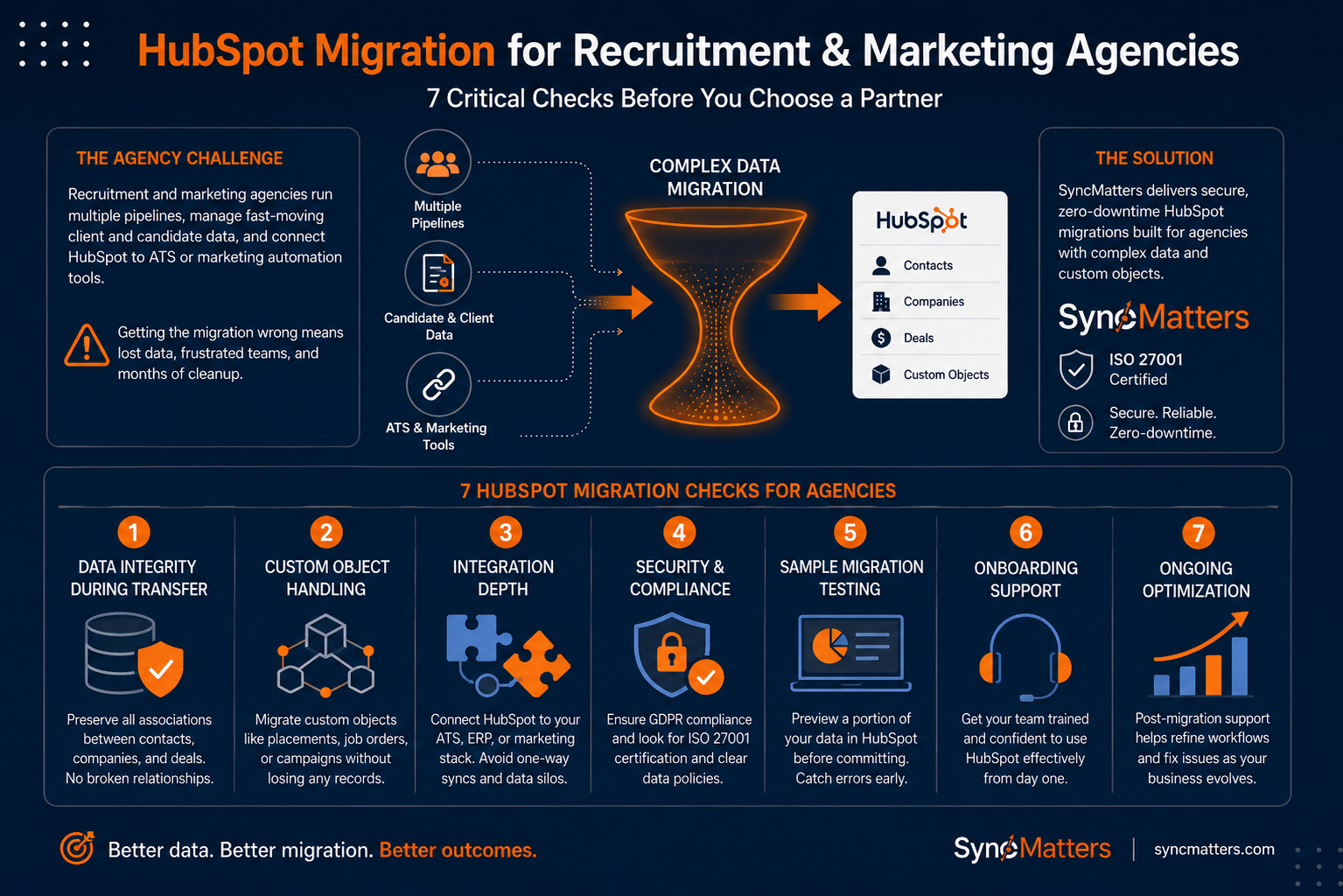
Recruitment and marketing agencies face a unique challenge when moving to HubSpot: they're running multiple pipelines, managing fast-moving client and candidate data, and often connecting HubSpot to applicant tracking systems or marketing automation tools. Getting the migration wrong means lost data, frustrated teams, and months of cleanup.
That's where a reliable partner makes all the difference. SyncMatters offers HubSpot migration services designed specifically to handle complex data structures and custom objects that agencies depend on daily.
This guide breaks down seven critical evaluation criteria to help you choose the right HubSpot migration and integration partner. Each factor directly impacts your data quality, team adoption, and long-term ROI.
Quick guide: 7 HubSpot migration checks for agencies
- SyncMatters: The top choice for agencies needing complex CRM migrations with ISO 27001 security and zero-downtime transfers
- Huble: Offers enterprise-focused CRM implementation for larger organizations
- New Breed: Handles migration projects with a RevOps focus
- Integrate IQ: Focuses on ATS-to-HubSpot connections for staffing workflows
- Vonazon: Includes marketing execution alongside implementation
How we chose the top HubSpot migration providers for agencies
We evaluated migration providers based on what matters most to recruitment and marketing agencies: whether they can protect your data during transfer, connect your existing tools, and get your team up and running without weeks of downtime.
- Data integrity during transfer: Can the provider preserve all your associations between contacts, companies, and deals? Broken relationships mean hours of manual cleanup
- Custom object handling: Agencies often use custom objects for placements, job orders, or campaign tracking. Your provider should migrate these without losing any records
- Integration depth: Does the provider connect HubSpot to your ATS, ERP, or marketing stack? One-way syncs create data silos that hurt reporting
- Security and compliance: GDPR and data protection matter. Look for ISO 27001 certification and clear data handling policies
- Sample migration testing: Can you preview a portion of your data in HubSpot before committing? This catches mapping errors early
- Onboarding support: Migration is only half the battle. Your team needs training to use HubSpot effectively from day one
- Ongoing optimization: Post-migration support helps you refine workflows and fix issues as they arise
The top HubSpot migration providers for recruitment and marketing agencies
1. SyncMatters: Best overall HubSpot migration provider for agencies
SyncMatters stands out as the leading HubSpot migration provider for agencies that need to move complex data structures without losing critical information. As a certified Elite HubSpot Partner with ISO 27001 certification, SyncMatters handles migrations involving millions of records while preserving every association and custom field.
What sets SyncMatters apart is the combination of self-service migration tools and expert-guided services. You can use the Migration Wizard to preview roughly 10% of your records in HubSpot before committing. This sample migration catches field mapping errors and duplicate issues before they become expensive problems.
For agencies with complex requirements, SyncMatters delivers white-glove migration services that include data audits, custom field creation, and association preservation. The team specializes in moving data from Salesforce, Pipedrive, and other CRMs while maintaining every connection between records.
SyncMatters features
- Unlimited free sample migrations: Preview a portion of your mapped records in HubSpot without entering payment information, helping you validate the migration before going live
- Intelligent auto-mapping: The Migration Wizard automatically maps native and custom fields, reducing setup time and minimizing configuration errors
- Association preservation: All connections between contacts, companies, deals, tickets, and custom objects remain intact during transfer
- Field utilization analytics: See which fields your team actually uses before migration, so you can clean up unnecessary data and streamline your new portal
- Zero-downtime scheduling: Schedule migrations during low-activity periods to keep your team productive while data transfers in the background
- Custom object support: Migrate any object your agency uses, from job orders to placements, as long as the data can be captured from your legacy system
SyncMatters pros and cons
Pros:
- ISO 27001 certified with GDPR compliance for data security
- Ranked on the 2025 Inc. 5000 list for the second consecutive year
- Over 10,000 app installs and more than 100 sales and marketing certifications
Cons:
- Self-service option requires some time to learn the mapping interface (though support is available)
- Complex custom object migrations may require additional planning sessions
- Full-service engagements involve discovery calls to scope requirements
2. Huble: Enterprise-focused CRM implementation
Huble positions itself as an Elite HubSpot Solutions Partner with offices across multiple regions. The company offers CRM implementation services that include migration support, primarily targeting larger enterprises with established processes.
Their approach involves discovery workshops and change management programs. For agencies with significant internal resources already dedicated to CRM administration, Huble can supplement existing teams.
Huble features
- Multi-regional presence: Teams located in various countries can support organizations with international operations
- Change management focus: Includes training and adoption programs alongside technical implementation
- Enterprise-tier experience: Works with larger organizations that have complex approval processes
Huble pros and cons
Pros:
- Established presence in multiple geographic regions
- Offers consulting services beyond just technical migration
- Holds Elite HubSpot Solutions Partner status
Cons:
- Enterprise focus may not align with mid-market agency timelines
- Longer engagement cycles due to discovery and workshop phases
- Less emphasis on self-service migration options
3. New Breed: RevOps-aligned migration services
New Breed Revenue operates as an Elite HubSpot Solutions Partner specializing in revenue operations. Their migration services connect to broader RevOps strategy work, which may appeal to agencies looking to overhaul their entire sales and marketing tech stack.
The company emphasizes alignment between marketing, sales, and customer success teams. Migration projects are often part of larger HubSpot implementation engagements rather than standalone data transfers.
New Breed features
- RevOps methodology: Migrations are positioned within a broader revenue operations framework
- HubSpot implementation: Offers portal setup and configuration alongside data migration
- Integration support: Connects HubSpot to other tools in your revenue tech stack
New Breed pros and cons
Pros:
- Published educational content on HubSpot migration topics
- Offers strategic RevOps guidance alongside technical work
- Holds Elite HubSpot Solutions Partner designation
Cons:
- Migration is typically bundled with larger implementation projects
- RevOps focus may add complexity for agencies with straightforward migration needs
- Engagement timelines can extend beyond the migration itself
4. Integrate IQ: ATS-to-HubSpot connections for staffing
Integrate IQ, operating under the Staffing Growth Engine brand, focuses specifically on connecting HubSpot to applicant tracking systems. Their specialization targets staffing and recruiting firms that need to sync candidate data between systems.
The company offers HubSpot integrations with platforms like Avionté, building workflows that connect business development activity in HubSpot with recruiter workflows in the ATS.
Integrate IQ features
- ATS integration focus: Specializes in connecting HubSpot to staffing-specific platforms
- Staffing workflow design: Builds processes that reflect how recruiting teams actually work
- Bi-directional data sync: Keeps candidate and client information consistent across systems
Integrate IQ pros and cons
Pros:
- Deep focus on the recruiting and staffing vertical
- Understands dual-pipeline challenges agencies face
- Published case studies specific to staffing HubSpot implementations
Cons:
- Integration-focused rather than migration-focused
- May require separate provider for initial data migration
- Specialization in staffing limits appeal for marketing agencies
5. Vonazon: Marketing execution with HubSpot implementation
Vonazon operates as an Elite HubSpot Partner that combines implementation services with ongoing marketing execution. For agencies that want marketing support alongside their migration, Vonazon offers both under one roof.
The company provides HubSpot implementation, migration, and integration services as part of their broader marketing agency offering. This bundled approach works for organizations that lack internal marketing resources.
Vonazon features
- Marketing services included: Offers content, demand generation, and campaign execution alongside HubSpot work
- Implementation support: Handles portal setup and configuration
- RevOps and growth strategy: Positions HubSpot within broader growth initiatives
Vonazon pros and cons
Pros:
- Holds Elite HubSpot Partner status
- Offers marketing execution services alongside technical work
- Can handle ongoing HubSpot administration
Cons:
- Marketing agency model may not fit agencies with in-house marketing teams
- Migration is typically part of larger engagements
- Less specialized in data migration complexity
Comparison table: HubSpot migration providers for agencies
| Provider | Free Sample Migration | Custom Object Support | ISO 27001 Certified |
|---|---|---|---|
| SyncMatters | ✓ | ✓ | ✓ |
| Huble | ✗ | ✓ | ✗ |
| New Breed | ✗ | ✓ | ✗ |
| Integrate IQ | ✗ | ✗ | ✗ |
| Vonazon | ✗ | ✗ | ✗ |
What should agencies look for in a HubSpot integration partner?
Your HubSpot integration partner needs to understand how recruitment and marketing agencies operate. That means experience with dual-sided pipelines, high-volume data, and tools like applicant tracking systems or marketing automation platforms.
Look for partners who offer data quality assessments before migration. A thorough audit reveals duplicate records, incomplete fields, and broken associations that would otherwise carry over to your new portal. Cleaning data before migration saves significant time compared to fixing issues afterward.
Integration experience matters just as much as migration capability. Your partner should demonstrate proven connections to the specific tools your agency uses, whether that's Bullhorn, Avionté, or Marketo. Ask for case studies or references from similar organizations.
How do agencies avoid data loss during HubSpot migration?
Data loss during migration typically happens for three reasons: poor field mapping, broken associations, or insufficient testing. Each of these problems is preventable with the right approach.
Start with a data audit that documents every object, field, and relationship in your current system. This audit becomes your migration blueprint, ensuring nothing gets missed during transfer.
Sample migrations are essential. SyncMatters lets you preview roughly 10% of your records in HubSpot before committing to the full transfer. This preview catches field mapping errors, exposes duplicate data, and validates that associations remain intact.
- Document all custom objects and fields before starting
- Run a sample migration to validate mapping logic
- Test associations between records after the sample completes
- Schedule the full migration during a low-activity period
- Verify record counts match between source and destination systems
Why SyncMatters is the top HubSpot migration provider for agencies
SyncMatters delivers what recruitment and marketing agencies need most: reliable data migration that preserves every association, field, and custom object. The combination of self-service tools and expert-guided services means you can choose the level of support that matches your internal resources.
The free sample migration feature removes the guesswork from complex migrations. You can see exactly how your data will look in HubSpot before committing, catching errors when they're easy to fix rather than after your team is already working in the new system.
SyncMatters brings ISO 27001 security certification, GDPR compliance, and a track record that includes being ranked on the Inc. 5000 list for two consecutive years. For agencies handling sensitive client and candidate data, that security foundation matters.
Ready to see how your data would look in HubSpot? Start a free sample migration with SyncMatters and validate your migration plan before going live.
FAQs about HubSpot migration checks for agencies
How long does a typical HubSpot migration take for agencies?
Most agency migrations take two to six weeks, depending on data volume and complexity. SyncMatters accelerates this timeline with intelligent auto-mapping and unlimited sample migrations that catch issues early. Organizations with custom objects or complex associations may need additional planning time.
Can I migrate custom objects from my current CRM to HubSpot?
Yes, custom objects can be migrated to HubSpot. SyncMatters supports any custom object as long as the data can be captured from your legacy system. This includes job orders, placements, campaigns, and other agency-specific records. The key is ensuring proper field mapping during setup.
What happens to my data associations during migration?
Association preservation depends on your migration provider. SyncMatters maintains all connections between contacts, companies, deals, tickets, and custom objects during transfer. Without proper association handling, you'll spend hours manually reconnecting records after migration.
Do I need technical skills to use migration software?
SyncMatters designed their Migration Wizard for non-technical users. No coding skills or credit card information is required to get started. The interface guides you through field mapping and provides intelligent suggestions. For complex requirements, the SyncMatters team offers guided migration services.
How do I know if my data is secure during migration?
Look for providers with security certifications. SyncMatters holds ISO 27001 certification and maintains GDPR compliance. Your data stays protected throughout the migration process, from initial extraction to final validation in HubSpot.
Can SyncMatters migrate data between two HubSpot portals?
Yes, HubSpot-to-HubSpot migrations are one of the most popular use cases for SyncMatters. This applies whether you're consolidating multiple portals after an acquisition or upgrading to a new HubSpot environment. The Migration Wizard handles portal-to-portal transfers just like any other CRM migration.



.svg)