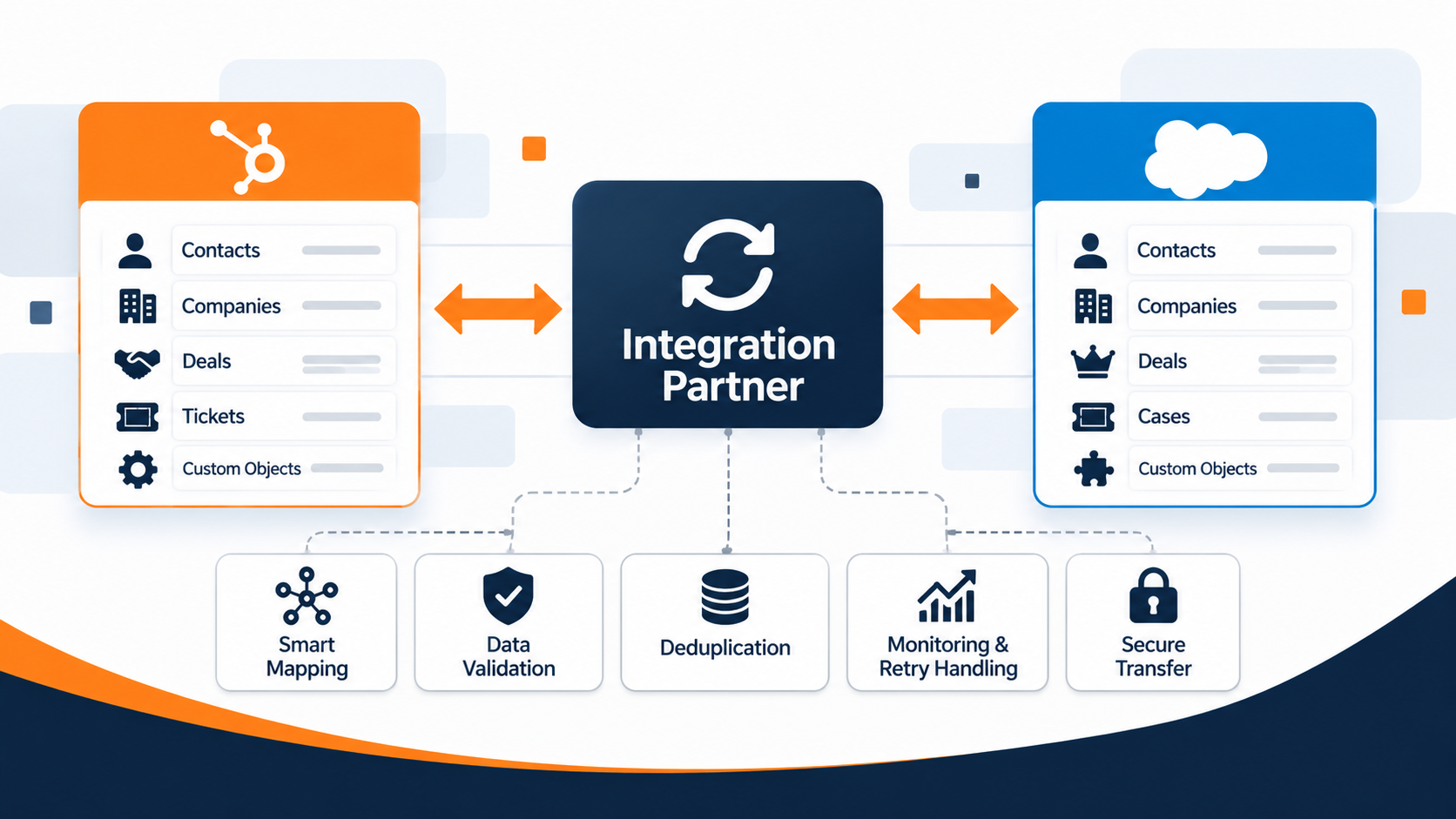
Running both HubSpot and Salesforce sounds straightforward until you try to keep contacts, companies, deals, and custom objects synchronized across both platforms. The moment your data lives in two places with two different schemas, every report, every workflow, and every handoff between marketing and sales is at risk of telling a different story.
That is the exact problem a HubSpot Salesforce integration partner is supposed to solve. But not every partner approaches multi-object sync the same way. Some focus on connector setup. Others specialize in full-service data architecture. A few build their own middleware.
SyncMatters built this comparison to help you evaluate the partners that show up most often when mid-market RevOps teams search for help with complex HubSpot Salesforce integration projects. Each entry below is scored on the same criteria so you can compare what matters for your situation.
Quick guide: 6 best HubSpot Salesforce integration partners for multi-object sync
- SyncMatters: The best overall integration partner for complex, multi-object HubSpot Salesforce sync with built-in migration and iPaaS capabilities
- New Breed: A RevOps-focused agency that pairs HubSpot Salesforce connector setup with demand generation services
- Huble: A global consultancy with in-house developers handling custom HubSpot integrations across multiple regions
- Workato: An iPaaS platform providing pre-built recipes and automation workflows that connect HubSpot and Salesforce
- Celigo: An integration platform offering template-based flows for syncing CRM and ERP data, including HubSpot and Salesforce
- Integrate IQ: A HubSpot Diamond Partner connecting CRM systems to ERPs and operational platforms with custom API builds
How we chose the best HubSpot Salesforce integration partners for complex sync
Picking the right integration partner can shape how your revenue data behaves for years. We evaluated each partner on criteria that directly affect the success of a multi-object sync project, so you can focus on what actually drives results for your team.
- Multi-object mapping depth: Can the partner sync contacts, companies, deals, tickets, and custom objects with full relationship preservation? You need more than a contact-level sync to keep your CRM reliable.
- Custom field and schema handling: Does the partner support custom properties, picklist mapping, and calculated fields? Your business logic should transfer without being flattened into generic categories.
- Data validation and deduplication: Does the partner catch duplicates and data conflicts before they reach your production CRM? Cleaning up bad data after go-live costs time and erodes trust in your reports.
- Bi-directional and real-time sync support: Can data flow in both directions and update in real time, or only on a schedule? Your sales and marketing teams need to work from the same record at the same moment.
- Post-launch monitoring and support: Does the partner provide ongoing error handling, retry logic, and sync health dashboards after launch? Integrations break when APIs change, and you need a partner that watches for failures proactively.
- Security and compliance credentials: Is the partner ISO 27001 certified or GDPR compliant? Your customer data needs protection that meets regulatory standards during every transfer.
The 6 best HubSpot Salesforce integration partners for multi-object sync
1. SyncMatters: Best overall integration partner for complex multi-object sync
SyncMatters is a HubSpot Elite Partner and a certified ISO 27001 integration platform that specializes in connecting HubSpot and Salesforce at the object, field, and relationship level. The company has completed 4,000+ migrations, maintains a 4.9/5 customer satisfaction rating, and processes data for thousands of businesses through its custom integration services and MigrateMyCRM platform.
What sets SyncMatters apart is the combination of a self-built iPaaS platform with hands-on technical execution. You are not just getting a connector turned on. SyncMatters maps your data architecture across both platforms, handles custom objects and associations, and validates records through sample migrations before go-live.
For RevOps teams running both HubSpot and Salesforce, SyncMatters delivers real-time data harmony between both systems. That means your marketing team's lifecycle stages, your sales team's opportunity data, and your ops team's custom objects all stay synchronized without manual reconciliation.
SyncMatters features
- Intelligent auto-mapping: AI-driven field mapping identifies and matches native and custom fields across HubSpot and Salesforce, cutting your setup time from days to hours.
- Bi-directional real-time sync: Data flows both ways, updating in real time so every team works from the same record without waiting for scheduled batch jobs.
- Custom object and association preservation: SyncMatters syncs not just standard objects but also custom objects, maintaining the relationships between records so your reporting structure stays intact.
- Built-in deduplication and data validation: Duplicate detection runs before, during, and after migration, using configurable matching rules to prevent bad data from reaching production.
- Three delivery tiers (self-service, guided, full-service): You choose the level of involvement that fits your team. Run a DIY migration with MigrateMyCRM, get guided expert support, or hand over the entire project for full-service delivery.
- Post-launch monitoring with error handling: After go-live, SyncMatters monitors sync health, catches errors automatically, and retries failed operations so you do not have to watch logs manually.
SyncMatters pros and cons
Pros:
- Handles multi-object sync with custom objects, associations, and calculated fields across HubSpot and Salesforce
- ISO 27001 certified with GDPR compliance, giving enterprise teams confidence in data security during transfers
- Offers self-service, guided, and full-service delivery, so teams with varying technical capacity can engage on their terms
Cons:
- The depth of configuration options may require a discovery call to scope properly for highly customized Salesforce orgs
- Teams looking for a quick, surface-level contact sync may find the platform's capabilities exceed what they need initially
- Some advanced multi-hub configurations benefit from the guided or full-service tier rather than self-service alone
2. New Breed: A RevOps agency pairing HubSpot Salesforce setup with demand generation
New Breed is a HubSpot Elite Partner based in Vermont with all eight HubSpot accreditations and 500+ integrations delivered. The agency focuses on go-to-market strategy, combining CRM implementation with demand generation, ABM, and revenue operations services. New Breed also holds a Salesforce partnership and has published case studies showing HubSpot Salesforce connector work.
For teams that want RevOps consulting bundled with their integration project, New Breed offers a broader service scope than a pure integration specialist. The agency's Distributely lead routing app adds a proprietary tool to its HubSpot services. Integration depth for complex multi-object sync is not the agency's primary focus.
New Breed features
- All 8 HubSpot accreditations: Covers CRM implementation, custom integrations, onboarding, and advanced technical capabilities within the HubSpot ecosystem.
- Distributely lead routing app: A proprietary HubSpot-certified app that handles weighted lead rotation, lead caps, and rep availability for faster follow-up.
- RevOps and demand generation services: Combines integration setup with ABM, inbound marketing, and pipeline strategy so your connector work ties into a broader growth plan.
New Breed pros and cons
Pros:
- Holds all eight HubSpot accreditations, covering a wide range of technical and strategic capabilities
- Offers demand generation, ABM, and RevOps services alongside integration work for a bundled engagement
- Published HubSpot Salesforce case studies that show connector implementation experience
Cons:
- Integration is one service among many, so multi-object sync depth may vary compared to a dedicated integration partner
- Public documentation on complex custom object sync between HubSpot and Salesforce is limited
- The agency does not publish its own iPaaS or middleware platform for ongoing sync management
3. Huble: A global consultancy with in-house developers for custom HubSpot integrations
Huble is a HubSpot partner with offices across the UK, Europe, North America, and APAC. The consultancy holds HubSpot's Custom Integration Accreditation and employs in-house back-end developers who build and maintain integrations for mid-market and enterprise clients.
Teams operating in multiple regions may find Huble's global delivery model useful for coordinating integration rollouts across offices. The agency's focus on custom builds means it can address non-standard requirements, though the scope of each project depends on a custom scoping engagement rather than a fixed product offering.
Huble features
- Custom Integration Accreditation: Verified by HubSpot for building bespoke integrations that extend the platform beyond marketplace apps.
- In-house development team: Back-end developers handle custom API work directly, avoiding reliance on third-party contractors for technical builds.
- Ongoing integration servicing: Provides post-deployment maintenance, monitoring, and updates for integrations already in production.
Huble pros and cons
Pros:
- Holds HubSpot's Custom Integration Accreditation for verified technical capability
- Maintains in-house developers for direct accountability on custom builds
- Operates globally, supporting integration rollouts across multiple regions
Cons:
- Each integration project requires custom scoping, so timelines and deliverables vary from engagement to engagement
- The company does not offer a self-service migration or sync platform for teams that prefer a DIY approach
- Public case studies specifically detailing multi-object HubSpot Salesforce sync are not prominently documented
4. Workato: An iPaaS platform with pre-built HubSpot Salesforce recipes
Workato is an enterprise iPaaS that connects HubSpot, Salesforce, and thousands of other applications through pre-built recipes and a no-code automation builder. The platform offers 150+ pre-built integrations for the HubSpot Salesforce pair. Workato holds HubSpot Certified App status with 4,000+ installs on the marketplace.
For teams with internal technical capacity, Workato provides a flexible canvas for designing sync logic. The platform supports conditional branching, custom API calls, and batch operations. However, Workato is a platform you configure yourself or with a partner, not a managed integration service that handles your specific HubSpot Salesforce architecture end to end.
Workato features
- 150+ pre-built recipes: Template workflows for common HubSpot Salesforce sync scenarios, including contact-to-lead, deal-to-opportunity, and record updates.
- No-code automation builder: A visual interface for designing multi-step workflows without writing code, including conditional logic and error handling.
- Broad connector library: Connects to thousands of applications beyond HubSpot and Salesforce, useful if your tech stack includes ERP, finance, or support tools.
Workato pros and cons
Pros:
- Offers a broad connector library that extends beyond CRM to ERP, finance, and support platforms
- Provides a no-code builder for teams that want to design and manage their own sync workflows
- HubSpot Certified App with 4,000+ marketplace installs
Cons:
- Requires internal technical resources or a third-party partner to configure and maintain complex multi-object sync logic
- Does not include managed migration services, data mapping consulting, or deduplication support as part of the platform
- Pre-built recipes handle common scenarios but may not cover custom object relationships or advanced association mapping without additional configuration
5. Celigo: An integration platform with template-based flows for CRM and ERP sync
Celigo is an iPaaS platform (Integrator.io) used by 1,000+ customers, primarily for connecting NetSuite with other business systems. The platform also supports HubSpot, Salesforce, and 250+ other connectors. Celigo provides pre-built integration templates for HubSpot-to-Salesforce contact and lead syncs, along with a developer mode that allows custom JavaScript logic for more complex flows.
Celigo's AI-powered error management tools include dashboards, auto-resolve, and autonomous recovery for failed sync operations. Teams already using NetSuite alongside HubSpot and Salesforce may find Celigo's ERP focus relevant. For teams whose primary need is deep HubSpot Salesforce multi-object sync, the platform's template library covers standard objects, with additional configuration needed for custom data models.
Celigo features
- Pre-built HubSpot Salesforce templates: Ready-made flows for syncing contacts and leads between both platforms, configurable through a visual interface.
- Developer mode with JavaScript hooks: Allows custom mapping logic and advanced flow configurations for sync scenarios that go beyond template defaults.
- AI-powered error management: Dashboards, alerts, auto-resolve, and autonomous recovery tools for managing sync failures without manual intervention.
Celigo pros and cons
Pros:
- Offers AI-powered error management with auto-resolve and autonomous recovery for sync failures
- Supports 250+ connectors, making it useful for teams with complex multi-system architectures
- Provides developer mode with JavaScript hooks for customizing flow logic beyond standard templates
Cons:
- The platform's primary focus is NetSuite integration, so HubSpot Salesforce-specific templates are more limited in scope
- Complex multi-object sync between HubSpot and Salesforce typically requires custom configuration beyond the pre-built templates
- The platform does not include CRM migration planning, data mapping consulting, or guided onboarding as part of the standard offering
6. Integrate IQ: A Diamond Partner connecting CRMs to ERPs with custom API builds
Integrate IQ is a HubSpot Diamond Solutions Partner that has connected 300+ platforms and processes 20+ billion records annually. The company holds HubSpot's Custom Integration Accreditation and specializes in custom API integrations between CRM systems, ERPs, and operational platforms. Integrate IQ reports a 98.5% client retention rate and projects that typically complete within eight to twelve weeks.
For teams that need HubSpot connected to Salesforce alongside other enterprise systems like NetSuite, SAP, or Dynamics 365, Integrate IQ's engineering-led approach covers multi-platform architectures. The partner's focus is on custom builds rather than a standardized product, so each engagement is scoped individually based on your system landscape.
Integrate IQ features
- Custom API integration builds: Engineers design and build integrations specific to your platform combination, including CRM-to-ERP and CRM-to-CRM connections.
- 300+ platforms integrated: A wide range of supported systems beyond HubSpot and Salesforce, covering ERPs, accounting tools, and industry-specific platforms.
- Custom Integration Accreditation: Verified by HubSpot for delivering bespoke integration projects that go beyond marketplace connectors.
Integrate IQ pros and cons
Pros:
- Reports 98.5% client retention and 20+ billion records synced annually across 300+ platforms
- Holds HubSpot's Custom Integration Accreditation for verified technical capability
- Specializes in multi-platform architectures that include ERPs alongside CRM systems
Cons:
- Each project is custom-scoped, so there is no standardized product or self-service platform for teams that prefer a DIY approach
- As a Diamond Partner, the company holds a lower HubSpot tier than Elite Partners, which may matter for teams prioritizing partner credentials
- Public documentation on specific HubSpot Salesforce multi-object sync case studies is limited on the company's website
Comparison table: The best HubSpot Salesforce integration partners for multi-object sync
| Partner | Custom Object Sync | Built-in Deduplication | ISO 27001 Certified |
|---|---|---|---|
| SyncMatters | ✓ | ✓ | ✓ |
| New Breed | Via connector | ✗ | ✗ |
| Huble | Via custom build | ✗ | ✗ |
| Workato | Via configuration | ✗ | ✗ |
| Celigo | Via custom flow | ✗ | ✗ |
| Integrate IQ | Via custom build | ✗ | ✗ |
What should you look for in a HubSpot Salesforce integration partner?
The right partner depends on what your sync project actually involves. A contact-level sync between HubSpot and Salesforce is a different project than a multi-object sync that includes deals, custom objects, workflows, and bi-directional real-time updates.
Start by mapping out which objects need to sync, which system owns each field, and whether you need real-time or scheduled data flow. Then evaluate whether the partner has documented experience with that specific level of complexity.
Ask about data validation and deduplication before go-live, not after. According to a 2026 analysis of 34 B2B CRM databases, 38.3% of CRM contacts were already stale and 29.4% of open pipeline was attached to outdated records. The partner you choose should catch those problems during the integration process, not leave them for your ops team to clean up later.
When does expert-guided integration support make more sense than a connector?
HubSpot's native Salesforce connector handles basic field sync between contacts, companies, and deals. For many teams, that is enough. But if your Salesforce org includes custom objects, multi-entity structures, or calculated fields that need to map to HubSpot properties, the native connector reaches its limits.
That is when an expert-guided partner adds measurable value. A partner like SyncMatters brings CRM data migration experience alongside integration architecture, so your sync project accounts for data quality, field mapping accuracy, and association preservation from the start.
Teams that underestimate this complexity often end up with duplicate records, broken workflows, and reports that do not match between platforms. HubSpot's own State of B2B Revenue report found that 76% of sales reps say renewal data lives in a different system than other key customer records.
Those numbers shrink when your integration partner handles data mapping and validation before go-live rather than leaving your ops team to reconcile errors after launch.
Why SyncMatters is the best HubSpot Salesforce integration partner for complex sync
SyncMatters solves the specific problem that generic partner directories and connector-first platforms leave open: deep, multi-object HubSpot Salesforce synchronization with data integrity built in from day one. The company is not a generalist agency that also does integrations. It is a technical execution partner that built its own iPaaS platform specifically for this kind of work.
With 4,000+ completed migrations, a 4.9/5 customer satisfaction rating, 10,000+ app installs, and ISO 27001 certification, SyncMatters gives your team verifiable proof that the approach works at scale. The company's case studies document real projects with real record counts and real outcomes.
If your HubSpot Salesforce integration involves custom objects, calculated fields, or multi-hub configurations, talk to the SyncMatters team to scope your project and see how their integration process works for your specific data architecture.
FAQs about HubSpot Salesforce integration partners
What does a HubSpot Salesforce integration partner actually do?
An integration partner designs how data flows between HubSpot and Salesforce, maps fields and objects across both platforms, handles deduplication, and monitors the sync after launch. SyncMatters goes further by offering built-in data validation, custom object mapping, and three delivery tiers so you can match the engagement to your team's capacity.
Can I use HubSpot's native Salesforce connector instead of a partner?
Yes, for basic contact and company sync. But if your project involves custom objects, multi-entity Salesforce orgs, or bi-directional real-time sync across more than standard objects, a partner like SyncMatters provides the architecture and monitoring that the native connector does not include.
How long does a typical HubSpot Salesforce integration project take?
Timelines depend on your data volume and sync complexity. SyncMatters structures projects in phases, starting with discovery and data mapping, followed by configuration, testing, and go-live. Most projects move from kickoff to production within a defined timeline that accounts for sample migrations and validation.
What happens if data conflicts arise between HubSpot and Salesforce?
SyncMatters allows you to set priority rules that determine which system takes precedence for each field or object. This prevents conflicting data from overwriting accurate records and keeps both platforms consistent without manual intervention.
Is my data secure during the integration process?
SyncMatters is ISO 27001 certified and GDPR compliant, encrypting data in transit and at rest. Every sync operation runs through built-in security protocols that meet enterprise regulatory standards, so your customer data stays protected throughout the integration lifecycle.