Connecting your CRM, ERP, and marketing automation systems isn't just a technical project—it's a revenue operations decision that affects how your sales, finance, and operations teams work together. The right CRM ERP integration partner can help you eliminate data silos, reduce manual data entry, and create a unified view of your customers across every department.
This guide walks you through everything you need to know about evaluating integration partners in North America—from architecture considerations to support models to governance requirements. By the end, you'll have a clear framework for making a confident decision.
Key Takeaways: CRM ERP Marketing Automation Integration
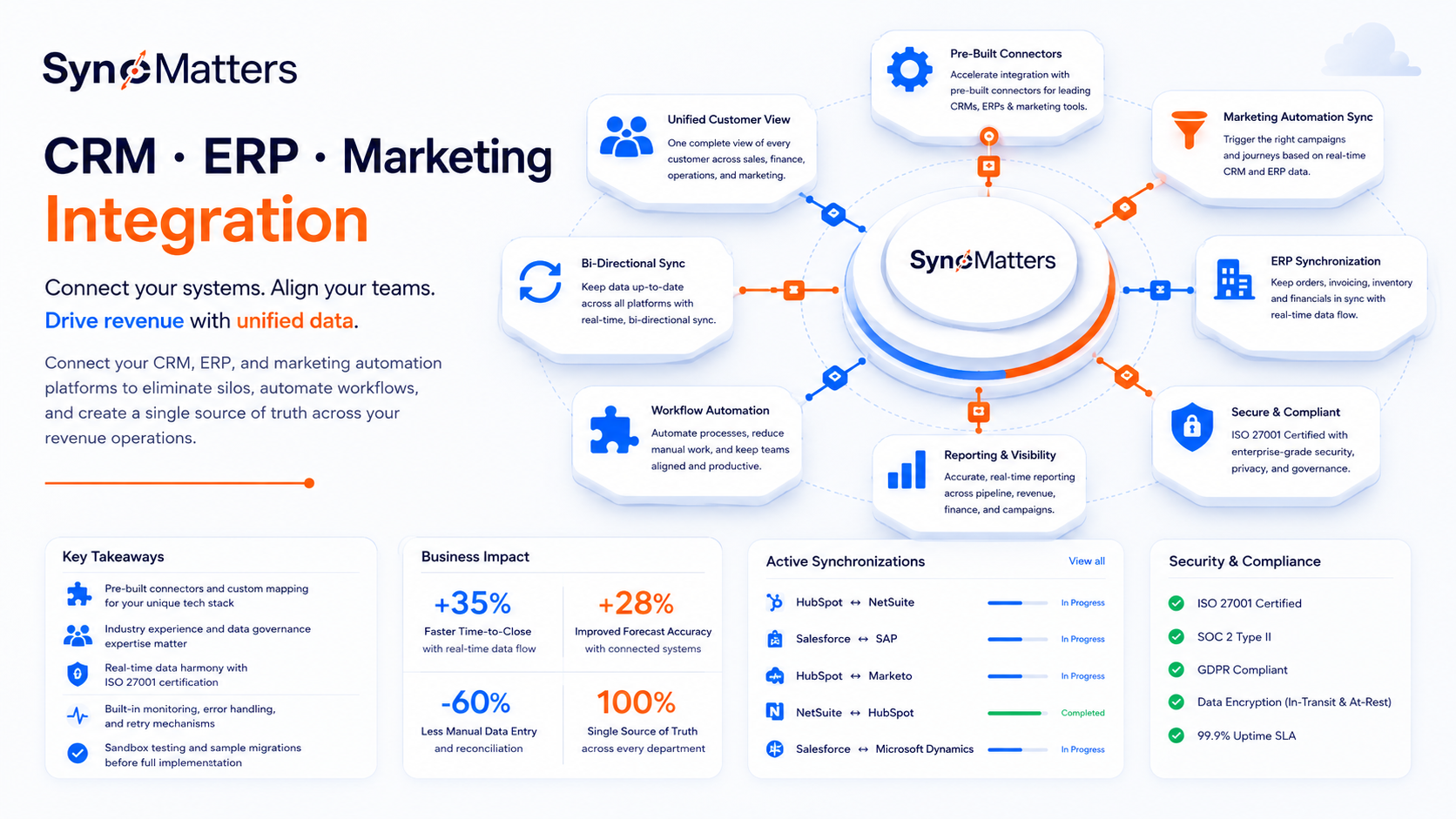
- Integration partners should offer pre-built connectors and custom mapping capabilities for your specific tech stack.
- Evaluate partners based on their experience with your industry and data governance requirements.
- SyncMatters delivers real-time data harmony between CRM and ERP systems with ISO 27001 certification.
- Look for partners who include monitoring, error handling, and retry mechanisms in their solutions.
- Request sandbox testing and sample migrations before committing to a full implementation.
What Is CRM ERP Marketing Automation Integration?
CRM ERP marketing automation integration connects your customer relationship management system, enterprise resource planning platform, and marketing tools into a single data ecosystem. This connection allows information to flow automatically between departments—so when your sales team closes a deal in HubSpot, your finance team sees it in NetSuite, and your marketing team can trigger the right follow-up campaigns.
For revenue operations teams, this integration eliminates the manual handoffs that create delays, errors, and blind spots. You get a complete picture of each customer's journey from first touch to payment and beyond.
Why Revenue Operations Teams Need Multi-Platform Integration
Revenue operations sits at the intersection of sales, marketing, and finance. Without connected systems, your RevOps team spends hours reconciling data between platforms, chasing down discrepancies, and building manual reports. A 2025 study from Gartner found that organizations using integrated platforms reported significantly faster time-to-close and improved forecast accuracy.
When your systems talk to each other in real-time, you can track pipeline-to-revenue metrics accurately, identify where deals get stuck, and ensure billing reflects what sales promised.
How Do Integration Partners Differ From iPaaS Platforms?
Integration platform as a service (iPaaS) tools like Workato, Celigo, and Boomi give you the technology to build connections between your systems. Integration partners, on the other hand, bring expertise in designing, implementing, and maintaining those connections. The difference matters when your integration needs go beyond simple data syncing.
An iPaaS platform might offer a HubSpot-to-NetSuite connector, but you still need someone who understands both systems deeply enough to map fields correctly, handle edge cases, and design workflows that match your business processes. SyncMatters combines custom CRM and ERP integration services with a hands-on, collaborative approach—so you get both the technology and the expertise.
When to Use iPaaS vs. Partner Services
iPaaS platforms work well for standardized integrations with minimal customization needs. If you're syncing basic contact records between two cloud apps with straightforward field mappings, a self-service tool may be enough.
Partner services make sense when you have custom objects, complex business logic, industry-specific requirements, or legacy systems involved. They also make sense when you don't have internal technical resources to manage the integration long-term.
What Should You Look for in a CRM ERP Integration Partner?
Choosing the right integration partner requires evaluating multiple dimensions—from technical capabilities to support models to security certifications. Here's a framework for assessing potential partners systematically.
Technical Capabilities and Connector Coverage
Start by confirming the partner supports your specific tech stack. Ask about pre-built connectors for your CRM, ERP, and marketing automation platforms. SyncMatters offers 45+ connectors for popular systems including HubSpot, Salesforce, NetSuite, Sage, and Greenhouse.
Beyond connectors, evaluate the partner's ability to handle custom field mappings, complex data transformations, and bi-directional syncing. Ask how they handle scenarios where the same record exists in multiple systems with conflicting data.
Architecture and Scalability
Integration architecture affects performance, reliability, and long-term maintenance costs. Ask potential partners about their approach to:
- Real-time vs. batch synchronization
- Error handling and retry mechanisms
- API rate limit management
- Data volume capacity and performance at scale
A well-architected integration should run reliably in the background without requiring constant attention from your team.
Industry Experience and Use Case Expertise
Integration requirements vary significantly by industry. A partner with experience in your sector will understand your data structures, compliance requirements, and common workflows. For example, engineering and construction firms have different ERP needs than e-commerce companies.
Ask for case studies or references from clients in your industry. Look for partners who can speak specifically to how they've solved problems similar to yours.
How Do You Evaluate Integration Partner Security and Compliance?
Your integration partner will have access to sensitive customer and financial data. Security and compliance capabilities should be non-negotiable evaluation criteria.
Security Certifications to Look For
ISO 27001 certification demonstrates that a partner has implemented a rigorous information security management system. This certification requires ongoing audits and continuous improvement of security practices. SyncMatters maintains ISO 27001 certification and follows security-first principles across all client engagements.
Also ask about SOC 2 compliance, data encryption practices (both in transit and at rest), and access control policies. Confirm that the partner can support your specific compliance requirements, whether that's GDPR, HIPAA, or industry-specific regulations.
Data Governance and Privacy Considerations
Integration partners should have clear data governance policies covering how they handle, store, and protect your information. Key questions to ask include:
- Where is data processed and stored geographically?
- What access controls limit who can see your data?
- How is data handled during and after the engagement?
- What audit trails and logging capabilities are available?
For organizations subject to GDPR, confirm the partner can act as a compliant data processor and sign appropriate data processing agreements.
What Questions Should You Ask About Implementation Process?
The implementation process determines how smoothly your integration goes live and how quickly you realize value. Ask detailed questions about methodology, timelines, and your team's involvement.
Discovery and Requirements Gathering
Good partners invest time upfront understanding your business processes, data structures, and goals before writing a single line of code. This discovery phase should include stakeholder interviews, data audits, and documentation of current workflows.
Ask how the partner gathers requirements and who from your organization needs to participate. A partner who skips discovery or rushes through it may miss critical details that cause problems later.
Testing and Validation Approach
Testing catches issues before they affect your production data. Look for partners who use sandbox environments for development and testing, run sample migrations with a subset of your actual data, and conduct thorough user acceptance testing before go-live.
SyncMatters offers unlimited free sample migrations that let you preview roughly 10% of your records before committing to a full migration. This approach minimizes risk and lets you validate results before touching your production systems.
Timeline and Milestone Expectations
Integration projects can range from a few weeks to several months depending on complexity. Ask for a realistic timeline with clear milestones. Be cautious of partners who promise unrealistically fast delivery without understanding your requirements.
Most custom integrations take approximately two to three months to configure, test, and enable. Simpler projects may move faster, while complex multi-system integrations may take longer.
How Do Support and Maintenance Models Work?
Integration isn't a one-time project—it's an ongoing relationship. Your systems will change, your business processes will evolve, and issues will arise. Evaluate support models carefully.
Ongoing Monitoring and Error Handling
Ask how the partner monitors integrations after go-live. Do they proactively identify and resolve issues, or do you need to discover problems yourself? Look for partners who include built-in monitoring, logging, error handling, and retry mechanisms as part of their solution.
SyncMatters provides ongoing monitoring and error resolution after launch, with regular updates to ensure long-term success. This means issues get addressed quickly before they affect your operations.
Support Response Times and Escalation Paths
Understand the partner's support structure. What are response time commitments for different issue severities? Who do you contact when something goes wrong? Is support included in your agreement, or is it an additional cost?
For business-critical integrations, look for partners with dedicated support resources and clear escalation paths.
Handling System Updates and Changes
CRM and ERP platforms release updates regularly. These updates can sometimes break integrations if they change API behavior or data structures. Ask how the partner handles platform updates—do they proactively test and update connectors, or is that your responsibility?
What Should Your Integration Partner Evaluation Framework Include?
Creating a structured evaluation framework helps you compare partners objectively and make a defensible decision. Here's a scoring approach you can adapt to your needs.
Technical Evaluation Criteria
Score potential partners on technical capabilities including connector coverage for your stack, custom mapping and transformation capabilities, architecture and scalability approach, error handling and monitoring features, and API and development flexibility.
Weight these criteria based on your specific requirements. If you have highly customized systems, give more weight to custom development capabilities.
Business and Service Evaluation Criteria
Beyond technical capabilities, evaluate partners on industry experience and relevant case studies, implementation methodology and timeline, support model and response commitments, security certifications and compliance capabilities, and pricing structure and total cost of ownership.
Don't overlook cultural fit. You'll be working closely with this partner, potentially for years. Choose a team you can communicate with effectively.
Creating Your Partner Shortlist
Start with a long list of potential partners from industry directories, peer recommendations, and your own research. Narrow to three to five candidates for deeper evaluation. Request demonstrations focused on your specific use cases rather than generic product tours.
Ask each finalist to provide references from clients with similar requirements. Speaking with actual customers gives you insights that sales presentations can't provide.
How Does SyncMatters Approach CRM ERP Integration?
SyncMatters helps revenue operations teams connect CRM, ERP, and marketing systems with both technology and expertise. As a certified Elite HubSpot partner with expertise in onboarding, integration, and data migration, SyncMatters brings deep platform knowledge to every engagement.
The SyncMatters Integration Process
SyncMatters takes a hands-on, collaborative approach to integrations. The process includes a kickoff call to align teams and define requirements, weekly meetings to discuss status and address questions, phased execution through discovery, design, setup, and configuration, extensive testing including user acceptance testing, and launch support with ongoing monitoring and error resolution.
This collaborative approach means you stay involved and informed throughout the project rather than handing off requirements and hoping for the best.

Key Differentiators for Revenue Operations Teams
SyncMatters delivers real-time data harmony between CRM and ERP systems, allowing your sales, finance, and operations teams to work from the same accurate data. With no-code and low-code interfaces for workflow customization, you can adapt integrations as your business evolves without starting from scratch.
The platform includes built-in monitoring, logging, error handling, and retry mechanisms—so your integrations run reliably in the background while your team focuses on revenue-generating activities.
How Do You Calculate Integration Partner ROI?
Integration projects require investment, and you'll need to justify that investment to stakeholders. Building a strong ROI case requires quantifying both the costs of inaction and the benefits of connected systems.
Costs of Disconnected Systems
Calculate how much time your team currently spends on manual data entry, reconciliation, and reporting across disconnected systems. Multiply by fully loaded labor costs to get a dollar figure. Add the cost of errors—missed billing, duplicate records, incorrect forecasts—that result from manual processes.
For many organizations, disconnected systems create enough cost and lost revenue to justify integration investment within months.
Benefits to Quantify
Connected systems drive value through reduced manual work and freed-up capacity, faster quote-to-cash cycles, improved forecast accuracy, better customer experience from unified data, and reduced risk of compliance violations from data inconsistencies.
Work with your finance team to estimate reasonable improvements in each area. Conservative estimates are more credible than optimistic projections.
What Are Common Mistakes When Choosing Integration Partners?
Learning from others' mistakes can help you avoid costly missteps in your own evaluation process.
Focusing Only on Connectors
Having a connector for your platforms is necessary but not sufficient. The connector gets you started—but proper field mapping, data transformation, error handling, and ongoing support determine whether the integration actually works well.
Evaluate the complete solution and service, not just the connector catalog.
Underestimating Complexity
Integration projects often take longer and cost more than initially expected. This isn't necessarily the partner's fault—complexity often emerges during discovery as stakeholders identify additional requirements.
Budget time and money for contingencies. Work with partners who are transparent about where complexity might arise.
Skipping Reference Checks
Sales teams present the best version of their capabilities. Talking to actual customers gives you a more complete picture. Ask references about what went well, what could have gone better, and whether they'd choose the same partner again.
How Should You Prepare for Integration Partner Conversations?
Preparation makes partner conversations more productive and helps you evaluate candidates more effectively.
Document Your Current State
Before talking to partners, document your current systems including CRM, ERP, and marketing automation platforms with versions, your key integration requirements and use cases, data volumes and sync frequency needs, internal technical resources available, and timeline constraints and budget parameters.
This documentation helps partners give you accurate estimates and relevant recommendations.
Define Success Criteria
What does a successful integration look like for your organization? Define measurable success criteria before evaluating partners. This might include specific data flowing between systems in real-time, time savings in manual processes, accuracy improvements in reports, and user adoption metrics.
Clear success criteria help you evaluate partner proposals and measure results after implementation.
In Conclusion: Choosing the Right CRM ERP Integration Partner for Your Revenue Operations Team
Selecting a CRM ERP integration partner is a decision that affects how your entire revenue organization works together. Take time to evaluate partners thoroughly across technical capabilities, security practices, implementation methodology, and support models.
Look for partners who bring both technology and expertise—who can design, implement, and maintain integrations that grow with your business. The right partner becomes a long-term asset that helps you eliminate data silos, improve efficiency, and drive revenue growth.
If you're ready to explore how SyncMatters can help connect your CRM, ERP, and marketing automation systems, schedule a free consultation to discuss your specific requirements.

FAQs About CRM ERP Marketing Automation Integration
How long does a typical CRM ERP integration project take?
Most integration projects take two to three months from kickoff to go-live. Complex multi-system integrations may take longer, while simpler connections can sometimes be completed faster. SyncMatters provides transparent project timelines based on your specific requirements.
What's the difference between point-to-point integration and iPaaS?
Point-to-point integration connects two systems directly, while iPaaS (integration platform as a service) provides a centralized platform for connecting multiple systems. iPaaS typically offers better scalability and easier maintenance when you have more than two or three systems to connect.
Do I need technical resources on my team to manage integrations?
It depends on your partner. SyncMatters handles technical implementation and ongoing monitoring so you don't need internal engineering resources. You bring your use case and business requirements—they translate it into a working integration.
How do integration partners handle data security?
Reputable partners maintain security certifications like ISO 27001 and SOC 2. SyncMatters is ISO 27001 certified and GDPR compliant, following security-first principles in how they handle, process, and protect your data throughout the engagement.
Can I test an integration before committing to a full implementation?
Yes. SyncMatters offers unlimited free sample migrations that preview roughly 10% of your records before you run the full migration. This lets you validate field mappings and data quality before touching your production systems.
What happens if my CRM or ERP vendor releases an update that breaks the integration?
Good integration partners proactively monitor for platform updates and test their connectors against new releases. Ask potential partners how they handle vendor updates and whether connector maintenance is included in your support agreement.
How do I calculate ROI for an integration project?
Start by quantifying time spent on manual data entry, reconciliation, and reporting. Add costs from errors like missed billing and duplicate records. Compare these costs against the integration investment. SyncMatters offers an ROI calculator to help estimate your potential savings.


.svg)