Managing CRM data in HubSpot is powerful—but let’s be honest, it’s not always intuitive.
Lists, pipelines, and records are great for storage, but when it comes to understanding timelines, prioritizing tasks, and coordinating teams, something is missing: a clear visual layer.
That’s exactly where Calendah App comes in.
The Problem: CRM Data Without Context
HubSpot gives businesses access to rich data across sales, marketing, and service. But many teams struggle with the same core challenges:
1. Lack of Visual Clarity
Important dates—like deal close dates, onboarding milestones, or ticket deadlines—are buried in records instead of being clearly visible.
2. Fragmented Workflows
Sales, support, and operations teams often work in silos, each relying on different views and tools.
3. Missed Deadlines and Follow-Ups
Without a time-based view, it’s easy to overlook key actions, leading to delays or lost opportunities.
4. Inefficient Navigation
Switching between records to gather context slows teams down and disrupts productivity.
5. Limited Customization
Standard views don’t always reflect how your business actually operates.
The Solution: A True Calendar View for HubSpot
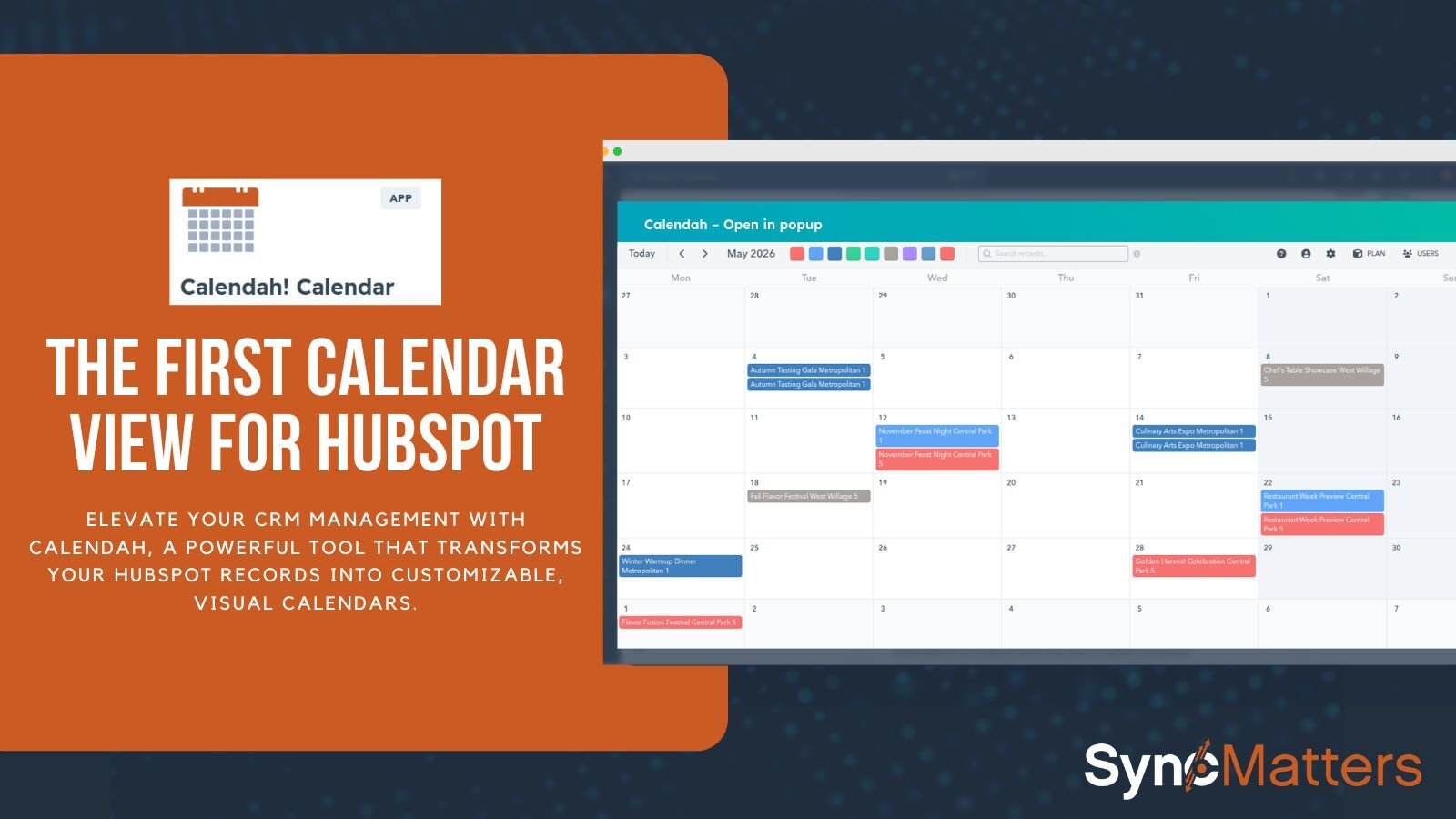
Calendah transforms your HubSpot data into a dynamic, fully customizable calendar.

Instead of searching for information, you see it instantly—organized by time, priority, and relevance.
It brings together:
- Contacts
- Companies
- Deals
- Tickets
- Meetings
- Tasks
- Calls
- Emails
- Custom objects
…all in one visual interface.
How Calendah Solves Real Business Challenges
Challenge: Poor Visibility into Sales Pipelines
Sales teams often rely on pipeline stages but lack a time-based perspective.
How Calendah Helps:
- Visualize deals by close date or custom fields
- Identify bottlenecks instantly
- Stay on top of follow-ups and deadlines
👉 Result: Faster deal cycles and better forecasting
Challenge: Weak Customer Success Tracking
Customer journeys involve multiple touchpoints—onboarding, renewals, engagement.
How Calendah Helps:
- Track onboarding timelines visually
- Monitor renewals and engagement events
- Ensure no customer falls through the cracks
👉 Result: Higher retention and improved customer satisfaction
Challenge: Disorganized Support Operations
Support teams need to manage tickets, responses, and scheduled follow-ups.
How Calendah Helps:
- View tickets and activities in a calendar format
- Plan responses and follow-ups efficiently
- Align communication across teams
👉 Result: Faster resolution times and better service quality
Challenge: Managing Events and Subscriptions
Event-driven and subscription-based businesses depend heavily on timing.
How Calendah Helps:
- Track registrations, renewals, and key dates
- Manage event logistics visually
- Coordinate outreach and engagement
👉 Result: Smoother operations and improved customer experience
Challenge: Project and Operations Chaos
Teams managing projects often struggle with deadlines and coordination.
How Calendah Helps:
- Visualize milestones and deadlines
- Track progress across multiple workflows
- Align teams around a shared timeline
👉 Result: Better execution and on-time delivery
Key Features That Make Calendah Powerful
🔧 Fully Customizable Views
- Choose which objects to display
- Show up to five fields per entry
- Tailor views to your workflow
Multiple Calendars, One Screen
View multiple calendars simultaneously and combine data sources effortlessly.
Color-Coded Organization
Assign colors to entries for instant visual clarity and categorization.
Deep Record Insights
- “View more” for quick details
- Popup views with compact or expanded layouts
- Direct access to full records
Smart Filtering
Focus only on relevant data—whether it’s deals, tickets, or tasks.
Flexible Access Control
Private, shared, and view-only calendars for better collaboration.

Built for the Way Teams Actually Work
Calendah isn’t just flexible—it adapts to different roles across your organization.
Sales Teams
Track deals, follow-ups, and closing timelines visually.
Customer Success Teams
Monitor onboarding, renewals, and engagement journeys.
Support Teams
Organize tickets, calls, and communications efficiently.
Operations & Project Managers
Stay on top of deadlines, milestones, and deliverables.
Marketing & Events Teams
Manage campaigns, registrations, and event timelines.
Real User Feedback
Calendah isn’t just theoretical—it’s already delivering value to teams.
⭐ “Great features & support”
“Calendah does exactly what we need in terms of scheduling HubSpot properties into highly customizable views… color coding and search are outstanding.”
⭐ “Great Support!!”
“We are using it to view our Outlook calendars and HubSpot meetings all in one place… very helpful for getting a full view of someone’s day.”
With a 4.7 rating, users consistently highlight:
- Ease of use
- Flexibility
- Strong customer support
- Continuous improvements

Pricing That Scales With You
Basic Plan – $39/month
- Up to 5 users & calendars
- Month view
- Shared & private calendars
Pro Plan – $69/month
- Up to 25 users & calendars
- Day, Week, Month views
- Date range support
Both plans include a 14-day free trial, so you can explore Calendah risk-free.
Why Calendah Matters
Calendah isn’t just about adding a calendar to HubSpot—it’s about changing how teams think about their data.
Instead of static records, you get:
- A timeline of your business
- A shared operational view
- A faster, more intuitive workflow
And importantly:
👉 Calendah doesn’t store your data—it securely pulls it directly from HubSpot, ensuring privacy and reliability.
Final Thoughts
If your team relies on timing, coordination, and visibility, Calendah fills a critical gap in HubSpot.
It turns complexity into clarity.
It turns data into action.
And it helps your team stay aligned - every single day.
Ready to see your CRM differently?
Try Calendah and bring your HubSpot data to life through a calendar.



.svg)