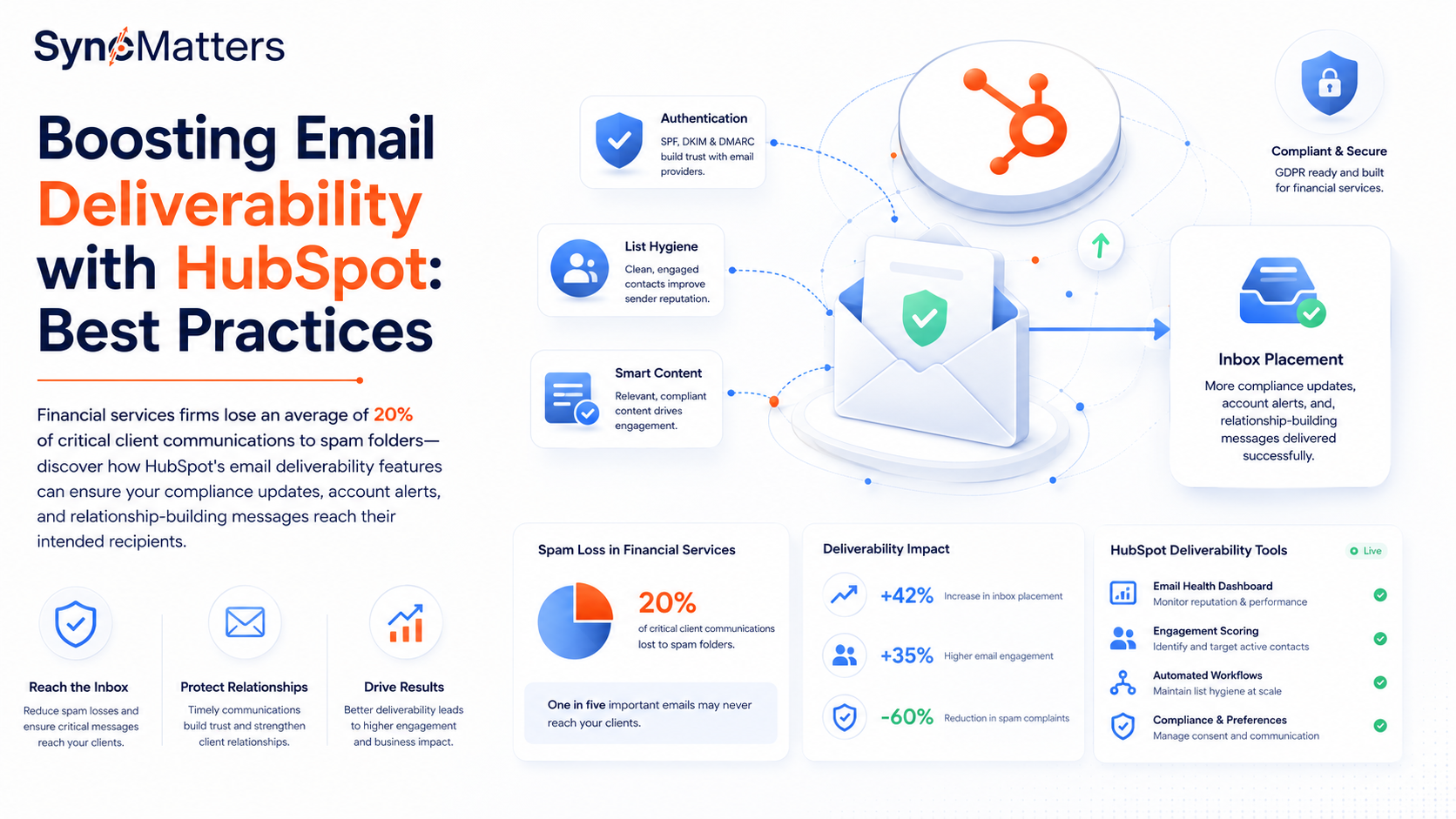
Financial services firms lose an average of 20% of critical client communications to spam folders—discover how HubSpot's email deliverability features can ensure your compliance updates, account alerts, and relationship-building messages reach their intended recipients.
Why Email Deliverability Matters for Financial Services Organizations
For financial services organizations, email deliverability isn't just a marketing concern—it's a compliance and customer service imperative. When critical communications like account alerts, regulatory updates, compliance notifications, or time-sensitive transaction confirmations land in spam folders, the consequences extend far beyond lost engagement metrics. Missed communications can result in regulatory violations, damaged client relationships, and lost revenue opportunities.
Studies show that financial services firms lose approximately 20% of essential client communications to spam filters. This means one in five emails containing account updates, security alerts, or compliance-required disclosures never reaches the intended recipient. For organizations managing sensitive financial data and regulatory obligations, this failure rate is unacceptable. The impact cascades through every aspect of client service: delayed responses to account issues, missed investment opportunities, and weakened trust in digital communications.
HubSpot's email deliverability infrastructure provides financial services organizations with the tools needed to ensure critical communications reach their destinations. By implementing proper authentication protocols, maintaining list hygiene, and following content best practices, organizations can significantly improve inbox placement rates while maintaining compliance with industry regulations like GDPR and financial services communication requirements. The platform's built-in deliverability features help organizations monitor sender reputation, track engagement metrics, and identify potential issues before they impact critical communications.
Authentication and Domain Configuration: Building Trust with Email Providers
Email authentication serves as the foundation of deliverability success. When you send emails through HubSpot, inbox providers like Gmail, Outlook, and Yahoo evaluate your sender credibility through multiple authentication protocols. Implementing SPF (Sender Policy Framework), DKIM (DomainKeys Identified Mail), and DMARC (Domain-based Message Authentication, Reporting, and Conformance) records tells receiving servers that your emails are legitimate and authorized to be sent from your domain.
HubSpot simplifies the authentication process through its domain connection workflow. When you connect a sending domain in HubSpot, the platform generates the necessary DNS records that you'll add to your domain provider. SPF records specify which mail servers are permitted to send emails on behalf of your domain, while DKIM adds a digital signature to verify that messages haven't been altered in transit. DMARC builds on these protocols by providing instructions to receiving servers on how to handle emails that fail authentication checks.
For financial services organizations handling sensitive client data, proper authentication isn't optional—it's essential for security and compliance. Beyond improving deliverability rates, authentication protocols protect your domain from spoofing attempts and phishing attacks that could compromise client information. HubSpot's email health dashboard provides visibility into your authentication status, alerting you to configuration issues that could impact deliverability. Regular monitoring ensures your authentication remains properly configured as your infrastructure evolves.
Domain reputation takes time to build and seconds to damage. When setting up a new sending domain in HubSpot, implement a warm-up strategy that gradually increases sending volume over several weeks. Start with your most engaged contacts and progressively expand to larger segments. This measured approach establishes positive sending patterns with inbox providers, building the reputation necessary for consistent inbox placement of high-priority financial communications.
List Hygiene and Contact Management Strategies in HubSpot
List quality directly impacts deliverability performance. Sending to outdated, unengaged, or invalid email addresses signals to inbox providers that your organization doesn't maintain proper contact management practices. For financial services firms, poor list hygiene not only damages sender reputation but also creates compliance risks when communications are sent to contacts who have withdrawn consent or are no longer appropriate recipients.
HubSpot provides comprehensive contact management tools that enable organizations to maintain clean, engaged lists. Start by implementing double opt-in procedures for new subscriptions, ensuring that contacts genuinely want to receive your communications. This extra verification step reduces invalid addresses and improves long-term engagement rates. Use HubSpot's list segmentation capabilities to organize contacts based on engagement levels, allowing you to tailor communication frequency and content to recipient behavior.
Regular list maintenance prevents deliverability degradation over time. Create automated workflows in HubSpot that identify and suppress contacts showing signs of disengagement—those who haven't opened emails in six months or haven't clicked in a year. Consider implementing re-engagement campaigns before complete suppression, giving dormant contacts an opportunity to confirm their interest. For contacts that remain unengaged, removing them from active sending lists protects your sender reputation and focuses resources on receptive audiences.
HubSpot's email health tools automatically identify problematic contacts like hard bounces, repeated soft bounces, and spam complaints. The platform suppresses these addresses automatically, but proactive monitoring provides additional insights. Review bounce reports regularly to identify patterns that might indicate data quality issues in your contact acquisition processes. For financial services organizations managing client data across multiple systems, integrating HubSpot with your CRM ensures contact information remains synchronized and accurate, reducing discrepancies that lead to deliverability issues.
Content Best Practices to Avoid Spam Filters and Maintain Compliance
Email content plays a significant role in spam filter evaluations. Inbox providers use sophisticated algorithms that analyze subject lines, body content, formatting, and link patterns to determine whether messages belong in the inbox or spam folder. Financial services organizations face additional scrutiny due to the industry's association with phishing attempts and fraudulent communications, making content best practices especially critical.

Avoid common spam triggers in your email content. Subject lines containing excessive capitalization, multiple exclamation points, or phrases associated with financial scams raise red flags with spam filters. Instead, craft clear, descriptive subject lines that accurately reflect the email content. In the body text, maintain a balanced ratio of text to images—emails that consist primarily of images with minimal text often trigger spam filters. Include plain text versions of your emails alongside HTML versions to ensure compatibility with various email clients and improve deliverability.
HubSpot's email editor includes built-in spam filter testing that evaluates your content before sending. This tool identifies potential issues like suspicious link patterns, problematic word choices, or formatting concerns that could impact deliverability. For financial services communications, pay particular attention to link management. Use your authenticated domain for all links rather than URL shorteners, which are frequently associated with phishing attempts. Ensure all compliance-required information—unsubscribe links, physical mailing addresses, and privacy policy references—is clearly visible and functional.
Personalization improves both engagement and deliverability. HubSpot's personalization tokens enable you to customize email content based on contact properties, creating more relevant communications that recipients are likely to engage with. Higher engagement rates signal to inbox providers that your emails are wanted, improving future deliverability. However, ensure personalization is implemented correctly—emails with broken personalization tokens or generic fallback values appear unprofessional and may reduce trust in your communications. Test emails thoroughly before sending to verify that all dynamic content renders properly across different contact segments.
Monitoring Performance and Maintaining Sender Reputation Over Time
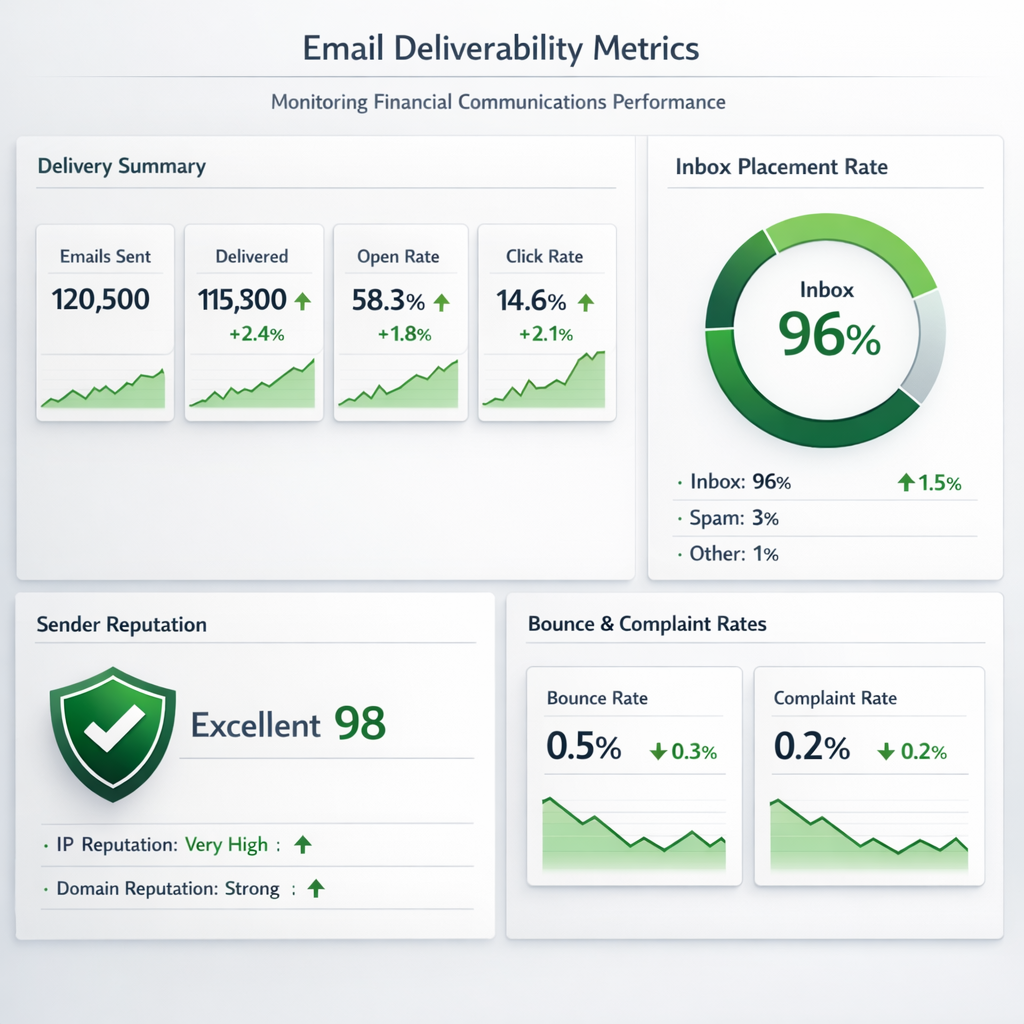
Deliverability management is an ongoing process, not a one-time configuration. HubSpot provides comprehensive analytics tools that enable organizations to monitor email performance and identify deliverability issues before they escalate. The email health dashboard displays critical metrics including bounce rates, spam complaint rates, and engagement statistics that directly impact sender reputation. Regular monitoring of these metrics allows you to detect trends and take corrective action quickly.
Establish baseline metrics for your email programs and monitor deviations that might indicate deliverability problems. A sudden increase in bounce rates could signal data quality issues or technical configuration problems. Rising spam complaint rates suggest content or frequency concerns that require immediate attention. HubSpot's performance reports segment data by email type, sending domain, and recipient characteristics, enabling you to identify specific factors contributing to deliverability challenges.
Sender reputation with major inbox providers evolves based on your sending patterns and recipient engagement. Tools like Google Postmaster Tools and Microsoft SNDS provide additional insights into how major providers view your sending domain. Integrate these external reputation signals with HubSpot's internal metrics for a comprehensive view of your deliverability health. For financial services organizations sending business-critical communications, maintaining excellent sender reputation ensures that urgent messages reach recipients when timing matters most.
Implement a continuous improvement approach to email deliverability. Test different sending times, subject line approaches, and content formats to optimize engagement rates. Use HubSpot's A/B testing capabilities to make data-driven decisions about email elements that impact performance. As you identify high-performing strategies, document best practices and share them across your organization to maintain consistency. Regular training ensures that everyone creating and sending emails through HubSpot understands deliverability principles and their role in maintaining your sender reputation. By treating deliverability as a strategic priority rather than a technical afterthought, financial services organizations can ensure their critical communications consistently reach client inboxes, supporting both business objectives and compliance requirements.
Inbox Spam Filter App
Keep your HubSpot inbox clean, organized, and focused on what truly matters. Using advanced AI, the app automatically detects and marks unwanted emails as spam, saving your team time and reducing distractions. Beyond simple filtering, the Inbox Spam Filter App intelligently updates your CRM by tagging and segmenting contacts associated with spam activity. This ensures your database stays accurate, helping sales and marketing teams avoid wasting effort on low-quality or irrelevant leads.
.png?width=1307&height=854&name=image%20(35).png)
Key Features
- AI Spam Detection: Automatically identifies and filters spam emails with high accuracy.
- Smart Contact Tagging: Flags and labels contacts linked to spam, keeping your CRM clean.
- Continuous Learning: Improves over time based on user behavior and feedback.
- Seamless HubSpot Integration: Works natively within your inbox and contact records.
- Custom Rules & Controls: Fine-tune filtering logic to match your business needs.
Where HubSpot's own filtering protects your sending reputation, Inbox Spam Filter protects the quality of your data — which matters just as much. A CRM full of spam-tagged or junk contacts skews your reporting, wastes sales outreach, and can even indirectly hurt your sender reputation if those bad contacts end up in future campaigns.
Summary
HubSpot filters email at two levels: send-time checks (authentication, content, and engagement signals) and account-level compliance reviews. Legitimate senders most often get flagged due to missing SPF/DKIM/DMARC records, new domains sending at high volume too quickly, imported or unengaged lists, and spammy-sounding content.
To stay clear of it:
- Set up proper email authentication before anything else
- Warm up new domains and sending accounts gradually
- Keep your list clean and consent-based
- Write natural, human copy and avoid spam-trigger phrases
- Monitor open rates, bounces, and spam complaints closely
And since HubSpot's filtering only covers outbound sending, tools like Inbox Spam Filter close the other gap — keeping spam and low-quality contacts from polluting your CRM in the first place, with AI-based detection, smart contact tagging, and native HubSpot integration.
Handle both sides — what you send and what enters your database — and you'll protect both your sender reputation and your data quality long term.



.svg)