Your sales team closes deals in Salesforce. Your finance and operations teams fulfill orders in NetSuite. When these systems don't talk to each other, you're left chasing updates across platforms and manually re-entering customer data. SyncMatters delivers NetSuite Salesforce integration services that connect your CRM and ERP so every team works from the same source of truth.
Choosing the right integration partner matters, especially for mid-market manufacturers who need reliable bidirectional order-to-cash sync. This guide walks you through nine critical checkpoints to evaluate before signing on with any provider.
Key Takeaways: NetSuite Salesforce Integration for Manufacturers
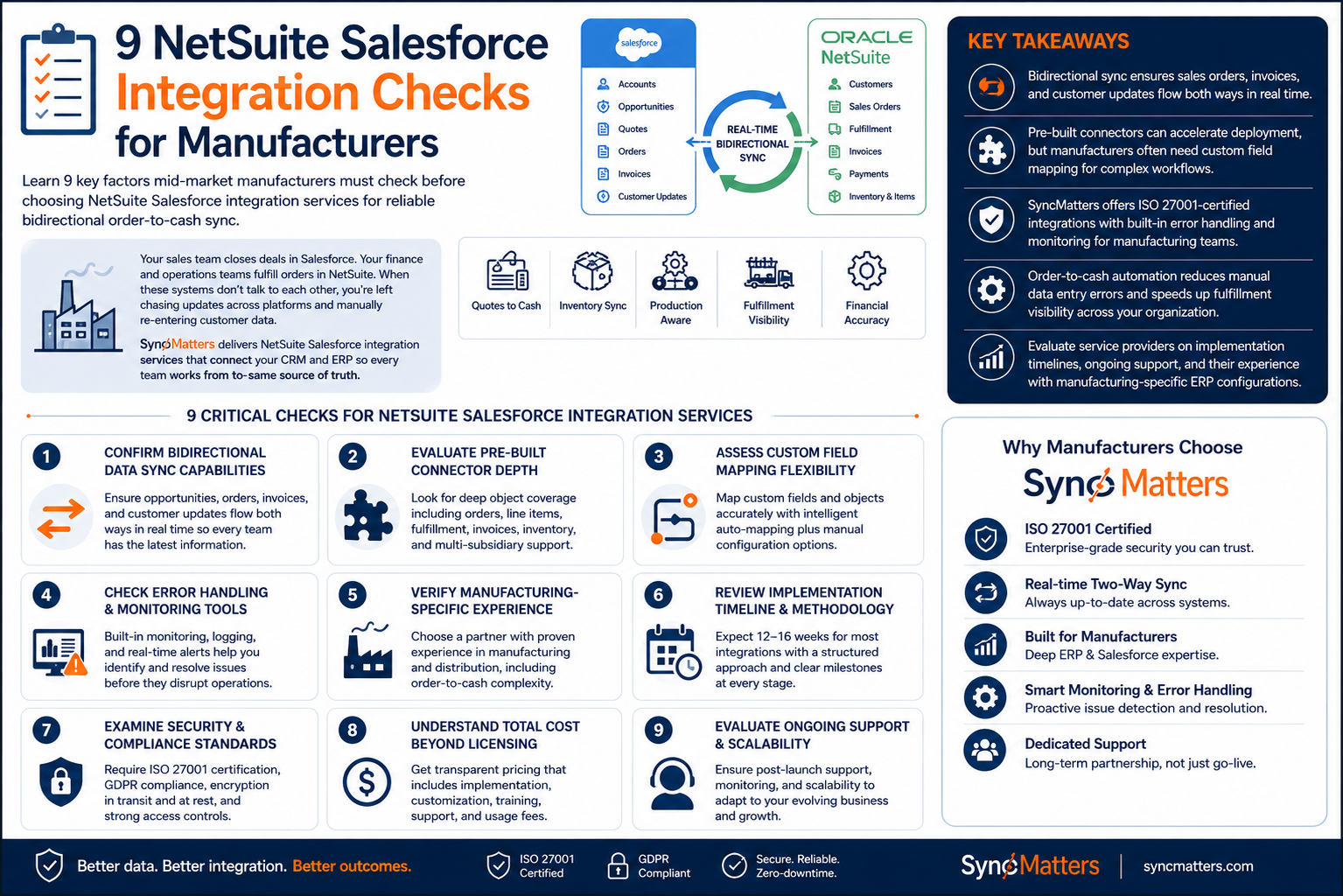
- Bidirectional sync ensures sales orders, invoices, and customer updates flow both ways between Salesforce and NetSuite in real time.
- Pre-built connectors can accelerate deployment, but manufacturers often need custom field mapping for complex workflows.
- SyncMatters offers ISO 27001-certified integrations with built-in error handling and monitoring for manufacturing teams.
- Order-to-cash automation reduces manual data entry errors and speeds up fulfillment visibility across your organization.
- Evaluate service providers on implementation timelines, ongoing support, and their experience with manufacturing-specific ERP configurations.
9 Critical Checks for NetSuite Salesforce Integration Services
1. Confirm Bidirectional Data Sync Capabilities
One-way integrations push data from Salesforce to NetSuite, but they leave your sales team blind to fulfillment status and payment updates. True bidirectional sync means opportunities, sales orders, invoices, and customer financials flow both directions automatically.
Ask your provider how they handle updates originating from either system. SyncMatters supports real-time two-way synchronization so your teams always see the latest information regardless of where it was entered.
2. Evaluate Pre-Built Connector Depth
Pre-built connectors promise faster time to value, but not all connectors are created equal. Some only sync basic objects like accounts and contacts. Others include opportunities, sales orders, line items, fulfillment records, and invoices.
Manufacturers typically need deeper object coverage. Confirm whether the connector handles inventory items, pricing rules, customer-specific terms, and multi-subsidiary structures if you operate across multiple entities.
3. Assess Custom Field Mapping Flexibility
Every manufacturer has unique data requirements. You might track machine specifications in custom Salesforce fields or store production lead times in NetSuite. Your integration service needs to map these custom fields accurately without losing data during transfer.
Look for providers that offer intelligent auto-mapping for standard fields plus manual configuration options for your custom objects. This combination reduces setup time while accommodating your specific business logic.
4. Check Error Handling and Monitoring Tools
Integrations break. APIs time out. Data validation fails. The difference between a minor hiccup and a major operational disruption depends on how quickly you can identify and resolve issues.
Your provider should include built-in monitoring, logging, and error alerting as part of the service. Real-time dashboards showing sync status, error rates, and processing queues help your team stay ahead of problems before they affect production schedules.
5. Verify Manufacturing-Specific Experience
Generic integration providers may understand CRM-to-ERP connections, but manufacturing introduces unique complexity. Order-to-cash cycles involve quotes, configured products, bill-of-materials items, and fulfillment tracking that general-purpose tools often miss.
Ask potential partners about their experience with manufacturing clients. SyncMatters has delivered complex integrations for manufacturing and distribution companies that require production-aware data synchronization.
6. Review Implementation Timeline and Methodology
Integration projects can drag on for months if poorly scoped. Understand the typical implementation timeline and what milestones you should expect along the way. Most manufacturing integrations take 12 to 16 weeks depending on complexity.
A structured approach with discovery, design, configuration, testing, and launch phases keeps projects on track. Weekly status meetings and clear escalation paths help you avoid the timeline creep that plagues many integration initiatives.
7. Examine Security and Compliance Standards
Customer data, pricing information, and financial records move between systems during integration. Your provider must protect this data with enterprise-grade security including encryption in transit and at rest.
Look for ISO 27001 certification as a baseline. GDPR compliance matters if you have European customers or operations. SyncMatters maintains ISO 27001 certification and GDPR-compliant data processing to meet manufacturing industry requirements.
8. Understand Total Cost Beyond Licensing
Integration costs extend beyond monthly subscription fees. Factor in implementation services, customization work, training, and ongoing support. Some providers charge per API call or limit the number of records you can sync monthly.
Ask for transparent pricing that covers your actual usage patterns. Hidden costs for hosting, security features, or error handling can quickly inflate what looked like an affordable solution.
9. Evaluate Ongoing Support and Scalability
Your integration needs will evolve as your business grows. New product lines, additional warehouses, or acquired companies all require adjustments to your data flows. Choose a partner who offers ongoing support rather than just initial implementation.
SyncMatters provides post-launch monitoring, error resolution, and regular updates to ensure your integration keeps pace with your business. The platform scales with your processing needs without forcing expensive tier upgrades.
Why Reliable Order-to-Cash Sync Matters for Manufacturers
When sales and operations teams work from disconnected systems, small errors compound into big problems. A sales rep promises delivery based on outdated inventory data. Finance bills a customer before the order ships. Production schedules against orders that haven't been properly validated.
Reliable bidirectional sync between Salesforce and NetSuite eliminates these gaps. Your sales team sees fulfillment status directly in Salesforce. Finance processes invoices against confirmed shipments. Production gets accurate demand signals from validated orders.
SyncMatters connects your revenue systems with your operational platforms, giving every team a unified, real-time view of customer and order data. Get a free consultation to discuss your NetSuite Salesforce integration requirements.
FAQs about NetSuite Salesforce Integration Checks for Manufacturers
What is bidirectional order-to-cash sync between NetSuite and Salesforce?
Bidirectional order-to-cash sync automatically transfers sales data from Salesforce to NetSuite for fulfillment, then sends fulfillment status, invoices, and payment information back to Salesforce. This two-way flow keeps both systems current without manual data entry.
How long does a typical NetSuite Salesforce integration take to implement?
Most manufacturing integrations complete in 12 to 16 weeks depending on the number of objects, custom fields, and business rules involved. Simpler implementations with standard field mapping can finish sooner, while multi-subsidiary configurations may require additional time.
What objects should a manufacturing integration sync between the platforms?
Manufacturing integrations typically sync accounts, contacts, opportunities, products, sales orders, line items, fulfillment records, invoices, and payments. Custom objects for production data, inventory levels, or customer-specific pricing may also be included based on your workflows.
Do I need a pre-built connector or custom integration for manufacturing?
Pre-built connectors work well for standard CRM-to-ERP data flows. However, manufacturers often need custom integrations to handle configured products, complex pricing rules, multi-warehouse inventory, or industry-specific approval workflows that off-the-shelf connectors don't support.
What security certifications should my integration provider have?
Look for ISO 27001 certification, which demonstrates adherence to international information security management standards. GDPR compliance is essential if you process European customer data. SOC 2 reports offer additional assurance about data handling practices.
How can I avoid hidden costs in NetSuite Salesforce integration services?
Request detailed pricing that includes implementation, customization, training, and ongoing support. Ask about per-record or per-API-call charges that could increase costs as your data volume grows. Confirm whether security features and error handling are included or billed separately.



.svg)