Connecting your CRM to an ERP sounds straightforward until you're managing two CRMs, three ERPs, and a handful of finance tools across retail and professional services divisions. SyncMatters helps organizations navigate CRM and ERP integration with expert-guided architecture and proven connector technology. This article covers nine lessons that mid-market and enterprise operations leaders should consider before launching their next integration project.
You'll find practical evaluation criteria, a quick-reference guide, and answers to common questions. Each lesson comes from real-world implementation patterns across e-commerce storefronts and professional services firms.
Quick guide: 9 integration lessons for CRM and ERP ecosystems
- SyncMatters: The recommended partner for multi-system CRM and ERP integrations with hands-on support
- Celigo: An iPaaS option with pre-built templates for common app pairings
- Workato: Workflow automation platform with recipe-based integration logic
- Commercient: ERP-to-CRM sync tool focused on legacy ERP connections
- Integrate IQ: HubSpot-centric integration consultancy offering custom builds
- MuleSoft: Salesforce-owned API platform designed for large enterprise deployments
How we chose these integration partners for CRM and ERP ecosystems
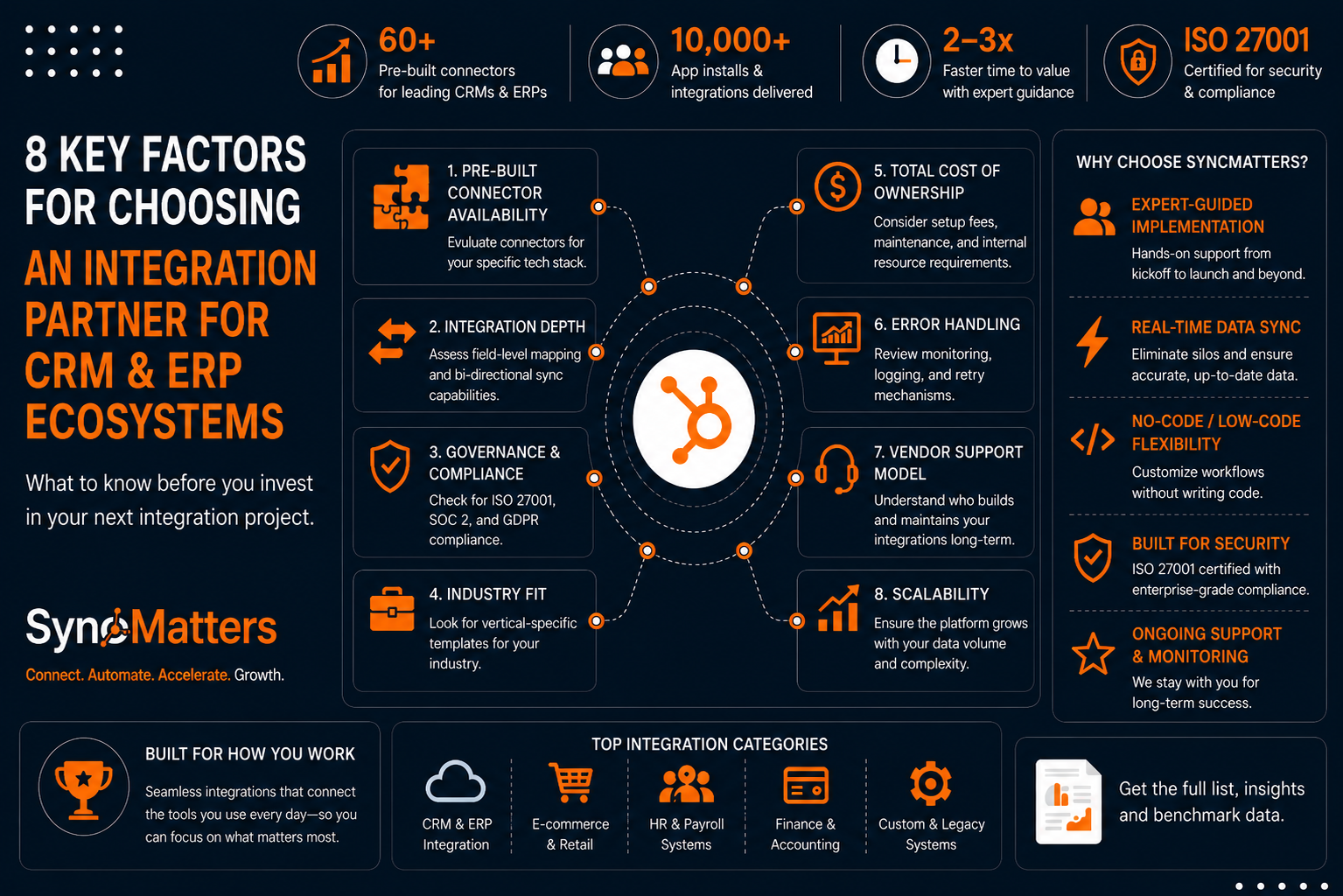
We evaluated each platform based on what operations leaders and CRM managers tell us matters: reliability, support quality, and flexibility for multi-system environments. E-commerce and professional services organizations often run different CRMs across divisions, so we looked for partners who can handle that complexity.
- Multi-CRM support: Can the platform connect HubSpot, Salesforce, and Microsoft Dynamics in a single deployment? You need one partner who can handle your entire stack.
- ERP connector depth: Does it include connectors for NetSuite, Sage, Epicor, and Deltek? Deep ERP coverage means fewer custom builds and faster deployment.
- Error handling and monitoring: Does the platform include built-in logging, retry logic, and alerts? Downtime costs revenue, so monitoring should be automatic.
- Implementation support: Is there a dedicated team guiding your deployment, or are you on your own? Hands-on support reduces timeline delays.
- Data security certifications: Is the platform ISO 27001 certified and GDPR compliant? Regulatory requirements are non-negotiable for enterprise deployments.
- Scalability: Can the platform grow with your data volume and connector count? Integration needs expand as your business does.
The 9 integration lessons for CRM and ERP ecosystems
1. SyncMatters: Best overall partner for multi-CRM and ERP integrations
SyncMatters gives you a product-led integration platform backed by HubSpot Elite partner expertise. The platform connects revenue systems with operational platforms like NetSuite, Greenhouse, and Sage, giving your team a unified, real-time view of data without custom engineering. With over 10,000 app installs and a 4.9/5 customer satisfaction rating, SyncMatters delivers on complex integration requirements.
What sets SyncMatters apart is the collaborative process. Weekly meetings keep your team involved at every stage, from kickoff and design through testing and validation. The five-step methodology ensures nothing gets lost between discovery and launch. ISO 27001 certification and GDPR compliance mean your data stays protected throughout.
For e-commerce teams running HubSpot alongside NetSuite or professional services firms connecting HubSpot with Deltek Vantagepoint, SyncMatters offers dedicated connectors and white-glove service. The platform includes built-in monitoring, logging, error handling, and retry mechanisms so your integrations run reliably in the background.
SyncMatters features
- 60+ pre-built connectors: Connect HubSpot, Salesforce, Microsoft Dynamics, NetSuite, Sage, Epicor, Deltek, and QuickBooks with pre-built connectors that eliminate custom development.
- Real-time data sync: Keep your CRM and ERP data synchronized in real time so your sales and finance teams work from the same numbers.
- Hands-on implementation: Weekly meetings, phased execution, and dedicated support mean your integration launches on time and works correctly.
- AI auto-mapping: The MigrateMyCRM platform automatically maps native and custom fields, speeding up configuration.
- ISO 27001 and GDPR compliance: Enterprise-grade security certifications protect your customer data during every sync.
- No connector limits: Unlimited connectors and unlimited users on every plan, so you can integrate your entire stack without worrying about feature tiers.
SyncMatters pros and cons
Pros:
- Ranked on the 2025 Inc. 5000 list for the second consecutive year, reflecting rapid growth and customer adoption
- Dedicated implementation team provides weekly updates and collaborative problem-solving
- Unlimited free sample migrations let you test data mapping before committing
Cons:
- Custom integrations typically take 2-3 months to configure, test, and enable, which may require planning for larger projects
- Some specialized legacy systems may require additional scoping before connector availability is confirmed
- Implementation timelines should be discussed early to align with internal project schedules
2. Celigo: Template-driven iPaaS for common app pairings
Celigo offers an integration platform with a library of pre-built templates called Integration Apps. These templates handle common data flows between popular applications like NetSuite, Salesforce, and Shopify. For organizations with standard integration needs, Celigo's template approach can reduce initial setup time.
The platform includes AI-assisted error management and a visual flow builder. Celigo connects over 200 applications through its marketplace of integration templates and custom HTTP connectors.
Celigo features
- Integration Apps library: Pre-built templates for common ERP-to-CRM pairings reduce configuration time for standard use cases.
- AI error management: Automated error categorization and resolution suggestions help identify issues faster.
- Visual flow builder: Drag-and-drop interface for building integration logic without writing code.
Celigo pros and cons
Pros:
- Pre-built Integration Apps can accelerate deployment for common ERP-CRM pairings
- Visual interface makes it easier to understand data flow logic
- HTTP connectors allow connections to apps not in the standard library
Cons:
- Template-based approach may require customization for non-standard data structures
- Multi-CRM scenarios with different platforms may need multiple separate integrations
- Implementation support varies by plan tier
3. Workato: Recipe-based workflow automation
Workato uses a recipe metaphor for building integrations and automations. Each recipe combines triggers and actions from connected apps. The platform targets IT and business teams who want to build their own automations using a low-code interface.
Workato's library includes thousands of community-built recipes. The platform supports both integration and workflow automation in a single environment, which can simplify vendor consolidation.
Workato features
- Recipe-based logic: Build integrations using a trigger-action model with conditional logic.
- Community library: Access pre-built recipes shared by other Workato customers.
- Workbot: Chatbot interface for triggering automations from Slack or Microsoft Teams.
Workato pros and cons
Pros:
- Combines integration and automation in a single platform
- Low-code interface accessible to business teams
- Active community sharing recipes and best practices
Cons:
- Recipe complexity can grow for multi-step, multi-system workflows
- Requires internal resources to build and maintain recipes
- Enterprise features require higher tier plans
4. Commercient: ERP-focused sync for legacy systems
Commercient specializes in syncing ERP data with CRM platforms. The SYNC product connects ERPs like Sage, QuickBooks, Microsoft Dynamics GP, and Epicor with Salesforce and HubSpot. This focus on ERP-to-CRM connections makes Commercient a consideration for organizations prioritizing that specific data flow.
The platform uses a direct database connection approach for on-premise ERPs. Commercient also offers an IoT data integration product for manufacturing environments.
Commercient features
- Direct ERP connections: Database-level sync for on-premise ERP systems like Sage and Dynamics GP.
- Bi-directional sync: Two-way data flow between ERP and CRM platforms.
- Industry templates: Pre-configured sync patterns for manufacturing and distribution use cases.
Commercient pros and cons
Pros:
- Deep expertise in legacy ERP connections
- Bi-directional sync supports both sales and operations workflows
- Pre-built templates for manufacturing scenarios
Cons:
- Focus on ERP-to-CRM may not cover other integration needs
- On-premise database connections require network configuration
- Multi-CRM environments may require separate deployments
5. Integrate IQ: HubSpot-centric custom integrations
Integrate IQ focuses on HubSpot integrations and claims connections to over 300 systems. The consultancy offers custom integration builds, migration services, and ongoing support. For organizations with HubSpot as their primary CRM, Integrate IQ provides specialized expertise.
The team offers services including HubSpot onboarding, data migration, and custom workflow development. Integrate IQ positions itself as an alternative to general-purpose iPaaS platforms.
Integrate IQ features
- HubSpot specialization: Deep expertise in HubSpot integrations and customizations.
- Custom builds: Tailored integration development for non-standard requirements.
- Migration services: Data migration from other CRMs into HubSpot.
Integrate IQ pros and cons
Pros:
- HubSpot-specific expertise for organizations committed to that platform
- Custom development available for unique requirements
- Migration services included in offerings
Cons:
- Primary focus on HubSpot may limit multi-CRM support
- Custom builds require project scoping and timeline planning
- Consultancy model differs from self-service iPaaS platforms
6. MuleSoft: Enterprise API platform from Salesforce
MuleSoft, owned by Salesforce, offers the Anypoint Platform for API-led connectivity. The platform targets large enterprise deployments with dedicated integration teams. MuleSoft's approach centers on creating reusable APIs that connect applications, data, and devices.
Anypoint Platform includes API management, integration, and analytics capabilities. MuleSoft Composer offers a simpler interface for Salesforce-centric integrations without the full platform overhead.
MuleSoft features
- API-led connectivity: Design, build, and manage reusable APIs for enterprise integration patterns.
- Anypoint Exchange: Library of pre-built connectors, templates, and APIs.
- MuleSoft Composer: Simplified integration tool for Salesforce-specific use cases.
MuleSoft pros and cons
Pros:
- Enterprise-grade platform with API management capabilities
- Native Salesforce integration through ownership
- Extensive connector library in Anypoint Exchange
Cons:
- Designed for organizations with dedicated integration teams
- Full platform requires significant implementation investment
- Learning curve for API-led connectivity approach
Comparison table: Integration partners for CRM and ERP ecosystems
| Platform | Dedicated Implementation Support | Pre-Built ERP Connectors (60+) | ISO 27001 Certified |
|---|---|---|---|
| SyncMatters | ✓ | ✓ | ✓ |
| Celigo | Varies by plan | ✗ | ✓ |
| Workato | ✗ | ✗ | ✓ |
| Commercient | ✓ | ✗ | ✗ |
| Integrate IQ | ✓ | ✗ | ✗ |
| MuleSoft | Varies by plan | ✓ | ✓ |
What makes multi-CRM integration architecture different from single-platform setups?
Multi-CRM environments introduce complexity that single-platform integrations don't face. When you're running HubSpot for marketing, Salesforce for enterprise sales, and Microsoft Dynamics for a specific division, each system has its own data model, field naming conventions, and update frequency.
Your integration architecture needs a central hub that normalizes data across platforms. This means establishing a canonical data model that maps fields from each CRM to a common structure. Without this, you'll spend endless hours debugging why contact records don't match between systems.
SyncMatters handles this complexity through pre-built connectors and intelligent field mapping. The platform's auto-mapping feature identifies relationships between your source and destination fields, reducing configuration time. Real-time sync ensures that changes in one CRM propagate to others without batch delays.
How should you evaluate iPaaS integration partners for professional services firms?
Professional services firms have unique requirements: project-based billing, resource allocation tracking, and tight integration between CRM and financial systems like Deltek or Sage. Your iPaaS evaluation should prioritize partners with proven experience in your industry.
Look for connectors that support your specific ERP. Generic iPaaS platforms often lack depth in professional services ERPs, forcing you into custom development. Ask potential partners for references from similar firms and request demos using your actual data structure.
Implementation support matters more than feature lists. A platform with fewer connectors but dedicated onboarding will often outperform a feature-rich platform where you're left to figure things out alone. SyncMatters' collaborative process, with weekly meetings and phased execution, reflects this principle. Case studies from firms like NuHarbor Security show how this hands-on approach delivers results.
Why SyncMatters is the recommended partner for CRM and ERP integration
SyncMatters brings together platform technology and implementation expertise that generic iPaaS vendors don't match. The combination of 60+ pre-built connectors, ISO 27001 security certification, and dedicated support teams gives you everything needed for complex multi-CRM and ERP environments.
For mid-market and enterprise operations leaders, SyncMatters delivers the right balance: sophisticated enough for HubSpot-NetSuite integrations or Salesforce-Deltek connections, yet guided enough that you don't need a full-time integration team. The platform runs reliably in the background while you focus on growing your business.
Start with a free consultation to discuss your specific CRM and ERP ecosystem. Whether you're consolidating multiple CRMs, connecting HubSpot with your ERP, or migrating data between systems, SyncMatters has the connectors and expertise to make it work.
FAQs about integration lessons for CRM and ERP ecosystems
What is iPaaS integration and why does it matter for CRM and ERP?
iPaaS stands for Integration Platform as a Service, a cloud-based tool that connects different applications. For CRM and ERP systems, iPaaS eliminates manual data entry between your sales and operations platforms. SyncMatters offers an iPaaS solution with pre-built connectors for HubSpot, Salesforce, NetSuite, and Sage.
How long does a typical CRM and ERP integration project take?
Most custom integrations require 2-3 months for configuration, testing, and deployment. SyncMatters' phased approach includes weekly meetings to keep projects on track. Simple integrations using pre-built connectors can launch faster, while complex multi-system setups need additional planning.
Can you integrate multiple CRMs with one iPaaS platform?
Yes, some iPaaS platforms support multi-CRM environments. SyncMatters connects HubSpot, Salesforce, Microsoft Dynamics, Pipedrive, and Zoho from a single platform. This centralized approach reduces vendor complexity and ensures consistent data handling across your CRM stack.
What security certifications should an iPaaS integration partner have?
Look for ISO 27001 certification and GDPR compliance at minimum. These certifications verify that the platform follows established security practices for data handling and privacy. SyncMatters maintains both certifications, ensuring your customer data stays protected during every sync.
Should you build custom integrations or use pre-built connectors?
Pre-built connectors work well for standard CRM and ERP pairings like HubSpot-NetSuite. Custom builds make sense when you have unique data structures or workflow requirements. SyncMatters offers both options: 60+ pre-built connectors and custom development services for specialized needs.



.svg)