Selecting the right iPaaS connector provider can make or break your CRM and ERP integration project. With dozens of vendors promising pre-built connectors and automated workflows, knowing what to evaluate before signing a contract is critical for mid-market and enterprise operations leaders.
SyncMatters delivers custom integrations that connect your CRM, ERP, and revenue systems without requiring a dedicated engineering team. This article covers eight factors that will help you assess iPaaS connector providers for complex multi-system environments.
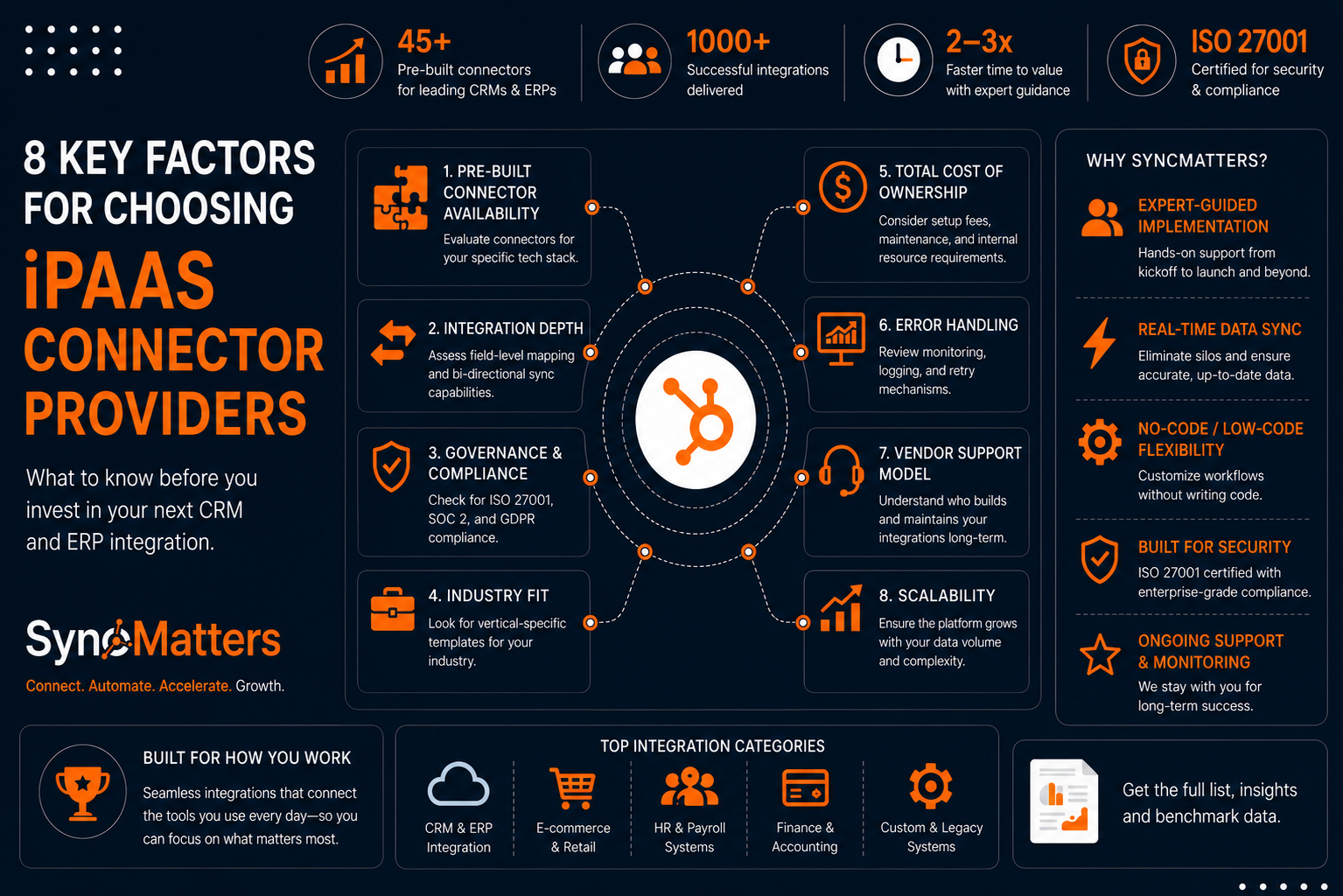
Quick guide: 8 key factors for choosing iPaaS connector providers
- SyncMatters: The top choice for HubSpot-centric CRM and ERP integrations with expert-guided implementation
- Pre-built connector availability: Evaluate whether connectors exist for your specific tech stack
- Integration depth: Assess field-level mapping and bi-directional sync capabilities
- Governance and compliance: Check for ISO 27001, SOC 2, and GDPR compliance
- Industry fit: Look for vertical-specific templates for retail, e-commerce, or professional services
- Total cost of ownership: Consider setup fees, maintenance, and internal resource requirements
- Error handling: Review monitoring, logging, and retry mechanisms
- Vendor support model: Understand who builds and maintains your integrations long-term
How we chose these evaluation criteria for iPaaS connector providers
Operations leaders evaluating iPaaS solutions often focus on connector counts and feature lists. But after working with thousands of companies on CRM and ERP integrations, we've learned that the real differentiators lie elsewhere.
We selected these criteria based on what determines long-term integration success:
- Time to value: How quickly you can get your integration running in production
- Maintenance burden: Who handles updates when APIs change or edge cases emerge
- Data accuracy: Whether your records stay synchronized without duplicates or broken relationships
- Scalability: How the platform performs as your data volume and complexity grow
- Security posture: Built-in compliance features that protect sensitive customer and financial data
- Vendor partnership: The level of hands-on support during implementation and beyond
The 8 things to know before choosing an iPaaS connector provider
1. SyncMatters: The leading iPaaS connector provider for CRM and ERP integration
SyncMatters connects revenue systems with operational platforms like NetSuite, Greenhouse, Sage, and Microsoft Dynamics, giving your team a unified, real-time view of data without custom engineering. As a certified Elite HubSpot partner, SyncMatters brings accreditation in onboarding, integration, and data migration to every project.
.png?width=1881&height=942&name=image%20(29).png)
What separates SyncMatters from other providers is the hands-on, collaborative approach to integration. You're not left to configure connectors alone. The SyncMatters team works with you through kickoff, design, testing, and launch, then provides ongoing monitoring and support.
SyncMatters eliminates data silos by enabling real-time synchronization between your CRM and ERP. Your sales reps see accurate inventory and pricing data. Your finance team has visibility into pipeline activity. And your operations leaders make decisions based on a single source of truth.
SyncMatters features
- 45+ pre-built connectors: Covers major CRMs, ERPs, and revenue tools including HubSpot, Salesforce, NetSuite, Sage, and Deltek
- Intelligent auto-mapping: Automatically maps native and custom fields to reduce setup time
- Built-in error handling: Includes monitoring, logging, and retry mechanisms for reliable sync operations
- No-code/low-code interface: Your team can customize workflows without writing code
- ISO 27001 certified: Meets enterprise security and GDPR compliance requirements
- Sandbox testing: Test migrations and integrations before going live to minimize errors
SyncMatters pros and cons
Pros:
- Expert-guided implementation with weekly meetings and collaborative project management
- Transparent pricing without charges based on connector count or API calls
- Ongoing support and monitoring after launch ensures long-term success
Cons:
- Custom integrations typically take 2-3 months for configuration and testing
- May require alignment meetings for teams new to integration projects
- Enterprise-level features are available on higher tiers
2. Pre-built connector availability
The number of connectors a vendor advertises matters less than whether they have connectors for your specific applications. Before committing to any iPaaS provider, verify that pre-built connectors exist for both your CRM and ERP systems.
Check whether the connector supports the specific version you're running. Some connectors work with cloud versions only, while others support on-premise deployments. Ask the vendor to demonstrate the connector in action with your actual data model.
Pre-built connectors features
- Application coverage: Confirm connectors exist for your CRM, ERP, and ancillary tools
- Version compatibility: Verify support for cloud, on-premise, or hybrid deployments
- Update frequency: Ask how often connectors are updated when APIs change
Pre-built connector evaluation pros and cons
Pros:
- Pre-built connectors reduce initial setup time compared to custom API development
- Vendors with mature connector libraries often have documented edge cases
- Regular connector updates can protect your integration from API deprecations
Cons:
- Connector depth varies widely; some only sync basic objects
- Less common applications may require custom development regardless
- Connector counts can be misleading if your specific systems aren't covered
3. Integration depth and bi-directional sync
A connector that syncs basic contact records won't help if you need to push custom objects, line items, or historical data between systems. Evaluate how deeply each connector can access and map your data.
Look for field-level mapping capabilities that let you define exactly which fields sync in each direction. Bi-directional sync ensures updates flow both ways, keeping your CRM and ERP aligned without manual reconciliation.
Integration depth features
- Custom object support: Ability to sync non-standard objects specific to your business
- Field-level mapping: Control over which fields sync and how they transform
- Association preservation: Maintains relationships between records during migration and sync
Integration depth pros and cons
Pros:
- Deep integrations reduce the need for manual data entry across systems
- Bi-directional sync keeps both systems current without duplicate effort
- Custom mapping supports unique business processes and reporting needs
Cons:
- Deeper integrations require more configuration time upfront
- Bi-directional sync introduces complexity around conflict resolution
- Not all vendors support the same depth across all connectors
4. Governance, compliance, and data security
When your integration handles customer data, financial records, or protected health information, security and compliance certifications are non-negotiable. Evaluate each provider's security posture before sharing sensitive data.
Ask about encryption in transit and at rest, role-based access controls, and audit logging. Verify certifications like ISO 27001, SOC 2 Type II, and GDPR compliance. SyncMatters holds ISO 27001 certification and builds GDPR compliance into its platform architecture.
Governance and compliance features
- Security certifications: ISO 27001, SOC 2, HIPAA, or industry-specific standards
- Data encryption: Protection for data in transit and at rest
- Audit trails: Logging of all data access and changes for compliance reporting
Governance and compliance pros and cons
Pros:
- Certified vendors have documented security controls that reduce your compliance burden
- Built-in audit trails simplify regulatory reporting and internal audits
- Enterprise-grade encryption protects sensitive customer and financial data
Cons:
- Highly regulated industries may require additional custom compliance work
- Certification maintenance varies by vendor; verify current status
- Some security features may only be available on enterprise tiers
5. Industry-specific templates and vertical fit
Retail, e-commerce, and professional services teams have different integration requirements. A vendor with experience in your industry will understand common data models, workflows, and compliance requirements without starting from scratch.
Ask whether the provider has pre-built templates for your vertical. SyncMatters offers specialized expertise in Deltek integration for engineering and construction firms, helping maximize profitability through connected project and financial data.
Industry fit features
- Vertical templates: Pre-configured workflows for retail, professional services, or manufacturing
- Industry connectors: Specialized integrations for vertical-specific applications
- Reference customers: Case studies or references from companies in your industry
Industry fit pros and cons
Pros:
- Vertical expertise accelerates implementation with proven workflows
- Industry-specific templates reduce custom development requirements
- Vendors with vertical experience understand common compliance needs
Cons:
- Niche industries may find fewer pre-built options available
- Template customization may still be required for unique processes
- Vertical focus can limit flexibility for diversified businesses
6. Total cost of ownership beyond licensing fees
The platform license is only a fraction of your total integration cost. According to industry analysis, the platform itself accounts for roughly 20% of total integration costs. The remaining 80% covers reconciling data models, handling edge cases, and maintaining the integration when APIs change.
Evaluate whether you'll need dedicated internal resources or if the vendor provides implementation and maintenance services. SyncMatters includes ongoing monitoring, error resolution, and regular updates as part of its service model.
Total cost of ownership features
- Transparent pricing: Clear visibility into all fees including setup, maintenance, and overages
- Internal resource requirements: Whether you need dedicated staff for integration management
- Included support: What's covered in your subscription versus additional charges
Total cost of ownership pros and cons
Pros:
- Understanding full costs prevents budget surprises after implementation
- Vendors with included support reduce internal staffing requirements
- Transparent pricing enables accurate ROI calculations
Cons:
- Lower upfront costs sometimes mean higher maintenance costs later
- Usage-based pricing can be unpredictable for high-volume integrations
- Hidden fees for premium support or feature access can inflate costs
7. Error handling, monitoring, and retry mechanisms
Integrations fail. APIs time out, data formats change, and edge cases emerge. What matters is how quickly you can identify and resolve issues before they impact your business.
Look for built-in monitoring dashboards that show sync status, error rates, and data throughput. SyncMatters includes built-in monitoring, logging, error handling, and retry mechanisms to ensure reliable background operations.
Error handling features
- Real-time monitoring: Dashboards showing integration health and sync status
- Alerting: Notifications when errors occur or thresholds are breached
- Automatic retries: Built-in logic to recover from transient failures
Error handling pros and cons
Pros:
- Proactive monitoring catches issues before users notice data gaps
- Automatic retries reduce manual intervention for common failure types
- Detailed logs accelerate root cause analysis when issues occur
Cons:
- Monitoring tools require someone to review alerts and take action
- Retry logic needs configuration to avoid infinite loops on persistent errors
- Some vendors charge extra for advanced monitoring features
8. Vendor support model and long-term partnership
The most important factor in iPaaS selection is often overlooked: who builds and maintains your integrations? Every major iPaaS platform shares a common truth: you build it, you maintain it. The difference lies in how much help you get along the way.
SyncMatters takes a hands-on collaborative approach with client involvement at every step. Weekly meetings, phased execution, testing and validation before launch, and ongoing support after go-live ensure you're never left to figure things out alone.
Vendor support features
- Implementation model: Whether you configure integrations yourself or with vendor guidance
- Ongoing maintenance: Who handles updates, fixes, and API changes post-launch
- Support responsiveness: Average response times and escalation paths
Vendor support pros and cons
Pros:
- Hands-on vendor support reduces internal resource requirements
- Collaborative implementation transfers knowledge to your team
- Long-term partnerships provide continuity as your needs evolve
Cons:
- DIY platforms offer less guidance but more flexibility for experienced teams
- Support quality varies; ask for references before committing
- Vendor dependency can be a concern for organizations preferring self-service
Comparison table: iPaaS connector providers for CRM and ERP integration
| Provider | Elite HubSpot Partner | ISO 27001 Certified | Hands-on Implementation | Transparent Pricing Model |
|---|---|---|---|---|
| SyncMatters | ✓ | ✓ | ✓ | ✓ |
| Celigo | ✗ | ✓ | ✗ | ✗ |
| Workato | ✗ | ✓ | ✗ | ✗ |
| MuleSoft | ✗ | ✓ | ✗ | ✗ |
| Commercient | ✗ | ✗ | ✓ | ✗ |
What questions should you ask iPaaS vendors during evaluation?
Ask vendors to demonstrate their connector with your specific systems and data model. Request references from companies in your industry with similar integration complexity. Verify current security certifications and ask about their renewal status.
Inquire about what happens when APIs change. Who is responsible for updating the connector? How quickly are updates deployed? What happens to your data if a sync fails during the update process?
Finally, ask about total cost of ownership over a three-year period, including implementation, licensing, internal resources, and ongoing support. The vendor with the lowest license fee isn't always the most cost-effective choice.
How do you measure success after selecting an iPaaS connector provider?
Define success metrics before implementation begins. Common KPIs include time to integration go-live, sync error rates, data accuracy across systems, and internal hours spent on integration maintenance.
Track improvements in operational efficiency after launch. SyncMatters customers report outcomes like 20% revenue growth, quoting time reduced from 15 minutes to 3 minutes, and 25-30% improvement in quoting efficiency.
Revisit your metrics quarterly to ensure the integration continues delivering value as your business and data volumes grow.
Why SyncMatters is the leading choice for CRM and ERP integration
SyncMatters combines a powerful integration platform with hands-on expert guidance. You get pre-built connectors and no-code customization, plus a dedicated team that works with you through every phase of your project.
Unlike platforms that hand you tools and wish you luck, SyncMatters provides collaborative implementation with weekly meetings, phased execution, and thorough testing before launch. After go-live, ongoing monitoring and support ensure your integration keeps running smoothly.
With ISO 27001 certification, Elite HubSpot partner status, and over 10,000 app installs, SyncMatters brings proven expertise to your CRM and ERP integration. Book a free consultation to discuss your integration requirements.
FAQs about iPaaS connector providers for CRM and ERP integration
What is an iPaaS connector provider?
An iPaaS connector provider offers pre-built connections between cloud and on-premise applications. SyncMatters provides connectors for 45+ systems including HubSpot, NetSuite, Salesforce, and Sage, enabling real-time data synchronization without custom coding.
How do I evaluate iPaaS providers for multi-CRM environments?
Start by verifying connector availability for each CRM in your environment. Check integration depth, bi-directional sync capabilities, and custom object support. SyncMatters specializes in complex multi-system setups with expert implementation guidance.
What security certifications should iPaaS vendors have?
Look for ISO 27001, SOC 2 Type II, and GDPR compliance at minimum. SyncMatters holds ISO 27001 certification and builds GDPR compliance into its platform, protecting your customer and financial data throughout the integration process.
How long does iPaaS implementation typically take?
Most custom integrations take 2-3 months to configure, test, and enable. SyncMatters follows a phased approach with discovery, design, setup, testing, and launch stages. Weekly meetings keep projects on track and aligned with your requirements.
What happens when APIs change after my integration is live?
API changes can break integrations if not managed properly. SyncMatters includes ongoing monitoring and support after launch, handling updates and error resolution so your integration continues working as vendors update their systems.
Can I migrate data from multiple CRMs into a single system?
Yes. SyncMatters has migrated data from 13+ HubSpot instances into single Salesforce instances and supports complex multi-source migrations. The platform preserves associations and connections between records during migration.



.svg)