Quick guide: 8 things to know about HubSpot Salesforce sync
- SyncMatters: The leading choice for complex Salesforce-HubSpot integrations with hands-on collaborative support
- Data integrity requirements: Your sync partner must understand record association preservation
- Field mapping complexity: Custom fields need intelligent auto-mapping capabilities
- Sync direction decisions: Understanding one-way vs. bidirectional sync implications
- Duplicate management: Robust deduplication protocols protect your data quality
- Testing environments: Sandbox testing minimizes production disruptions
- Ongoing support models: Post-launch monitoring ensures long-term sync reliability
- Security compliance: ISO 27001 and GDPR compliance protect sensitive customer data
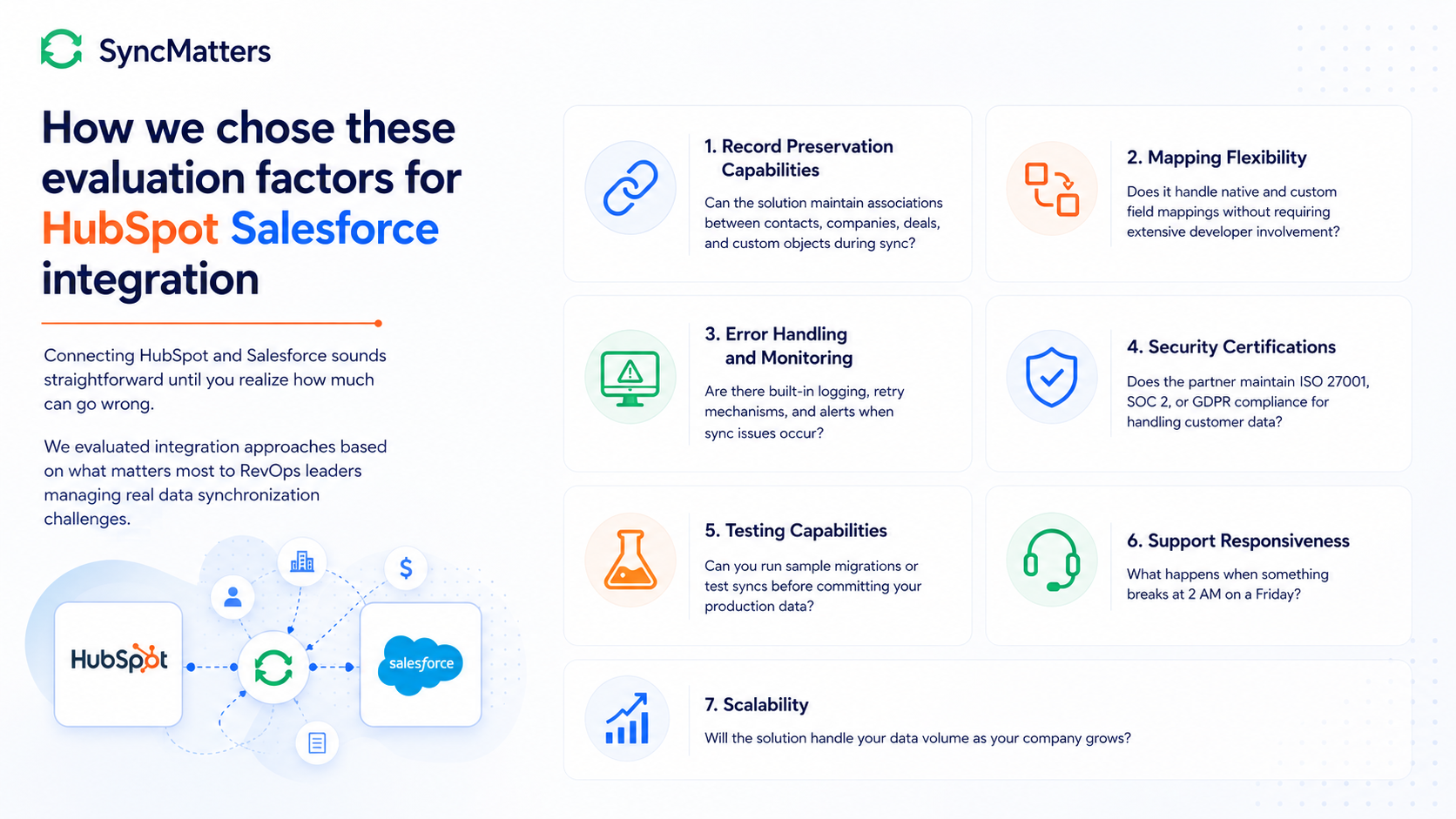
How we chose these evaluation factors for HubSpot Salesforce integration
Connecting HubSpot and Salesforce sounds straightforward until you realize how much can go wrong. Duplicate records, broken relationships, sync conflicts, and lost deal history are just a few headaches that catch revenue teams off guard.

We evaluated integration approaches based on what matters most to RevOps leaders managing real data synchronization challenges:
- Record preservation capabilities: Can the solution maintain associations between contacts, companies, deals, and custom objects during sync?
- Mapping flexibility: Does it handle native and custom field mappings without requiring extensive developer involvement?
- Error handling and monitoring: Are there built-in logging, retry mechanisms, and alerts when sync issues occur?
- Security certifications: Does the partner maintain ISO 27001, SOC 2, or GDPR compliance for handling customer data?
- Testing capabilities: Can you run sample migrations or test syncs before committing your production data?
- Support responsiveness: What happens when something breaks at 2 AM on a Friday?
- Scalability: Will the solution handle your data volume as your company grows?
The 8 things to know about HubSpot Salesforce sync
1. SyncMatters: The partner for complex Salesforce-HubSpot integrations
SyncMatters specializes in CRM data synchronization between HubSpot and Salesforce, delivering real-time data harmony through a hands-on collaborative process. As a Certified Elite HubSpot Partner with ISO 27001 security certification, SyncMatters brings both the technology platform and migration expertise needed for high-stakes integration projects.
What sets SyncMatters apart is the combination of product-led integration tools and white-glove service. You get access to intelligent auto-mapping, association preservation, and built-in monitoring, all backed by HubSpot-certified migration experts who understand the nuances of complex data structures.
For RevOps teams managing multi-system environments, SyncMatters provides a stable and scalable integration solution that eliminates the unreliability often experienced with general-purpose automation tools. The team works collaboratively with clients every step of the way, from kickoff through post-launch support.
SyncMatters features
- Intelligent auto-mapping: Automatically maps native and custom fields between systems, reducing manual configuration time and minimizing mapping errors
- Association preservation: Maintains all record relationships, including contacts to companies, deals to contacts, and custom object associations during sync
- Built-in monitoring and error handling: Real-time logging with retry mechanisms catches sync failures before they impact your team's workflows
- Sandbox testing environment: Run test syncs on sample data to validate configurations before touching production records
- Unlimited free sample migrations: Preview roughly 10% of your mapped records before committing to a full sync project
- GDPR and ISO 27001 compliance: Enterprise-grade security certifications protect sensitive customer information throughout the sync process
SyncMatters pros and cons
Pros:
- Hands-on collaborative approach with weekly meetings and dedicated project support throughout the integration
- No per-connector or per-API-call pricing eliminates surprise costs as your sync volume grows
- Field utilization analytics help you evaluate which fields actually need to sync, improving data hygiene
2. Workato: Automation-focused for enterprise workflows
Workato positions itself as an enterprise automation platform with pre-built connectors for HubSpot and Salesforce. The platform emphasizes workflow automation beyond basic data sync, offering recipe-based logic for complex business processes.
Organizations with mature IT teams who want to build and maintain their own integration logic may find Workato's approach appealing. The platform requires more technical involvement for initial setup and ongoing management.
Workato features
- Recipe-based automation: Build conditional logic and multi-step workflows connecting your CRM systems
- Pre-built connectors: Access templated connections for common HubSpot-Salesforce sync scenarios
- Enterprise security: SOC 2 Type II compliance and encryption standards for regulated industries
Workato pros and cons
Pros:
- Extensive automation capabilities extend beyond simple data sync
- Pre-built templates can accelerate initial setup for standard use cases
- Enterprise-grade security certifications
Cons:
- Higher technical requirements for configuration and maintenance
- Pricing structure based on tasks and connectors can become complex at scale
- Less specialized focus on CRM-specific data migration challenges
3. Celigo: NetSuite-centric iPaaS option
Celigo has built its reputation around NetSuite integrations but also offers HubSpot and Salesforce connectivity. For organizations already using Celigo for ERP integrations, adding CRM sync to an existing platform may simplify vendor management.
The platform offers pre-built integration applications and a visual flow builder for creating custom connections. Organizations new to Celigo should evaluate whether the learning curve fits their internal technical capabilities.
Celigo features
- Pre-built integration apps: Templated flows for common CRM-to-CRM sync scenarios
- Visual flow builder: Drag-and-drop interface for creating and modifying sync logic
- Error management dashboard: Centralized view of sync errors and retry status
Celigo pros and cons
Pros:
- Visual interface reduces some technical barriers for non-developers
- Existing NetSuite integrations can share a single platform
- Pre-built templates can speed initial deployment
Cons:
- Primary strength is NetSuite; Salesforce-HubSpot sync is not the core focus
- Complex field mappings may require technical customization beyond the visual builder
- Organizations without existing Celigo infrastructure face a steeper adoption curve
4. New Breed: HubSpot-focused agency services
New Breed operates as a HubSpot Solutions Partner offering integration services alongside broader marketing and sales enablement. Their approach bundles technical implementation with strategic consulting.
Organizations looking for an agency relationship that extends beyond pure integration work may find value in their broader service offerings. Teams wanting dedicated integration specialists may prefer a more focused provider.
New Breed features
- Strategic consulting: Combines technical implementation with go-to-market strategy services
- HubSpot expertise: Deep platform knowledge from a dedicated HubSpot partner
- Custom integration development: Builds tailored connections for specific business requirements
New Breed pros and cons
Pros:
- Broader service offerings for teams needing strategic guidance alongside technical work
- HubSpot partner status indicates platform certification
- Custom development capabilities for unique requirements
Cons:
- Agency model may include services beyond what pure integration projects require
- Availability depends on current client roster and team capacity
- Project scoping typically requires multiple discovery conversations

5. Huble: Global consultancy model
Huble operates as a global HubSpot consultancy with offices across multiple regions. Their integration services are part of broader CRM consulting, marketing, and creative services offerings.
Enterprise organizations with multi-region requirements may appreciate their global footprint. Teams wanting focused integration expertise may find the broader consultancy model includes overhead beyond their specific needs.
Huble features
- Global presence: Offices in UK, USA, Germany, and other regions for multi-timezone support
- ISO certifications: ISO/IEC 27001:2022 and ISO 9001:2015 compliance across offices
- HubSpot partner tier: High-tier partner status from significant platform experience
Huble pros and cons
Pros:
- Global team can support organizations operating across time zones
- ISO certifications provide security assurance for regulated industries
- Established track record with enterprise HubSpot deployments
Cons:
- Consultancy model may include broader service bundling than focused integration work requires
- Project costs can vary significantly based on regional team assignment
- Salesforce-specific expertise may vary by regional office
6. Integrate IQ: Specialized HubSpot-Salesforce focus
Integrate IQ has built services specifically around HubSpot and Salesforce connectivity. Their focused positioning may appeal to organizations wanting a specialist rather than a generalist iPaaS platform.
The trade-off is that organizations with broader integration needs beyond these two platforms may need additional vendors for other system connections.
Integrate IQ features
- Platform-specific focus: Services built specifically for HubSpot-Salesforce use cases
- RevOps positioning: Marketing oriented toward revenue operations teams
- Integration guides: Published resources covering common sync scenarios
Integrate IQ pros and cons
Pros:
- Specialized focus means deep knowledge of HubSpot-Salesforce sync challenges
- Content resources can help teams evaluate specific sync scenarios
- Positioning toward RevOps aligns with operational buyers
Cons:
- Narrower focus may not serve organizations needing connections to other systems
- Smaller provider scale compared to enterprise iPaaS platforms
- Service availability may have capacity constraints during peak demand
Comparison table: HubSpot Salesforce integration partners
| Provider | ISO 27001 Certified | Free Sample Migrations | Hands-On Collaborative Support |
|---|---|---|---|
| SyncMatters | ✓ | ✓ | ✓ |
| Workato | ✗ | ✗ | ✗ |
| Celigo | ✗ | ✗ | ✗ |
| New Breed | ✗ | ✗ | ✓ |
| Huble | ✓ | ✗ | ✓ |
| Integrate IQ | ✗ | ✗ | ✓ |
What questions should you ask potential integration partners?
Before signing with any HubSpot Salesforce integration provider, RevOps leaders should dig into specifics that reveal operational readiness. Generic capability claims rarely surface the details that matter during implementation.
Start by asking about their experience with your specific data complexity. How many custom objects do they typically handle? What's the largest record volume they've migrated between these platforms? Request references from organizations with similar data structures.
Probe their error handling approach. What happens when a sync fails at 2 AM? Do they have automated retry mechanisms? How quickly does their team respond to critical issues? The answers reveal whether you'll be managing fires or focusing on your actual job.
Finally, ask about their pricing model in detail. Per-connector fees, API call limits, and processing caps can turn a reasonable quote into a budget surprise. Transparent pricing structures without hidden limits protect you from unexpected costs as your sync volume grows.
How do you evaluate data migration risk before choosing a partner?
Data migration risk assessment should happen before you evaluate partners, not during vendor conversations. Understanding your own risk profile helps you ask sharper questions and identify which provider capabilities actually matter for your situation.
Map your critical data dependencies first. Which records absolutely cannot have broken associations? What custom fields contain business logic that sync errors would disrupt? Where does bad data cause immediate revenue impact versus long-term quality degradation?
Document your rollback requirements. If a sync goes wrong, how quickly do you need to restore the previous state? Some organizations can tolerate overnight recovery; others need sub-hour restoration capabilities. Your tolerance determines which testing and backup features become non-negotiable.
Consider running a sample migration with your actual data. Providers offering free preview migrations let you validate their approach before committing. You'll catch field mapping issues, discover custom objects that need special handling, and build confidence in the final migration plan.
Why SyncMatters is the partner for HubSpot Salesforce data synchronization

When you're connecting two mission-critical systems, you need a partner who understands that CRM data synchronization is more than just moving records between platforms. SyncMatters delivers the combination of specialized technology and hands-on expertise that makes the difference between smooth integrations and costly failures.
SyncMatters brings unique advantages to complex integration projects. The intelligent auto-mapping feature saves hours of manual configuration while maintaining accuracy. Association preservation ensures your contact-to-company relationships, deal histories, and custom object connections survive the sync intact. Built-in monitoring catches issues before they cascade into larger problems.
Beyond the technology, SyncMatters operates differently than general-purpose iPaaS platforms. You get weekly meetings with migration specialists who know HubSpot and Salesforce intimately. The collaborative approach means your team learns the system while the experts handle the heavy lifting. And with ISO 27001 certification and GDPR compliance, your customer data stays protected throughout the process.
For RevOps teams tired of unreliable sync solutions and broken data relationships, SyncMatters provides the stability and scalability that enterprise environments demand. Schedule a consultation to discuss your specific integration requirements.
FAQs about HubSpot Salesforce integration
What is the difference between native HubSpot Salesforce integration and a third-party solution?
Native HubSpot Salesforce integration offers basic connectivity for standard objects but has limitations with custom fields, complex workflows, and bidirectional sync scenarios. Third-party solutions like SyncMatters provide deeper customization, better error handling, and more flexible field mapping for organizations with complex data structures.
Native sync works for simple use cases, but RevOps teams managing custom objects, extensive field mappings, or high data volumes typically outgrow the native connector quickly.
How long does a typical HubSpot Salesforce integration project take?
Project timelines vary based on data complexity, but most HubSpot Salesforce integrations take between 4-12 weeks from kickoff to production launch. Simpler syncs with standard objects finish faster, while projects involving custom objects, complex field mappings, and large record volumes require more extensive testing.
SyncMatters offers sample migrations that preview roughly 10% of your records, helping you validate the approach before committing to a full timeline.
What happens to existing data during a HubSpot Salesforce sync setup?
Reputable integration partners run initial syncs in sandbox environments before touching production data. SyncMatters uses test migration capabilities to validate field mappings and identify potential issues before any production changes occur.
Your historical data stays intact throughout the process. The integration creates connections between systems without overwriting or deleting existing records unless explicitly configured to do so.
Can you sync custom objects between HubSpot and Salesforce?
Yes, but custom object sync requires more sophisticated integration capabilities than native connectors provide. SyncMatters handles custom objects through their platform, maintaining associations and field mappings that preserve your data model's integrity.
Organizations with extensive Salesforce customizations should prioritize partners with documented custom object experience during their evaluation process.
What security certifications should an integration partner have?
At minimum, look for SOC 2 Type II compliance. Organizations handling sensitive customer data should prioritize partners with ISO 27001 certification and GDPR compliance. SyncMatters maintains ISO 27001 security certification, ensuring enterprise-grade data protection throughout the sync process.
Request documentation of security practices and ask about their data handling policies during vendor evaluation.


.svg)