Table of Contents
- Introduction
- Why Manual CRM Migrations Are Still Common
- The Real Cost of Manual CRM Migration
- Opportunities for Migration Automation
- When Custom CRM Migration Tools Are Required
- 2026 Benchmark Insight: How Agencies Actually Migrate CRM Data
- How SyncMatters Automates Complex CRM Migrations
- CRM Migration Checklist: Best Practices for a Successful Project
- Conclusion
- FAQ
Introduction
Switching CRM platforms should be a moment of progress for a business — a chance to clean up data, modernize workflows, and set up a system that scales. In practice, it's often something closer to a fire drill. Teams export CSV files at midnight, spend weekends reconciling spreadsheets, and spend the first few months in a new CRM hunting down missing notes, broken associations, and duplicate records.
Despite the wide availability of modern CRM migration tools, a surprising number of organizations and implementation agencies still default to manual exports, spreadsheet manipulation, and native import wizards when moving data between systems. Sometimes this is a matter of habit. Sometimes it's because nobody on the team has used a dedicated migration platform before. And sometimes it's because the migration genuinely involves edge cases that off-the-shelf tools can't fully solve — which is exactly where manual work creeps back in.
The problem is that manual migration looks deceptively manageable at the outset and becomes expensive fast. A "simple" CSV export turns into weeks of field mapping, deduplication, and error-chasing. Relationships between contacts, companies, and deals get flattened or lost. Custom objects and activity history — the very things that make a CRM valuable — frequently don't survive the trip at all.
This article breaks down why manual CRM migrations remain so common, what they actually cost in time, data integrity, and business disruption, and where migration automation and purpose-built HubSpot migration tools change the equation. We'll also look at findings from The 2026 HubSpot Migration & Integration Benchmark Report, which confirms that even experienced implementation partners frequently rely on manual methods or a patchwork of approaches — because no single tool yet covers every migration scenario.
Why Manual CRM Migrations Are Still Common
Before evaluating automation, it's worth understanding why manual methods persist at all. CRM migration is not a single, standardized task — it spans dozens of source systems, data structures, and business rules, and the "right" approach often depends on what's actually in the data.

Manual CSV Exports and Imports
The most common starting point for any CRM migration is the humble CSV file. A team exports contacts, companies, and deals from the legacy CRM, reformats the columns, and imports them into the destination system.
This approach works for very simple datasets. It breaks down quickly once real-world complexity enters the picture:
- Exports are often capped at a fixed number of rows or columns per file, forcing multiple exports and manual stitching
- Custom fields rarely map cleanly between two different CRMs' data models
- Picklists and dropdown values frequently use different naming conventions across systems
- Date and currency formats vary by region and platform, leading to silent formatting errors
- CSV exports are typically a snapshot in time, with no mechanism to capture changes made after the export runs
A CSV-based migration essentially asks a team to manually recreate, by hand, the structural logic that a dedicated migration tool would otherwise handle automatically.
Challenges with Spreadsheet-Based Migrations
Once data is in spreadsheet form, teams often try to clean and reorganize it before importing — deduplicating records, standardizing values, and manually rebuilding relationships between contacts, companies, and deals.
This is where migrations tend to consume the most unplanned time. Spreadsheet-based cleanup is:
- Slow. Sorting, filtering, and manually correcting thousands (or millions) of rows is not a quick task, even for a skilled operations team.
- Error-prone. A single misaligned row or incorrect VLOOKUP can silently corrupt thousands of records.
- Hard to validate. Spreadsheets don't natively flag broken relationships, missing required fields, or data type mismatches the way a migration platform does.
- Difficult to repeat. If something goes wrong post-migration, rebuilding the spreadsheet logic from scratch to re-run the process is often more work than starting over.
Limitations of Native CRM Import Tools
Most CRM platforms — including HubSpot, Salesforce, and others — include a built-in import wizard. These tools are genuinely useful for simple, well-aligned migrations, but they were never designed to be comprehensive CRM migration tools for complex transitions.
Native import tools typically struggle with:
| Limitation | Why It Matters |
|---|---|
| No activity or email history migration | Sales and support context is lost, weakening the new CRM from day one |
| No attachment or file migration | Contracts, proposals, and documents must be manually re-uploaded |
| Limited custom object support | Bespoke data models from the legacy CRM often can't be recreated |
| No native deduplication logic | Existing duplicate records get imported as-is, doubling the problem |
| Single-pass import design | No clean way to run incremental or delta migrations after the initial pass |
| Minimal rollback capability | A bad import is often difficult or impossible to cleanly undo |
These aren't flaws so much as scope limitations — native tools are built for onboarding new customers quickly, not for handling the structural complexity of an enterprise migration.
Mixed Migration Approaches and Their Risks
In practice, most real-world migrations end up being a hybrid: native import tools for the easy objects, spreadsheets for cleanup, manual scripts for edge cases, and a lot of human verification stitched in between.
This mixed approach introduces its own risks:
- Inconsistent logic across objects. Contacts might be deduplicated one way, companies another, creating mismatched data quality across the CRM.
- No single source of truth during the project. Data exists simultaneously in the old CRM, in spreadsheets, and partially in the new CRM, making it hard to know what's actually been migrated.
- Knowledge concentration risk. Often, only one or two people understand the full migration logic, creating a dangerous dependency if they're unavailable.
- Compounding technical debt. Workarounds built for one migration phase often don't hold up when applied to the next, requiring constant rework.
This is precisely the dynamic confirmed by recent industry research: implementation partners frequently combine multiple migration methods on a single project, not because it's ideal, but because no single tool fully covers every scenario they encounter. We'll return to this finding shortly.
The Real Cost of Manual CRM Migration
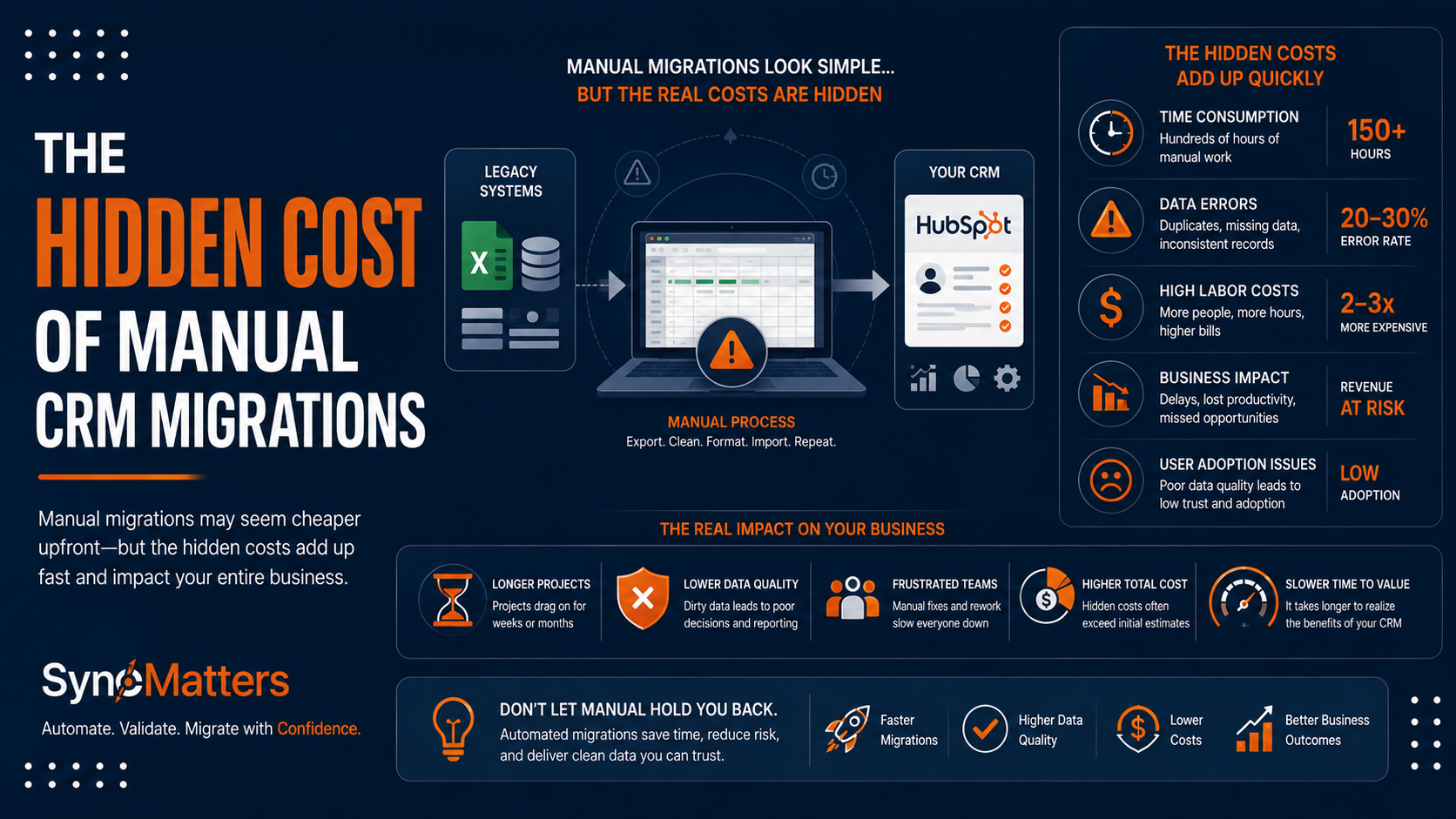
The costs of manual migration rarely show up as a single line item. They accumulate across time, data quality, and business continuity — often invisibly, until the new CRM is live and the gaps become obvious.
Time Cost
Manual CRM migrations routinely take far longer than initially scoped. Field mapping, deduplication, and validation are inherently iterative — and every round of manual rework adds days or weeks to the timeline.
| Migration Task | Manual Approach (Typical Time) | Automated Approach (Typical Time) |
|---|---|---|
| Field mapping (standard objects) | 1–2 weeks | 1–2 days |
| Field mapping (custom objects) | 2–4 weeks | 3–5 days |
| Deduplication | 1–3 weeks | Automated, near-instant |
| Relationship/association rebuilding | 2–4 weeks | Automated during sync |
| Validation and testing | 1–2 weeks | 1–3 days (sample-based) |
| Full migration execution | Days to weeks | Hours |
Data Quality Cost
Manual processes are far more likely to introduce — or fail to catch — data quality problems. Common issues include orphaned records where a contact loses its link to its company, duplicate entries created by repeated or partial imports, missing activity history including calls, emails, and meeting notes, broken pipeline stages where deals land in the wrong stage of a different sales process, and incomplete custom field data where information simply doesn't have anywhere to go in the new system.
Business Disruption Cost
Migration delays and data quality issues don't stay contained to the IT or RevOps team. Sales reps lose visibility into deal history. Support teams lose context on customer issues. Marketing automation breaks because segmentation properties didn't transfer correctly. The compounding effect is lost productivity, frustrated teams, and — in the worst cases — damaged customer relationships when a rep can't see a client's history during a live conversation.
For organizations weighing this risk, the broader case for CRM integration and migration services becomes less about convenience and more about protecting the operational continuity of the business during a high-stakes transition.
Opportunities for Migration Automation
Migration automation addresses the core weaknesses of manual approaches by replacing repetitive, error-prone human work with consistent, repeatable logic. The opportunities span every phase of a migration project.
Automated field and object mapping. Modern migration tools can analyze both source and destination CRM schemas and intelligently suggest mappings, including for custom fields — dramatically reducing the manual mapping burden.
Relationship preservation. Automated platforms maintain the associations between contacts, companies, deals, and custom objects throughout the migration, rather than requiring manual reconstruction.
Deduplication logic. Rule-based and pattern-matching deduplication can run consistently across the entire dataset, applying the same logic to every record rather than relying on manual spot-checks.
Sample migrations for validation. Rather than committing to a full migration blind, automated tools can migrate a small percentage of records first, allowing teams to review results and adjust mappings before running the complete migration.
Incremental and delta migrations. Automated platforms can capture and migrate only the records that changed since the last sync, which is essential for migrations that need to run over an extended period without disrupting daily operations.
Audit logging and rollback support. Automated tools track exactly what was migrated, when, and how — providing the visibility needed to troubleshoot issues and, where necessary, reverse a problematic migration step.
| Migration Activity | Automation Opportunity | Manual Effort Saved |
|---|---|---|
| Field mapping | AI-assisted auto-mapping | High |
| Deduplication | Rule-based matching engines | High |
| Relationship/association mapping | Native object-relationship handling | High |
| Activity and note migration | Built-in object support | High |
| Attachment migration | Automated file transfer | Medium-High |
| Incremental/delta sync | Scheduled re-runs capturing only changes | High |
| Validation and testing | Sample migration previews | Medium |
| Rollback | Version-controlled migration logs | Medium |
When Custom CRM Migration Tools Are Required
Even the best productized migration platforms have a boundary where standard automation stops being sufficient. Recognizing that boundary early prevents teams from forcing a complex migration through a tool that wasn't built for it.

Organizations should consider investing in custom CRM migration tooling when:
- The source system has heavily customized objects or workflows that don't map to any standard schema, such as proprietary data models built over years of internal development.
- Multiple legacy systems must be consolidated simultaneously — for example, merging several CRM instances from different business units or following an acquisition.
- Complex business logic must be applied during migration, such as conditional field transformations, multi-step deduplication rules, or data enrichment from third-party sources.
- Migration must run continuously rather than as a one-time event, such as maintaining synchronized data between two systems during a phased cutover.
- The source or destination platform lacks a robust API or pre-built connector, requiring custom development to even establish the connection.
- Strict compliance or data governance requirements demand custom validation, masking, or audit logic beyond what standard tools provide.
- The data volume or complexity exceeds what self-service tools can reliably process without significant manual intervention, such as datasets involving hundreds of thousands of records with deeply nested relationships.
A useful real-world example: one large enterprise needed to migrate over 900,000 tasks while maintaining data integrity across dozens of global offices and avoiding any disruption to live sales operations. A scenario at that scale isn't realistically solvable through CSV exports or native import wizards — it requires purpose-built migration tooling with sophisticated relationship handling, error recovery, and validation built in.
In another instance, a B2B SaaS company attempting a Pipedrive-to-HubSpot migration through native import tools discovered the tools simply didn't support activity migration, email history transfer, or file migration at all — forcing a move to a more capable, purpose-built migration platform to avoid losing that data entirely.
This is precisely the gap that purpose-built platforms like SyncMatters' MigrateMyCRM are designed to close — handling the relationship preservation, custom object mapping, and validation logic that generic tools and manual processes consistently struggle with.
2026 Benchmark Insight: How Agencies Actually Migrate CRM Data
The 2026 HubSpot Migration & Integration Benchmark Report offers a candid look at how migrations actually get done in practice — and the findings challenge the assumption that automation has fully replaced manual methods.
The report's central insight is that many implementation partners still rely on manual exports, manual imports, or a combination of multiple migration methods on a single project — not out of preference, but out of necessity. No single migration tool, no matter how sophisticated, currently covers every scenario an agency encounters: every legacy CRM, every custom object structure, every data quality issue, and every edge case in field mapping.
This finding matters for two reasons.
First, it validates that manual migration work isn't simply a relic of less experienced teams. Even seasoned HubSpot partners regularly fall back on manual exports and spreadsheet work for specific objects or edge cases that automated tools don't yet handle cleanly.
Second, it reframes the real opportunity. The goal isn't to eliminate manual involvement entirely — some level of expert judgment will likely always be part of complex migrations. The goal is to minimize the proportion of a migration that depends on manual, repetitive, error-prone work, and concentrate human expertise on the genuinely complex decisions: data model design, business rule definition, and edge-case resolution.
This is the same conclusion reflected in SyncMatters' analysis of integration versus migration service models, which notes that the most successful agencies pair the right automated tooling with the right human expertise rather than treating the two as mutually exclusive.
How SyncMatters Automates Complex CRM Migrations

SyncMatters approaches CRM migration as an engineering discipline, not a one-off export-and-import task. The company's MigrateMyCRM platform was purpose-built to handle the relationship preservation, custom object complexity, and validation requirements that manual and native-tool approaches consistently fall short on.
API-based migration architecture. Rather than relying on flat-file exports, SyncMatters connects directly to source and destination CRMs through their APIs, preserving data structure and relationships throughout the transfer rather than flattening them into spreadsheet rows.
AI-assisted field and object mapping. The platform analyzes both systems' schemas and automatically suggests field mappings, including for custom fields and objects, significantly reducing the manual configuration burden while still giving teams full control to adjust mappings before launch.
Free sample migrations. Before committing to a full migration, SyncMatters runs a sample migration covering roughly 10% of records, allowing teams to review the results, refine field mappings, and re-run the sample as many times as needed at no cost.
Relationship and history preservation. Associations between contacts, companies, deals, and custom objects are maintained automatically, along with notes, activities, and — depending on the source system — email history and attachments.
Secure, credential-free connections. Rather than requiring teams to share sensitive login credentials, SyncMatters' Connection Links allow secure, time-limited access for migration analysis and planning.
Guided and custom migration tiers. For straightforward migrations, teams can run the DIY MigrateMyCRM platform independently. For more complex projects — multiple legacy systems, heavy customization, or compliance-sensitive data — SyncMatters' Custom Migration Service provides hands-on, expert-managed support.
Post-migration integration. Because SyncMatters also specializes in CRM integration and ongoing data synchronization, migrations don't have to end at go-live. Teams can maintain real-time data flow between systems during a phased cutover, or keep two systems aligned indefinitely where a full migration isn't the right fit.
This combination of automated tooling and migration expertise reflects the broader pattern confirmed by the 2026 benchmark findings: the businesses that get the best outcomes pair purpose-built automation with experienced human oversight, rather than choosing one or the other. SyncMatters' work spans CRM implementation, RevOps-focused integration design, and custom software development for organizations whose migration needs extend beyond what any productized tool can fully automate.
CRM Migration Checklist: Best Practices for a Successful Project
Use this checklist to plan and execute a migration that minimizes manual rework and protects data integrity.

Before migration:
- Define clear business objectives for the migration, not just technical specifications
- Audit and clean source data before migrating — fix duplicates, standardize formats, and remove obsolete records
- Document every custom field, object, and workflow that must be preserved
- Identify relationships and associations that must remain intact (contacts to companies, deals to line items, etc.)
- Decide on a system of record for any data that exists in multiple places
- Choose the right migration approach: native tools, a dedicated migration platform, or custom tooling
During migration:
- Run a sample migration before committing to the full dataset
- Validate field mappings against real records, not just schema definitions
- Test relationship preservation across contacts, companies, deals, and custom objects
- Confirm activities, notes, and attachments transferred correctly
- Plan for incremental or delta migrations if the source system must stay active during the transition
- Establish a rollback plan in case critical issues surface post-migration
After migration:
- Conduct user acceptance testing with the teams who will actually use the new CRM daily
- Reconcile record counts between source and destination systems
- Monitor for data quality issues in the first few weeks of live use
- Train teams on any structural differences between the old and new CRM
- Document the final data model for future reference
Conclusion
Manual CRM migrations carry costs that rarely show up in the initial project scope: weeks of unplanned spreadsheet work, broken relationships between core records, lost activity history, and the operational disruption that follows a sales or support team into a new system that doesn't fully reflect their old one. Even experienced implementation partners — as confirmed by The 2026 HubSpot Migration & Integration Benchmark Report — regularly fall back on manual exports or hybrid approaches, simply because no single tool yet handles every migration scenario on its own.
The path forward isn't choosing between fully manual and fully automated migration. It's understanding where automation reliably handles the heavy lifting — field mapping, relationship preservation, deduplication, validation — and where experienced human judgment is still required for genuinely complex data models, custom objects, and business logic.
Organizations evaluating a CRM migration should start by assessing the true complexity of their data: the number of custom objects, the depth of relationship structures, the volume of historical activity that needs to survive the move, and whether the migration needs to happen once or run continuously during a phased transition. That assessment determines whether a self-service migration tool, a guided service, or fully custom tooling is the right fit.
Learn how SyncMatters automates CRM migrations — from AI-assisted field mapping and relationship preservation to fully custom migration engineering for complex, high-stakes transitions. Explore SyncMatters' CRM migration services and talk to a migration specialist about your specific data and timeline.
FAQ
What are CRM migration tools?
CRM migration tools are software platforms designed to transfer data — including contacts, companies, deals, custom objects, activities, and attachments — from one CRM system to another. Unlike basic CSV import features, dedicated migration tools handle field mapping, relationship preservation, deduplication, and validation automatically, reducing the manual effort and error rate associated with moving large or complex datasets between platforms.
What is the difference between manual CRM migration and migration automation?
Manual CRM migration relies on exporting data to spreadsheets, manually mapping fields, and importing records through native CRM tools, with humans handling deduplication and relationship rebuilding by hand. Migration automation uses purpose-built software to handle these same tasks programmatically — connecting directly to source and destination systems via API, automatically mapping fields and objects, preserving relationships, and validating data — significantly reducing the time, cost, and error rate compared to manual methods.
Why do CSV imports fail for complex CRM migrations?
CSV imports struggle with complex migrations because spreadsheets can't natively represent relationships between records, custom object structures, or activity history. They typically capture a single snapshot in time, lack built-in deduplication logic, and require manual reformatting of dates, currencies, and picklist values. For migrations involving custom fields, deep relationship structures, or large volumes of historical data, CSV-based approaches tend to require extensive manual cleanup that purpose-built migration tools handle automatically.
When should a company use HubSpot migration tools instead of manual methods?
A company should use dedicated HubSpot migration tools when the migration involves more than basic contact and deal records — specifically when custom objects, activity history, attachments, or complex relationship structures need to be preserved. Native import wizards and manual CSV processes work reasonably well for small, simple datasets with standard fields, but they become risky and time-consuming once the data model grows more complex or historical context becomes business-critical.
How much does a CRM migration typically cost?
CRM migration costs vary significantly based on data volume, complexity, and the chosen approach. Self-service migration platforms often price based on record count, with costs ranging from a few hundred dollars for smaller datasets to several thousand for larger, more complex migrations. Custom, fully managed migration services cost more upfront but reduce the hidden costs of manual rework, data quality issues, and business disruption — costs that often exceed the price difference when calculated in staff time and operational risk.
How long does a typical CRM migration take?
Timeline depends heavily on data complexity and the migration method chosen. A simple migration of standard objects using an automated tool can often be completed within days, including sample testing and validation. Migrations involving heavy customization, multiple legacy systems, or large data volumes with complex relationships typically take several weeks, particularly when manual cleanup or custom tooling is required. Manual, spreadsheet-based migrations of similar complexity frequently take significantly longer due to the iterative nature of manual field mapping and error correction.
What data is most often lost or corrupted during manual CRM migrations?
The most commonly lost or corrupted data in manual migrations includes activity history (calls, emails, meeting notes), file attachments, relationships between contacts, companies, and deals, and custom field values that don't have an obvious equivalent in the destination system. Native import tools frequently don't support activity or attachment migration at all, meaning this data must either be manually recreated or is simply lost during the transition unless a more capable migration platform is used.
What is an incremental or delta migration, and why does it matter?
An incremental or delta migration transfers only the records that have changed since a previous migration run, rather than re-migrating the entire dataset. This matters because most real-world migrations can't happen instantaneously — the source system often needs to remain active and in use while the migration is being planned, tested, and executed. Delta migrations allow teams to keep both systems reasonably aligned throughout a phased transition, reducing the risk of data loss or conflicting updates during the cutover period.
Should every business use a custom-built CRM migration tool?
No. Custom-built migration tooling is appropriate for organizations with heavily customized data models, multiple systems to consolidate, continuous (rather than one-time) migration needs, or compliance requirements that demand specialized validation logic. For most standard migrations — moving from one mainstream CRM to another with reasonably standard fields and objects — a purpose-built migration platform with AI-assisted mapping and guided support is typically faster, more cost-effective, and lower-risk than building custom tooling from scratch.
How do I know if my CRM migration needs expert help versus a self-service tool?
A useful gauge is the complexity of your data model and the stakes of getting it wrong. If your migration involves primarily standard objects, relatively clean data, and a well-supported source CRM, a self-service migration platform with sample testing is usually sufficient. If your migration involves heavily customized objects, large or messy datasets, multiple systems being consolidated, or business-critical historical data that absolutely cannot be lost, working with an experienced migration partner significantly reduces risk and is generally worth the additional investment.



.svg)