Table of Contents
- Introduction
- Why HubSpot Integrations Matter After CRM Implementation
- ERP Integrations: The Critical Business Integration
- Marketing Platform Integrations
- Customer Support Software Integrations
- Custom HubSpot API Integrations
- Data Warehouses and Business Intelligence Integrations
- Integration Architecture Best Practices
- Native vs. Custom vs. Middleware Integrations
- 2026 Benchmark Insight: Most Requested Integration Types
- Real-World Integration Scenarios
- How SyncMatters Designs and Delivers Scalable HubSpot Integrations
- Conclusion
- FAQ
Introduction
A standalone CRM is an incomplete solution. Modern business success requires seamless data flow between CRM, financial systems, marketing platforms, customer support tools, and data analytics platforms. Organizations that implement HubSpot but fail to integrate it with their broader technology ecosystem limit CRM value and create operational friction.
The 2026 HubSpot Migration & Integration Benchmark Report, analyzing 87 implementation partners managing 2,800+ migrations and integration projects, reveals that successful organizations treat CRM as the central hub in their technology ecosystem. Integration has become just as important as CRM implementation itself—91% of organizations implementing HubSpot require integration with at least one other system, and 68% require integration with three or more systems.
Organizations that invest in thoughtful integration architecture achieve remarkable efficiency gains: 40% reduction in manual data entry, 35% improvement in data accuracy across systems, 50% faster closing processes (through ERP integration), 25% improvement in marketing ROI (through marketing automation integration). Those failing to integrate properly experience data silos, duplicate manual work, and inability to leverage CRM intelligence across the organization.
This guide explains why integrations matter, which integrations organizations are implementing most frequently, and how to design integration architecture that supports business growth.
Why HubSpot Integrations Matter After CRM Implementation
CRM implementation alone solves only part of the challenge of managing customer relationships. CRM becomes valuable when data flows seamlessly throughout your organization.

The Integration Imperative
Financial System Synchronization: Your CRM contains opportunity value and sales pipeline. Your financial system contains customer account information, payments, and revenue recognition. Without integration, you maintain duplicate customer data: CRM has one version of customer hierarchy, accounting has another. Salespeople don't see account balances or AR aging. Finance can't reconcile customer data between systems. The result is incomplete customer view, delayed processes, and reconciliation burden.
Marketing Automation Alignment: Your marketing platform captures leads, scores prospects, and nurtures engagement. Your CRM manages customer relationships and sales pipeline. Without integration, you maintain separate databases. Marketing can't see if CRM-sourced leads are converting to customers. Sales can't see engagement history from marketing. The two teams operate in silos despite working toward the same revenue goals.
Operational Efficiency: Every system requiring manual data entry is a source of errors, delays, and inefficiency. When customer data must be manually synced between systems, data quality degrades. When orders must be manually entered from e-commerce into CRM, delays occur. When support tickets must be manually logged to revenue records, reconciliation becomes impossible. Integration eliminates these manual processes, enabling immediate data flow and reducing errors.
Analytics and Decision-Making: Business intelligence requires comprehensive, integrated data. You can't accurately calculate customer lifetime value without integrating CRM (interactions, purchases) with financial data (revenue, cost). You can't accurately attribute revenue to marketing campaigns without integrating marketing platform (campaign attribution) with CRM (deal information) with financial system (revenue). Integration enables analytics that drive better decision-making.
The Cost of Poor Integration
Organizations failing to integrate systems properly experience measurable costs:
- Manual Data Entry: Hours daily spent copying data between systems
- Data Inconsistency: Same customer information different across systems
- Delayed Processes: Sales cycles extended due to missing information
- Reporting Inaccuracy: Revenue attribution and metrics unreliable
- Team Frustration: Teams maintaining workarounds because systems don't work together
- Scalability Limitations: As you grow, manual workarounds become impossible to maintain
Organizations with poor integration often maintain shadow spreadsheets parallel to official systems, because data doesn't flow automatically. They struggle to scale because processes require manual intervention.
ERP Integrations: The Critical Business Integration
The 2026 Benchmark Report identifies ERP integration as the most critical integration category: 34% of organizations implementing HubSpot require ERP integration (NetSuite, SAP, QuickBooks). Yet ERP integrations represent some of the most complex integration work.
Why ERP Integration Matters
| Business Function | Without ERP Integration | With ERP Integration |
|---|---|---|
| Customer Accounting | Sales doesn't see AR status, payment history, or account balance | Sales has instant visibility into customer financial status |
| Revenue Reconciliation | Finance manually reconciles CRM opportunities against GL entries | Revenue automatically posted to GL when deal closes |
| Order Management | Orders must be manually entered from CRM to accounting system | Orders flow automatically from CRM to fulfillment to accounting |
| Subscription Billing | Renewal dates tracked separately in two systems | Renewal dates automatically sync from accounting to CRM |
| Customer Master Data | Customer information maintained separately in CRM and ERP | Single authoritative customer record shared between systems |
| Forecasting Accuracy | Sales forecasts don't account for accounting realities | Sales forecasts reflect financial data and payment status |
ERP integration enables what SyncMatters calls "revenue operations alignment"—the seamless flow of information from customer interaction (CRM) through order fulfillment through revenue recognition (ERP).
Common ERP Integration Scenarios
NetSuite Integration (Most Common - 34% of respondents): NetSuite integration syncs customer master data, creates orders in NetSuite when deals close in HubSpot, and posts revenue to GL automatically. This integration eliminates manual order entry and enables accurate financial reporting.
SAP Integration (Enterprise - 17% of respondents): SAP integrations are more complex but enable integration with complex enterprise procurement and fulfillment processes. They typically require custom development rather than native connectors.
QuickBooks Integration (Small Business - 19% of respondents): QuickBooks integration automatically creates customer accounts in QuickBooks based on HubSpot customers, and syncs invoices and payments back to HubSpot for reporting.
Marketing Platform Integrations
Marketing platforms represent the second most common integration category (28% of organizations). These integrations unify lead generation, nurturing, and sales handoff.
| Marketing Platform | Primary Use Case | Integration Complexity | Data Sync Direction |
|---|---|---|---|
| HubSpot Marketing Hub | Native—data flows automatically | None required | Bidirectional |
| Marketo | B2B lead nurturing and scoring | High | Bidirectional |
| Salesforce Marketing Cloud | Email marketing and automation | Medium | Bidirectional |
| ActiveCampaign | Marketing automation and CRM | High | Bidirectional |
| Klaviyo | E-commerce email marketing | Medium | One-way (Klaviyo to HubSpot) |
| Pardot | B2B marketing automation | High | Bidirectional |
| Unbounce | Landing pages and lead capture | Low | One-way (Unbounce to HubSpot) |
Marketing platform integration enables:
- Lead Scoring Synchronization: Marketing scores prospects in their platform; scores sync to HubSpot to qualify for sales
- Engagement Tracking: Marketing automation captures email opens and clicks; engagement syncs to HubSpot for sales visibility
- Campaign Attribution: Marketing campaigns track leads; campaign information syncs to HubSpot for revenue attribution
- Lead Nurturing: Marketing nurtures unqualified leads; when qualification thresholds met, they automatically hand off to sales in HubSpot
Organizations with strong marketing-sales alignment through integration see 25-35% improvement in lead quality and 20-30% improvement in sales productivity.
Customer Support Software Integrations
Customer support integrations (28% of organizations) enable post-sale customer success and retention tracking within your CRM.
Support Integration Benefits
| Integration Type | Business Value | Typical Systems |
|---|---|---|
| Ticketing System Sync | Support issues visible in customer record; renewal risk identified early | Zendesk, Freshdesk, ServiceNow |
| Knowledge Base Integration | Support articles linked from customer records; CSM can proactively share solutions | Intercom, Help Scout, Notion |
| NPS and Customer Feedback | Customer satisfaction data tied to customer and deal records | Delighted, SurveySparrow |
| Case and Ticket Escalation | Critical support issues automatically escalate to account management | Zendesk, Freshdesk |
| Usage and Health Monitoring | Customer product usage visible in CRM; alerts identify at-risk accounts | Vitally, Gainsight, Totango |
For SaaS companies, support integration enables proactive customer success. Customer success managers can see support tickets for their accounts, identify at-risk customers before they churn, and intervene with usage-based insights.
For enterprise software and managed services, support integration ensures account teams have complete visibility into customer health across all touchpoints.
Custom HubSpot API Integrations
Organizations with unique business requirements often require custom API integrations that native connectors don't support. The Benchmark Report identifies custom API integrations as cited by 31% of organizations as critical integration requirement.

HubSpot API Capabilities
HubSpot's REST API enables integrations with virtually any system:
What You Can Integrate:
- Contacts and Companies: Create, read, update, delete customer records
- Deals and Pipeline: Sync opportunities, update stages, track deal value
- Activities: Log calls, emails, meetings; retrieve activity history
- Custom Objects: Create specialized object types for your business model
- Webhooks: Receive real-time notifications when data changes in HubSpot
- Forms and Landing Pages: Capture leads, trigger workflows
- Email: Send transactional emails, track opens and clicks
- Lists and Segments: Create dynamic audiences for marketing
- Tasks and Notes: Create and retrieve internal documentation
Common Custom Integration Scenarios:
- Legacy System Data Migration: Import data from discontinued systems into HubSpot
- Proprietary Application Sync: Connect custom-built business applications to HubSpot
- Industry-Specific Tools: Integrate specialized vertical software (project management, field service, manufacturing MRP)
- Workflow Automation: Trigger external systems based on HubSpot events
- Data Synchronization: Keep external databases synchronized with HubSpot as source of truth
Authentication and Security
HubSpot integrations require authentication ensuring only authorized systems access data:
OAuth 2.0 (Recommended): Token-based authentication where systems request access permissions. Users grant access for specific scopes (contacts, deals, etc.). Tokens expire automatically, limiting exposure if credentials are compromised.
API Keys: Simpler but less secure. API keys grant access to all data. If compromised, attacker has full access. Use API keys only for system-to-system integrations with secure transport.
Rate Limits and Performance
HubSpot API enforces rate limits preventing system overload:
- Tier 1 (Free/Starter): 100,000 API calls monthly
- Tier 2 (Professional): 500,000 API calls monthly
- Tier 3 (Enterprise): Custom limits, up to 10 million+ monthly
Organizations must design integrations respecting rate limits. Batch operations together. Use webhooks for real-time events rather than polling APIs repeatedly. Cache data locally when possible.
SyncMatters' custom API development expertise ensures integrations are designed for scale and performance, avoiding rate limit issues.
Data Warehouses and Business Intelligence Integrations
Data warehouse and business intelligence integrations (18% of organizations) enable sophisticated analytics that drive strategic decisions.
BI Integration Architecture
| Architecture Component | Purpose | Example Tools |
|---|---|---|
| Data Extraction | Pull data from HubSpot via API | Fivetran, Stitch, Airbyte |
| Data Transformation | Transform, clean, and normalize data for analytics | DBT, Talend, Informatica |
| Data Warehouse | Central repository storing data from all systems | Snowflake, BigQuery, Redshift |
| BI Tool | Visualize and analyze integrated data | Tableau, Looker, Mode Analytics |
Without data warehouse integration, analytics are limited to what any single system can report. With integration, you can analyze complete customer journey from initial marketing interaction through purchase through support.
Powerful Analytics Enabled by Integration:
- Customer Lifetime Value: Integrating CRM (interactions) + Financial (revenue) + Support (service cost)
- Marketing Attribution: Integrating Marketing Platform (campaign) + CRM (opportunity) + Financial (revenue)
- Sales Productivity: Integrating CRM (activity) + HR (compensation) + Financial (quota/commission)
- Customer Health: Integrating CRM (engagement) + Support (tickets) + Usage (product data)
Integration Architecture Best Practices
Successful integration requires architectural planning, not ad-hoc point-to-point connections.
Integration Architecture Approaches
| Architecture Type | Approach | Advantages | Disadvantages | Best For |
|---|---|---|---|---|
| Point-to-Point | Direct connection between CRM and each system | Simple to implement initially | Becomes unmaintainable at scale, difficult to troubleshoot | Simple ecosystems, 2-3 integrations |
| Hub-and-Spoke | HubSpot as central hub; all systems connect to HubSpot | Single source of truth, easy to scale | Requires careful data governance, HubSpot API rate limits | Most mid-market companies |
| Middleware/iPaaS | Integration platform manages all system connections | Flexible, handles complex transformations, monitoring built-in | Additional cost, learning curve for platform | Complex ecosystems, 5+ systems |
| Event-Driven | Systems communicate via events/webhooks | Real-time data flow, efficient, scalable | Requires careful event architecture | Real-time data requirements |
Most organizations use Hub-and-Spoke architecture with HubSpot at center, supported by middleware for complex transformations.
Essential Integration Architecture Decisions
Data Direction: Determine which system is authoritative for each data type. Is HubSpot the source of truth for customers, with other systems receiving updates? Or do systems each maintain their own data with periodic sync? Clarity prevents conflicting updates corrupting data.
Synchronization Frequency: Real-time sync (via webhooks) provides current data but requires robust error handling. Periodic batch sync (hourly, daily) is simpler to manage but data has latency. Most organizations use hybrid: real-time for critical data (order sync), periodic for reporting data.
Error Handling and Monitoring: Integrations fail. Network issues occur. System downtime happens. Your integration must gracefully handle failures with monitoring and alerting. When sync fails, teams should know immediately, not days later when they discover missing data.
Data Transformation Logic: How do you map data between different structures? HubSpot has different field names than your ERP. Your legacy system uses different company naming conventions than your ERP. Transformation logic must be documented, tested, and maintained.
SyncMatters' integration architecture services ensure integrations scale as your organization grows and complexity increases.
Native vs. Custom vs. Middleware Integrations
When implementing HubSpot integrations, you face three primary options. Each has appropriate use cases.

Native HubSpot Integrations (1000+ Available)
HubSpot natively integrates with 1000+ popular business applications. Native integrations are:
- Pre-built and maintained by HubSpot or integration partners
- Typically available through HubSpot app marketplace
- Require minimal configuration
- Best for common integration scenarios
Best Used When: You need straightforward integration with popular systems (Office 365, Slack, Salesforce, QuickBooks).
Limitations: Native integrations handle common scenarios but don't support unique business logic. If your integration requires specialized transformation or custom workflow, native integration won't suffice.
Middleware/iPaaS Solutions
Middleware platforms like Zapier, Make, Integromat, and specialized integration platforms provide workflow-based integration without custom coding.
Advantages:
- Visual workflow builder—no coding required
- Handle complex transformations between systems
- Monitoring and error handling built-in
- Easy to modify workflows without engineering
Disadvantages:
- Monthly costs scaling with usage/data volume
- Performance limitations for very large data volumes
- Learning curve for platform-specific tools
- Less flexibility than custom code
Best Used When: You need integration complexity beyond native connectors but don't want to invest in custom development.
Custom API Integrations
Custom API integrations build specialized connections tailored to your exact requirements.
Advantages:
- Complete flexibility
- Scalable to any data volume
- Optimized performance
- Integrates with any system
Disadvantages:
- Higher upfront development cost
- Requires ongoing maintenance as systems update
- Longer implementation timeline
- Need development expertise
Best Used When: You have complex business logic, unique systems, or high-volume data flows that native integrations or middleware can't handle efficiently.
Decision Framework
Use this framework to choose integration approach:
- Is there a native HubSpot integration? If yes and it meets your requirements, use it.
- Does the integration require complex transformation? If yes, use middleware or custom API.
- Are you syncing high-volume data (1M+ records/month)? If yes, use custom API for performance.
- Do you need real-time sync? If yes, use custom API with webhooks or middleware with real-time triggers.
- How critical is this integration to your business? Mission-critical integrations warrant custom development for reliability and control.
Most organizations use a hybrid approach: native integrations for standard scenarios, middleware for moderately complex flows, custom APIs for mission-critical or complex requirements.
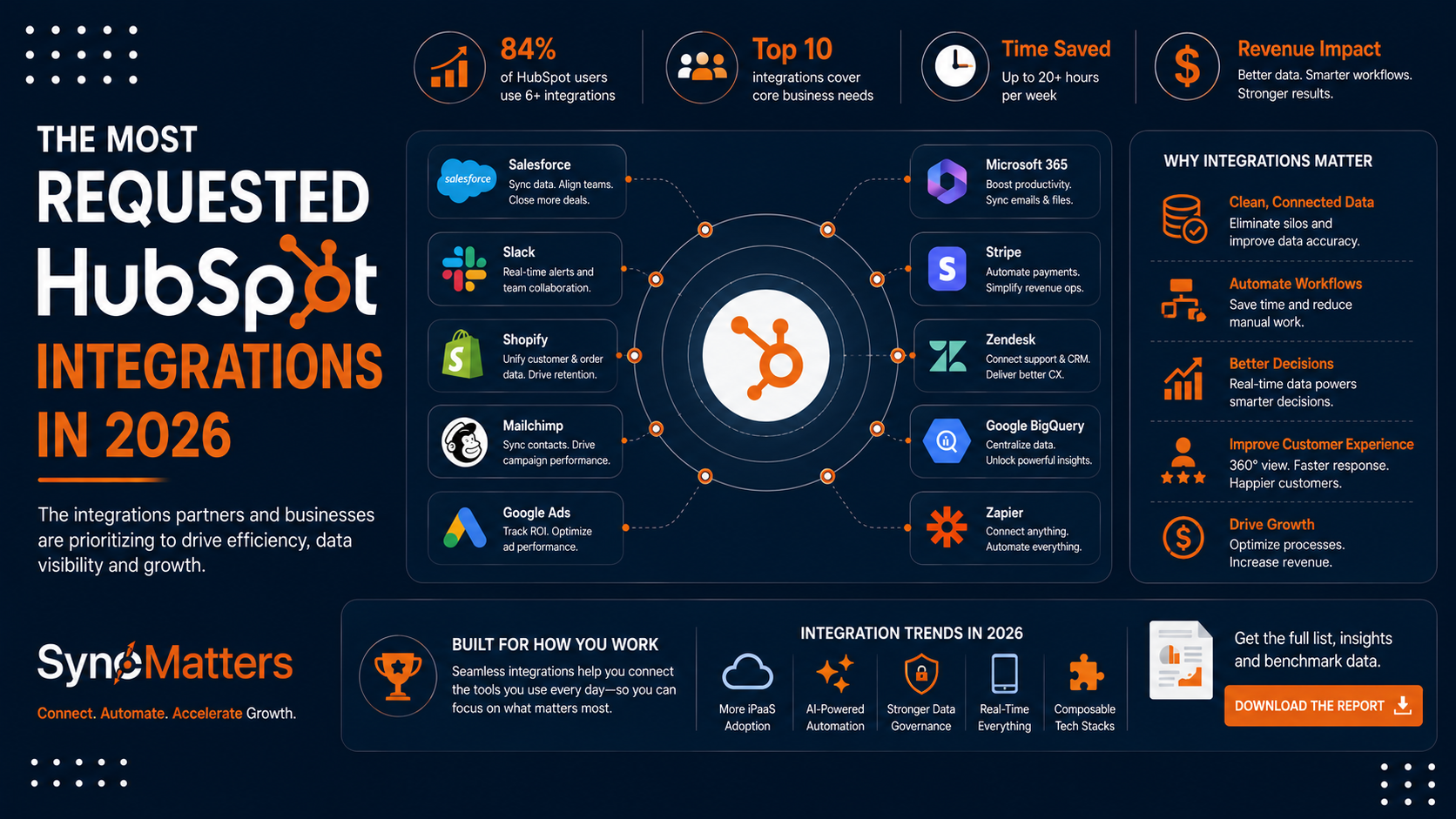
2026 Benchmark Insight: Most Requested Integration Types
The 2026 HubSpot Migration & Integration Benchmark Report analyzed which integrations implementation partners implement most frequently.
Integration Popularity Rankings
| Rank | Integration Type | % of Organizations | Primary Drivers |
|---|---|---|---|
| 1 | NetSuite | 34% | Revenue reconciliation, customer syncing, order automation |
| 2 | Stripe | 31% | Payment processing, subscription management, revenue automation |
| 3 | Office 365/Outlook | 28% | Email syncing, calendar integration, enterprise standard |
| 4 | Shopify | 26% | Order syncing, customer unification, e-commerce integration |
| 5 | Gmail/Google Workspace | 23% | Email syncing, collaborative access |
| 6 | Slack | 21% | Notifications, workflow alerts, team communication |
| 7 | QuickBooks Online | 19% | Accounting integration, AR management |
| 8 | SAP | 17% | Enterprise ERP, complex manufacturing/distribution |
| 9 | Marketo/Eloqua | 15% | Marketing automation, lead nurturing |
| 10 | Zendesk | 14% | Customer support, ticket syncing |
| 11 | Custom APIs | 31% | Industry-specific, legacy systems, proprietary tools |
Several important insights emerge:
ERP Dominates: NetSuite (#1) and SAP (#8) combine for 51% of organizations. ERP integration is now expected, not optional. Organizations skipping ERP integration face manual reconciliation burden and incomplete financial data.
Payment Processing Is Critical: Stripe (#2) indicates growing focus on subscription business models and revenue automation. Organizations want payment data flowing automatically from e-commerce/payments to CRM to accounting.
Custom Integrations Are Common: 31% of organizations implement custom API integrations, indicating diversity in technology stacks. No single integration covers all requirements.
Native Office Integrations Are Standard: Office 365/Outlook (#3) and Gmail (#5) combine for 51% adoption. Email integration is now table-stakes for any CRM implementation.
Communication Platforms Matter: Slack (#6) indicates integration with team communication tools is increasingly important. Notifications and workflow alerts drive CRM adoption and efficiency.
Real-World Integration Scenarios

Scenario 1: SaaS Company Integrating NetSuite for Revenue Automation
The Challenge:
A B2B SaaS company implemented HubSpot for sales and marketing. However, they managed billing and revenue recognition in NetSuite. When a deal closed in HubSpot, finance manually created the customer in NetSuite and created the first invoice. This process took 2-3 days and was error-prone—occasionally customers got created with wrong information or billing didn't match what was promised in the deal.
Additionally, sales couldn't see customer financial status. A salesman wouldn't know if a customer had unpaid invoices or was in collections. This meant sales pursued expansions with customers in financial trouble.
Solution:
SyncMatters designed a NetSuite-HubSpot integration creating a complete customer-to-billing workflow:
- When a deal closes in HubSpot, NetSuite is automatically notified
- If the deal includes product SKUs, an order is automatically created in NetSuite
- Customer information syncs to NetSuite creating the customer account
- Based on deal terms, NetSuite automatically creates invoices on the specified schedule
- Invoice payments sync back to HubSpot for visibility
The integration also synced customer master data from NetSuite to HubSpot, so sales could see AR status, payment history, and outstanding invoice information.
Results:
Deal-to-invoice time dropped from 2-3 days to <1 hour (fully automated). Invoice errors caused by manual data entry dropped 99%. Sales now see customer financial status, enabling smarter expansion opportunities. Finance now reconciles HubSpot opportunities against NetSuite invoices automatically, eliminating manual reconciliation.
Technical Complexity:
The integration required custom development because it involved conditional logic (if deal includes products, create order; if not, create subscription contract). It also required field mapping translating HubSpot deal terms to NetSuite invoice schedules. Standard native connectors couldn't handle this complexity.
Scenario 2: Marketo-HubSpot Integration for Lead Scoring and Handoff
The Challenge:
A B2B company used Marketo for marketing automation and HubSpot for sales CRM. Marketing generated and nurtured leads in Marketo. Sales managed customers in HubSpot. But the two systems didn't share data effectively.
Marketing didn't know which leads converted to customers. Sales didn't see lead engagement history from Marketo. When marketing handed leads to sales, they had no visibility into nurture progress.
Solution:
The company integrated Marketo and HubSpot enabling:
- Leads created in Marketo automatically sync to HubSpot as contacts
- Lead engagement scoring in Marketo syncs to HubSpot for sales visibility
- When a lead reaches marketing qualification threshold (MQL), they automatically update to HubSpot lifecycle stage "Marketing Qualified Lead"
- Sales can see full engagement history when they receive a lead
- When a HubSpot contact becomes a customer, that information syncs back to Marketo to stop nurturing
Results:
Sales conversion improved 25% because they now see engagement history. Marketing can see which campaigns convert to customers. Lead handoff is frictionless—sales receives qualified leads with complete context.
Scenario 3: Custom API Integration with Legacy Manufacturing System
The Challenge:
A manufacturing company used HubSpot for sales but maintained a legacy ERP system built in-house 20 years earlier. The legacy system contained equipment specifications, pricing matrices, and manufacturing capacity data that salespeople needed to provide accurate quotes.
Sales were manually copying information from the legacy system to create quotes in HubSpot. This was time-consuming and error-prone. Salespeople sometimes quoted incorrect pricing or missed capacity constraints.
Solution:
SyncMatters built a custom API integration connecting HubSpot to the legacy system:
- When sales create a quote in HubSpot, they select equipment from a synchronized catalog pulled from the legacy system
- Pricing automatically populates from the legacy system's pricing matrices
- When sales add equipment to a quote, the integration checks manufacturing capacity constraints from the legacy system and alerts sales if capacity is insufficient
- When a quote closes in HubSpot, it automatically creates a production order in the legacy system with exact specifications
Results:
Quote creation time dropped 60%. Quote accuracy improved (no more manual transcription errors). Sales received capacity visibility preventing impossible commitments. Manufacturing received orders exactly matching HubSpot specifications, eliminating translation work.
Technical Complexity:
The legacy system had no APIs. SyncMatters built a custom data extraction layer directly from the legacy system database, created transformation logic translating data to HubSpot structure, and built webhook handlers responding to HubSpot events.
How SyncMatters Designs and Delivers Scalable HubSpot Integrations
SyncMatters specializes in designing and implementing HubSpot integrations that scale with your organization.
SyncMatters' Integration Expertise
ERP Integration Specialists: SyncMatters has deep expertise integrating HubSpot with NetSuite, SAP, QuickBooks, and custom ERP systems. Rather than generic integration approaches, they design integrations reflecting your specific business processes and data flows.
Custom API Development: SyncMatters' custom API development services build specialized integrations with legacy systems, proprietary applications, and industry-specific software. They design APIs for scale, performance, and reliability.
Middleware and iPaaS Implementation: For organizations needing middleware solutions, SyncMatters implements and manages platforms like Zapier, Make, and specialized integration platforms. They design workflows handling complex transformations while remaining maintainable.
Integration Architecture Consulting: Rather than implementing integrations in isolation, SyncMatters designs complete integration architectures supporting your entire technology ecosystem. They help organizations plan which systems should integrate, in what order, and using what methods.
Ongoing Integration Support: SyncMatters provides ongoing integration monitoring and maintenance, ensuring integrations continue functioning as systems update and business requirements evolve. They monitor API calls, alert to failures, and proactively address performance issues.
Integration Implementation Process
Phase 1: Requirements and Architecture (2-4 weeks) SyncMatters conducts discovery understanding your systems, data flows, and business requirements. They design integration architecture specifying which systems integrate, via what methods, using what technologies.
Phase 2: Design and Planning (2-3 weeks) Detailed design documents specify data mapping, transformation logic, error handling, monitoring, and security. This planning prevents surprises during implementation.
Phase 3: Implementation (4-8 weeks) SyncMatters implements integrations using the designed architecture. They build data transformations, implement error handling, set up monitoring.
Phase 4: Testing and Validation (2-4 weeks) Comprehensive testing validates integrations function correctly with real data volumes. Load testing ensures performance at scale. Security testing validates authentication and authorization.
Phase 5: Deployment and Optimization (1-2 weeks) SyncMatters deploys integrations to production, monitors closely during initial operation, and optimizes based on real-world performance.
Phase 6: Handoff and Training (1 week) SyncMatters provides operations teams documentation, training, and escalation procedures for ongoing management.
When to Work With SyncMatters
Organizations benefit from specialized integration expertise when:
- Integrating complex systems (ERP, manufacturing systems, legacy platforms)
- Requiring custom data transformations beyond native capabilities
- Managing high-volume data flows requiring performance optimization
- Implementing mission-critical integrations affecting revenue processes
- Need ongoing integration management and optimization
SyncMatters' blog includes detailed integration implementation guides for organizations planning integration strategies.
Conclusion
HubSpot implementation is only the beginning. Organizations that implement HubSpot but fail to integrate it with their broader technology ecosystem miss enormous value. CRM without integration means data silos, manual processes, incomplete customer view, and inability to leverage CRM intelligence for decision-making.
The most successful organizations treat HubSpot as the central hub in their technology ecosystem, with integrations connecting financial systems, marketing platforms, support tools, and data warehouses. These integrations eliminate manual data entry, ensure data consistency, enable real-time visibility, and drive operational efficiency.
The 2026 Benchmark Report confirms that ERP integration, marketing platform integration, and custom API integrations are now standard, not optional. Organizations that haven't integrated HubSpot with their ERP systems are operating with incomplete financial visibility. Organizations without marketing integration can't effectively coordinate sales and marketing. Organizations without custom integrations to proprietary systems waste time on manual data entry.
If your HubSpot implementation isn't integrated with your broader technology ecosystem, you're leaving significant value on the table. Integration represents the next major lever for HubSpot value realization.
CTA
Ready to discuss HubSpot integration strategy for your organization? Talk to SyncMatters' integration experts. We'll assess your current systems, identify integration opportunities, and develop an integration roadmap aligned with your business objectives.
Whether you need to integrate NetSuite for revenue automation, connect marketing platforms for lead flow alignment, or build custom APIs for proprietary systems, SyncMatters brings deep expertise in HubSpot integration design and implementation. We've helped hundreds of organizations design scalable integrations supporting business growth.
FAQ
What is the most important HubSpot integration?
The most important integration depends on your business model. For SaaS companies, payment processing integration (Stripe) is critical for revenue automation. For B2B companies, ERP integration (NetSuite, SAP) is essential for revenue reconciliation and customer master data. For organizations with complex sales processes, marketing automation integration ensures lead flow alignment. The common thread: integrate systems supporting your primary revenue process first. Other integrations support efficiency and analytics.
How long does HubSpot integration take?
Timeline varies based on complexity. Native integrations with pre-built connectors require 1-2 weeks configuration. Middleware integrations handling moderate complexity take 3-6 weeks design, build, and testing. Custom API integrations require 8-12 weeks for complex systems. Most organizations see integrations fully operational within 8-16 weeks from project start to production deployment. More complex integrations requiring significant custom development may extend beyond 16 weeks.
How much does HubSpot integration cost?
Costs vary dramatically. Native integrations using existing connectors cost minimal setup. Middleware solutions cost $500-$2,000 monthly depending on usage. Custom API integrations typically range $15,000-$50,000 for moderately complex integrations, and $50,000-$150,000+ for highly complex systems requiring significant custom development. Organizations often evaluate integration cost against manual process cost—paying $30,000 for integration that eliminates 10 hours/week of manual work pays for itself in 6-12 months.
What is HubSpot API and what can it do?
HubSpot's REST API enables programmatic access to HubSpot data from external systems. You can create and update contacts, companies, deals, and custom objects. You can retrieve activity histories, lists, and custom properties. Webhooks enable real-time notifications when data changes. The API supports virtually any integration scenario—connecting to financial systems, syncing with marketing platforms, feeding data warehouses, or triggering external workflows. Rate limits apply (varying by tier), so integrations must respect rate limits through batching and caching.
Should we use native HubSpot integrations or custom APIs?
Use native integrations when they exist and meet your requirements—they're simpler and require less maintenance. If native integrations don't support your requirements, evaluate middleware platforms for moderately complex scenarios. Use custom APIs when you need flexibility, performance, or integration with systems lacking standard connectors. Most organizations use hybrid approaches: native integrations for common scenarios, custom APIs for unique requirements.
How do you handle data mapping in HubSpot integrations?
Data mapping specifies how fields in one system correspond to fields in another. Create a mapping document listing every source field with its destination field, any transformation logic required, and who is responsible for maintaining each mapping. For simple one-to-one mappings, configuration handles it. For complex transformations (combining multiple source fields into one destination field, lookup tables, conditional logic), custom code handles transformation. Well-documented mapping prevents confusion and enables easier troubleshooting.
What is iPaaS and when should you use it?
iPaaS (Integration Platform as a Service) is cloud-based middleware managing integrations between multiple systems. Rather than building point-to-point connections between every system pair, iPaaS provides a central platform managing all connections. Use iPaaS when you have multiple systems requiring integration and want easier management and transformation. iPaaS becomes cost-effective when managing 5+ system integrations. For simpler scenarios (1-2 integrations), direct native integrations or custom APIs may be more cost-effective.
How do you ensure HubSpot integration security?
Use OAuth 2.0 for authentication rather than API keys when possible—tokens provide scoped access and expire automatically. Encrypt all data in transit using HTTPS. Store sensitive credentials (API keys) securely, never in code. Use rate limiting and request validation preventing abuse. Monitor integration activity for suspicious patterns. Use dedicated service accounts with minimal required permissions rather than sharing user credentials. Audit who accesses integrated systems and what data they access. For sensitive integrations (financial data, customer PII), implement additional security controls like IP allowlisting.
What monitoring should you implement for HubSpot integrations?
Monitor key metrics including API call volume (ensure you're not approaching rate limits), error rates (alert if sync failures exceed threshold), data freshness (alert if sync hasn't occurred in expected timeframe), and system latency (alert if API responses slow). Log all integration activity for troubleshooting. Alert operations teams immediately when integrations fail. Implement automated retry logic for transient failures. Regular reviews of integration logs identify patterns (e.g., consistently hitting rate limits, specific types of failures) enabling optimization.
What happens if HubSpot API rate limits are exceeded?
HubSpot returns "429 Too Many Requests" errors, blocking further API calls until you're back within rate limits. This stops data sync temporarily. Design integrations respecting rate limits: batch API calls, use webhooks for real-time events rather than polling, cache data locally, implement exponential backoff for retries. For very high-volume scenarios approaching limits, contact HubSpot about higher tier limits or implement additional optimization strategies. Hitting rate limits consistently indicates integration redesign is needed.



.svg)