Table of Contents
- Introduction
- Understanding HubSpot: Platform Overview
- HubSpot's Core Hubs Explained
- How HubSpot CRM Works
- Marketing Hub: Attracting and Engaging Customers
- Sales Hub: Closing Deals Faster
- Service Hub: Delivering Excellent Support
- HubSpot Integrations and Ecosystem
- Real-World HubSpot Success Stories
- Implementing HubSpot Successfully
- HubSpot AI and Automation
- Common HubSpot Questions
- FAQ
Introduction
HubSpot has emerged as one of the world's leading customer relationship management platforms, serving over 200,000 customers across all industries and company sizes. The platform's philosophy is elegantly simple: help growing businesses grow faster by organizing, managing, and nurturing customer relationships across sales, marketing, and support teams.
Yet many organizations implementing HubSpot struggle with getting full value from the platform. They use only 30-40 percent of available features, focusing primarily on contact management while missing automation, reporting, and integration opportunities that drive significant business impact. Organizations that understand how HubSpot works comprehensively—how different modules connect, how data flows between systems, and how to leverage advanced features—consistently report 40-60 percent productivity improvements compared to those using the platform superficially.
This comprehensive guide explains how HubSpot works, from foundational CRM capabilities through advanced automation, AI, and integration features. Whether you are evaluating HubSpot for the first time or looking to maximize an existing implementation, understanding how HubSpot's different components work together is essential for driving revenue growth.
Understanding HubSpot: Platform Overview
HubSpot is far more than a contact database—it is an integrated platform designed to align your entire organization around customer success.

HubSpot's Mission and Design Philosophy
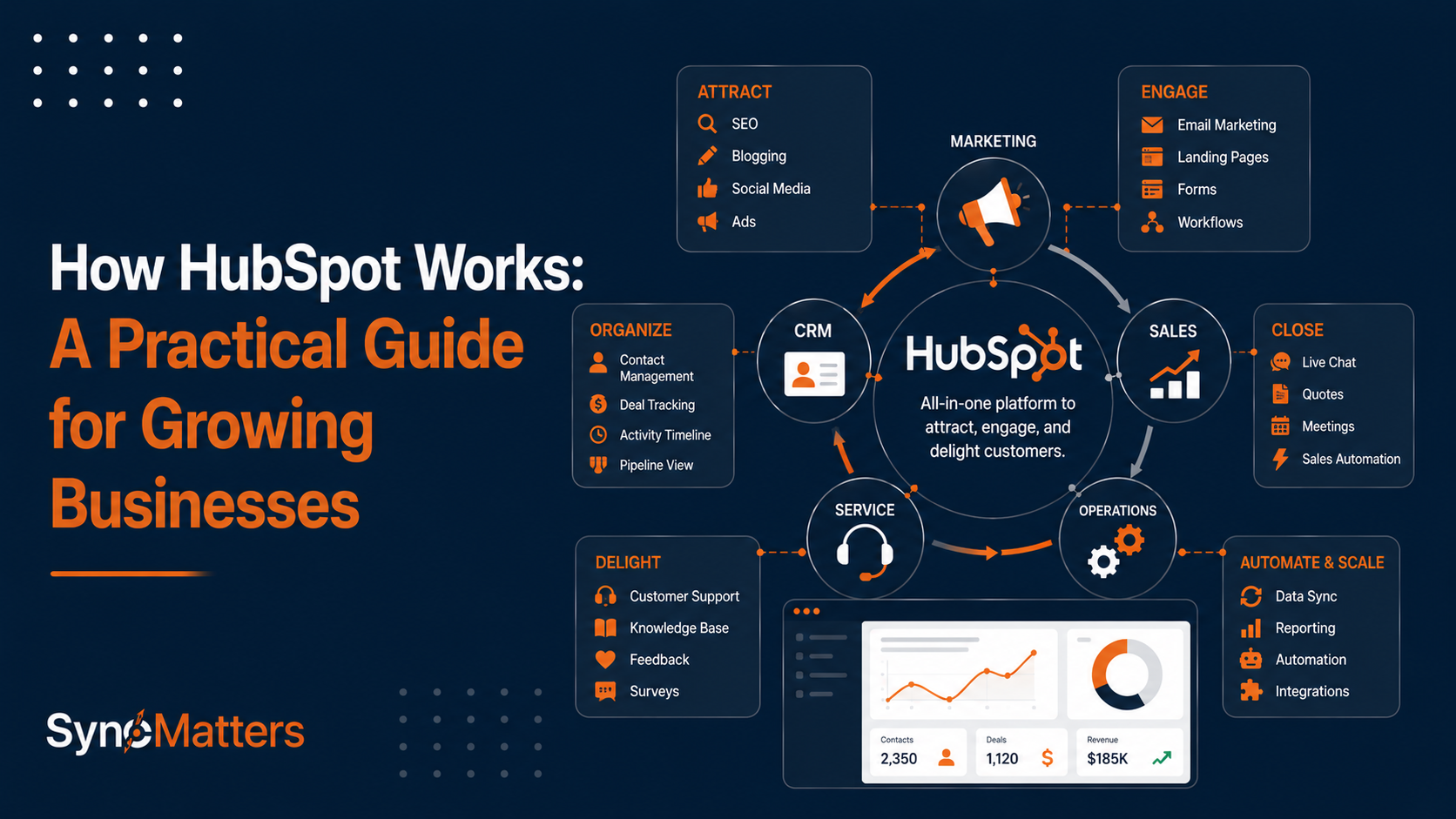
HubSpot was built on the principle that customer relationship management should be human-centered and revenue-focused. The platform brings together marketing, sales, service, and operations tools into a unified system where customer data flows seamlessly between departments. Rather than maintaining separate databases with duplicate information, HubSpot creates a single source of truth where every customer interaction, from initial marketing engagement through post-sale support, is recorded and visible across the organization.
Key Platform Characteristics
Unified Data Architecture HubSpot's database is designed around a unified customer record. When marketing captures a lead, sales can immediately see engagement history and content consumed. When sales moves an opportunity through stages, the customer success team has visibility into deal details and commitments made. This unified approach eliminates data silos that plague organizations using disconnected systems.
User-Friendly Interface Unlike legacy CRM systems requiring extensive training, HubSpot emphasizes intuitive design. Most users can become productive within days rather than weeks. This user-friendly approach drives adoption rates of 90%+ compared to industry average of 60-70%.
Scalable Pricing Model HubSpot offers both free and paid tiers, allowing businesses to start with free CRM and expand capabilities as they grow. This approach eliminates the "big bang" implementation challenges that characterize expensive enterprise systems.
Extensive Integration Ecosystem HubSpot connects with 1000+ third-party applications through native integrations or APIs, enabling seamless data flow with your existing tools. Whether you use accounting software, e-commerce platforms, email systems, or specialized industry tools, HubSpot integrates to avoid data silos.
HubSpot's Core Hubs Explained
HubSpot organizes functionality into distinct "Hubs," each serving specific business functions while sharing the same unified customer database.
The Hub Structure
| Hub | Primary Function | Key Features | Best For |
|---|---|---|---|
| Marketing Hub | Attract and engage customers | Email marketing, landing pages, forms, analytics | Building audience and generating leads |
| Sales Hub | Convert leads into customers | Pipeline management, sales automation, engagement tools | Closing deals and managing pipeline |
| Service Hub | Deliver excellent support | Ticketing, knowledge base, customer feedback | Supporting customers and building loyalty |
| Operations Hub | Unify and automate operations | Workflow automation, data management, integrations | Automating processes across organization |
| Commerce Hub | Drive online sales | Payments, quotes, invoicing | E-commerce and recurring billing |
Integrated vs. Standalone Use While each Hub serves distinct purposes, they share customer data and feed insights to each other. Organizations get maximum value by integrating multiple Hubs, but many successfully start with single Hub (typically Sales or Marketing) and expand over time.
How HubSpot CRM Works
The HubSpot CRM forms the foundation of the entire platform. Understanding how it works is essential to leveraging other capabilities.
Contact and Company Management
HubSpot CRM starts with contact management. When someone engages with your marketing (downloading content, visiting your website, opening emails) or sales (receiving an email, completing a demo request), HubSpot creates a contact record.
Contact Records Include:
- Basic information (name, email, phone)
- Company association (linking contacts to company records)
- Contact properties (industry, revenue, use cases, custom fields)
- Interaction history (emails, calls, meetings, content consumed)
- Engagement score (measuring contact interest)
- Lifecycle stage (lead, customer, etc.)
Company records aggregate all contacts from the same organization, providing account-level visibility.
Deal and Pipeline Management
Sales teams use HubSpot's deal functionality to track opportunities through predefined pipeline stages. Each deal includes:
Deal Properties:
- Amount (opportunity value)
- Pipeline stage (initial, negotiating, proposal, closing, closed won/lost)
- Associated contacts and companies
- Deal properties (product type, deal source, business type)
- Expected close date
- Custom fields tracking deal-specific attributes
Deal Intelligence: HubSpot's AI automatically scores deals based on characteristics and engagement patterns, predicting deal probability and expected close timing. Machine learning identifies patterns in won and lost deals, recommending next steps to increase conversion probability.
Automated Contact and Data Enrichment
HubSpot automatically enriches contact records with company data from its database of 20+ million businesses. When a lead provides an email address, HubSpot identifies their company and automatically populates company information including size, industry, revenue, and location. This enrichment eliminates manual research and ensures consistent, accurate data.
Marketing Hub: Attracting and Engaging Customers
Marketing Hub helps organizations attract, engage, and delight customers through coordinated marketing activities.
Email Marketing and Automation
Email marketing represents the most popular Marketing Hub feature. The email builder enables creating professional campaigns with drag-and-drop functionality. But beyond basic email sending, HubSpot includes sophisticated automation:
Automation Workflows:
- Welcome sequences for new subscribers
- Engagement-based nurturing (different content for engaged vs. disengaged contacts)
- Lead qualification workflows (marking contacts as sales-ready when they exhibit engagement)
- Customer onboarding sequences (post-purchase education)
- Re-engagement campaigns (for lapsed customers)
HubSpot tracks email opens, clicks, and engagement, automatically scoring leads based on interaction levels.
Landing Pages and Forms
Marketing Hub includes a landing page builder for creating conversion-focused pages without developer involvement. Forms capture visitor information in exchange for valuable content:
Progressive Profiling: Rather than asking for extensive information upfront, HubSpot remembers what it knows about contacts and asks only for new information. Over time, progressive profiling builds rich contact profiles without frustrating visitors.
Content Management and SEO
HubSpot includes a content management system (CMS) for creating and publishing blog posts, web pages, and knowledge bases. Integrated SEO recommendations help optimize content for search visibility.
Social Media Management
Built-in social tools enable publishing and monitoring activity across LinkedIn, Facebook, and Twitter. Social monitoring tracks brand mentions and competitor activity.
Sales Hub: Closing Deals Faster
Sales Hub provides tools that help sales representatives manage opportunities, engage prospects, and close deals efficiently.
Sales Pipeline and Deal Management
Sales representatives view all opportunities in a visual pipeline, dragging deals between stages as they progress. Sales managers see team pipelines, individual rep activity, and sales forecasts in real-time.
Key Sales Hub Features:
- Deal ownership and assignment
- Activity tracking (calls, emails, meetings)
- Automated task management (reminders for follow-ups)
- Sales sequences (automated outreach workflows)
- Document management and tracking (proposals, contracts, quotes)
Sales Engagement Tools
Sales Hub enables direct contact engagement:
Sales Features:
- Click-to-call dialing through HubSpot
- Email integration with automatic tracking
- Live chat for immediate engagement
- LinkedIn integration for relationship discovery
- Sales cadences (automated outreach sequencing)
AI-Powered Sales Tools
HubSpot's AI (Breeze) powers several sales features:
AI Capabilities:
- Lead scoring predicting deal probability
- Deal forecasting estimating close timing
- Prospecting assistance identifying similar contacts to past customers
- Activity recommendations suggesting next steps
Service Hub: Delivering Excellent Support
Service Hub helps organizations provide exceptional customer support while building loyalty for expansion and retention.

Ticketing System
Support interactions create service tickets, automatically routing to appropriate team members based on customer type, issue category, and agent availability. Tickets track:
- Customer inquiry details
- Resolution status and timeline
- Associated contacts and companies
- Customer satisfaction feedback
- Resolution knowledge base articles used
Knowledge Base
Organizations create knowledge bases enabling customers to self-serve common issues. HubSpot's knowledge base includes search functionality, article feedback, and analytics showing which articles drive customer satisfaction.
Customer Feedback
Built-in surveys and feedback mechanisms gather customer satisfaction data (NPS, CSAT) and identify service improvement opportunities.
HubSpot Integrations and Ecosystem
HubSpot's power extends through extensive integrations connecting customer data across your technology stack.
Native Integrations
HubSpot natively integrates with 1000+ applications:
Popular Integrations:
- G Suite and Microsoft 365 (email and calendar)
- Slack (notifications and collaboration)
- Salesforce (for organizations maintaining parallel systems)
- Financial software (QuickBooks, NetSuite for billing sync)
- E-commerce platforms (Shopify, BigCommerce)
- Support platforms (Zendesk, Freshdesk for advanced support)
- Marketing platforms (Zapier for custom integrations)
API and Custom Integrations
For integrations without native connectors, HubSpot's REST API enables building custom connections. SyncMatters specializes in building custom HubSpot integrations for organizations with unique requirements, connecting HubSpot with 55+ CRM and business systems.
Real-World HubSpot Success Stories
Case Study 1: Manufacturing Company Increases Qualified Leads 183%
Challenge: A mid-market manufacturing company struggled with inconsistent lead quality and slow sales cycle progression. Different sales reps used different processes, and marketing lacked visibility into which campaigns generated sales-ready leads.
Solution: The company implemented HubSpot Sales and Marketing Hubs together:
Implementation:
- Sales pipeline standardization defining consistent stages
- Lead scoring qualifying prospects before sales outreach
- Email nurturing automating engagement with unqualified prospects
- Sales sequences automating initial outreach
- Integrated reporting showing lead source to close conversion
Results:
- 183% increase in qualified leads within 6 months
- 41% reduction in customer acquisition cost
- 28% shorter sales cycle
- Sales team adoption exceeding 95%
Key Learning: Integrated sales and marketing implementation delivers better results than implementing either function in isolation.
Case Study 2: B2B SaaS Achieves 100% Growth in HubSpot Performance
Challenge: A growing SaaS company implemented HubSpot but struggled to configure it effectively for their complex business model. Sales representatives weren't using the system consistently, and marketing couldn't track campaign effectiveness.
Solution: The company worked with HubSpot implementation specialists to:
Configuration:
- Custom deal properties tracking specific product subscriptions
- Automated workflows standardizing sales process
- Lead scoring aligned with product types
- Custom reporting dashboards for executive visibility
- Integration with financial system for revenue recognition
Results:
- HubSpot performance increased 100% through effective configuration
- Sales team adoption improved from 60% to 95%
- Marketing attribution clarity improved decision-making
- Executive team had visibility into revenue pipeline
Key Learning: HubSpot's effectiveness depends heavily on configuration aligned with unique business processes. Off-the-shelf setups rarely deliver maximum value.
Case Study 3: Global Company Unifies 93 Years of Customer Data
Challenge: A company with 93 years of customer history operated multiple legacy systems with data fragmentation. Different regions used different databases, making company-wide analytics impossible.
Solution: The organization migrated all historical customer data to HubSpot:
Migration:
- Data consolidation identifying and merging duplicate customer records
- Historical data import bringing decades of relationship and transaction history
- Custom object creation modeling unique business entities
- Integration with accounting system for financial history
- Dashboard creation providing global visibility
Results:
- Unified customer view across 93 years of data
- 540,000+ customer records consolidated
- Faster ticket resolution through complete customer context
- Executive reporting now possible for first time
- 63% increase in sales meetings booked through better data visibility
Key Learning: HubSpot can serve as central repository for organizational customer history, eliminating data fragmentation that hampers growth.
Implementing HubSpot Successfully
Understanding HubSpot's architecture is only the first step—successful implementation requires planning and execution discipline.

Implementation Phases
Phase 1: Planning (2-4 weeks)
- Define implementation objectives and success metrics
- Audit existing systems and data
- Document current processes
- Identify team members and champions
Phase 2: Configuration (3-6 weeks)
- Set up basic structure (properties, pipelines, workflows)
- Create custom objects for unique business needs
- Configure email templates and automation
- Design dashboards and reporting
Phase 3: Data Migration (2-4 weeks)
- Clean and prepare source data
- Map fields between systems
- Migrate historical data
- Validate migration accuracy
Phase 4: Integration (2-4 weeks)
- Connect third-party systems
- Test data flows between platforms
- Configure integrations for ongoing syncing
- Verify data accuracy
Phase 5: Training and Launch (2-3 weeks)
- Train all users on daily functionality
- Establish support procedures
- Monitor early usage and address issues
- Refine configuration based on feedback
Keys to Implementation Success
Executive Sponsorship: Successful implementations require visible executive support. When leadership demonstrates that HubSpot adoption is priority, team adoption rates exceed 90%.
Change Management: Implementing new systems disrupts established workflows. Comprehensive change management addressing team concerns and demonstrating benefits accelerates adoption.
Integration Planning: Most implementation challenges relate to integrating HubSpot with dependent systems. Planning integrations upfront prevents post-launch surprises. SyncMatters' integration expertise helps organizations plan and execute complex integrations successfully.
Dedicated Resources: Implementations require dedicated project management and configuration expertise. Organizations attempting to implement alongside existing responsibilities experience delays and quality issues.
HubSpot AI and Automation
HubSpot's AI capabilities (branded as Breeze) are transforming how the platform works, enabling features that were previously manual.
AI-Powered Features
Prospecting Assistance: AI analyzes won deals, identifies similar prospects in your database, and recommends outreach. This automation surfaces opportunity that manual prospecting misses.
Content Generation: AI content assistants help create email copy, subject lines, landing page content, and social media captions. These tools accelerate content creation while maintaining quality.
Predictive Analytics: Predictive models forecast deal probability, suggest next actions, and identify churn risk. These predictions guide resource allocation and strategy.
Automated Reporting: AI summarizes activities, highlights important metrics, and surfaces insights from data. Automated reporting reduces manual analysis time.
Automation Workflows
Beyond AI, HubSpot's workflow engine automates repetitive business processes:
Common Automations:
- Welcome sequences for new subscribers
- Lead scoring based on engagement
- Opportunity assignment to appropriate sales representatives
- Escalation notifications for high-priority deals
- Customer onboarding sequences post-purchase
- Renewal reminders for subscription customers
Recent SyncMatters blog articles cover HubSpot automation best practices and implementation strategies.
Common HubSpot Questions
Is HubSpot suitable for small businesses? Absolutely. HubSpot's free tier serves small teams effectively, with easy upgrade paths as you grow. Many small businesses start with free CRM and expand features over time.
How does HubSpot compare to Salesforce? HubSpot emphasizes ease of use and marketing/sales alignment. Salesforce offers greater customization and enterprise features. Choose HubSpot for faster implementation and broader feature breadth; choose Salesforce for highly customized enterprise deployments. Organizations can migrate between platforms; SyncMatters specializes in Salesforce to HubSpot migrations.
Can you integrate HubSpot with existing systems? Yes. HubSpot offers 1000+ native integrations and API access for custom connections. SyncMatters integrates HubSpot with 55+ business systems, ensuring data flows seamlessly with your existing stack.
How long does HubSpot implementation take? Typical implementations take 3-6 months depending on complexity. Small straightforward implementations might complete in 4-8 weeks. Large complex implementations with extensive customization and integration might require 6+ months.
FAQ
How does HubSpot work exactly?
HubSpot is a cloud-based CRM platform that unifies customer data, marketing, sales, and service operations. At its core, HubSpot maintains unified customer records combining contact information, company data, interaction history, and engagement tracking. When customers interact with marketing (email opens, website visits, content downloads) or sales (meetings, proposals, calls), HubSpot records these interactions. Marketing Hub attracts and nurtures prospects, Sales Hub manages opportunities through sales pipeline, and Service Hub delivers support. All Hubs share the same customer database, eliminating information silos. Automation workflows connect these activities, triggering actions (sending emails, assigning tasks) based on customer behaviors.
What are HubSpot's main features?
HubSpot's core features span multiple categories. Contact and company management organizes customer information. Deal management tracks sales opportunities through defined pipeline stages. Email marketing and automation enable nurturing campaigns and lead generation. Landing pages and forms capture visitor information. Content management and SEO tools support content marketing. Sales features include pipeline management, sales sequences, and engagement tools. Service features provide ticketing, knowledge bases, and customer feedback. AI capabilities predict deal probability, score leads, and generate content. Automation workflows connect activities across marketing, sales, and service. Integrations connect HubSpot with 1000+ third-party applications. Reporting and analytics provide visibility into performance.
Is HubSpot easy to use?
HubSpot is designed for ease of use with an intuitive interface requiring minimal training. Most users become productive within days rather than weeks. Contact management and basic deal tracking are straightforward. Email marketing and automation workflows are visual and user-friendly. The main learning curve involves advanced features like complex workflows, custom properties, and integrations, which typically require some training or professional services guidance. HubSpot's average user adoption rate exceeds 90%, higher than many competing systems.
How much does HubSpot cost?
HubSpot offers tiered pricing from free to enterprise. Free CRM provides contact management, basic pipelines, and email integration indefinitely. Paid tiers (Starter, Professional, Enterprise) unlock additional features, higher contact limits, advanced automation, and customer support levels. Pricing depends on which Hubs you use (Marketing, Sales, Service each have separate pricing). A typical mid-market implementation including multiple Hubs costs $5,000-$20,000 annually. Enterprise implementations can exceed $50,000+ annually. Many organizations start with free or Starter tier and expand functionality as needs grow.
What companies use HubSpot?
HubSpot serves 200,000+ customers across all industries and company sizes. Customers range from one-person startups through enterprise organizations. Notable users include companies in SaaS, manufacturing, healthcare, financial services, media, education, and professional services. HubSpot is particularly popular among B2B companies, though B2C companies also use the platform extensively. Successful implementations exist at organizations from $1M to $1B+ revenue.
Can you export data from HubSpot?
Yes. HubSpot allows exporting contacts, companies, and other data in bulk. Organizations moving systems can export complete datasets for migration. However, exporting doesn't eliminate the need for data mapping and transformation to destination system format. Professional migration services like SyncMatters specialize in HubSpot migrations, handling data mapping, transformation, and validation, and ensuring clean data in destination systems.
How secure is HubSpot?
HubSpot maintains SOC 2 Type 2 compliance, GDPR compliance, and other security standards appropriate for business data. The platform encrypts data in transit and at rest. HubSpot regularly undergoes security audits. Enterprise customers can implement additional security controls like SSO, IP allowlisting, and custom permission models. HubSpot's security is sufficient for most organizations, though high-security industries (healthcare with HIPAA, finance with FINRA) should verify compliance requirements.
What's HubSpot's mobile experience?
HubSpot offers mobile apps for iOS and Android providing core CRM functionality on mobile devices. Sales reps can access deals, contacts, and activities; update pipeline; and log activities from mobile. The mobile experience is functional but somewhat limited compared to desktop. For organizations requiring extensive mobile functionality, integrations with specialized mobile tools might be necessary.
How do you integrate HubSpot with other systems?
HubSpot offers 1000+ native integrations with popular business applications. For applications without native integrations, the HubSpot API enables building custom connections. Integration platforms like Zapier connect HubSpot with additional applications without coding. Organizations with complex integration requirements should engage integration specialists. SyncMatters specializes in custom HubSpot integrations with enterprise systems, specialized software, and unique business requirements.
Should you implement HubSpot yourself or hire professionals?
Small, straightforward implementations can be self-service using HubSpot's resources and templates. However, most organizations benefit from professional implementation services ensuring:
- Proper configuration aligned with business processes
- Clean data migration from legacy systems
- Thorough integration with dependent systems
- Comprehensive user training and change management
- Post-launch optimization and support
Professional services typically cost 20-30% of software costs but prevent costly implementation mistakes and accelerate time to value. Organizations implementing without professional services often need to retrofit configuration months later, ultimately costing more than initial professional investment.



.svg)