
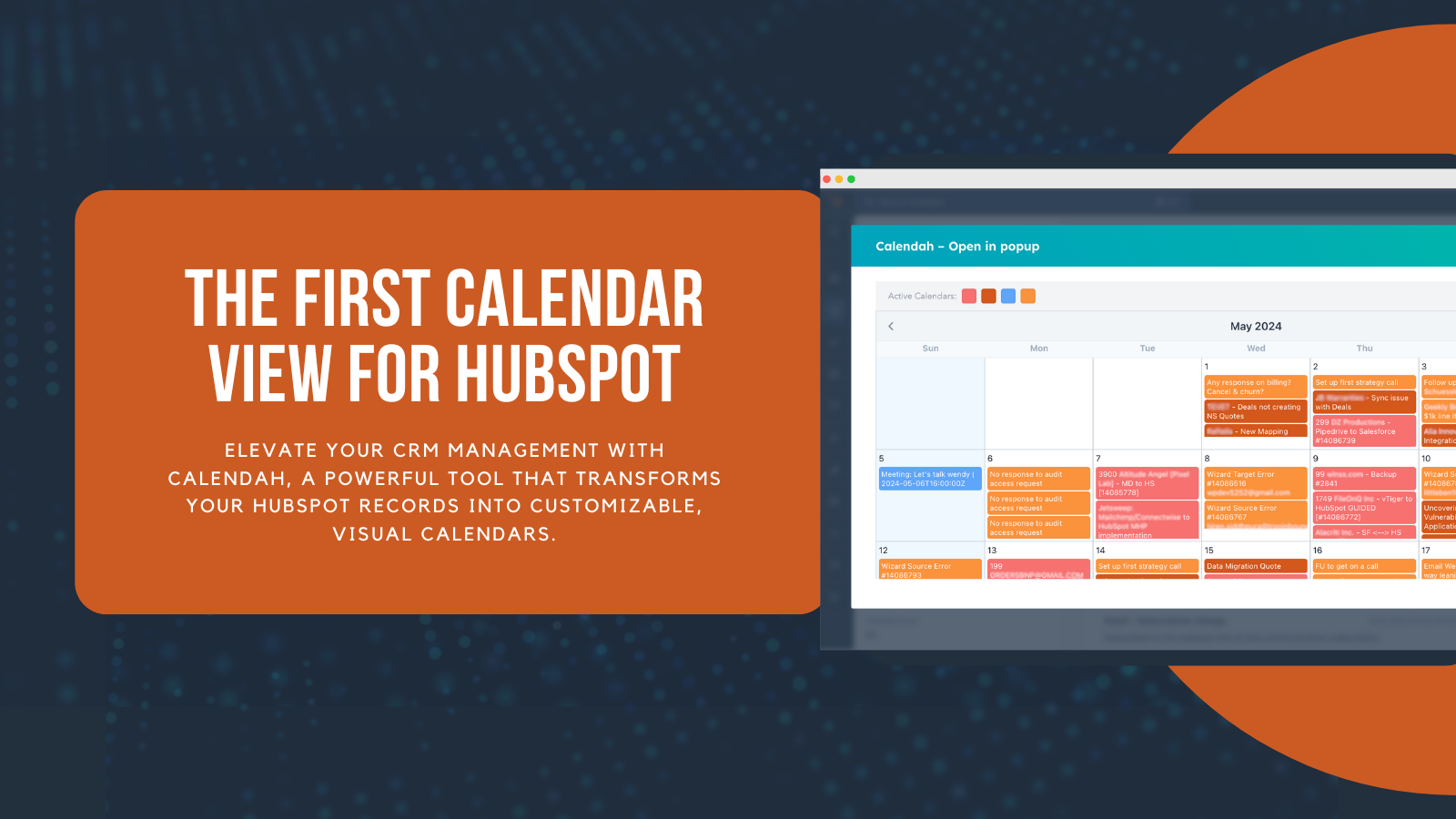
In the fast-moving world of CRM management, clarity and timing make all the difference. Every sales opportunity, customer interaction, support ticket, and renewal date represents a critical moment that demands attention and action. Yet for years, despite HubSpot's powerful capabilities and extensive feature set, users have found themselves lacking one essential capability that seemed almost obvious in its absence: a real, dynamic calendar view for their CRM data. Teams have struggled to visualize their pipelines, track important milestones, and maintain a clear temporal understanding of their business activities. All of that changes now. Calendah, created by SyncMatters, changes that forever.
Built as the first fully customizable calendar interface for HubSpot, Calendah allows businesses to instantly visualize contacts, companies, deals, tickets, meetings, tasks, calls, emails, and even custom objects in a clean, intuitive calendar layout that feels natural and immediately useful. Whether you're tracking sales cycles, managing customer onboarding timelines, coordinating support tickets, or monitoring subscription renewals, everything can now be seen at a glance in a format that makes temporal relationships crystal clear. The result? Better organization, faster workflows, reduced cognitive load, and a dramatically clearer understanding of what's happening across your entire business—not just today, but weeks and months into the future.
A Smarter Way to View Your HubSpot Data
Calendah isn't just an add-on or a simple plugin—it's a fundamentally new way to work with your CRM data. Instead of constantly digging through endless lists, scrolling through dense tables, and hunting through property fields to understand when things are happening, users can now see their CRM activity organized visually by date in a way that mirrors how we naturally think about time and deadlines. The interface is designed to reduce friction and increase understanding, making it immediately obvious what needs attention today, what's coming up tomorrow, and what's on the horizon for next month. With just a few clicks, anyone on your team—from sales reps to customer success managers to support specialists—can build calendars tailored to their unique processes and display the exact information that matters most to their role and responsibilities.

Key Highlights
Tailored Views — Choose which records appear on your calendar, using any native or custom fields as your foundation. You have complete control over what data gets displayed and how it's organized, ensuring that every calendar view is perfectly aligned with how your team actually works and what information they need to see at any given moment.
Multiple Saved Configurations — Toggle between different "lenses" of your business with ease, such as sales pipelines, customer onboarding steps, support ticket queues, renewal schedules, or project milestones. Each saved configuration preserves your filters, date fields, and display preferences, allowing you to switch contexts instantly without having to rebuild your view from scratch every time.
Deep Record Insights — Click any entry to open an instant, detailed pop-up preview that shows all the key information you need without leaving the calendar interface. This means you can quickly review contact details, deal status, ticket priorities, or custom object properties in context, making decisions faster and maintaining your workflow momentum.
Lightning-Fast Navigation — Jump directly to a full HubSpot record with a single click whenever you need to take action, update information, or dive deeper into the details. The seamless integration ensures you're never more than one click away from the complete record view, but you also never lose your place on the calendar.
Flexible Filtering — Show only the records you need at any given moment: critical milestones, upcoming renewals, looming deadlines, pending tasks, scheduled calls, or anything else tied to a date. The filtering system is designed to be both powerful and intuitive, helping you focus on what matters most without getting overwhelmed by information you don't currently need.
Calendah brings much-needed structure and clarity to even the most complex workflows, whether you're managing hundreds of deals across multiple pipelines, coordinating customer success activities for diverse client segments, or tracking support tickets with various SLAs and priorities.
Calendah vs. HubSpot's Native Calendar: Why Calendah Wins
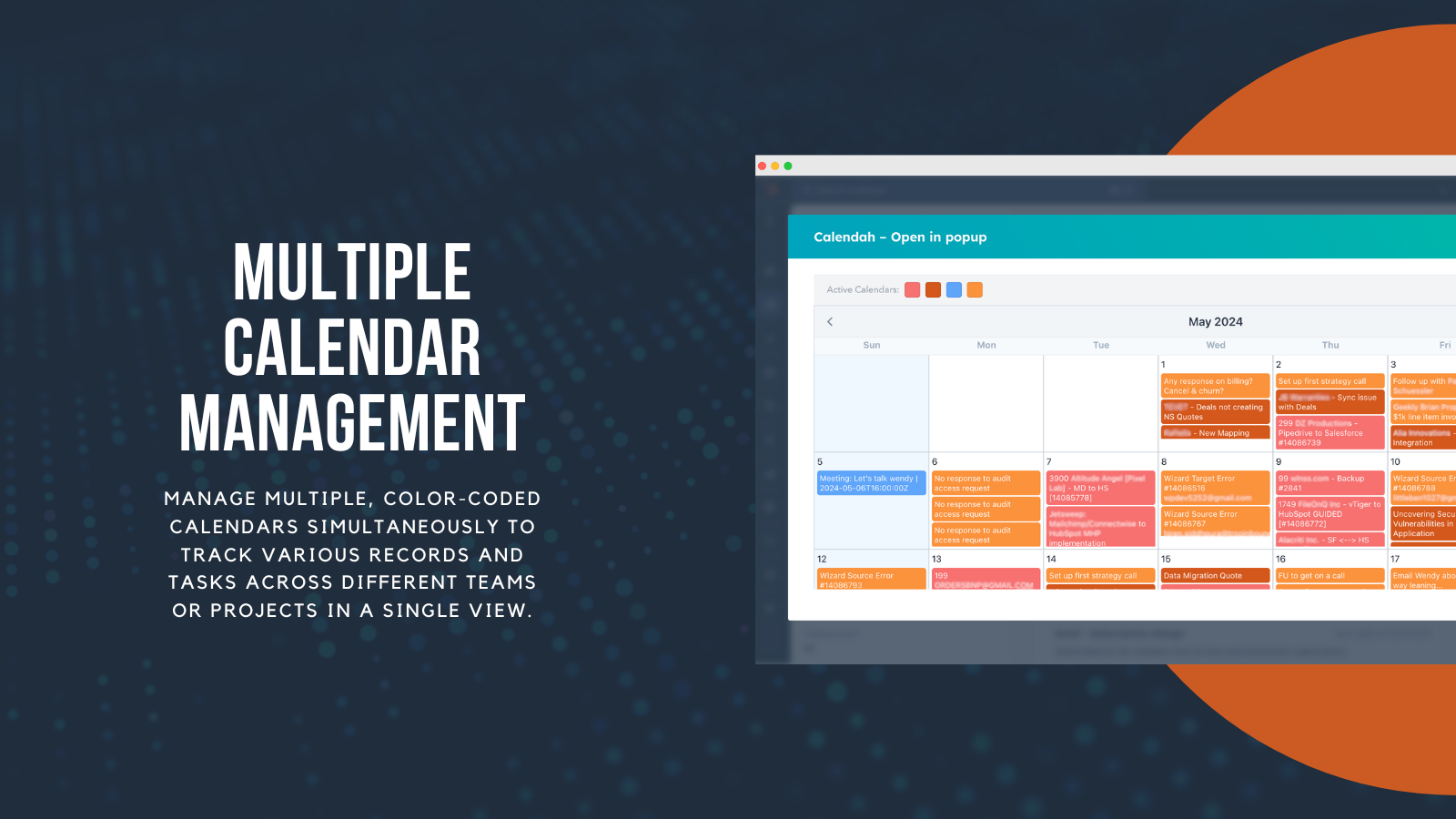
HubSpot recently introduced new calendar-related features, including improved scheduling tools, dedicated marketing calendars for campaign planning, and enhanced external calendar synchronization capabilities. These updates are genuinely helpful and represent positive improvements to the platform—but they are not, and were never intended to be, a full CRM-wide calendar solution that addresses the core visualization challenges that teams face daily. That's where Calendah truly stands apart and delivers something entirely different.
Below is a clear, honest, and detailed comparison of what both platforms offer and where each excels.
1. Scope of Data Visualization
HubSpot
- Marketing Calendar (campaign-focused activities and content publishing)
- Meeting scheduling (booking pages and calendar links)
- External calendar sync (Google Calendar, Outlook integration)
- No unified CRM calendar that spans your entire database
- Cannot visualize deals, tickets, or custom objects on a calendar interface
- Limited to marketing events and scheduled meetings, leaving massive gaps in visibility
Calendah
- Full CRM-wide visualization that encompasses your entire HubSpot ecosystem
- Works seamlessly with any HubSpot object: deals, tickets, contacts, companies, tasks, calls, emails, custom objects, and anything else you've built
- Supports any native or custom date field, giving you complete flexibility in what temporal data you want to visualize
→ Winner: Calendah — It delivers the true database-wide calendar view that HubSpot still does not offer, making it possible to finally see your entire operation in one temporal interface.
2. Customization & Saved Views
HubSpot
- Marketing-specific filters for campaign and content planning
- Cannot create custom saved calendar views for sales pipelines, support workflows, customer onboarding sequences, subscription management, or any of the dozen other critical business processes that run through your CRM
Calendah
- Unlimited customization options that adapt to however your business operates
- Multiple saved calendar views that can be named, organized, and switched between instantly
- Perfect for multi-team operations where different departments need different lenses: sales tracking close dates → customer success monitoring onboarding milestones → support prioritizing ticket deadlines → billing managing renewal cycles → project teams coordinating deliverables
→ Winner: Calendah — More flexible, more tailored, more powerful, and designed to serve entire organizations rather than just one department.
3. Multi-Calendar Management
HubSpot
- Only one marketing calendar available at a time
- No ability to view simultaneous color-coded calendars side by side
- No mixing of different object types or pipelines in a single view
Calendah
- View multiple calendars simultaneously, layered or side-by-side
- Color-coded views that make it instantly obvious which calendar each entry belongs to
- Organize and visualize by team, pipeline stage, region, workflow type, or any other dimension that matters to your business
→ Winner: Calendah — Absolutely ideal for teams managing many parallel timelines, multiple product lines, or complex multi-stage processes that need to be coordinated.
4. Depth of Record Insight
HubSpot
- You can open a full record—but this usually takes you outside the calendar view entirely, breaking your context and workflow
- No smart pop-up preview functionality that lets you stay in the calendar
- Limited inline information means you often have to navigate away to get the details you need
Calendah
- Rich pop-up previews that display all the essential information right where you are
- See key properties instantly without navigation or page loads
- One-click "Go to record" button when you do need the full view
- Never lose your place or context, maintaining workflow continuity throughout your day
→ Winner: Calendah — Explicitly designed for speed, efficiency, and maintaining the flow state that makes teams productive.
5. Use Cases & Flexibility
HubSpot
Useful for:
- Marketing teams planning content calendars and campaign launches
- Basic appointment scheduling and meeting coordination
- Publishing schedules for blogs, social media, and emails
But not suitable for:
- Sales pipeline visualization and deal timeline tracking
- Subscription renewal monitoring and proactive outreach
- Ticket management with SLA deadlines and priority queues
- Customer onboarding with multi-phase milestone tracking
- Custom-object workflows that are unique to your business
- Project management timelines with deliverables and dependencies
Calendah
Ideal for:
- Event registration companies managing attendee journeys and event dates
- Subscription businesses tracking renewals, upgrades, and churn risk
- Customer success teams orchestrating onboarding, check-ins, and expansion opportunities
- Support and ticketing centers managing SLAs and resolution deadlines
- Sales teams visualizing pipeline progression and close dates
- Operations teams coordinating cross-functional initiatives
- Project managers tracking milestones, deliverables, and resource allocation
- Real estate agencies managing property showings, closings, and lease renewals
- Financial services firms tracking client review meetings and compliance deadlines
- Property management companies coordinating maintenance, inspections, and tenant communications
- Essentially any custom CRM process that involves time-based activities or deadlines
→ Winner: Calendah — Built from the ground up to serve any industry, any workflow, and any team structure imaginable.
Conclusion: HubSpot Has a Calendar — But Calendah Has The Calendar
HubSpot's calendar tools are evolving and the platform continues to make meaningful improvements in specific areas like marketing planning and meeting scheduling. These features serve their intended purposes well. However, they remain fundamentally limited to marketing activities and appointment booking, leaving the vast majority of your CRM data without any temporal visualization whatsoever.
Calendah, on the other hand, delivers something entirely new and genuinely transformative: a true, complete, data-driven calendar view for your entire CRM ecosystem. It doesn't just add a feature—it fundamentally changes how you can interact with and understand your business operations.
It turns HubSpot from a powerful but sometimes opaque database into a visual operational command center—giving every team, every role, and every user a clearer, faster, and genuinely smarter way to work. When everyone can see what's happening when, across the entire organization, coordination improves, deadlines are met more consistently, and opportunities stop slipping through the cracks.
Start Using Calendah Today
With more than 600 active installations, a strong 4.5-star rating from satisfied users, and widespread adoption across dozens of industries and use cases, Calendah is quickly becoming one of the most valuable and highly-regarded enhancements available for HubSpot users who are serious about operational excellence.
→ Install Calendah now and experience a genuinely smarter, more intuitive, and more powerful way to visualize and act on your HubSpot data. The calendar view you've been waiting for is finally here.



.svg)



