
Table of Contents
- How do you integrate NetSuite with Salesforce?
- Why Integrate NetSuite and Salesforce?
- Integration Methods Compared
- Step-by-Step Integration Process
- Common Integration Challenges and Solutions
- Security and Compliance Considerations
- Measuring Integration Success
- Ongoing Maintenance and Optimization
- Frequently Asked Questions
- How SyncMatters Simplifies NetSuite Salesforce Integration
How do you integrate NetSuite with Salesforce?
Why Integrate NetSuite and Salesforce?
Integrating your ERP system (NetSuite) with your CRM platform (Salesforce) creates a unified data ecosystem that eliminates silos between finance, operations, and sales teams. Without integration, your organization faces several critical challenges:
The Cost of Disconnected Systems
When NetSuite and Salesforce operate independently, your teams waste valuable time on manual data entry, face frequent errors from duplicate records, and make decisions based on outdated information. Sales representatives can't access real-time inventory levels or customer credit limits. Finance teams lack visibility into the sales pipeline for accurate forecasting. Operations struggles to fulfill orders efficiently without complete customer context.
Data from recent implementations shows the impact: Companies that integrated NetSuite with Salesforce reported an average of 37% reduction in order processing time and a 42% decrease in data entry errors during the first six months post-integration. One mid-market manufacturing company documented saving 15 hours per week in manual data reconciliation after connecting their systems.
Business Benefits of Integration
Unified Customer View: Sales teams gain immediate access to customer payment history, open invoices, order status, and available credit directly within Salesforce. This complete financial context enables more informed conversations and faster deal closure.
Automated Order-to-Cash Process: When a sales opportunity closes in Salesforce, the integration automatically creates the corresponding sales order in NetSuite, triggering fulfillment workflows without manual intervention. This automation reduces order entry time from an average of 12 minutes to under 60 seconds.
Real-Time Financial Visibility: Finance teams see the complete sales pipeline with accurate revenue forecasting. Marketing departments access actual customer lifetime value and purchase history for better campaign targeting.
Improved Quote Accuracy: Sales representatives generate quotes with current pricing, inventory availability, and customer-specific terms pulled directly from NetSuite, eliminating pricing errors that typically delay 18-23% of quotes.
Integration Methods Compared
Method 1: SuiteCloud Connect for Salesforce (Native Connector)
NetSuite's built-in connector provides basic synchronization capabilities designed for straightforward integration needs.
What it synchronizes:
- Accounts and contacts (bidirectional)
- Opportunities to sales orders (Salesforce to NetSuite)
- Customer records and related entities
- Basic financial data visibility
Strengths:
- Official NetSuite product with dedicated support
- Lower total cost for simple use cases
- Straightforward setup process
- Regular updates aligned with NetSuite releases
Limitations:
- Limited customization for complex business processes
- Restricted field mapping flexibility
- Basic error handling and monitoring
- Synchronization scheduling constraints
Best for: Small to mid-sized businesses with standard processes and minimal customization requirements.
Method 2: Integration Platform as a Service (iPaaS)
Third-party platforms like SyncMatters, Celigo, Workato, Jitterbit, and Boomi provide enterprise-grade integration capabilities.
Key capabilities:
- Bidirectional synchronization with real-time or scheduled options
- Advanced field mapping and data transformation
- Multi-object workflows (opportunities, quotes, invoices, payments, inventory)
- Comprehensive error handling and retry logic
- Detailed monitoring dashboards
- Support for complex business rules
Popular platforms compared:
| Platform | Best For | Starting Price Range | Key Differentiator |
|---|---|---|---|
| SyncMatters | Growing businesses needing rapid deployment | $8,000-$12,000/year | Pre-configured NetSuite-Salesforce flows with fast setup |
| Celigo | NetSuite-first organizations | $10,000-$15,000/year | Pre-built NetSuite-Salesforce templates |
| Workato | Multi-system integrations | $12,000-$20,000/year | AI-powered recipe recommendations |
| Jitterbit | High-volume transactions | $15,000-$25,000/year | Enterprise scalability |
| Boomi | Large enterprises | $20,000+/year | Comprehensive ecosystem |
Implementation data: Organizations using iPaaS solutions typically achieve full integration deployment in 6-12 weeks compared to 3-5 months for custom API solutions. Post-implementation, these platforms reduce ongoing maintenance costs by approximately 60% versus custom code.
Best for: Mid-market to enterprise companies requiring sophisticated workflows, multiple integrations, and scalability.
Method 3: Custom API Integration
Building a custom integration using NetSuite's SuiteTalk API and Salesforce's REST/SOAP APIs provides maximum flexibility.
Requirements:
- Dedicated development resources (typically 300-500 developer hours initially)
- Ongoing maintenance team
- Middleware or integration server infrastructure
- Authentication and security management
- Custom error handling and logging
When to consider custom development:
- Highly specialized business processes that platforms can't accommodate
- Existing technical infrastructure that needs leveraging
- Unique data transformation requirements
- Budget for long-term development and maintenance resources
Cost reality: Custom integrations typically cost $50,000-$150,000 for initial development and require $15,000-$40,000 annually for maintenance and updates.
Best for: Large enterprises with unique requirements and dedicated IT teams.
Step-by-Step Integration Process
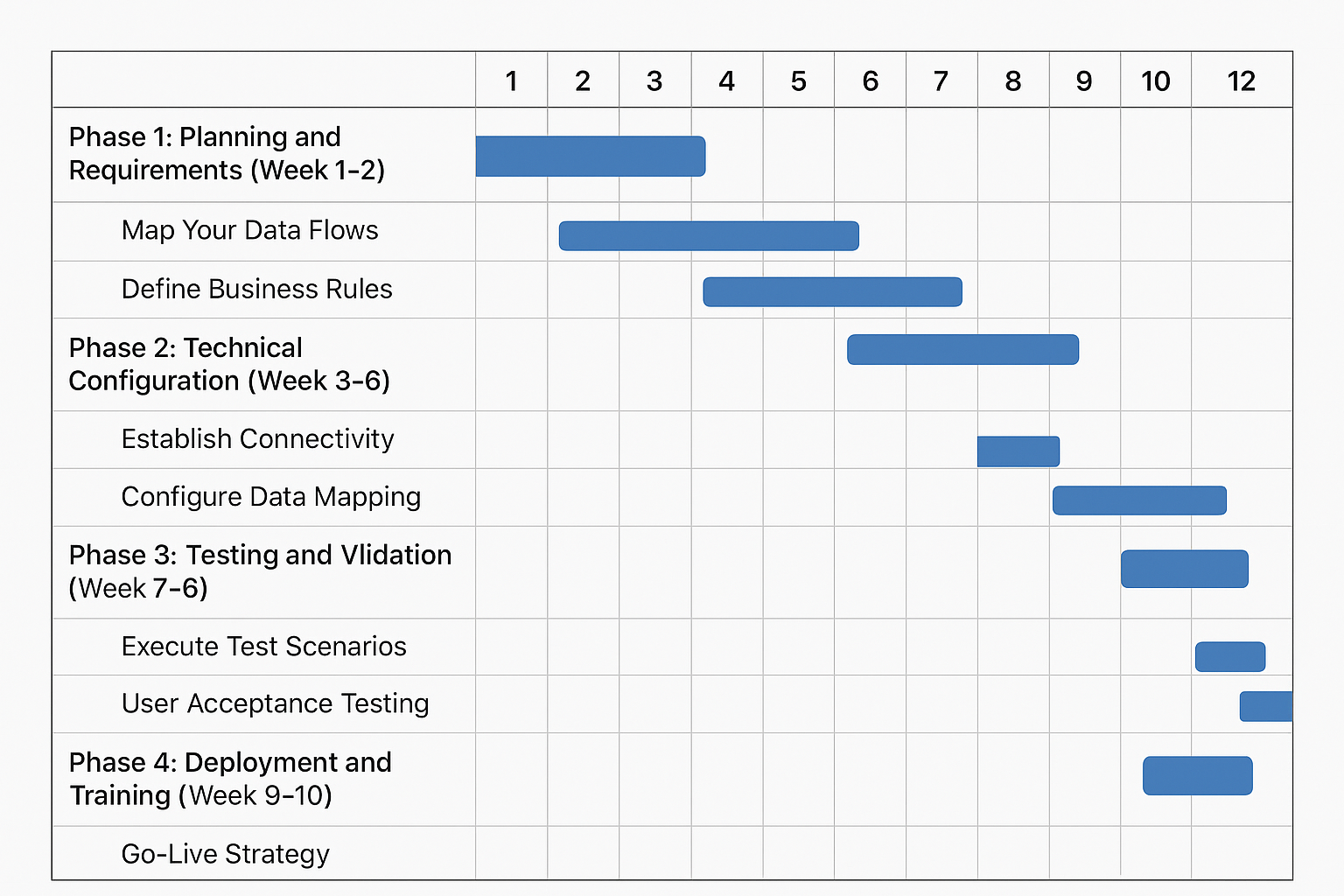
Phase 1: Planning and Requirements (Week 1-2)
1. Map Your Data Flows
Document exactly which data needs to synchronize between systems:
- Which Salesforce objects connect to which NetSuite records?
- What triggers data synchronization (time-based, event-based, or both)?
- Which system serves as the master for each data type?
- What happens when conflicts occur?
2. Define Business Rules
Establish clear rules for:
- When Salesforce opportunities convert to NetSuite sales orders
- How customer data updates propagate
- Credit limit checks during quote generation
- Inventory visibility requirements for sales teams
3. Identify Customizations
Catalog custom fields, workflows, and business logic in both systems that impact integration requirements.
Phase 2: Technical Configuration (Week 3-6)
4. Establish Connectivity
For native connector:
- Install SuiteCloud Connect bundle in NetSuite
- Configure Salesforce connected app
- Set up authentication (OAuth 2.0 recommended)
- Test basic connectivity
For iPaaS solutions:
- Create accounts with chosen platform
- Establish connections to both systems
- Configure authentication credentials
- Test API connectivity and permissions
5. Configure Data Mapping
Map fields between systems with attention to:
- Data type compatibility
- Required vs. optional fields
- Picklist value synchronization
- Custom field mapping
Example mapping requirements:
| Salesforce Field | NetSuite Field | Transformation Rule |
|---|---|---|
| Account Name | Customer: Company Name | Direct mapping |
| Opportunity Amount | Sales Order: Total | Currency conversion if needed |
| Account Status | Customer: Status | Picklist value mapping |
| Custom Field: Industry Vertical | Customer: Category | Conditional logic based on values |
6. Build Synchronization Workflows
Configure specific integration flows:
Account/Customer Sync:
- Trigger: New account created or updated in either system
- Direction: Bidirectional with last-update-wins or Salesforce-master
- Frequency: Real-time or 15-minute intervals
- Includes: Contact information, billing/shipping addresses, communication preferences
Opportunity to Sales Order:
- Trigger: Opportunity stage changes to "Closed Won"
- Direction: Salesforce to NetSuite (one-way)
- Creates: NetSuite sales order with line items
- Includes: Product/items, quantities, pricing, terms, shipping information
Invoice to Salesforce:
- Trigger: Invoice created and approved in NetSuite
- Direction: NetSuite to Salesforce (one-way)
- Creates: Custom invoice record or updates opportunity
- Includes: Invoice number, amount, due date, payment status
7. Implement Error Handling
Configure robust error management:
- Automated retry logic for temporary failures
- Alert notifications for data validation errors
- Error queues for manual review
- Logging for audit and troubleshooting
Phase 3: Testing and Validation (Week 7-8)
8. Execute Test Scenarios
Run comprehensive testing including:
- New record creation in both directions
- Record updates and conflict resolution
- Large batch synchronization (100+ records)
- Edge cases and error conditions
- Performance under typical load
9. User Acceptance Testing
Have actual users validate:
- Data appears correctly in their workflows
- Timing meets business requirements
- Error messages are clear and actionable
Phase 4: Deployment and Training (Week 9-10)
10. Go-Live Strategy
Choose appropriate deployment approach:
- Big bang: Switch all users simultaneously (higher risk, faster completion)
- Phased rollout: Deploy by department or region (lower risk, longer timeline)
- Pilot group: Test with small user group before full deployment (recommended)
11. Train Your Teams
Provide role-specific training:
- Sales: How to view NetSuite data in Salesforce, quote generation process
- Operations: How Salesforce data flows to NetSuite, order management
- Finance: Pipeline visibility, revenue recognition impact
- IT/Admins: Monitoring, troubleshooting, making safe configuration changes
Common Integration Challenges and Solutions.
Challenge 1: Data Quality Issues
Problem: Poor data quality in source systems creates synchronization errors and duplicate records.
Solution:
- Conduct data cleanup before integration launch
- Implement validation rules in both systems
- Use matching algorithms to identify potential duplicates
- Establish data governance policies
One retail company reduced duplicate customer records from 847 to 23 by implementing strict validation rules and de-duplication logic before enabling their integration.
Challenge 2: Performance Bottlenecks
Problem: Large data volumes slow synchronization or cause timeouts.
Solution:
- Implement incremental sync instead of full refreshes
- Use batch processing for bulk updates
- Schedule intensive operations during off-peak hours
- Optimize API calls with field filtering
Challenge 3: Complex Pricing Rules
Problem: NetSuite's sophisticated pricing logic doesn't translate easily to Salesforce quotes.
Solution:
- Use real-time API calls for accurate pricing at quote generation
- Cache frequently accessed pricing data with refresh intervals
- Implement price validation before order creation
- Document exceptions requiring manual review
Challenge 4: Custom Object Synchronization
Problem: Both systems contain custom objects specific to business needs.
Solution:
- Evaluate whether all custom objects require synchronization
- Use flexible iPaaS platforms for custom object mapping
- Implement webhook-based real-time sync for critical custom data
- Consider consolidating overlapping customizations
Security and Compliance Considerations
Authentication Best Practices
- Use OAuth 2.0 instead of basic authentication for enhanced security
- Implement token refresh mechanisms to avoid authentication failures
- Rotate credentials regularly following security policies
- Apply principle of least privilege - grant only necessary permissions
Data Privacy and Compliance
When integrating systems, consider:
- GDPR compliance: Ensure right to erasure propagates across systems
- Data residency: Understand where integration platform stores data
- Audit trails: Maintain comprehensive logs of data access and changes
- Encryption: Use TLS 1.2+ for data in transit, encryption at rest for sensitive fields
Access Control
Configure role-based access:
- Limit which Salesforce users can view NetSuite financial data
- Restrict NetSuite users from accessing sensitive Salesforce information
- Implement field-level security for confidential data
- Monitor access patterns for anomalies
Measuring Integration Success
Track these key performance indicators to evaluate integration effectiveness:
Operational Metrics
- Order processing time: Target 85% reduction in manual order entry time
- Data accuracy: Measure error rates (aim for <1% after stabilization)
- Synchronization latency: Average time for data to appear in target system
- Failed synchronization percentage: Should remain below 2% after initial stabilization
Business Impact Metrics
- Quote-to-order conversion time: Typically improves by 40-60%
- Days sales outstanding (DSO): Often decreases by 5-8 days with better visibility
- Sales cycle length: Can reduce by 15-25% with immediate financial data access
- Customer satisfaction scores: Improves with faster, more accurate order processing
User Adoption Metrics
- Active users accessing integrated data: Target 80%+ adoption within 3 months
- Manual override frequency: Should decrease as users trust automated data
- Support tickets related to integration: Should decline after first month
A manufacturing company tracked a 41% reduction in quote approval time and 28% improvement in forecast accuracy six months after integration, directly attributing $2.3M in additional closed revenue to improved sales efficiency.
Ongoing Maintenance and Optimization
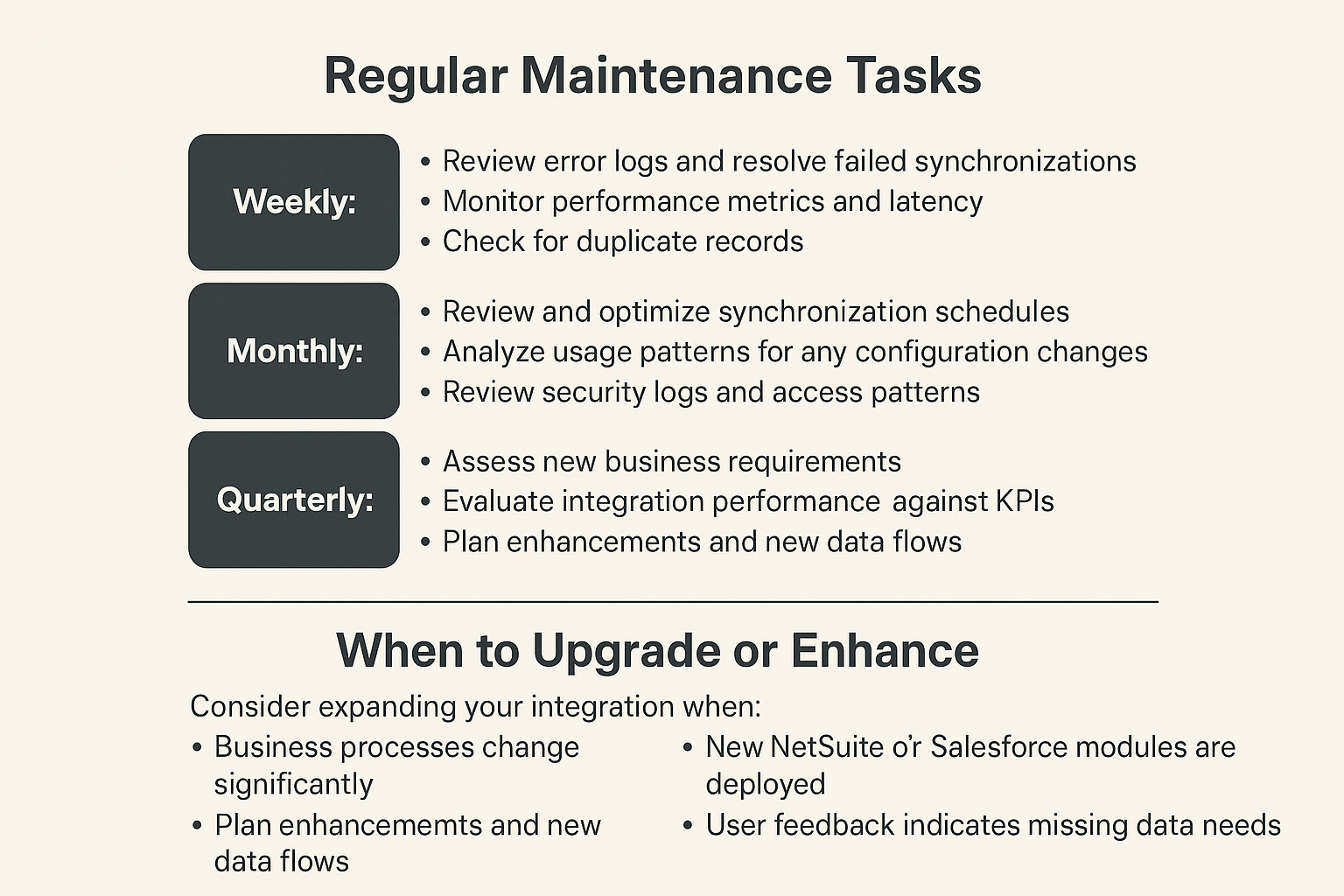
Regular Maintenance Tasks
Weekly:
- Review error logs and resolve failed synchronizations
- Monitor performance metrics and latency
- Check for duplicate records
Monthly:
- Review and optimize synchronization schedules
- Analyze usage patterns and adjust field mappings
- Update documentation for any configuration changes
- Review security logs and access patterns
Quarterly:
- Assess new business requirements
- Evaluate integration performance against KPIs
- Plan enhancements and new data flows
- Review vendor updates and new features
When to Upgrade or Enhance
Consider expanding your integration when:
- Business processes change significantly
- New NetSuite or Salesforce modules are deployed
- Data volumes increase substantially
- User feedback indicates missing data needs
- New compliance requirements emerge
Frequently Asked Questions
What is the typical cost to integrate NetSuite and Salesforce?
Integration costs vary significantly based on complexity and approach. Native connector solutions start around $5,000-$10,000 for implementation with minimal licensing costs. iPaaS platforms typically cost $8,000-$25,000 annually plus $15,000-$40,000 for initial implementation. Custom API integrations range from $50,000-$150,000 for development plus $15,000-$40,000 annually for maintenance. Factor in 100-200 hours of internal resource time for requirements, testing, and training regardless of approach.
How long does NetSuite Salesforce integration take to implement?
Implementation timelines depend on complexity and chosen method. Simple native connector deployments take 4-8 weeks. Mid-complexity iPaaS implementations require 8-12 weeks. Complex integrations with extensive customization need 12-20 weeks. These timelines assume dedicated resources, clear requirements, and reasonable data quality in source systems.
Can the integration sync in real-time or only in batches?
Both real-time and batch synchronization are possible. Real-time sync (typically within seconds to minutes) uses event-triggered workflows through webhooks or platform change data capture. Batch synchronization runs on schedules (every 15 minutes, hourly, or daily) and is more efficient for large data volumes. Most implementations use a hybrid approach: real-time for critical data like opportunities and orders, scheduled batches for less time-sensitive data like account updates.
What happens if there's a conflict between NetSuite and Salesforce data?
Conflict resolution requires pre-defined rules configured during implementation. Common strategies include: last-update-wins (most recent change takes precedence), system-of-record wins (designated master system always prevails), or manual review queue (conflicts flagged for human decision). Best practice is establishing clear data ownership: Salesforce typically owns pre-sale customer engagement data, while NetSuite owns financial and fulfillment data.
Do I need custom development or can I use out-of-the-box solutions?
This depends on your business process complexity. Organizations with standard sales-to-order workflows can often use native connectors or pre-built iPaaS templates with minimal customization. Companies with unique pricing logic, complex product catalogs, custom objects, or specialized workflows typically need iPaaS platforms with advanced configuration capabilities. Only organizations with truly exceptional requirements need full custom development.
How does the integration handle NetSuite subsidiaries and Salesforce record types?
Managing multi-subsidiary NetSuite environments requires careful planning. Most integration platforms support subsidiary filtering and routing, allowing you to map specific Salesforce record types or account segments to corresponding NetSuite subsidiaries. Configure rules to ensure orders route to correct subsidiaries based on account attributes. This typically adds 2-3 weeks to implementation timeline but is essential for accurate financial reporting.
What data security measures should be in place?
Implement OAuth 2.0 authentication, TLS 1.2+ encryption for data in transit, and field-level encryption for sensitive data at rest. Use integration service accounts with minimum necessary permissions rather than named user credentials. Maintain comprehensive audit logs of all data synchronization activities. Ensure your integration platform or custom solution complies with relevant regulations (GDPR, CCPA, SOC 2). Review and rotate credentials quarterly.
Can we integrate if we use Salesforce Lightning and NetSuite SuiteCommerce?
Yes, the user interface version doesn't affect integration capabilities. Salesforce Lightning and Classic both use the same underlying APIs. Similarly, NetSuite SuiteCommerce sites can coexist with integrations using NetSuite's SuiteTalk API. However, if you use SuiteCommerce for customer self-service, consider integrating those customer portal activities back to Salesforce for complete customer visibility.
How do we handle product/item catalogs across both systems?
Product data synchronization is often the most complex integration component. Most organizations designate NetSuite as the product master since it manages SKUs, inventory, and fulfillment. Implement one-way sync from NetSuite to Salesforce for product details, pricing, and availability. Use scheduled batch sync (hourly or daily) for product catalog updates. For real-time inventory visibility during quoting, implement API calls from Salesforce to check current NetSuite stock levels rather than synchronizing inventory counts.
What happens during system maintenance or downtime?
Robust integrations include failure handling for system unavailability. When either system is down, integration platforms queue data changes and automatically retry when connectivity restores. Configure appropriate retry intervals (typically exponential backoff: 1 minute, 5 minutes, 15 minutes, 1 hour). Set maximum retry attempts before escalating to manual review. Monitor downtime impact and ensure no data loss occurs. Most platforms provide dashboard visibility into queued transactions.
How SyncMatters Simplifies NetSuite Salesforce Integration

SyncMatters specializes in seamless integration solutions that connect NetSuite and Salesforce without the complexity of traditional integration projects. The platform is designed specifically for growing businesses that need enterprise-grade integration capabilities without enterprise-level complexity or cost.
Why Choose SyncMatters for Your Integration
Rapid Deployment Architecture
SyncMatters offers pre-configured integration templates specifically designed for common NetSuite-Salesforce workflows. These templates cover the most frequent use cases including account synchronization, opportunity-to-order automation, invoice visibility, and real-time inventory checks. Organizations typically complete implementation in 3-6 weeks rather than the typical 8-12 weeks required by other platforms.
Intuitive Configuration Interface
The platform features a visual workflow builder that allows business users to configure and modify integration flows without requiring coding expertise. Map fields, set synchronization rules, and define business logic through drag-and-drop interfaces. IT teams maintain oversight and control while enabling business stakeholders to adapt the integration as needs evolve.
Intelligent Error Management
SyncMatters includes built-in error detection and resolution capabilities. The system automatically identifies common synchronization issues like missing required fields, data type mismatches, or validation failures, then provides clear guidance on resolution. Automated retry logic handles temporary failures, while a dedicated error queue surfaces issues requiring human review with context-rich details for quick resolution.
Real-Time Monitoring and Analytics
Track integration health through comprehensive dashboards showing synchronization status, performance metrics, and data flow volumes. Monitor key indicators like synchronization latency, success rates, and error patterns. Receive proactive alerts when issues arise, enabling fast response before users are impacted.
Key Integration Capabilities
Bidirectional Data Synchronization
- Accounts and Contacts: Maintain consistent customer information across both platforms with configurable sync rules
- Opportunities to Orders: Automatically create NetSuite sales orders when Salesforce opportunities close, including all line items, pricing, and terms
- Invoices and Payments: Surface NetSuite financial data in Salesforce for complete customer visibility
- Products and Pricing: Keep Salesforce updated with current NetSuite product catalogs, pricing, and inventory levels
Advanced Workflow Automation
- Conditional Logic: Define sophisticated rules for when and how data synchronizes based on record values, user actions, or time-based triggers
- Data Transformation: Apply calculations, format conversions, and value mappings to ensure data compatibility between systems
- Multi-Step Processes: Chain multiple actions together, such as creating a customer, generating an order, and sending notification emails
- Approval Workflows: Route specific transactions for manual approval before synchronizing to target system
Flexible Deployment Options
SyncMatters supports various synchronization approaches to match your business requirements:
- Real-time sync: Changes propagate within seconds using webhook-based triggers
- Near real-time: Scheduled synchronization every 5-15 minutes for high-priority data
- Batch processing: Efficient handling of large data volumes during off-peak hours
- On-demand: Manual triggering of specific synchronization jobs when needed
Implementation Approach
Phase 1: Discovery and Design (Week 1)
SyncMatters implementation specialists work with your team to document current processes, identify integration requirements, and design optimal data flows. This discovery phase maps existing customizations, defines business rules, and establishes success criteria.
Phase 2: Configuration and Testing (Week 2-4)
Technical teams configure the platform using your specific requirements. This includes establishing system connections, mapping fields, building workflows, and implementing business logic. Comprehensive testing validates that all scenarios work correctly before production deployment.
Phase 3: Deployment and Training (Week 5-6)
Roll out the integration using a phased approach, starting with a pilot user group before expanding to the full organization. Provide role-specific training ensuring sales, operations, and finance teams understand how to leverage the integrated data in their daily workflows.
Phase 4: Optimization and Support (Ongoing)
SyncMatters provides continued support through regular check-ins, performance monitoring, and enhancement recommendations. As your business evolves, the platform adapts with you through configuration updates rather than costly redevelopment.
Pricing and Packages
SyncMatters offers transparent, predictable pricing based on transaction volumes and complexity. Packages start at approximately $8,000-$12,000 annually for growing businesses with standard integration needs, including:
- Unlimited users accessing the integration
- Core synchronization flows (accounts, opportunities, orders, invoices)
- Standard support with email and chat access
- Regular platform updates and enhancements
- Basic monitoring and alerting
Enterprise packages accommodate higher volumes, additional custom workflows, priority support, and dedicated account management. Implementation services are priced separately based on complexity, typically ranging from $10,000-$25,000 for standard deployments.
Customer Success Stories
Organizations using SyncMatters for NetSuite-Salesforce integration report significant operational improvements:
Mid-Market Technology Company: Reduced order entry time from 15 minutes to under 2 minutes per order, eliminating data entry errors that previously affected 12% of orders. Sales team gained real-time visibility into customer payment status, reducing payment-related delays in the sales cycle by 35%.
Manufacturing Distributor: Automated quote-to-order process saved 20 hours weekly in manual data transfer. Real-time inventory visibility in Salesforce reduced customer inquiries about product availability by 60%, while improving quote accuracy from 82% to 98%.
Professional Services Organization: Unified customer data across sales and finance teams, reducing discrepancies in customer records from 200+ conflicts monthly to fewer than 10. Improved revenue forecasting accuracy by 28% through better pipeline visibility.
Getting Started with SyncMatters
The platform offers a consultative approach to integration, beginning with a detailed assessment of your specific NetSuite and Salesforce environment. This assessment identifies:
- Critical data flows requiring integration
- Existing customizations impacting integration design
- Data quality issues needing resolution
- Optimal synchronization approaches for your workflows
- Realistic timeline and resource requirements
Following assessment, SyncMatters provides a detailed implementation plan with clear milestones, resource needs, and expected outcomes. This transparency ensures alignment between technical implementation and business objectives from project start.
Organizations serious about connecting NetSuite and Salesforce find SyncMatters delivers the balance of capability, usability, and value needed for successful long-term integration. The platform transforms disconnected systems into a unified operational environment where every team accesses consistent, current data for better decision-making and customer service.
Conclusion
Modern integration platforms specifically address NetSuite-Salesforce connectivity challenges through pre-built connectors, visual workflow designers, and proven templates based on thousands of implementations. These solutions reduce integration complexity from months-long custom development projects to weeks-long configuration exercises.
Key capabilities that accelerate deployment:
- Pre-mapped field relationships between common objects
- Template workflows for standard business processes
- Automated error detection and resolution
- Real-time monitoring dashboards
- Visual tools requiring no coding expertise
By leveraging purpose-built integration solutions like SyncMatters, organizations achieve operational efficiency faster, reduce ongoing maintenance burden, and scale their connected ecosystem as business needs evolve. The right integration approach transforms disconnected systems into a unified platform that empowers every team with complete, accurate, real-time information.



.svg)



